5.2. Interface Example
In this section, we will provide you with a full example showing how to create:
An Interface
Multiple Classes that Implement the interface
A Driver Program (Where the real benefit comes in)
As we go through this example, we will explain the syntax, why you would want to use an interface, and where it is appropriate to do so in your applications.
5.2.1. Creating an Interface
The role of the interface is to define the set of behaviors (methods) that all of the implementing classes must contain. In the example of the payment processing services, the interface would define each behavior (method) that each service must have.
Remember
As long as we can guarantee that all of the payment processing services have a certain set of behaviors (methods), the program that uses these behaviors (our website) does not have to change in order to work correctly with all of the services (even new ones).
For example, we might say that all three services mentioned earlier (Visa, PayPal, and Affirm) must be able to process payments and print receipts. Those are the two critical actions that all payment processors must be able to perform. We might also say that each service charges a 1.5% transaction fee to process a payment.
In this case, we could define the interface in Java as follows:
public interface PaymentProcessor {

    /** The fee for processing a transaction. */
    public static final double FEE_PERCENTAGE = 1.5;

    /**
     * Processes a payment for the specified {@code amount}. The details
     * of how the payment is processed depends on the implementing class.
     *
     * @param amount the amount to process.
     * @return if payment is successful
     */
    public abstract boolean processPayment(double amount);

    /**
     * Prints a receipt to the specified {@code customer} for the
     * specified {@code amount}.
     *
     * @param customer the name of the customer who made the payment.
     * @param amount the amount of the payment.
     */
    public abstract void printReceipt(String customer, double amount);

} // PaymentProcessor
Here is the same interface depicted using UML:
Fig. 5.5 UML diagram for the PaymentProcessor interface.
You should note the following important points about interfaces:
The goal of the interface is to define the methods that each class must contain.
The interface is the contract that each implementing class must follow.
In our example, we will have three implementing classes (Visa, PayPal, and Affirm). Once we set up the relationship, the Java compiler will be able to enforce the contract (interface) ensuring that all three implementing classes properly implement the methods in the interface which will allow our driver program to work seamlessly with all three.
More Formally: A Java interface is a reference type composed
of abstract methods and constants. An abstract method is
a non-static (instance) method without an implementation (body). Think
of creating a class, adding the method signatures, but not putting any
code in the methods. Constants are variables (static or not) that
are declared using the final keyword.
Note
As of Java 8, the technical definition for an interface allows it to contain only the following: abstract methods, constants, private methods, static methods, nested types, and default implementation methods ([INTERFACE]). In 1302, our interfaces will mostly contain only abstract methods and constants. Nested types and default methods will not be covered in this course.
This may all still seem a bit strange and why we do this in programming may not be clear at this point. Hang in there. As we work through the implementing classes and the driver program, you will see how it all comes together to allow us to write better code.
5.2.2. Creating Implementing Classes
In order to leverage the power of interfaces, you must combine the interface with regular classes that provide implementations for the abstract methods in the interface (called the implementing classes), as unimplemented methods are not particularly useful by themselves. We will use Visa and PayPal as our two implementing classes although you could certainly create others that represent other payment processing services.
Remember, the interface is a contract that all implementing classes must follow (specifies the set of things the implementing classes can do). Multiple classes can implement the same interface, each providing its own implementation of the contracted functionality. For this reason, the documentation for an interface must describe what a method does and not necessarily how it should do it. Such documentation is usually written using Javadoc comments in the interface as seen in the interface above.
In our example, both implementing classes (Visa and PayPal) must
have methods called processPayment and printReceipt since
those are the two abstract methods in the interface. Here is how those
classes might be implemented:
public class Visa implements PaymentProcessor {

    public boolean processPayment(double amount) {
        System.out.println("Processing Visa Card Payment of $" + amount);
        return true;
    } // processPayment

    public void printReceipt(String customer, double amount) {
        System.out.println(customer + " has completed a Visa purchase in the amount of $" + amount);
    } // printReceipt

} // Visa
public class PayPal implements PaymentProcessor {

    public boolean processPayment(double amount) {
        System.out.println("Processing PayPal Payment of $" + amount);
        return true;
    } // processPayment

    public void printReceipt(String customer, double amount) {
        System.out.println(customer + " has completed a PayPal purchase in the amount of $" + amount);
    } // printReceipt

} // PayPal
A few things that are important to note about the code above:
Both implementing classes include
implements PaymentProcessorin their class declaration. This is how the classes agree to uphold the contract laid out in the interface ("sign the contract"). If a class declaration states that a particular interface is implemented by the class, that class will not compile if it does not correctly implement the listed interface. This is how the Java compiler ensures compatibility across implementing classes.Each implementing class implements the methods differently. PayPal and Visa process payments and print receipts in different ways. Our example is overly simplified but you should take a moment to consider how these two payment processing systems would behave differently in a real-world scenario. Even if the real-world scenario is much more complex, the benefits of interfaces is the same.
5.2.3. The UGA Bookstore Website (Driver)
Now that we understand how interfaces and implementing classes can be created, it's important to understand why we might use them in our code and how they can benefit us as programmers.
Take a moment to revisit the code from earlier (repeated below). Think
about how the PaymentProcessor interface might help us improve this
code.
public class UGABookstore {

   public boolean purchase(Visa visa, String customerName, double amount) {
       visa.processPayment(amount);
       visa.printReceipt(customerName, amount);
       return true;
   } // purchase

   public boolean purchase(PayPal paypal, String customerName, double amount) {
       paypal.processPayment(amount);
       paypal.printReceipt(customerName, amount);
       return true;
   } // purchase

   public static void main(String[] args) {
       //
       // This method is the main entry point of the application and
       // contains calls to the purchase method. Specific code is omitted.
       //
   } // main

} // UGABookstore
Here is the updated code:
 1public class UGABookstore {
 2
 3    public static boolean purchase(PaymentProcessor payment, String customerName, double amount) {
 4        payment.processPayment(amount);
 5        payment.printReceipt(customerName, amount);
 6        return true;
 7    } // purchase
 8
 9    public static void main(String[] args) {
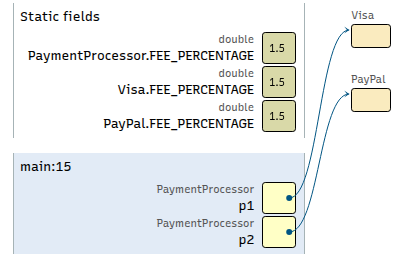
10        PaymentProcessor p1 = new Visa();
11        purchase(p1, "Alice", 120.00);
12
13        PaymentProcessor p2 = new PayPal();
14        purchase(p2, "Bob", 45.50);
15    } // main
16
17} // UGABookstore
 1public interface PaymentProcessor {
 2
 3    /** The fee for processing a transaction. */
 4    public static final double FEE_PERCENTAGE = 1.5;
 5
 6    /**
 7     * Processes a payment for the specified {@code amount}. The details
 8     * of how the payment is processed depends on the implementing class.
 9     *
10     * @param amount the amount to process.
11     * @return if payment is successful
12     */
13    public abstract boolean processPayment(double amount);
14
15    /**
16     * Prints a receipt to the specified {@code customer} for the
17     * specified {@code amount}.
18     *
19     * @param customer the name of the customer who made the payment.
20     * @param amount the amount of the payment.
21     */
22    public abstract void printReceipt(String customer, double amount);
23
24} // PaymentProcessor
 1public class PayPal implements PaymentProcessor {
 2
 3    public boolean processPayment(double amount) {
 4        System.out.println("Processing PayPal Payment of $" + amount);
 5        return true;
 6    } // processPayment
 7
 8    public void printReceipt(String customer, double amount) {
 9        System.out.println(customer + " has completed a PayPal purchase in the amount of $" + amount);
10    } // printReceipt
11
12} // PayPal
 1public class Visa implements PaymentProcessor {
 2
 3    public boolean processPayment(double amount) {
 4        System.out.println("Processing Visa Card Payment of $" + amount);
 5        return true;
 6    } // processPayment
 7
 8    public void printReceipt(String customer, double amount) {
 9        System.out.println(customer + " has completed a Visa purchase in the amount of $" + amount);
10    } // printReceipt
11
12} // Visa
New and Improved UGA Bookstore Class (using the interface) [code listing]
Updated UML
Notice that we only need one purchase method now. The purchase
method takes in a PaymentProcessor reference which is compatible
with any class that implements the interface. We can pass in
references to Visa objects, PayPal objects, and any other
implementing class that we create in the future. If we decide later to
add 20 additional payment processors, they will all work with our
existing purchase method. Our updated UGABookstore class will
be able to seamlessly work with the other payment processors.
Note
We are not allowed to create an object of type
PaymentProcessor, as it is an interface and contains abstract
(unimplemented) methods. Instead, we will create objects of the
implementing class types and reference them with a
PaymentProcessor reference. This is allowed since the types are
compatible.
5.2.4. Removal of Dependencies
Take a moment to compare the original UML diagram (before we added an interface) to the updated UML diagram (after interface). You can switch between the tabs below to see each.
Test Yourself
#. How many classes/interfaces does UGABookstore depend on
in each UML diagram?
Which diagram has fewer
dependsOnannotations?Do you think it's good or bad for our
UGABookstoreclass to have to have fewer dependencies?
Test Yourself Solutions
The "Before" diagram shows that
UGABookstoredepends on bothVisaandPayPal. The "After" diagram shows that it only depends onPaymentProcessor."After" has fewer.
It is better to have fewer. If we add more payment processors that implement the interface, the
UGABookstoreclass will not have to change because it won't depend on those new classes - it only depends on the interface.
The UML diagrams above show us visually how we can use an interface
to break the dependencies between our driver program (UGABookstore)
and our implementing classes (Visa and PayPal). Doing so leads
to more elegant code in the driver that won't have to be updated
later when we add more implementing classes.