7. Inheritance Lesson
Lesson Objectives
Show the benefits of inheritance by expanding on our
Drawable interface.
Expanding our Code Base
Expanding our Code Base
Sample solutions not included, because "Show Solutions" was not toggled before printing.
We have decided to expand our code base and build a game of life
simulation. In doing so, we added different types of employees
to model the various types of pay people receive. We want our
employees to be drawn in the simulation, so we added them as
implementing classes to the Drawable interface.
Part 1: An Interface Solution
Objectives
This part allows us to review interfaces and highlight the benefits of using them. It also allows us to point out a scenario where an interface is good, but inheritance is better. Doing interfaces first lets the students compare an interface solution to an inheritance solution side by side.
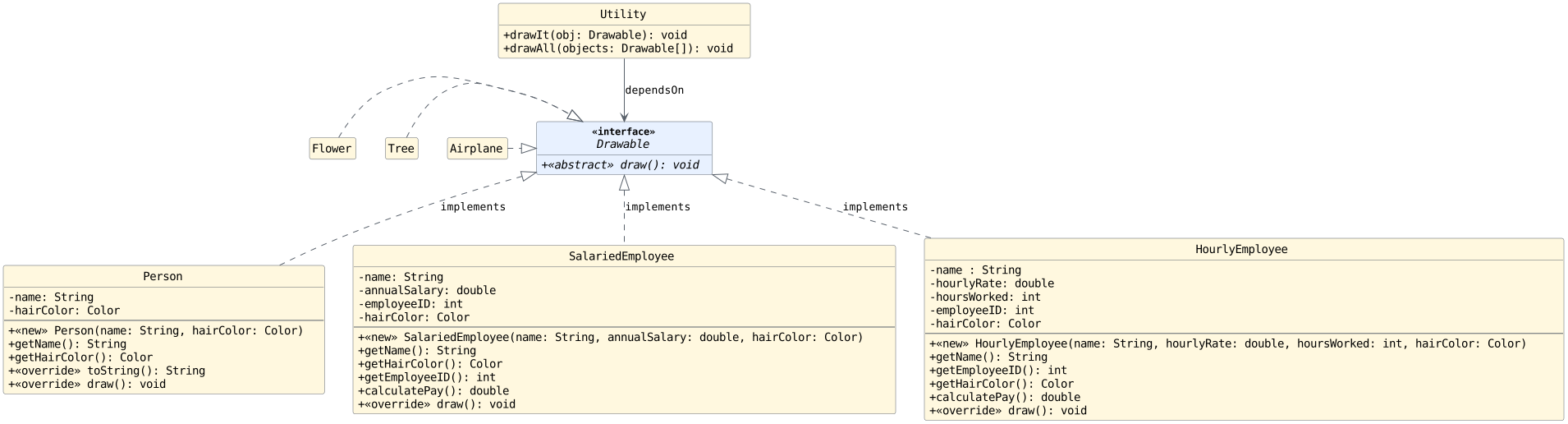
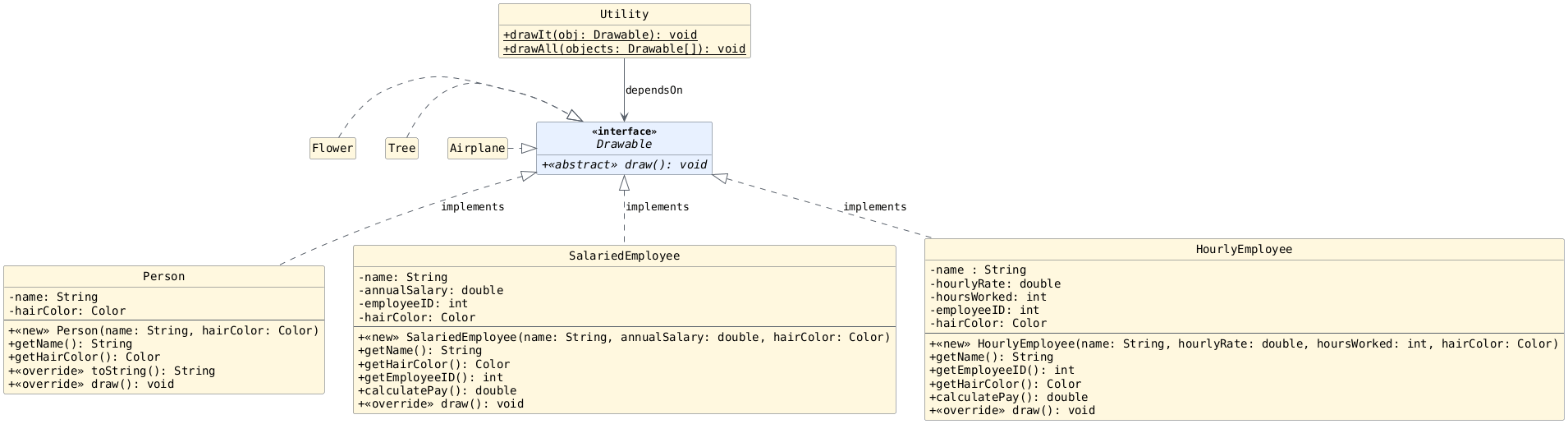
Adding a Utility Method
We want to write a method to loop over all relevant objects and
count the number of humans (not just objects of type Person)
with a given hair color. An incomplete method signature for
this can be seen below.
With your groups, write the method signature without the blank. Note: The blank may represent multiple parameters, if needed.
/**
 * Returns with the number of people with the specified hair color.
 * This method considers all humans in the simulation (not
 * just objects of type {@code Person}.
 *
 * @return the number of people with the specified hair color.
 * @param hairColor the hair color to count
 */
public static int numWithHairColor(Color hairColor, _________) {
    // ...
} // numWithHairColor
Solution
public static int numWithHairColor(Color hairColor, Person[] people,
                                   HourlyEmployee[] hourlyEmployees,
                                   SalariedEmployee[] salariedEmployees) {
    // ...
} // numWithHairColor
Adding a Utility Method (Code)
With our current UML diagram, this is the required method signature:
public static int numWithHairColor(Color hairColor, Person[] people,
                                   HourlyEmployee[] hourlyEmployees,
                                   SalariedEmployee[] salariedEmployees) {
    // ...
} // numWithHairColor
Take a minute with your group to think about the code would look for this method. Then, answer the following questions on your exit ticket:
Would there be redundant code within
numWithHairColor?If we add a class called
ContractEmployeeto our system, wouldnumWithHairColorhave to change?Can we replace the three arrays with a single array of type
Drawable?
Working Code
public static int numWithHairColor(Color hairColor, Person[] people,
                                   HourlyEmployee[] hourlyEmployees,
                                   SalariedEmployee[] salariedEmployees) {
    int count = 0;

    // Count Person objects with the desired hair color
    for (Person p: people) {
        if (p.getHairColor() == hairColor) {
            count++;
        } // if
    } // for

    // Count HourlyEmployee objects with the desired hair color
    for (HourlyEmployee he: hourlyEmployees) {
        if (he.getHairColor() == hairColor) {
            count++;
        } // if
    } // for

    // Count SalariedEmployee objects with the desired hair color
    for (SalariedEmployee se: salariedEmployees) {
        if (se.getHairColor() == hairColor) {
            count++;
        } // if
    } // for

    return count;
} // numWithHairColor
Solution
Yes, the method would have to change if we added another class. We would need another loop and another array parameter.
We cannot use type Drawable for the array since we
cannot get the hair color if we use a Drawable
reference.
Adding a Utility Method (UML)
Adding numWithHairColor to Utility.java means that
the Utility class is now dependent on Person,
HourlyEmployee, and SalariedEmployee.
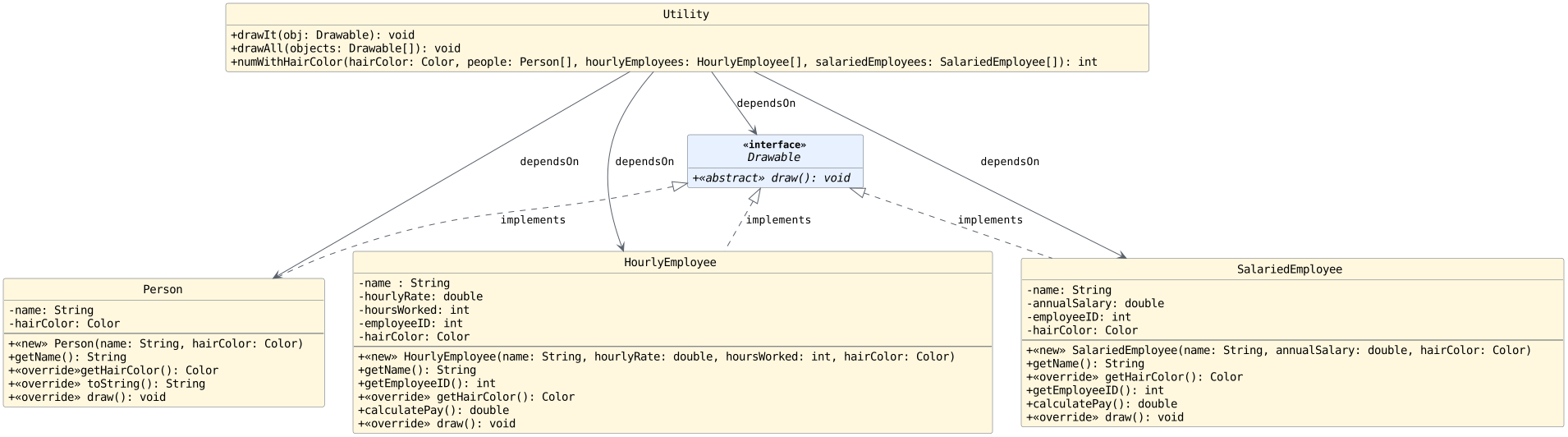
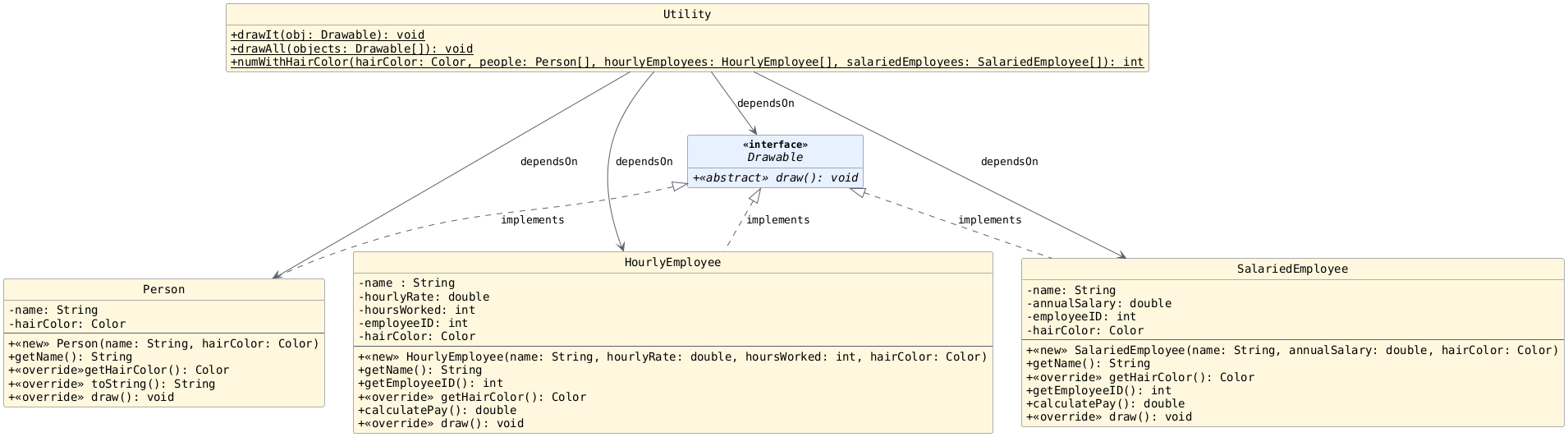
This is the exact thing we've been trying to avoid.
Answer the following question with your groups:
Question
Is it possible to avoid adding these dependencies while still
having a working numWithHairColor method?
Avoid using inheritance for now.
Solution
Yes, and we need to avoid this if possible. A change in one place in the code should not cause us to have to change other parts of the code (when possible).
Yes, we could use an interface or inheritance (coming soon)!
Updated UML
We could solve our problem with an interface, let's call it
HairColorGettable:
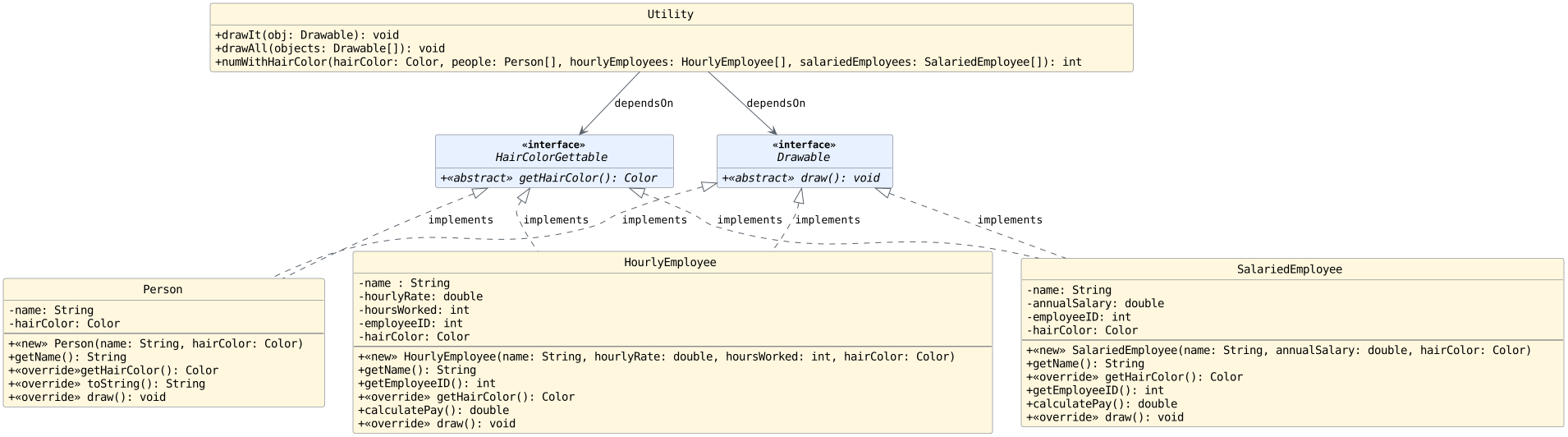
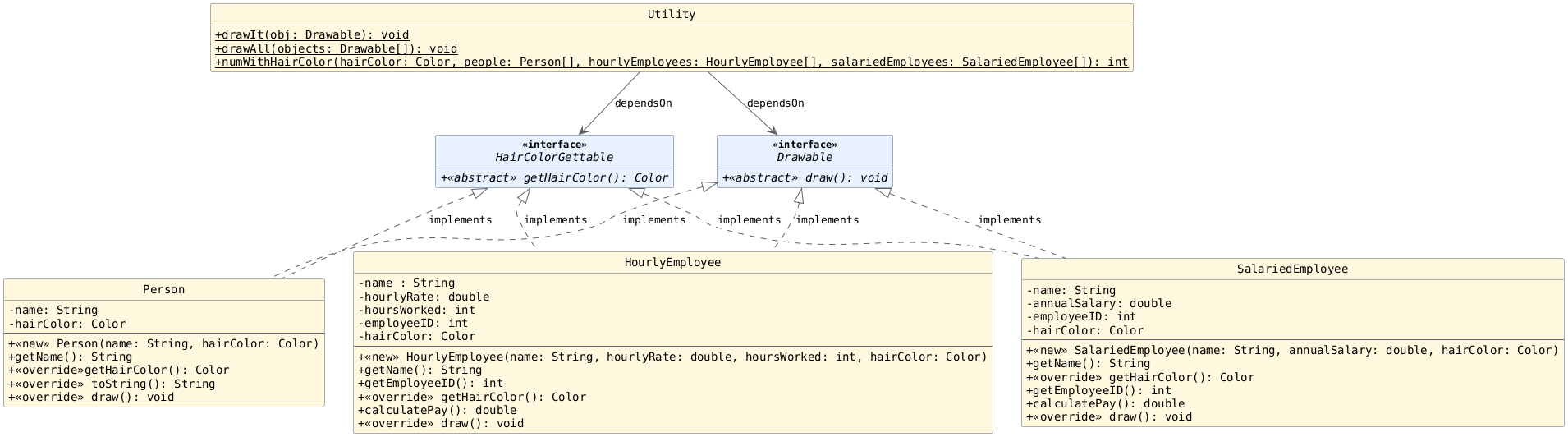
In your groups, write the updated method signature for
numWithHairColor on your exit ticket.
Does the new method leverage polymorphism? Explain.
Solution
public static int numWithHairColor(Color hairColor, HairColorGettable[] people) {
    // ...
} // numWithHairColor
This method now leverages polymorphism and allows all implementing class types to be passed in using the array.
Implementing the Improved Method
On your exit ticket, implement the method below:
/**
 * Returns with the number of people with the specified hair color.
 * This method considers all humans in the simulation (not
 * just objects of type {@code Person}.
 *
 * @return the number of people with the specified hair color.
 * @param hairColor the hair color to count
 */
public static int numWithHairColor(Color hairColor, HairColorGettable[] people) {
    // ...
} // numWithHairColor
Solution
public static int numWithHairColor(Color hairColor, HairColorGettable[] people) {
    int count = 0;
    for (HairColorGettable person: people) {
        if (person.getHairColor().equals(hairColor)) {
            count++;
        } // if
    } // if
    return count;
} // numWithHairColor
Eliminating Redundancy
Our solution improves the numWithHairColor method by
using polymorphism, but is this a good scenario for using
an interface?
Review the UML diagram below and answer the following on your exit tickets:
Which methods/instance variables are likely the same across multiple classes?
Which methods have the same signature, but are likely implemented differently?
Can inheritance help? How could we add inheritance without adding classes to our diagram?
Part 2: An Initial Inheritance Solution
Objectives
Help students understand how inheritance / extends
relationships can help them promote common instance methods
and instance variables to a parent class and enable
polymorphism outside of the class.
Inheritance: Initial Attempt
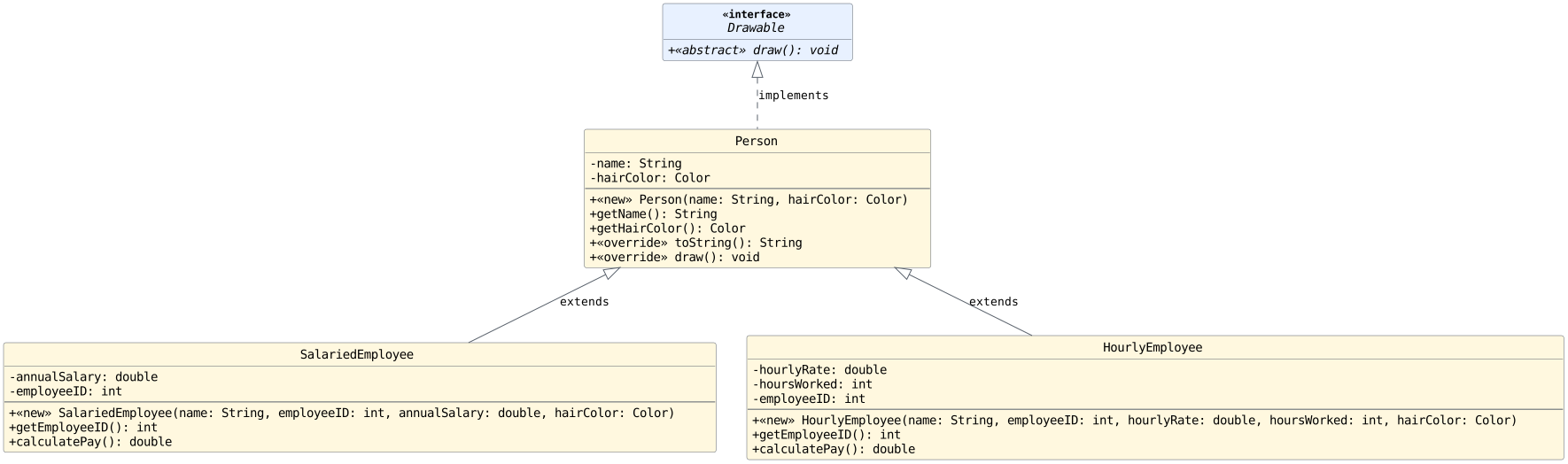
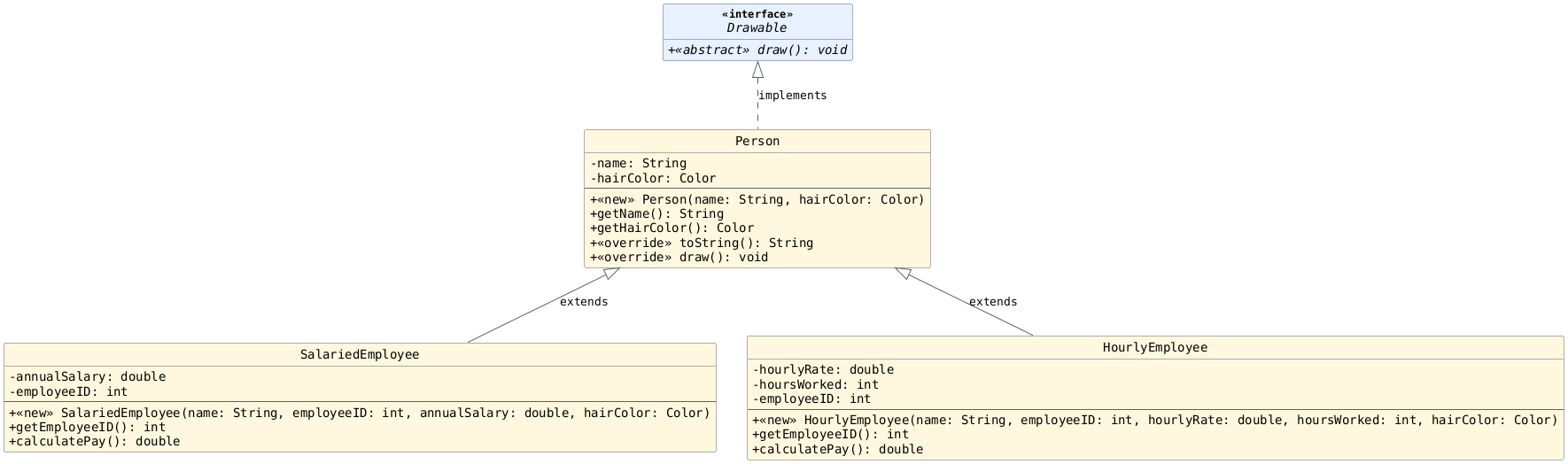
As a first attempt, lets have both employee classes directly
extend Person.
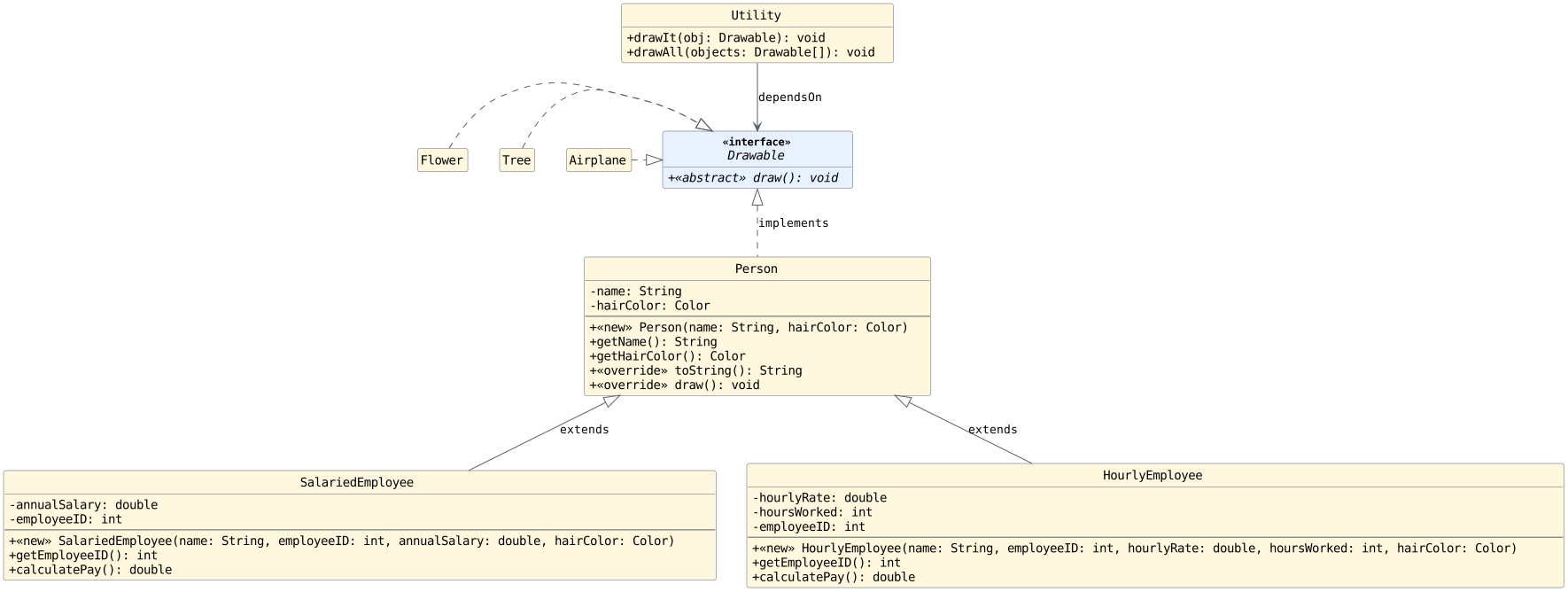
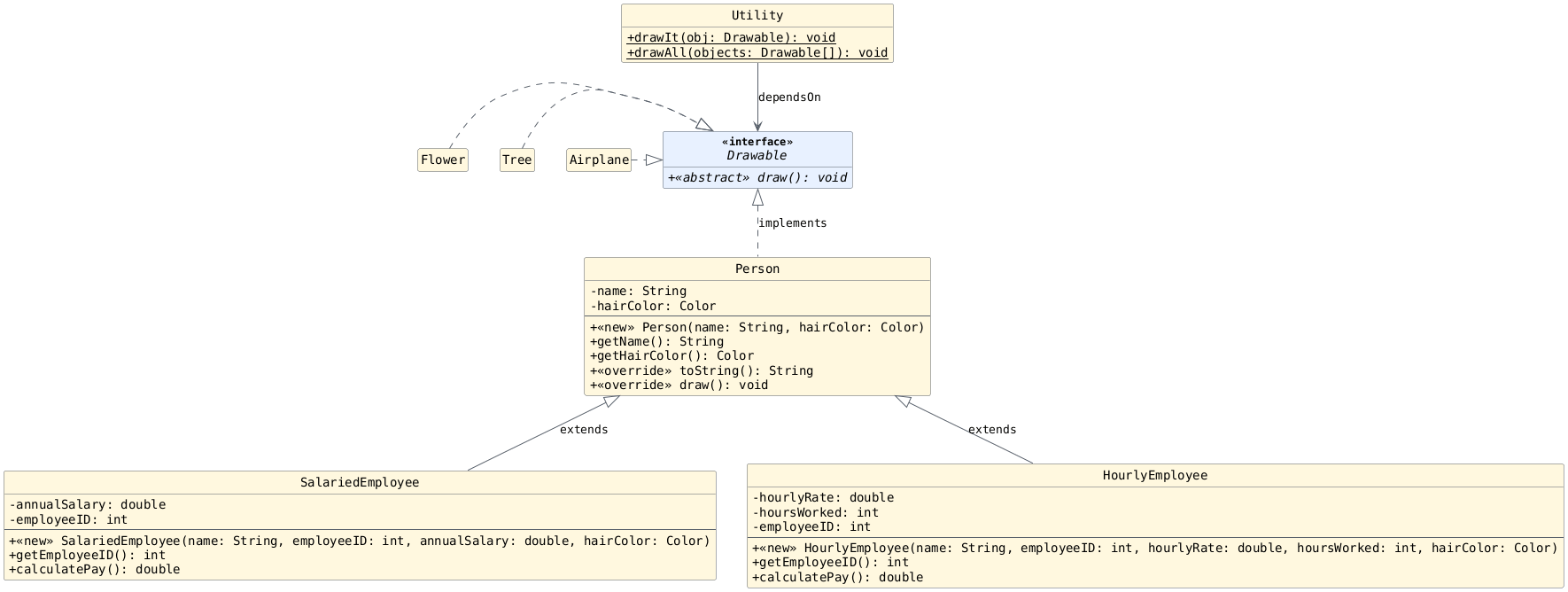
What is Inherited?
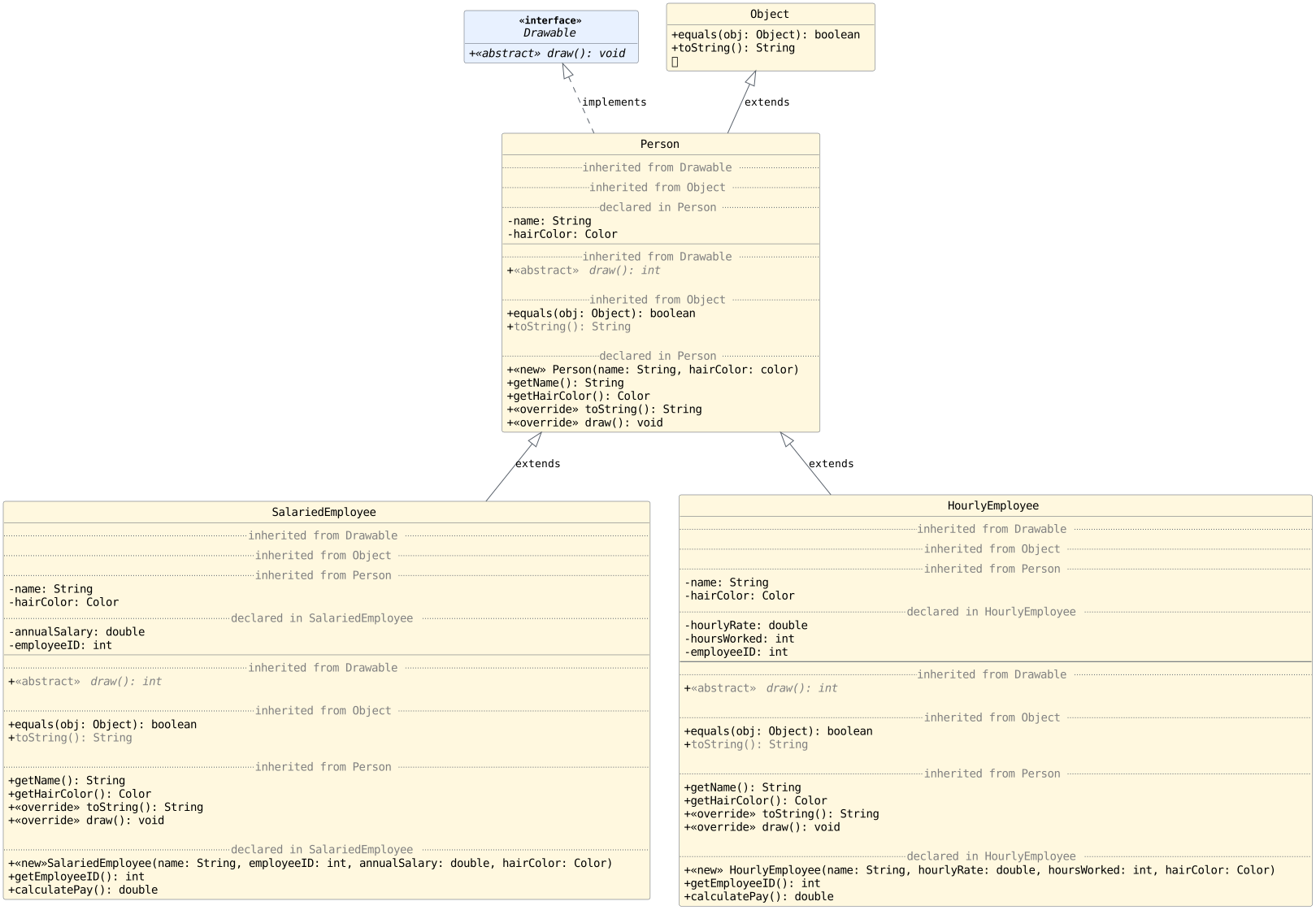
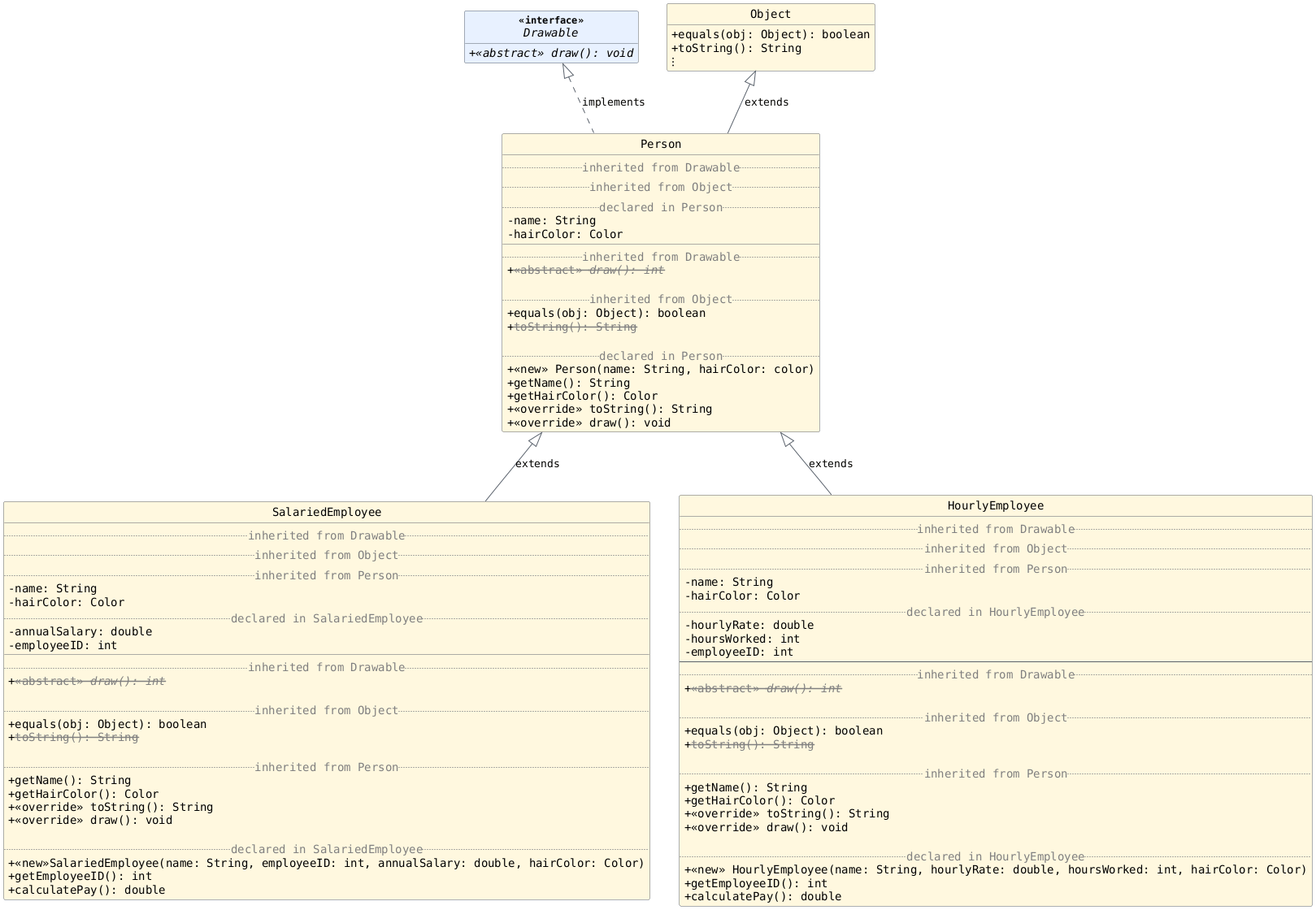
Using inheritance, we can reduce the redundancy within the classes without changing their functionality.
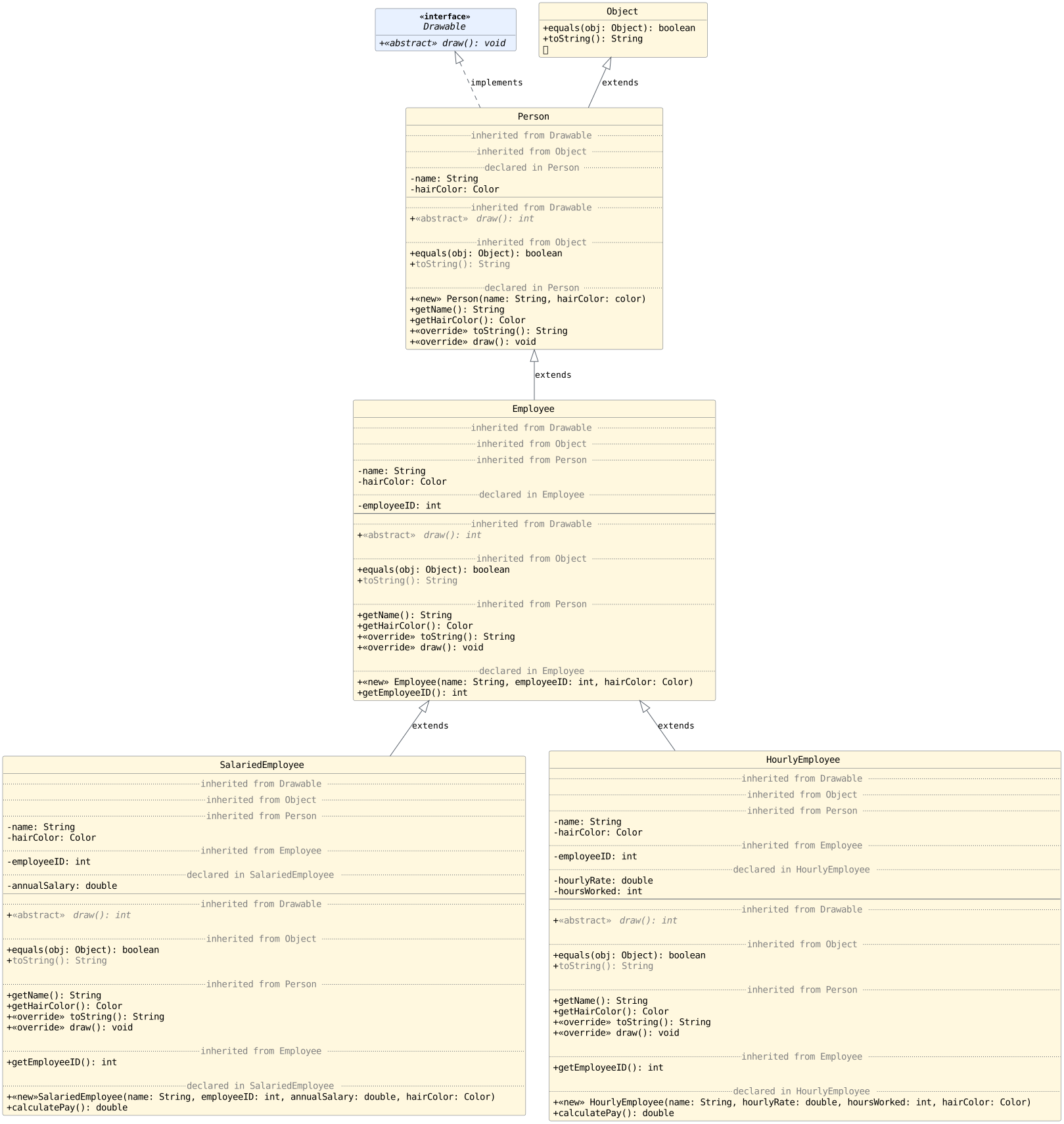
In the second tab, the UML shows the methods/variables that are inherited as well.
Using the diagram below: answer the following with your groups on your exit tickets:
How many instance variables are declared in
SalariedEmployee.java?How many instance variables are in an object of type
SalariedEmployee?How many methods are declared in
SalariedEmployee.java?How many methods can be called using a reference of type
SalariedEmployee?
Compatibility
Using inheritance has reduced redundancy in our code base. To make sure it hasn't also limited the functionality of our classes, lets explore compatibility.
Assignments (Code)
Imagine the code below is found in the main method of a
Driver class.
For each numbered block of code, write on your exit tickets whether or not the code will compile. Explain your answer for each.
 1Drawable bob = new Person("Bob", Color.BROWN);
 2Drawable lee = new HourlyEmployee("Lee", 4187, 24.0, 12, Color.GREY);
 3Utility lee = new HourlyEmployee("Lee", 4187, 24.0, 12, Color.GREY);
 4Airplane a = new Person("Bob", Color.BROWN);
 5SalariedEmployee s = new Utility();
 6SalariedEmployee s2 = new Person("Susan", Color.BROWN);
 7Drawable a = null; // or, e.g., new Person(...);
 8Drawable b = a;
 9Drawable a = new Drawable();
10Drawable a = getDrawable();     // assume return type of method is Drawable
Solutions
Yes. A
Personreference can be assigned to aDrawablevariable sincePersonimplementsDrawable.Yes. An
HourlyEmployeereference can be assigned to aDrawablevariable sinceHourlyEmployeeimplementsDrawable(it inherits the methods in the interface from its parent).No. These are not compatible types.
No. These are not compatible types.
No. These are not compatible types.
No. These are not compatible types. A
Personreference cannot be stored in aSalariedEmployeevariable.Yes. Reference variables can store
null.Yes. The types are compatible.
No. You cannot create an instance of an interface type.
Yes. The types are compatible.
Assignments Discussion
Given a variable of each type, write all compatible
expression types such that an assignment of the form
type name = expression will compile. Write your
answers on your exit ticket.
We have completed the first few to help get you started.
Person:
Person,SalariedEmployee,HourlyEmployeeSalariedEmployee[]:
SalariedEmployee[]Person[]:
Tree:
Airplane:
Drawable:
Flower:
SalariedEmployee:
HourlyEmployee:
Drawable[]:
Solutions
Person:
Person,SalariedEmployee,HourlyEmployeeSalariedEmployee[]:
SalariedEmployee[]Person[]:
Person[],SalariedEmployee[],HourlyEmployee[]Tree:
TreeAirplane:
AirplaneDrawable:
Drawable,Flower,Tree,Airplane,Person,SalariedEmployee,HourlyEmployeeFlower:
FlowerSalariedEmployee:
SalariedEmployeeHourlyEmployee:
HourlyEmployeeDrawable[]:
Drawable[],Flower[],Tree[],Airplane[],Person[],SalariedEmployee[],HourlyEmployee[]
Available Methods (Code)
Question 1
Question 2
Question 3
Question 4
Which of the following are valid method calls?
Drawable[] d = new Person[2];
d[0] = new SalariedEmployee("Bob", 4819, 45000.00, Color.BROWN);
d[1] = new Person("Susan", Color.GREY);

d.draw();             // a
d[0].draw();          // b
d[0].calculatePay();  // c
d[1].getHairColor();  // d
Utility.drawIt(d);    // e
Utility.drawIt(d[0]); // f
Utility.drawAll(d);   // g
Question 5
Which of the following are valid method calls?
Person[] people = new Person[2];
people[0] = new SalariedEmployee("Bob", 4819, 45000.00, Color.BROWN);
people[1] = new Person("Susan", Color.GREY);

people.draw();             // a
people[0].draw();          // b
people[0].calculatePay();  // c
people[1].getHairColor();  // d
Utility.drawIt(people);    // e
Utility.drawIt(people[0]); // f
Utility.drawAll(people);   // g
Solutions
1a. Yes
1b. No
1c. No
1d. Yes

2a. Yes
2b. No
2c. Yes
2d. Yes

3a. No
3b. Yes
3c. No
3d. No
3e. No
3f. Yes
3g. Yes

4a. No
4b. Yes
4c. No
4d. No
4e. No
4f. Yes
4g. Yes

5a. No
5b. Yes
5c. No
5d. Yes
5e. No
5f. Yes
5g. Yes
Available Methods Discussion (Table)
Imagine you are writing code in a separate driver class.
Given a variable of each type in the driver, write all
methods/variables that are available. In other words, if
we use the . operator after the variable in the form
varName._____, what can follow the .? Write your
answers on your exit ticket.
We have completed the first few to help get you started.
Drawable d:
d.draw()Person[] people:
people.length,people[0],people[1]Person p:
SalariedEmployee se:
HourlyEmployee he:
Drawable[] dArray:
Solutions
Drawable d:
d.drawPerson[] people:
people.length,people[0],people[1]Person p:
getName,getHairColor,toString,drawSalariedEmployee se:
getName,getHairColor,toString,draw,getEmployeeID,calculatePayHourlyEmployee he:
getName,getHairColor,toString,draw,getEmployeeID,calculatePayDrawable[] dArray:
dArray.length,dArray[0],dArray[1]
Deep Dive: HourlyEmployee
Assume we have a variable, sue, of type
HourlyEmployee.
methods directly declared in
HourlyEmployee:sue.getEmployeeID()sue.calculatePay()
methods that
HourlyEmployeeinherits fromPersonthat have not yet been overridden:sue.getName()sue.getHairColor()sue.draw()sue.toString()
methods that
HourlyEmployeeinherits fromObjectthat have not yet been overridden:sue.equals(Object)etc.
Javadoc Example
On the Javadoc page, you can see the inheritance hierarchy for any class along with the inherited methods and which parent they came from.
As an example, take a look at the JavaFX Button Class.
Answer the following questions with your groups:
How many parent (ancestor) classes does
Buttonhave?Which parent class declares (creates) the
setOnActionmethod?
Constructing Objects
What does the constructor look like in the parent class?
What does the constructor look like in a child class?
public Person(String name, Color hairColor) {
    this.name = name;
    this.hairColor = hairColor;
} // Person

public SalariedEmployee(String name, int employeeID, double annualSalary, Color hairColor) {
    this.employeeID = employeeID;
    this.annualSalarary = annualSalary;
    //
    // What about the other parameters?
    //
} // SalariedEmployee
public Person(String name, Color hairColor) {
    this.name = name;
    this.hairColor = hairColor;
} // Person

public SalariedEmployee(String name, int employeeID, double annualSalary, Color hairColor) {
    super(name, hairColor); // What is this calling?
    this.employeeID = employeeID;
    this.annualSalarary = annualSalary;
} // SalariedEmployee
Adding a Utility Method
Let's see how our new system design helps us write
numWithHairColor.
With your groups, write the method signature without the blank. Note: The blank may represent multiple parameters, if needed.
/**
 * Returns with the number of people with the specified hair color.
 * This method considers all humans in the simulation (not
 * just objects of type {@code Person}.
 *
 * @return the number of people with the specified hair color.
 * @param hairColor the hair color to count
 */
public static int numWithHairColor(Color hairColor, _________) {
    // ...
} // numWithHairColor
Solution
public static int numWithHairColor(Color hairColor, Person[] people) {
    // ...
} // numWithHairColor
Other Utility Methods
How many different kinds of arrays are needed to complete the tasks below? Write your answers on your exit ticket.
Also note: is there redundancy in the code? Don't write the code out, just try to imagine.
 // Determine the length of the longest name
 public static int getLongestNameLength(_________) {
     // ...
 } // getLongestNameLength
// Determine Largest Employee ID
public static int findLargestEmployeeID(________) {
    // ...
} // findLargestEmployeeID
Practice at Home
Fully implement the two methods above (method signature and body) for extra practice.
Solution
We just need one array of type
Person.We need two arrays - one of type
SalariedEmployeeand the other of typeHourlyEmployeefor this task.
Part 3: An Improved Inheritance Solution
Objectives
Help students understand how inheritance can enable them to promote some common methods and instance variables to a parent class and enable polymorphism outside of the class.
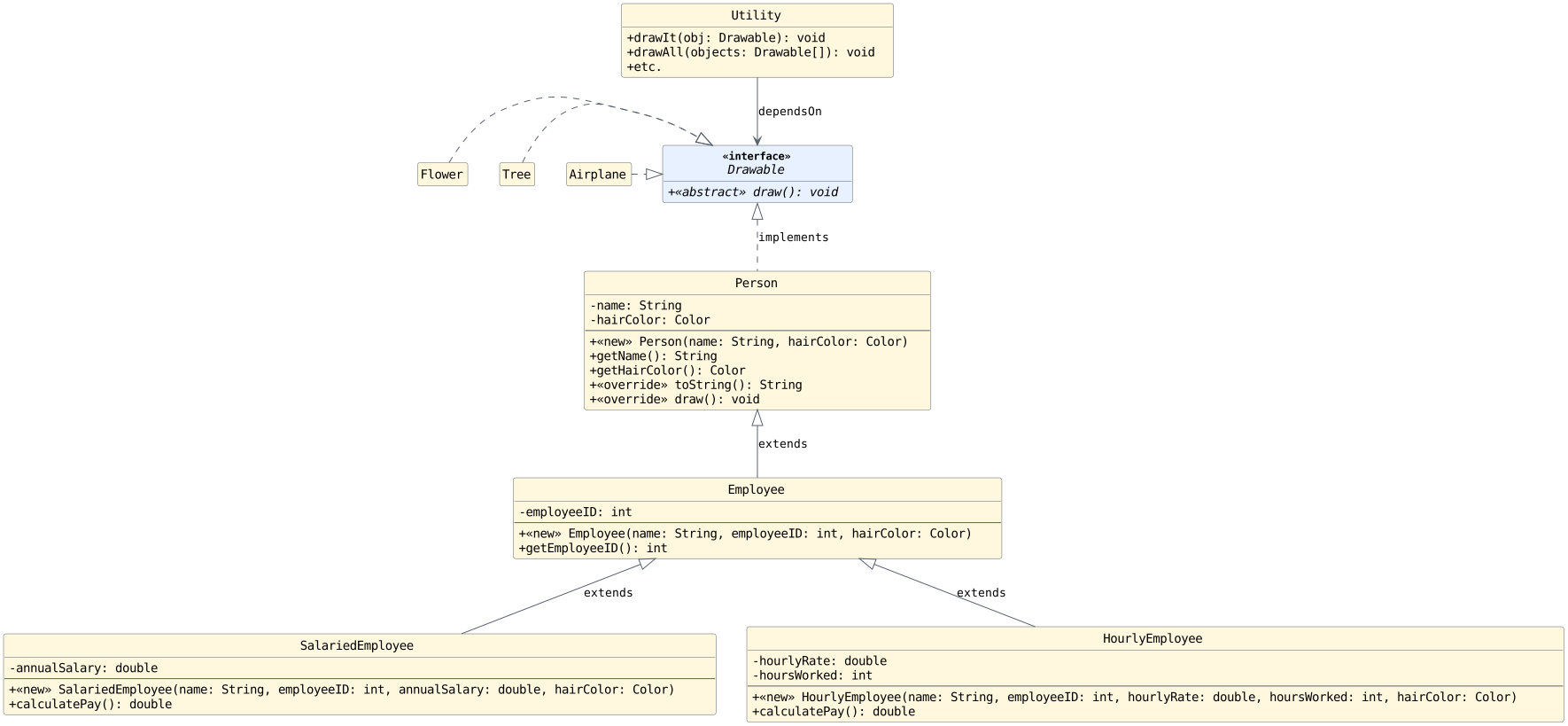
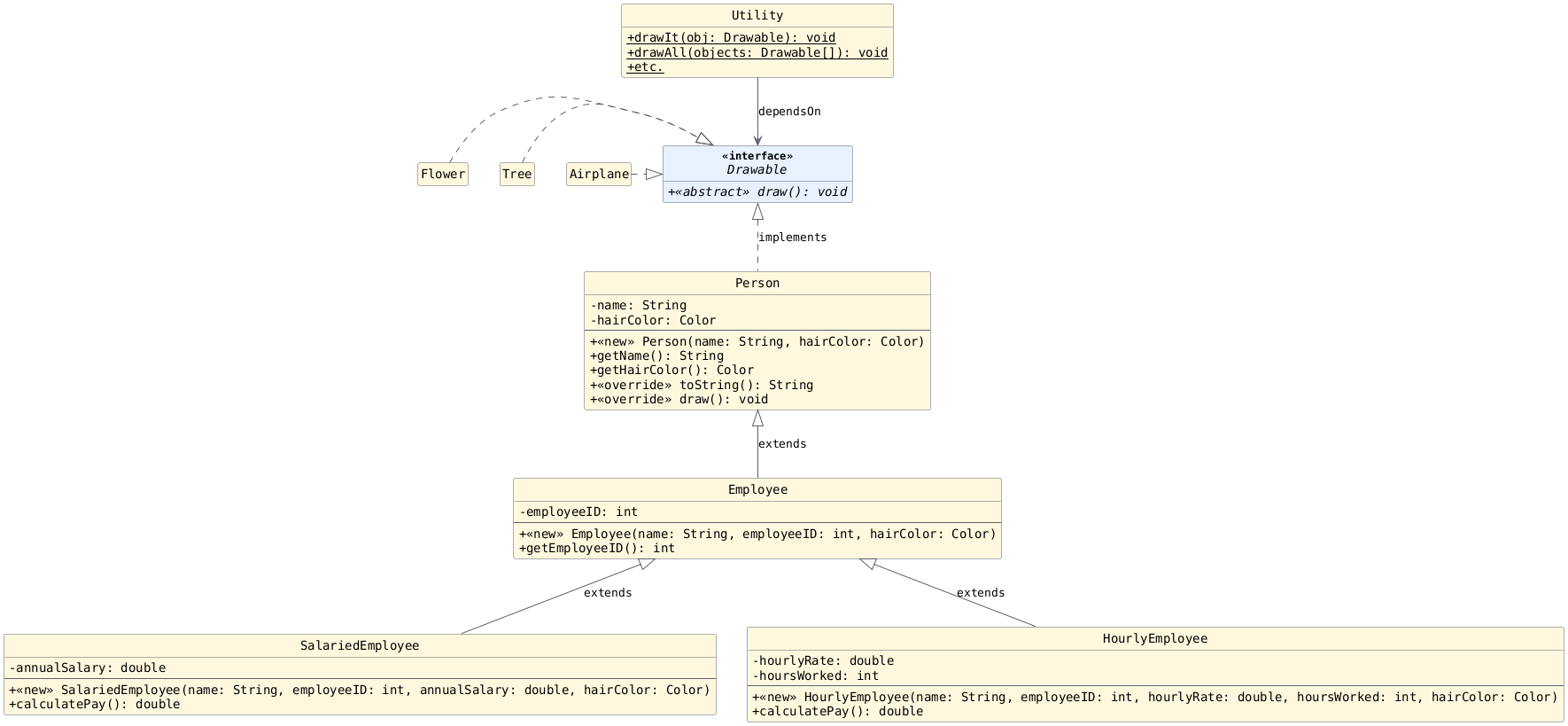
Updated UML (Inheritance Focused)
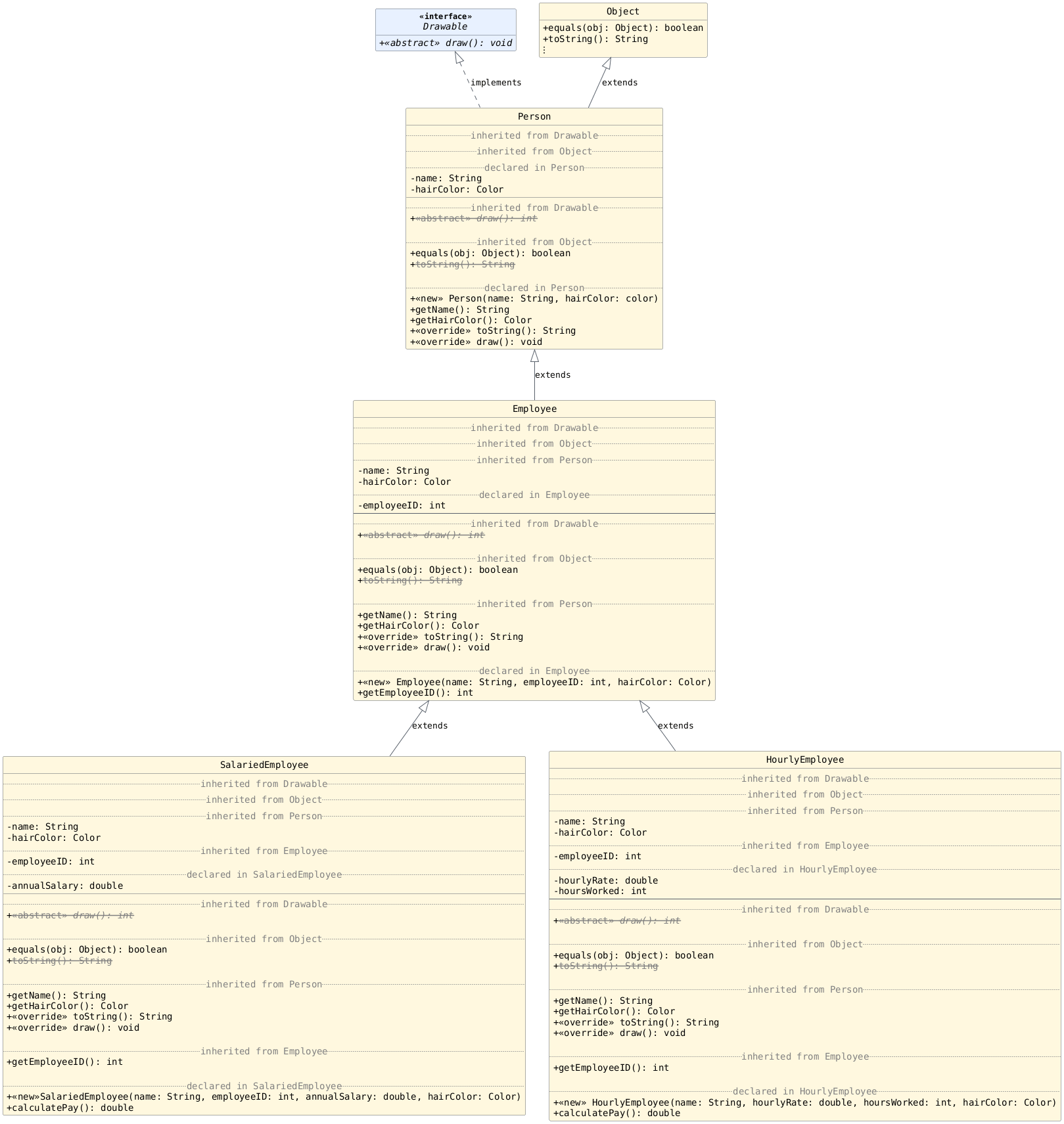
Here is the same content focused on the inheritance relationship.
In the second tab, the UML shows the methods/variables that are inherited as well. Showing this level of detail is not common in a UML diagram. We do it for educational purposes. Once we get used to seeing the detailed diagrams, the standard ones will be sufficient.
Using the diagram below: answer the following with your groups on your exit tickets:
How many instance variables are declared in
SalariedEmployee.java?How many instance variables are in an object of type
SalariedEmployee?How many methods are declared in
SalariedEmployee.java?How many methods can be called using a reference of type
SalariedEmployee?
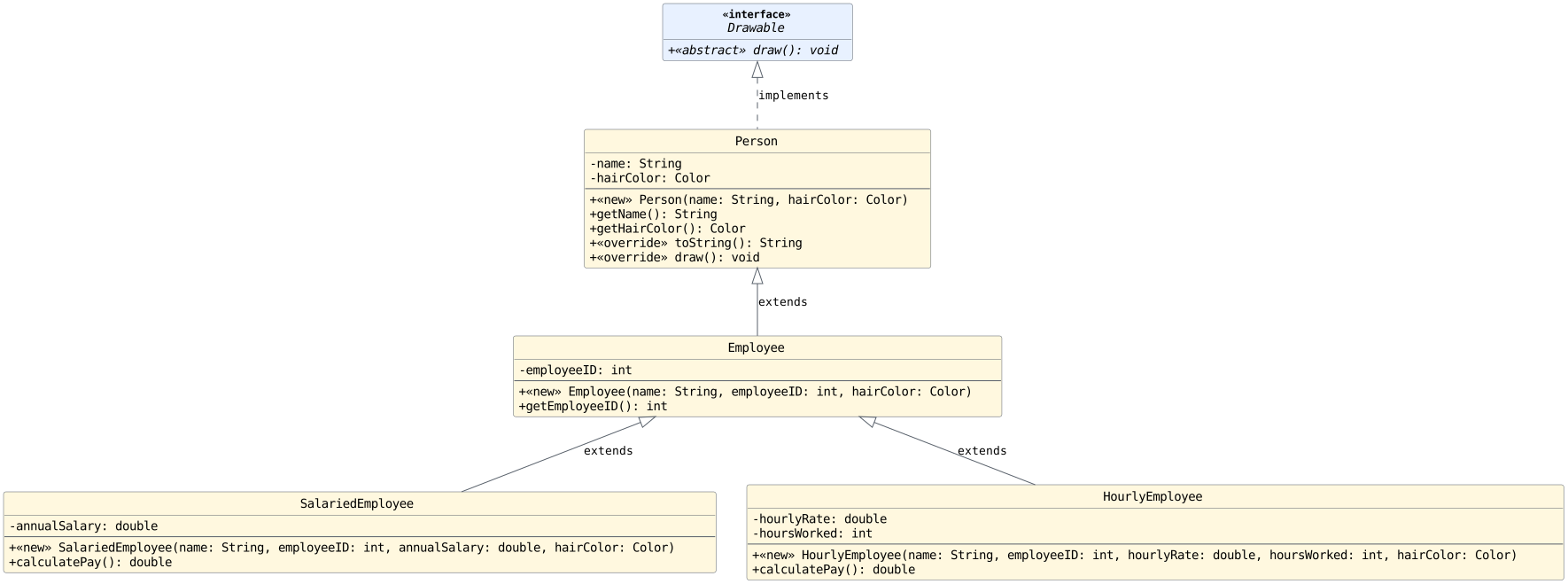
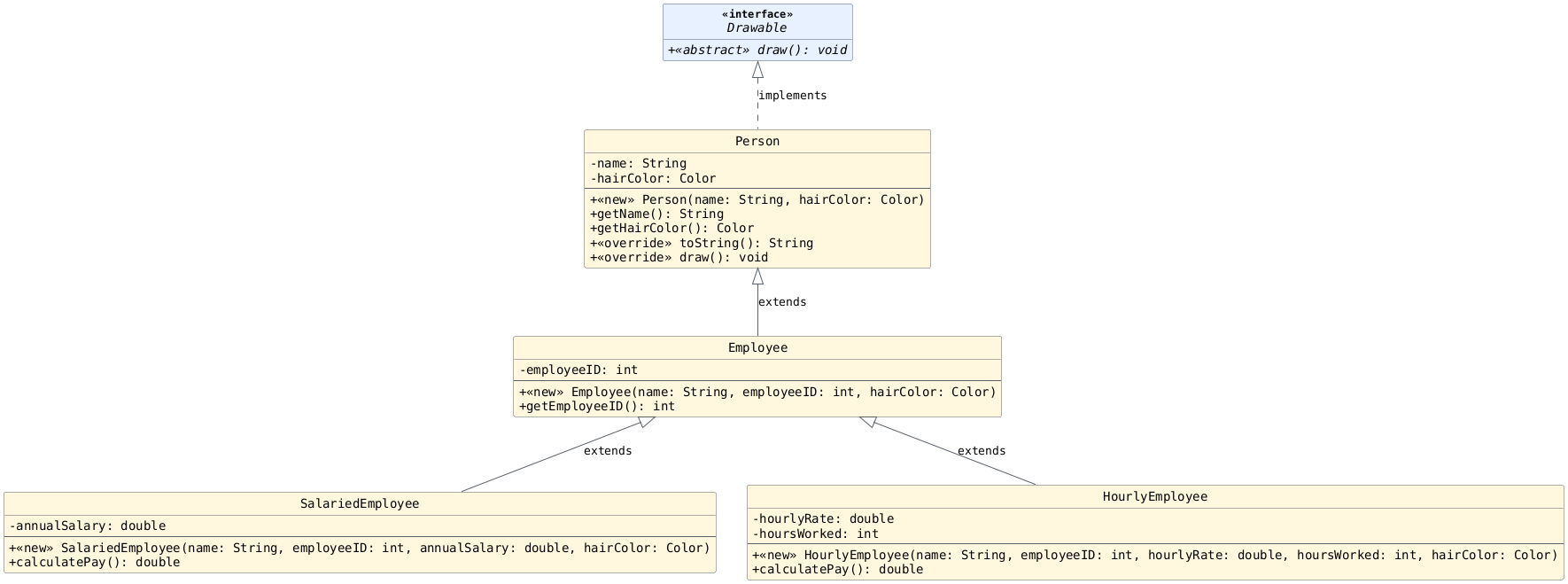
More Utility Methods
With our old design, findLargestEmployeeID required
an array parameter for each type of Employee. It
also contained redundant code (a nearly identical for
loop for each employee type).
Old Design and Code
Working Code
public static int findLargestEmployeeID(HourlyEmployee[] hourlyEmployees,
                                   SalariedEmployee[] salariedEmployees) {

    // Assume there is at least one item in the array
    // and set that employee ID to max to get us started.
    int max = hourlyEmployees[0].getEmployeeID();

    // Check hourly employees for a larger ID.
    for (HourlyEmployee he: hourlyEmployees) {
        if (he.getEmployeeID() > max) {
            max = he.getEmployeeID();
        } // if
    } // for

    // Check salaried employees for a larger ID.
    for (SalariedEmployee se: salariedEmployees) {
        if (se.getEmployeeID() > max) {
            max = se.getEmployeeID();
        } // if
    } // for

    return max;
} // findLargestEmployeeID
How many different kinds of arrays are needed to complete the tasks below now? Write your answers on your exit ticket. Is there redundancy within the code?
// Determine Largest Employee ID
public static int findLargestEmployeeID(________) {
    // ...
} // findLargestEmployeeID
public static double getAveragePay(________) {
    // ...
} // getAveragePay
Solution
We just need one array of type
Employeenow and one for loop. There is no more redundancy.We need two arrays: one of type
SalariedEmployeeand another of typeHourlyEmployee. The code in the method will be redundant.
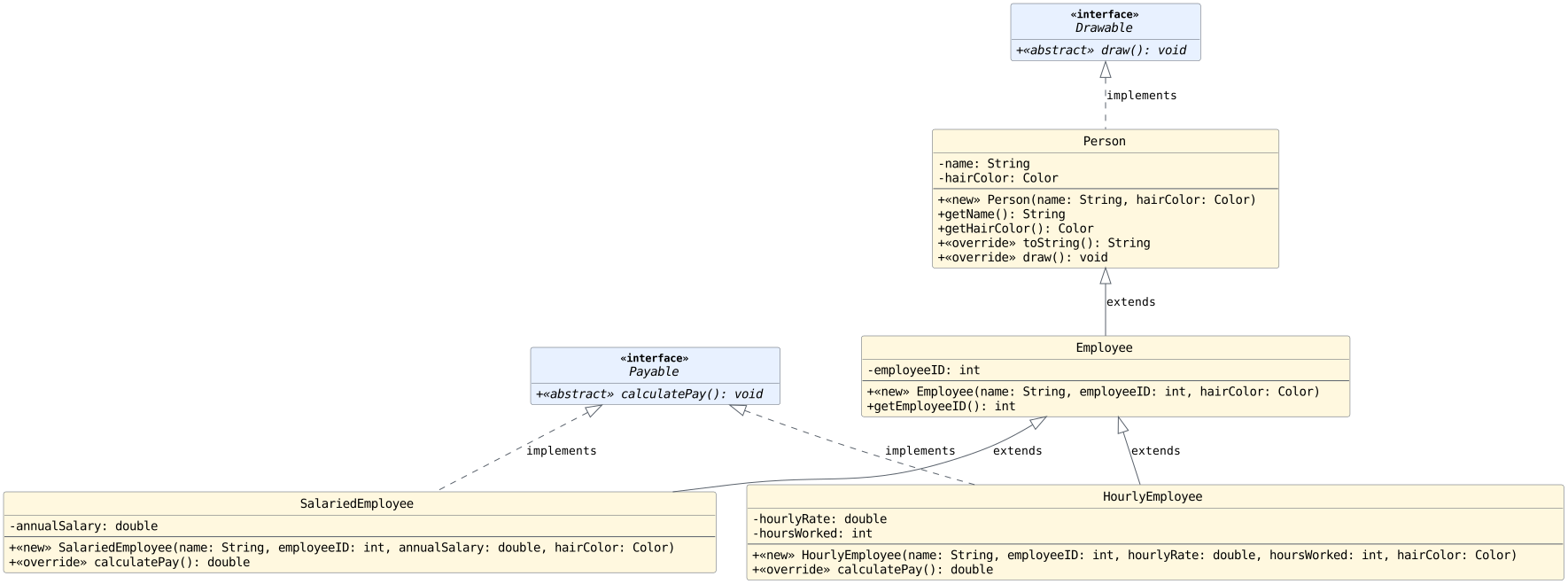
getAveragePay Discussion
Fixing getAveragePay
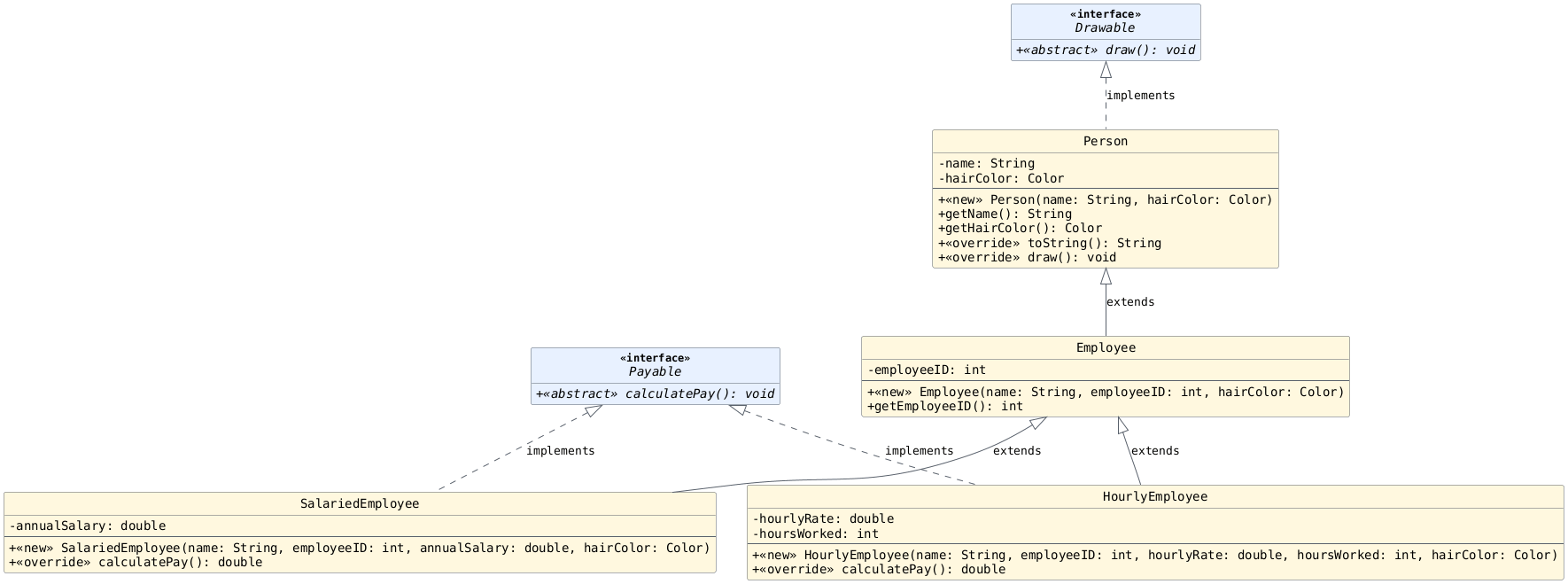
Solution 1: Use an interface
Solution 2: Use Employee
Can we move calculatePay into Employee?
public class Employee extends Person {

     //...

     public double calculatePay() {
         // What goes here?
     } // calculatePay

 } // Employee
We need the
Employeeclass to contain acalculatePaymethod so we can use polymorphism to calculate the pay of any type of employee.We should not be able to call the
calculatePaymethod on anEmployeeobject since that method does not have a reasonable implementation.
What do we do? Discuss with your groups.
Solution
There is really no way to calculate pay for an arbitrary employee. The most elegant solution to our problem is to use an abstract class as seen in the next section.
Part 4: Abstract Classes
Objectives
Help students understand how abstract classes can enable
them to prevent object creation and setup abstract
methods to enable even more polymorphism outside of the class
without having to introduce a separate interface.
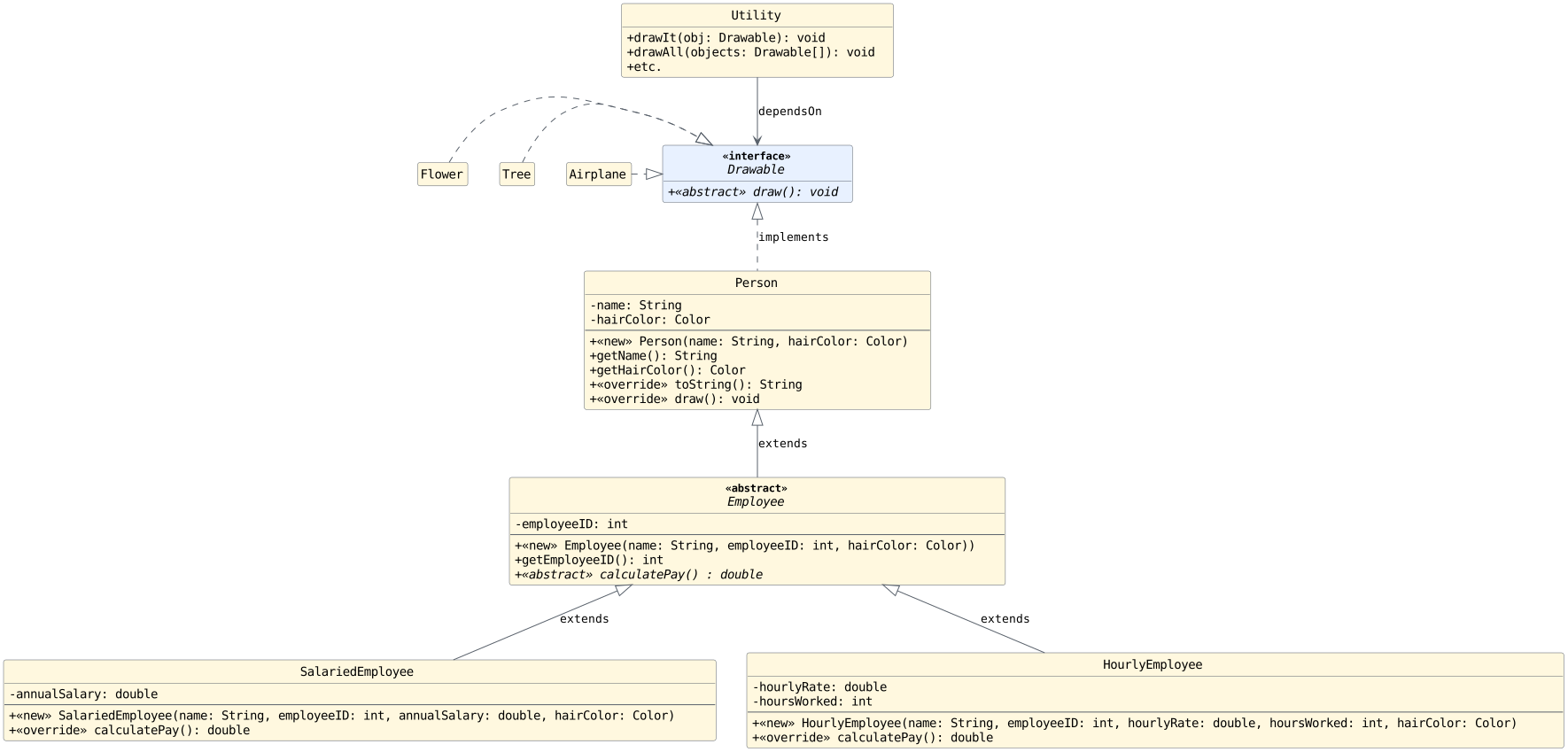
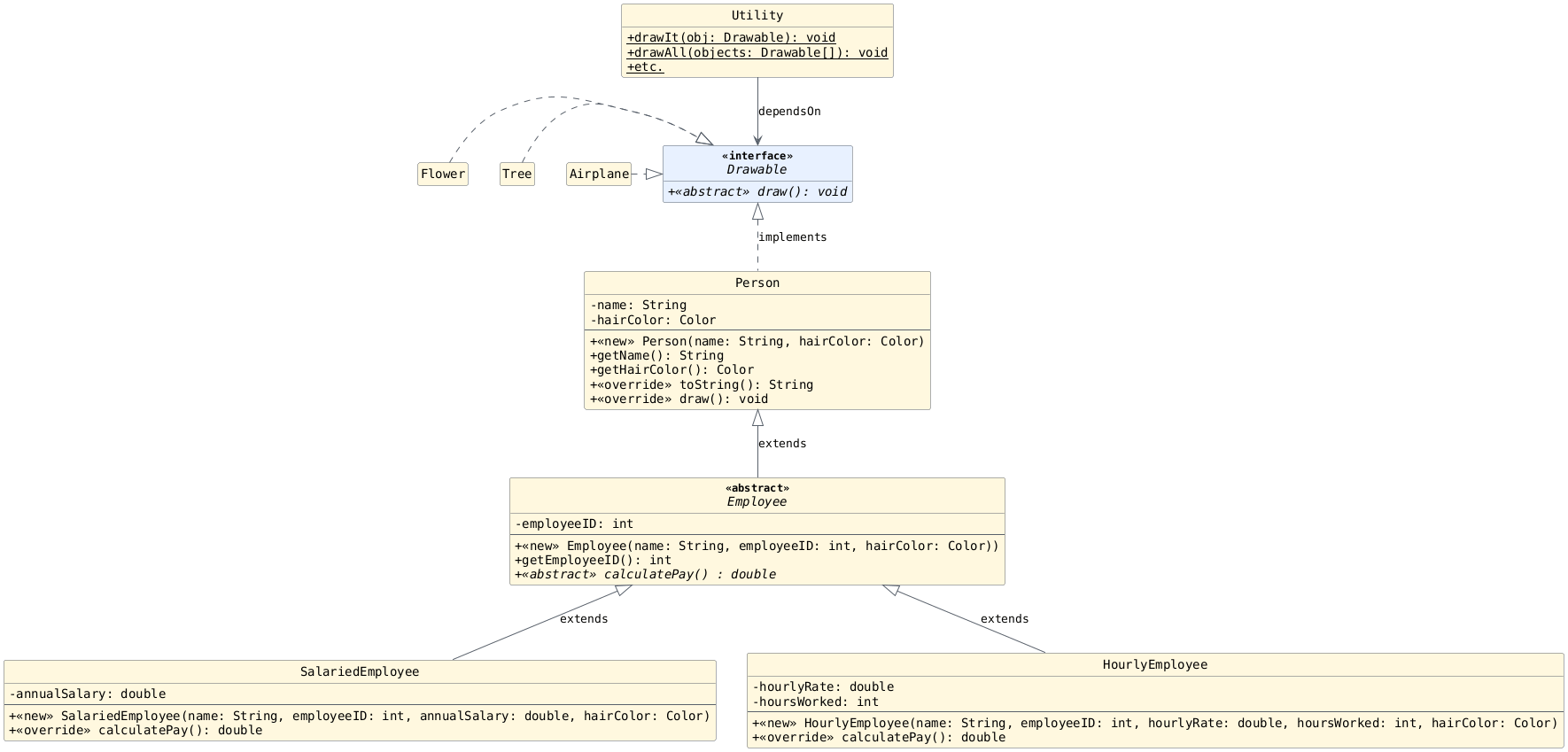
More Utility Methods
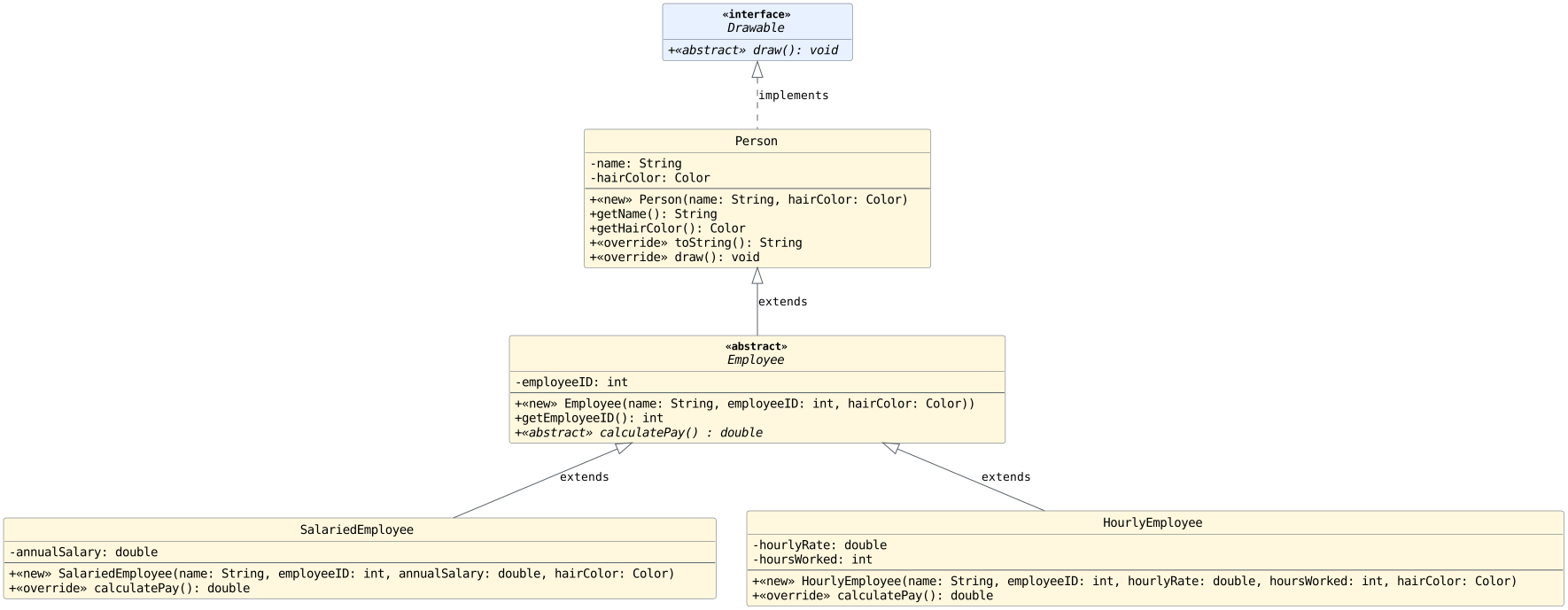
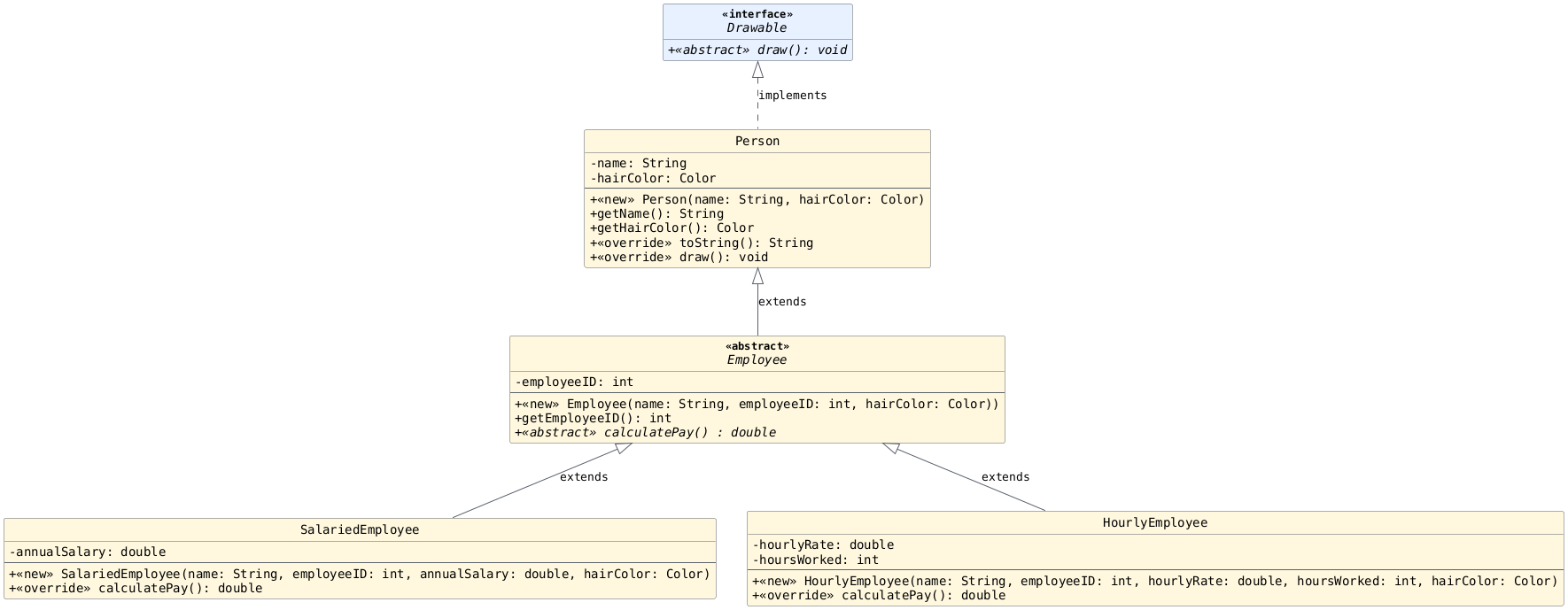
How many different kinds of arrays are needed to complete the tasks below? Write your answers on your exit ticket.
Also note: is there redundancy in the code? Don't write the code out, just try to imagine.
public static void drawAll(________) {
    // ...
} // drawAll
public static void printAllEmployeeIDs(________) {
    // ...
} // printAllEmployeeIDs
public static double getAveragePay(________) {
    // ...
} // getAveragePay
Solution
We can use
Drawable[]as the type to draw all objects.We can use
Employee[]as the type to print all IDs.We can use
Employee[]as the type to get the average pay.
There is no redundancy in the solutions now.
Constructing Objects
What does the constructor look like for
Person?What does the constructor look like for
Employee?What does the constructor look like for
SalariedEmployee?What does the constructor look like for
HourlyEmployee?Why does
Employeehave a constructor? Is the following allowed?
Employee e1 = new Employee(~, ~, ~);
public Person(String name, Color hairColor) {
    this.name = name;
    this.hairColor = hairColor;
} // Person
public Employee(String name, int employeeID, Color hairColor) {
    this.employeeID = employeeID;
    //
    // What about the other parameters?
    //
} // Employee
public Person(String name, Color hairColor) {
    this.name = name;
    this.hairColor = hairColor;
} // Person
public Employee(String name, int employeeID, Color hairColor) {
    super(name, hairColor); // What is this doing?
    this.employeeID = employeeID;
} // Employee
public SalariedEmployee(String name, int employeeID, double annualSalary, Color hairColor) {
    //
    // How do you write this?
    //
} // SalariedEmployee
public HourlyEmployee(String name, int employeeID, double hourlyRate, int hoursWorked, Color hairColor) {
    //
    // How do you write this?
    //
} // HourlyEmployee
The Object Class
Objectives
Help students understand where methods like toString and
equals come from. If time permits, discuss the final
keyword to inhibit inheritance and/or overrides.
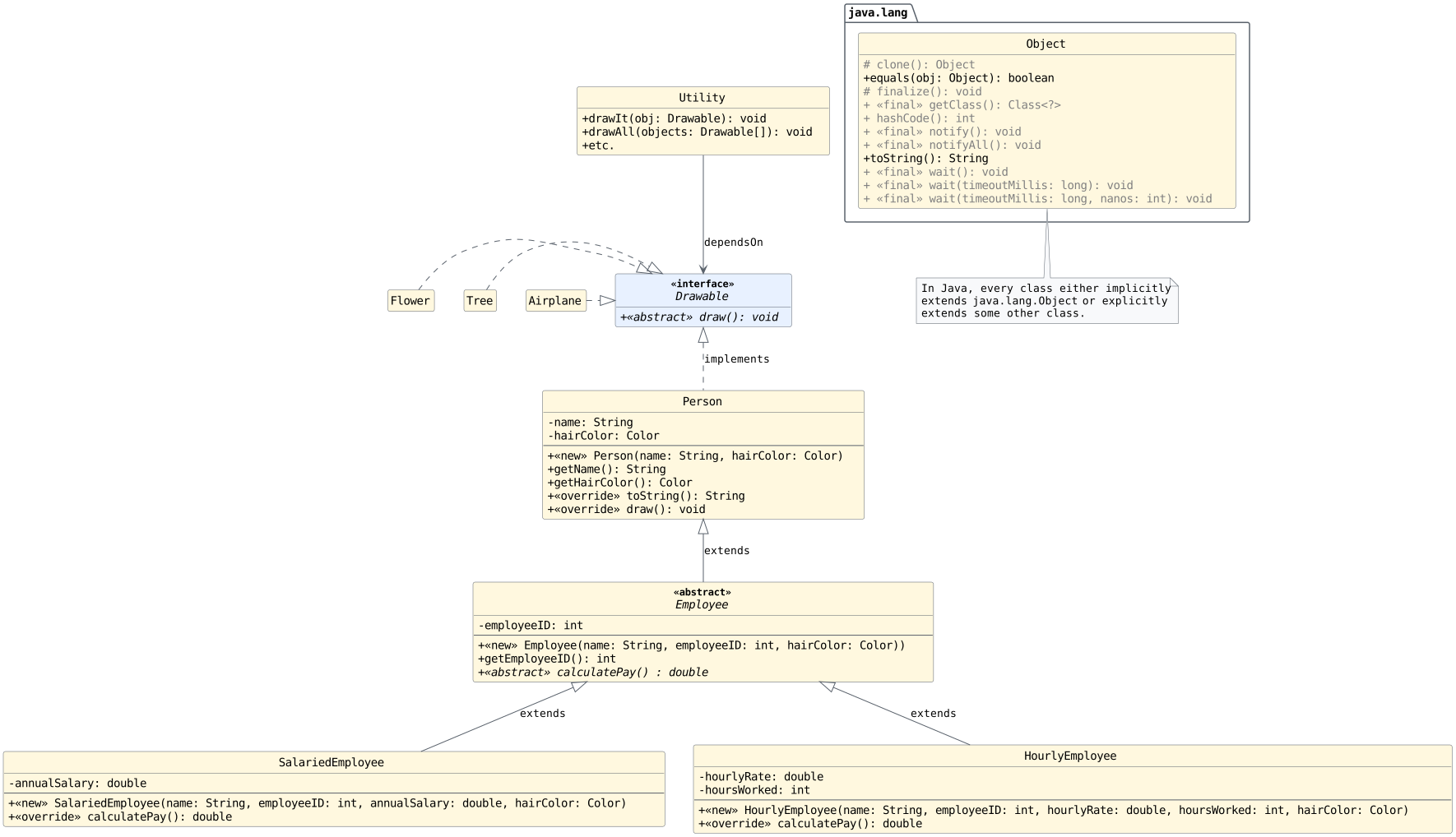
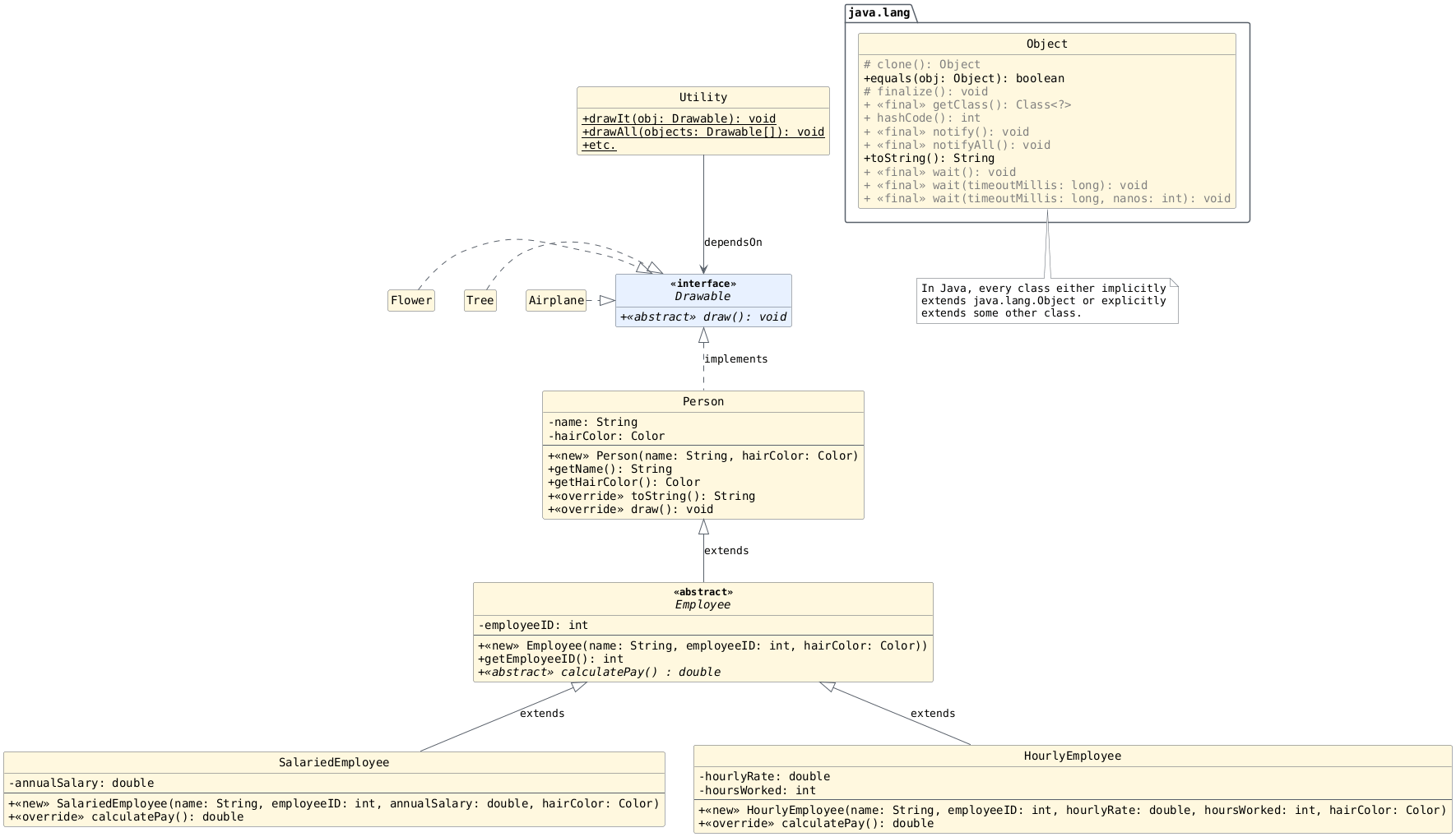
Note
Explicit means the extends/implements relationship of the class can be seen in its source code.
Implicit means the extends/implements relationship of the class exists but cannot be seen in its source code.
Answer the following questions on your exit ticket with your groups:
Which class(es) does
HourlyEmployeeexplicitly extend?Which class(es) does
HourlyEmployeeimplicitly extend?Does
HourlyEmployeeimplementDrawable? If so, is it implicit or explicit?
Child |
Explicitly Extends |
Implicitly Extends |
Implements |
|---|---|---|---|
|
|
Explicitly |
|
|
|
|
Implicitly |
|
|
|
Implicitly |
|
|
|
Implicitly |
|
|
Explicitly |
|
|
|
Explicitly |
|
|
|
No |
In the code below, we create a Circle object. For the
purposes of this discussion, assume the Circle class
exists and that its constructor requires a parameter of
type double representing the radius of the circle.
public static void main(String[] args) {

    // Create a Circle and assign it a radius
    Circle c = new Circle(4.2);

    System.out.println(c);
} // main
If we ran the code above, we would see something similar to:
Circle@251a69d7
Why do we see this output? What does it mean? Discuss with your groups and write your thoughts on your exit ticket.
Override toString to customize the string
representation for objects of the class.
/**
 * Returns with a reference to a String object representing this object.
 *
 * @return a reference to a String object representing this object.
 */
@Override
public String toString() {
    // ...
} // toString
Assuming obj is not null, the following are
equivalent:
System.out.println(obj);
System.out.println(obj.toString());
The toString method for class Object returns with a
reference to a String object whose contents consist of the name of the class of which the
object is an instance, the at-sign character '@', and
the unsigned hexadecimal representation of the hash code
of the object. The text matches the contents of the String
object referenced by the result of this expression:
this.getClass().getName() + '@' + Integer.toHexString(this.hashCode())
Override equals to customize how objects of a class are compared to other
objects for equality.
/**
 * Indicates whether some other object is "equal to" this one.
 *
 * @param obj the reference object with which to compare.
 * @return {@code true} if this object is the same as the {@code obj} argument;
 *     {@code false} otherwise.
 */
@Override
public boolean equals(Object obj) {
    ...
} // equals
Overriding toString
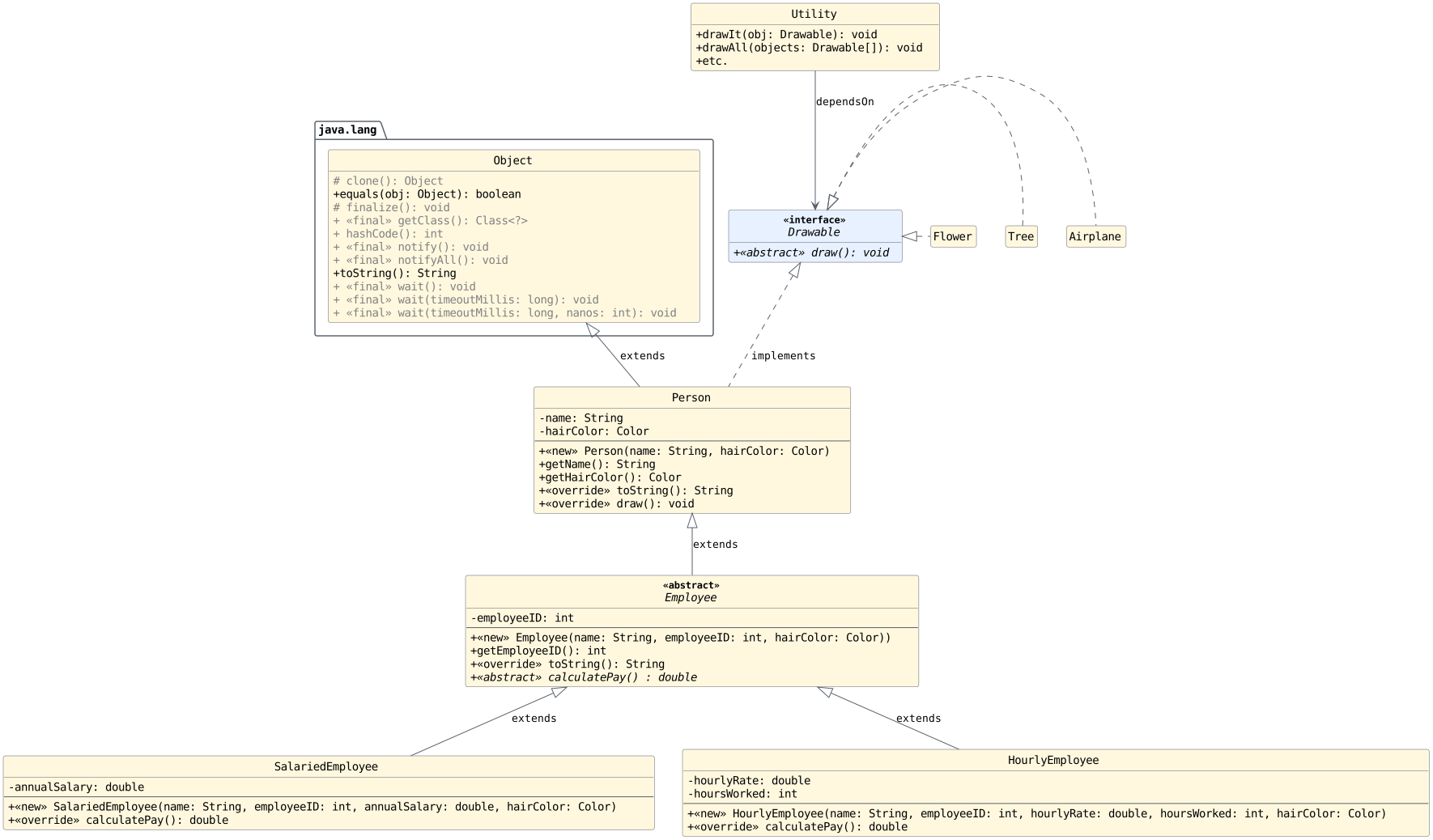
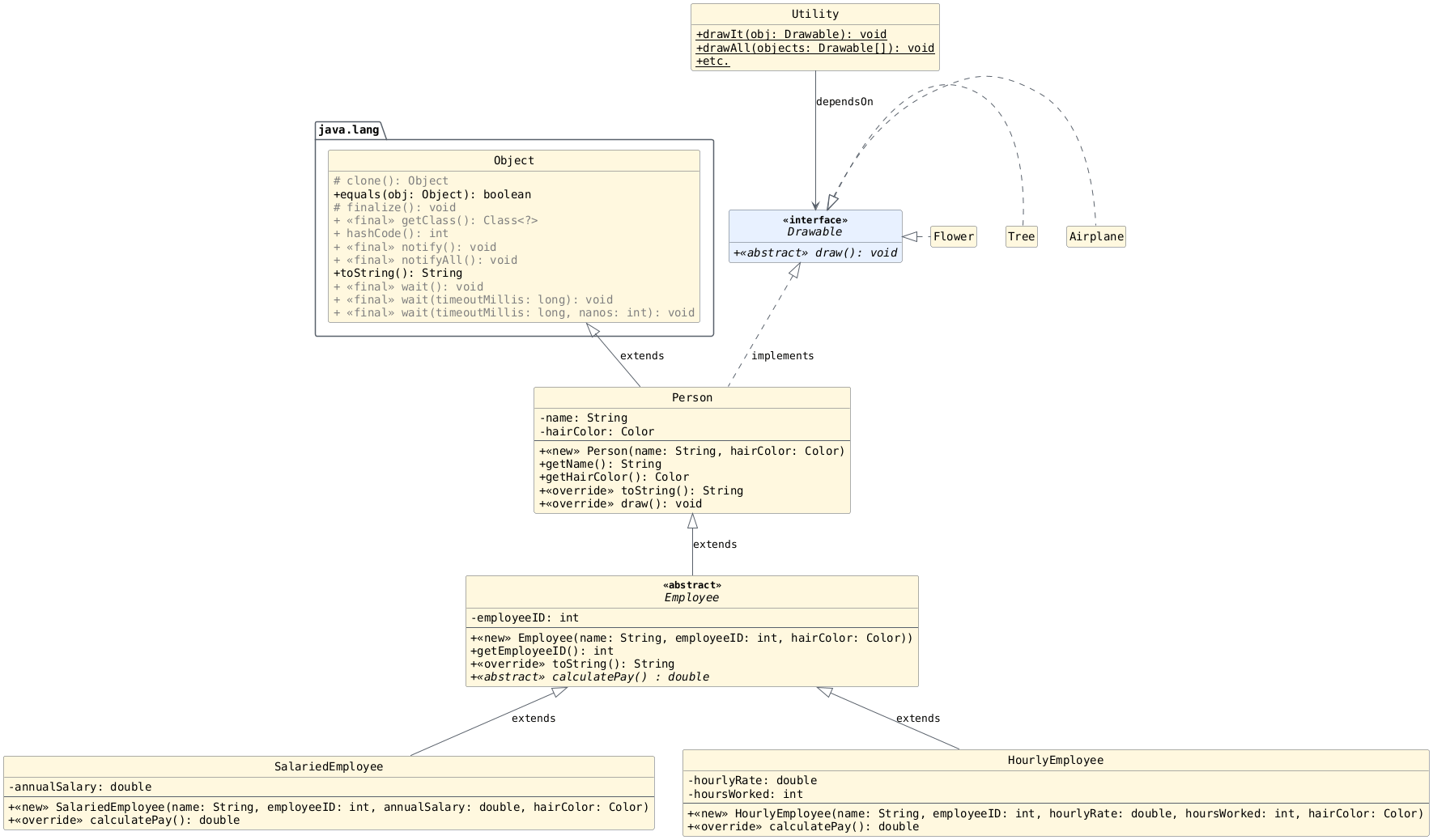
We want to override toString in the Employee class so
that all subclasses inherit the method and print their
calculated pay when printed. After we finish, the UML
will look like the diagram above.
public abstract class Employee extends Person {

     //...

     public abstract double calculatePay();

     @Override
     public String toString() {
         // Implement me!
         // Return with a reference to a String object containing the employee's ID and pay.
     } // toString

 } // Employee
Using Overridden toString
Now, the boss says he wants to print the ID and payment information
for all types of employees. We should be able to use our new
toString method.
Implement the method below:
public static void printInfo(________) {
    // ...
} // printInfo
Part 5: Adding a Manager Class
Objectives
Help students understand how to use super in overrides
to "adjust" an implementation and not just replace it.
Let's add a class called Manager that extends
SalariedEmployee. Every time a manager's pay is calculated,
it's some bonus dollar amount + 110% of what their pay would
be if they were only a salaried employee.
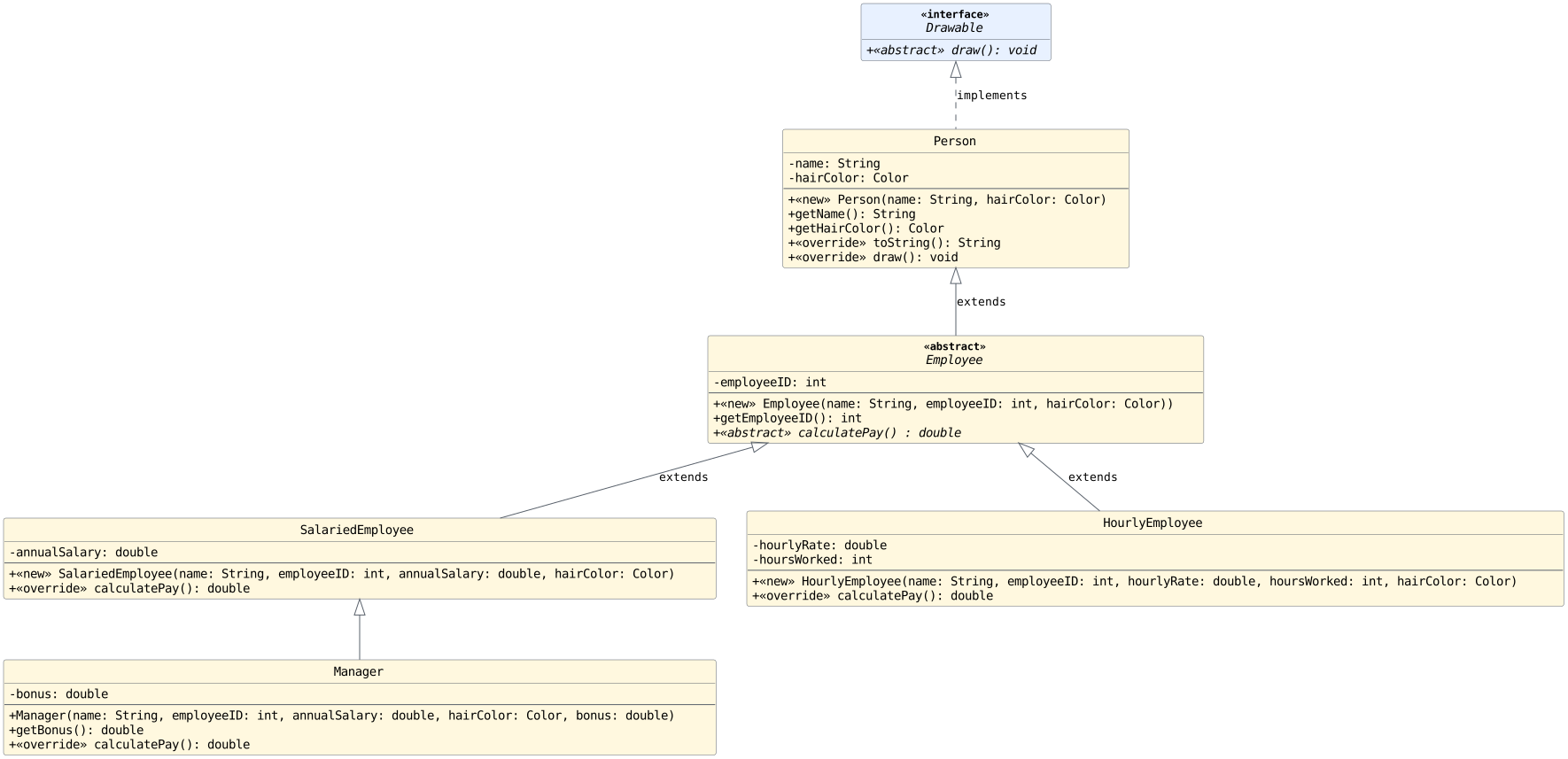
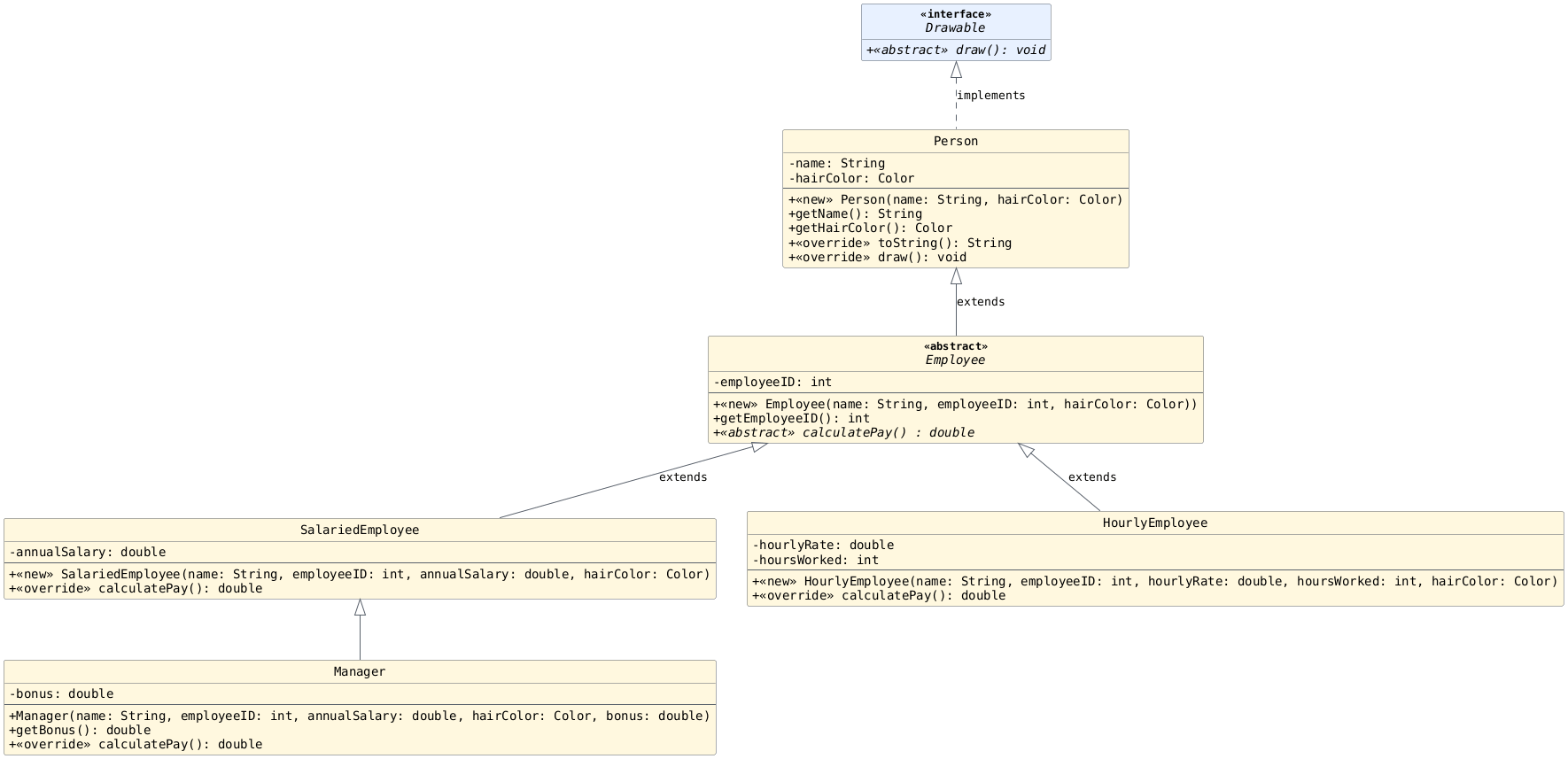
Below, we zoom in on the relevant aspects of the UML diagram seen above.
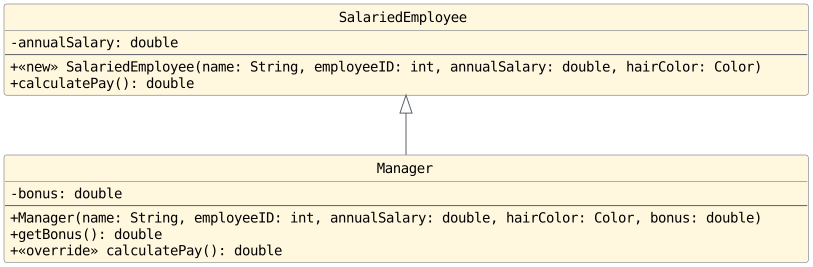
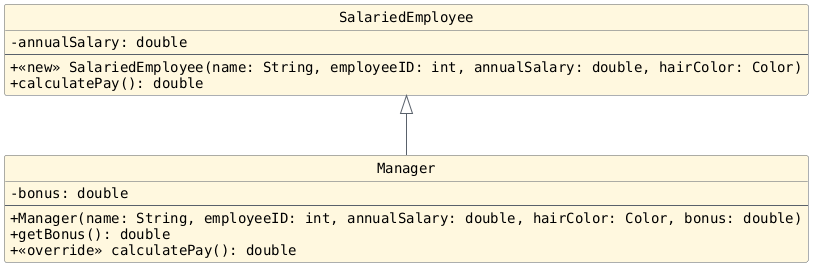
public Manager(String name, int employeeID, double annualSalary, Color hairColor, double bonus) {
    super(name, employeeID, annualSalary, hairColor);
    this.bonus = bonus;
} // Manager

public double getBonus() {
    return this.bonus;
} // getBonus
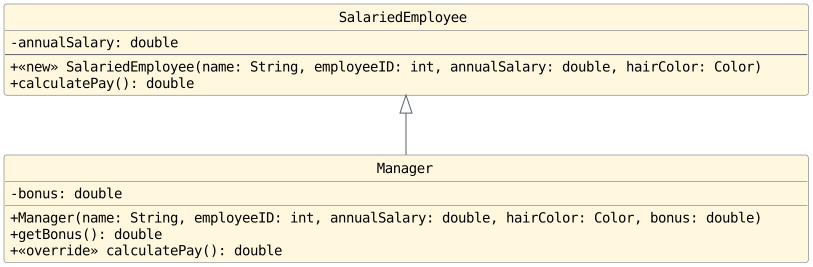
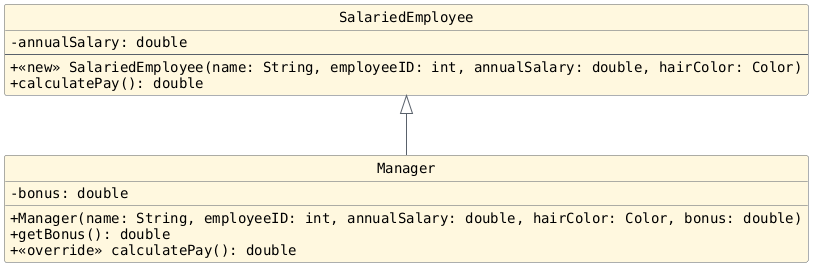
In your groups, write the code to implement
calculatePay within the Manager
class on your exit ticket:
@Override
public double calculatePay() {
    //
    // How can we do this?
    //
} // calculatePay
Part 6: Compatibility, Available Methods, and Dispatch
Compatibility (Example 1)
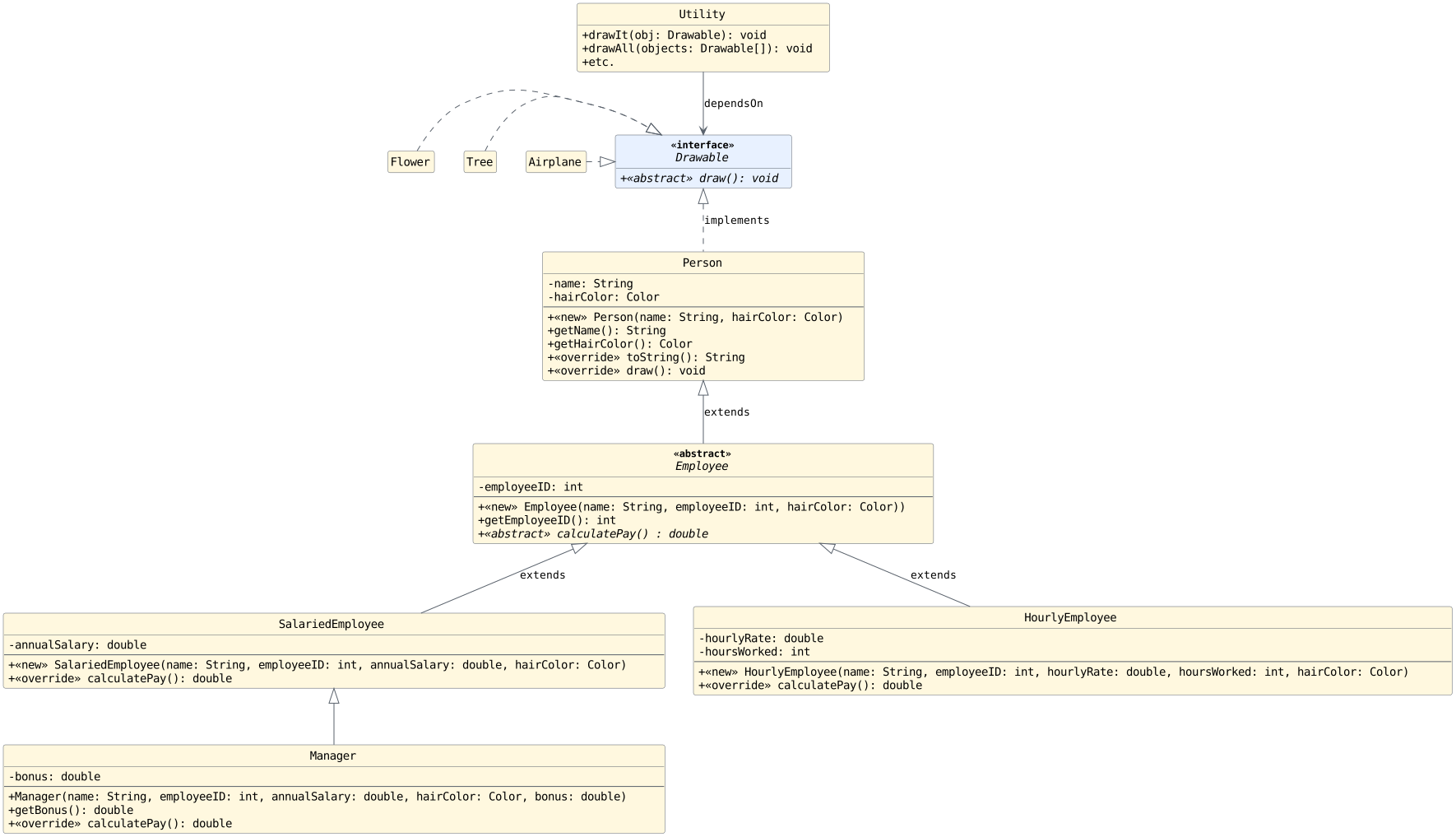
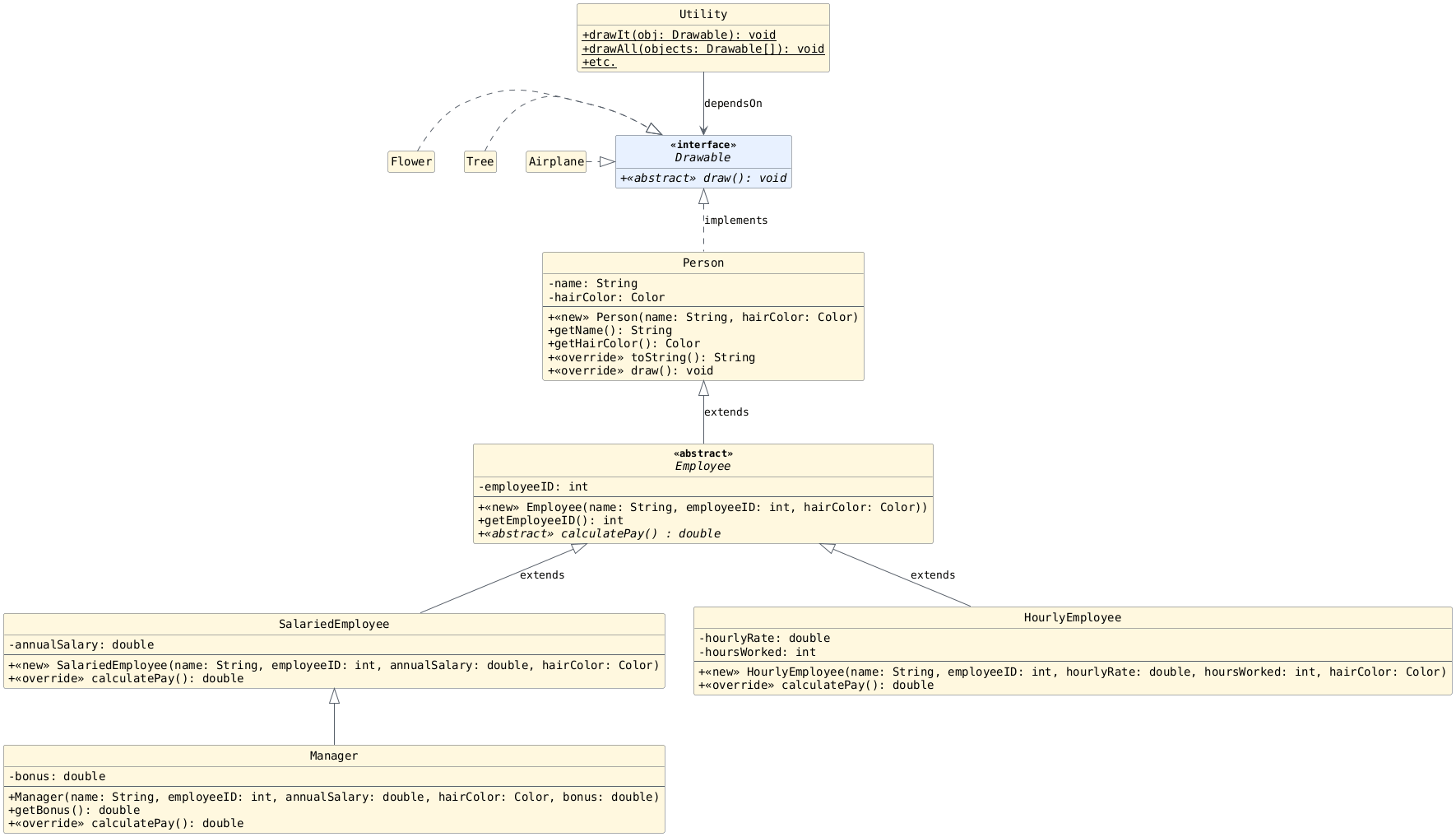
Given a variable of each type, write all compatible
expression types such that an assignment of the form
type name = expression will compile.
Person:
Employee:
SalariedEmployee:
HourlyEmployee:
Manager:
Drawable:
Solutions
Person:
Person,Employee,SalariedEmployee,HourlyEmployee,ManagerEmployee:
Employee,SalariedEmployee,HourlyEmployee,ManagerSalariedEmployee:
SalariedEmployee,ManagerHourlyEmployee:
HourlyEmployeeManager:
ManagerDrawable:
Drawable,Flower,Tree,Airplane,Person,SalariedEmployee,HourlyEmployee,Manager
Dispatch
Dispatch (Code)
Which class contains the code that will be run for each method below?
 1public class Driver {
 2
 3    public static void main(String[] args) {
 4
 5        Drawable[] refs = new Drawable[2];
 6        refs[0] = new Person("Joe", Color.BROWN, Color.RED);
 7        refs[1] = new SalariedEmployee("Carolyn", 85_000.00, Color.BROWN, Color.GREEN);
 8
 9        HourlyEmployee sue = new HourlyEmployee("Sue", 45.00, 24, Color.BROWN, Color.BROWN);
10        Drawable test2 = new HourlyEmployee("Bill", 9.00, 2, Color.BROWN, Color.BROWN);
11
12        Person test = sue;
13        test2 = sue;
14
15        Object oJoe = refs[0];
16
17        String name = test.getName();        // 1
18        refs[1].draw();                      // 2
19        String s = oJoe.toString();          // 3
20        test2.draw();                        // 4
21
22    } // main
23} // Driver
Available Methods
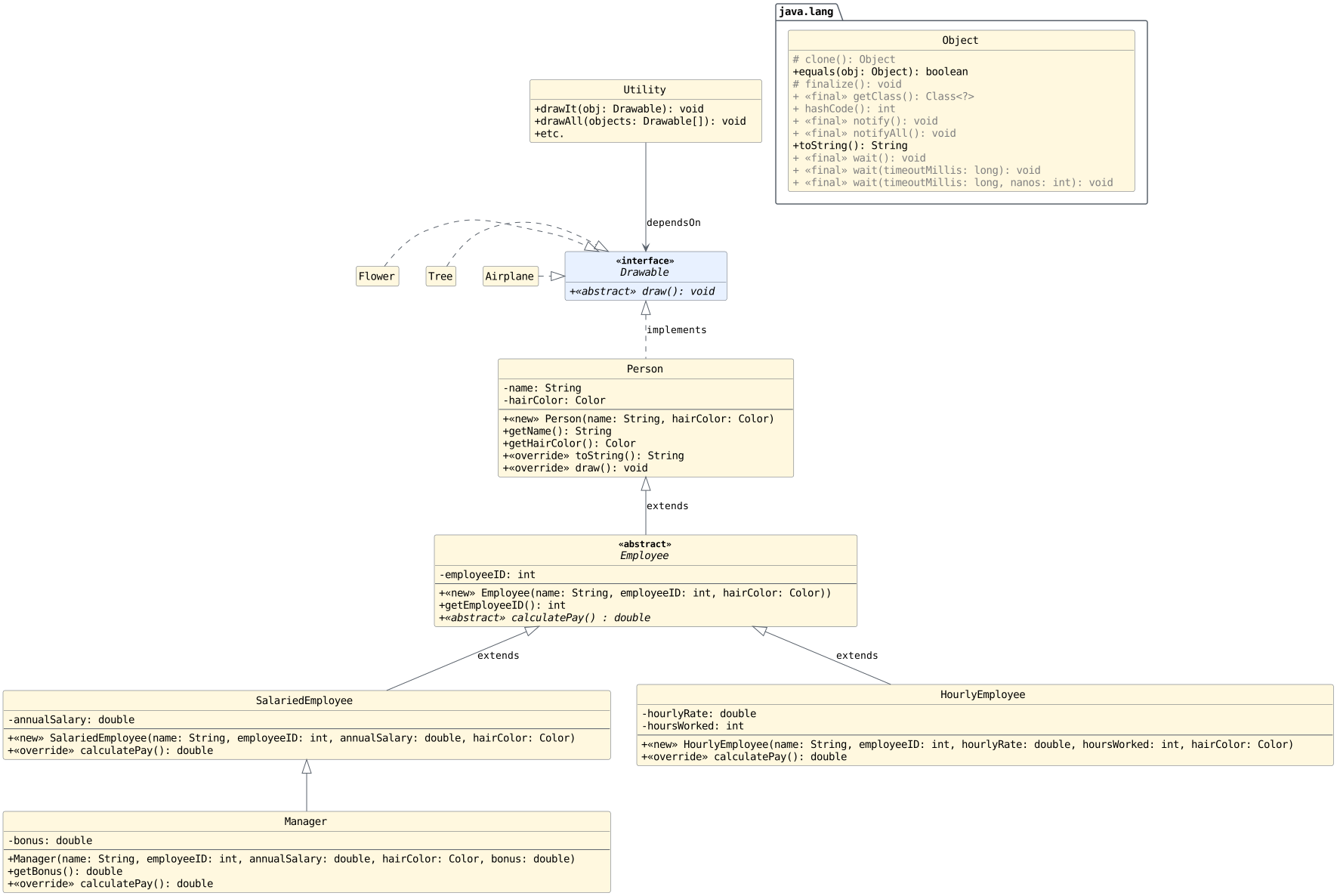
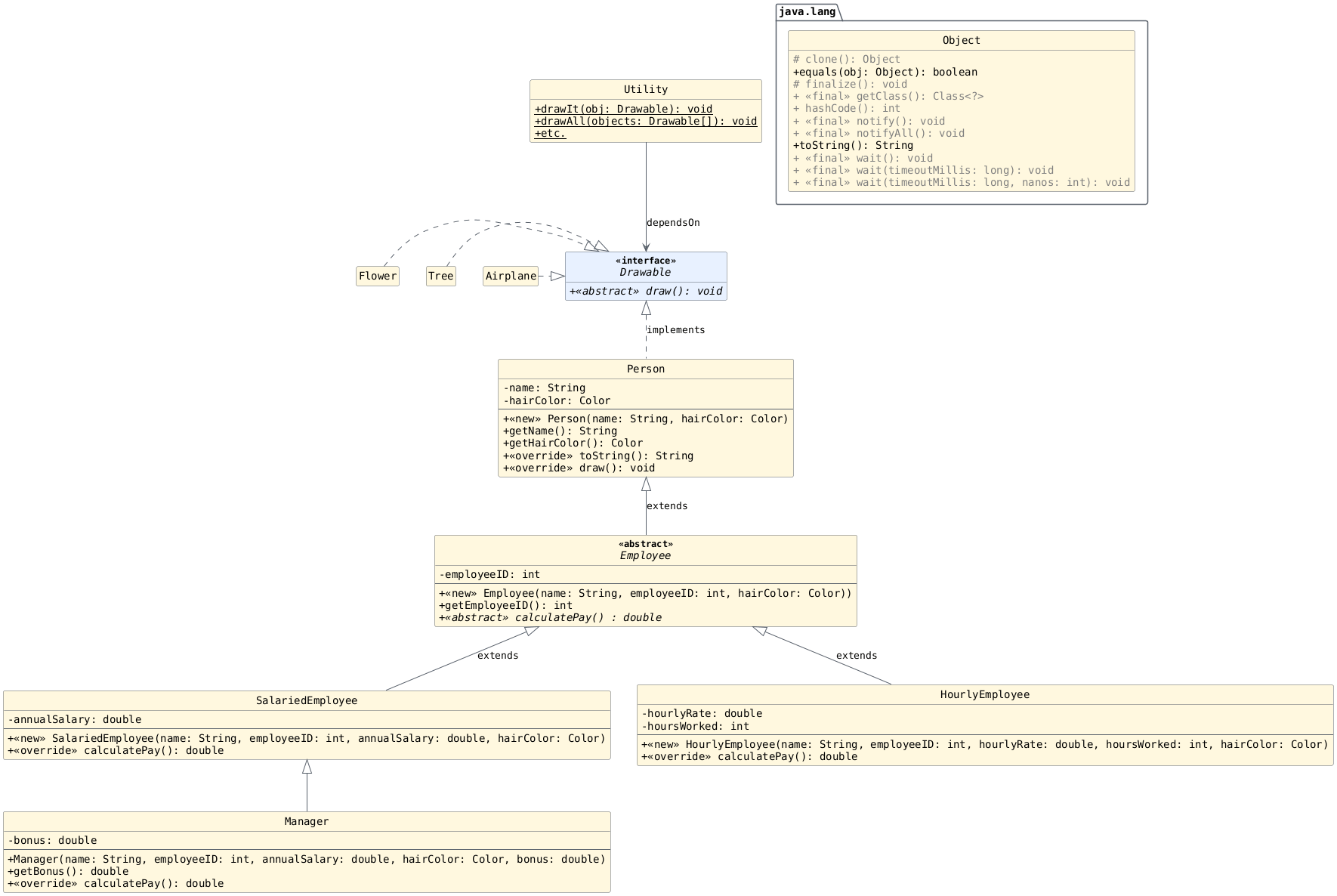
What methods can be called using the variable in each scenario below? You may safely assume that all expressions are valid Java code and that all assignments are compatible.
variable name = expression;
Variable Type |
Expression Type |
|---|---|
|
|
Variable Type |
Expression Type |
|---|---|
|
|
Methods declared in
Manager:getBonus()calculatePay()
Methods inherited from
SalariedEmployee:calculatePay()
Methods inherited from
Employee:getEmployeeID()
Methods inherited from
Person:getName()getHairColor()draw()toString()
Methods inherited from
Object:equals(Object)toString()etc.
Variable Type |
Expression Type |
|---|---|
|
|
Variable Type |
Expression Type |
|---|---|
|
|
same as before!
Variable Type |
Expression Type |
|---|---|
|
|
Variable Type |
Expression Type |
|---|---|
|
|
Methods declared in
Drawable:draw()
Methods inherited from
Object:equals(Ovject)toString()etc.
Dispatch
What method body is used in each call scenario below? You may
safely assume that each reference variable is not null;
that is, it refers to some object.
Variable Type |
Variable Name |
Object Type |
Call |
|---|---|---|---|
|
|
|
|
Variable Type |
Variable Name |
Object Type |
Call |
|---|---|---|---|
|
|
|
|
draw()fromPerson
Variable Type |
Variable Name |
Object Type |
Call |
|---|---|---|---|
|
|
|
|
Variable Type |
Variable Name |
Object Type |
Call |
|---|---|---|---|
|
|
|
|
draw()fromPerson
Variable Type |
Variable Name |
Object Type |
Call |
|---|---|---|---|
|
|
|
|
Variable Type |
Variable Name |
Object Type |
Call |
|---|---|---|---|
|
|
|
|
calculatePay()fromSalariedEmployee
Variable Type |
Variable Name |
Object Type |
Call |
|---|---|---|---|
|
|
|
|
|
|
|
|
Variable Type |
Variable Name |
Object Type |
Call |
|---|---|---|---|
|
|
|
|
|
|
|
|
calculatePay()fromManagergetEmployeeID()fromEmployee
Variable Type |
Variable Name |
Object Type |
Call |
|---|---|---|---|
|
|
|
|
|
|
|
|
Variable Type |
Variable Name |
Object Type |
Call |
|---|---|---|---|
|
|
|
|
|
|
|
|
m.toString()usestoString()fromPersont.toString()usestoString()fromObject
Test Yourself
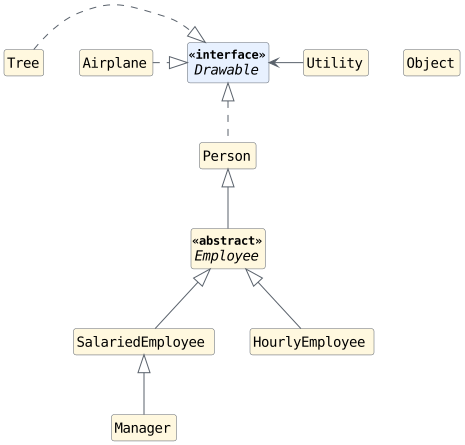
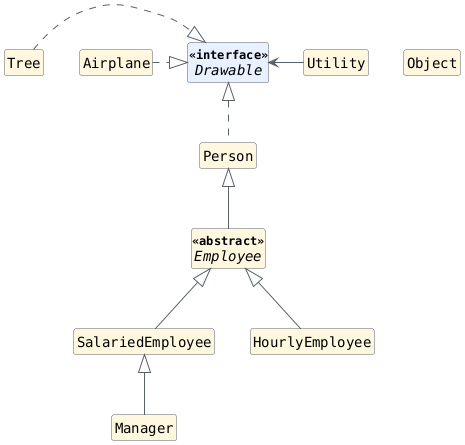
Which of the following are considered to be compatible
assignment scenarios, assuming expression is valid Java
code?
variable name = expression;
Variable Type |
Expression Type |
|---|---|
|
|
|
|
|
|
|
|
|
|
|
|
Variable Type |
Expression Type |
Compatible? |
|---|---|---|
|
|
Yes |
|
|
Yes |
|
|
No |
|
|
No |
|
|
Yes |
|
|
No |
Variable Type |
Expression Type |
|---|---|
|
|
|
|
|
|
|
|
|
|
|
|
|
|
Variable Type |
Expression Type |
Compatible? |
|---|---|---|
|
|
Yes |
|
|
Yes |
|
|
Yes |
|
|
No |
|
|
No |
|
|
Yes |
|
|
No |
Variable Type |
Expression Type |
|---|---|
|
|
|
|
|
|
|
|
|
|
|
|
Variable Type |
Expression Type |
Compatible? |
|---|---|---|
|
|
Yes |
|
|
Yes |
|
|
NO |
|
|
No |
|
|
Yes |
|
|
No |
Note
Write out quick examples in Java, as needed, to provide clarification.
Part 7: Summary and Additional Practice
As we evolved our design, we realized the following benefits:
Reduced redundancy in the classes used in the hierarchy (
Person,SalariedEmployee,HourlyEmployee, andManager). These classes no longer have repeated instance variables or instance methods.Reduced unnecessary parameters in the methods of
Utility.java. By the end, each of the methods associated with our tasks were able to be completed with a single parameter and contained no redundancy within the methods themselves. Here are the tasks we added and improved (although more could be added depending on need):public static void drawAll(________) { // ... } // drawAll public static void printAllEmployeeIDs(________) { // ... } // printAllEmployeeIDs // Determine Largest Employee ID public static int findLargestEmployeeID(________) { // ... } // findLargestEmployeeID public static double getAveragePay(________) { // ... } // getAveragePay public static int numWithHairColor(Color hairColor, _________) { // ... } // numWithHairColor
For extra practice, we highly recommend implementing each of these methods and focusing on the method body and the best replacement for the blank.
Inheritance Activity (Shapes Hierarchy)
Inheritance Activity (Shapes Hierarchy)
Sample solutions not included, because "Show Solutions" was not toggled before printing.
Information
This activity explores how to utilize inheritance in Java to create new classes that are directly based on existing ones, with an emphasis on code reuse and design implications. It also revisits how to commit and view changes to a local Git repository.
Prerequisite Knowledge
Course-Specific Learning Outcomes
LO3.b: Create class, interface, method, and inline documentation that satisfies a set of requirements.
LO3.c: Generate user-facing API documentation for a software solution.
LO4.c: (Partial) Design, create and use inheritance relationships in a software solution.
LO4.d: Utilize inheritance-based polymorphism in a software solution.
Getting Started
Download Source Code
Execute the command below to download and extract the files:
bundle1302 inheritance-shapes
- downloading cs1302-inheritance-shapes bundle...
- verifying integrity of downloaded files using sha256sum...
- extracting downloaded archive...
- removing intermediate files...
subdirectory cs1302-inheritance-shapes successfully created
Change into the cs1302-inheritance-shapes directory that was just created
and look around. There should be multiple Java files contained
within the directory structure. To see a listing of all of the
files under the src subdirectory, use the tree command.
You should see output similar to the following:
tree
.
|
|
compile_and_run.sh
|
|
src/
|
|
cs1302/
|
|
shapes/
|
|
Circle.java
|
|
Driver.java
|
|
Ellipse.java
|
|
Rectangle.java
|
|
Shape.java
|
3 directories, 6 files
Fig. 2 The current directory structure
Practice Opportunity (UML)
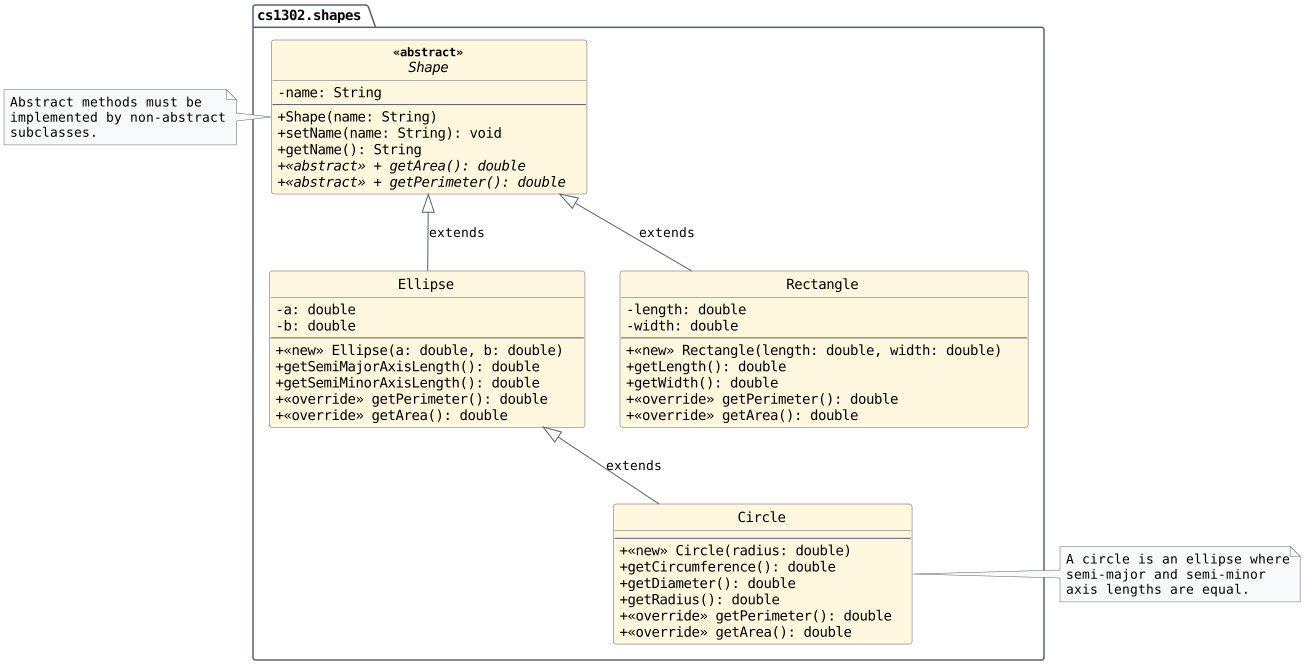
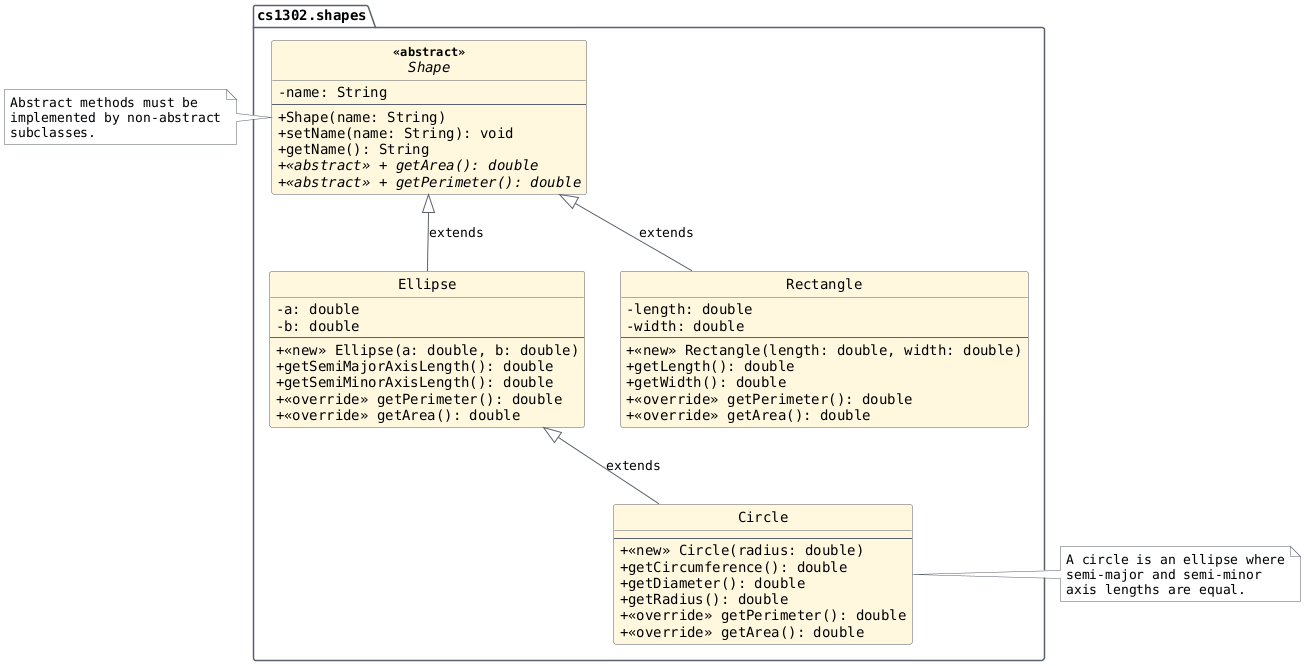
If you would like extra practice drawing UML, take this
opportunity to draw a complete, proper UML diagram for Shape
and its child classes contained in the starter code.
Refer to the CSCI 1302 UML Chapter if needed. Specifically, each individual class diagram should contain:
Class name;
Variables;
Constructors and methods;
If needed, a solid generalization arrow (
extends) to a parent class; andIf needed, a dashed generalization arrow (
implements) to an interface.
In a class diagram, do not list inherited members (methods or
attributes) unless they are explicitly overridden. Be sure to
include visibility modifiers (e.g., +, #, ~, -)
and type/return type information where needed.
Solution
The UML solution is given later in the activity.
Version Control with Git
Make sure that you are directly inside the
cs1302-inheritance-shapes directory, then initialize a
new local Git repository:
git init
Initialized empty Git repository in ./.git/
Note
When you execute the git clone command to download
the starter code for a project, you will not need
to run the git init command. In that scenario, you
are making a copy of an existing Git repository. The
other commands in this section would still apply.
Next, add all the starter file to that repository
git add .
Verify that the files will be committed:
git status
On branch main

No commits yet

Changes to be committed:
  (use "git rm --cached <file>..." to unstage)
    new file:   compile_and_run.sh
    new file:   src/cs1302/shapes/Circle.java
    new file:   src/cs1302/shapes/Driver.java
    new file:   src/cs1302/shapes/Ellipse.java
    new file:   src/cs1302/shapes/Rectangle.java
    new file:   src/cs1302/shapes/Shape.java
Commit those changes to the local repository with a nice log message:
git commit -m "initial commit"
[main (root-commit) ???????] initial commit
 6 files changed, 342 insertions(+)
 create mode 100755 compile_and_run.sh
 create mode 100644 src/cs1302/shapes/Circle.java
 create mode 100644 src/cs1302/shapes/Driver.java
 create mode 100644 src/cs1302/shapes/Ellipse.java
 create mode 100644 src/cs1302/shapes/Rectangle.java
 create mode 100644 src/cs1302/shapes/Shape.java
Check the log:
adog alias is setup on Odin. It is short
for git log with --all, --decorate,
--oneline, and --graph.¶git adog
* ??????? (HEAD -> main) initial commit
Adding a Square Class
Planning for a Square Class
In this section, we want to add a Square class to our
hierarchy, but first let's think about how it fits in. Answer
the following questions with your group:
Should
Squarehave a parent class? If so, what would it be?What instance variables need to be declared in
Square?What methods will we need in
Square?
Solution
Yes. It is best to place it as a child of
Rectangleto minimize redundancy.None. It will inherit
lengthandwidthfromRectangle.None. It will inherit the methods from
RectangleandShape.
Coding a Square Class
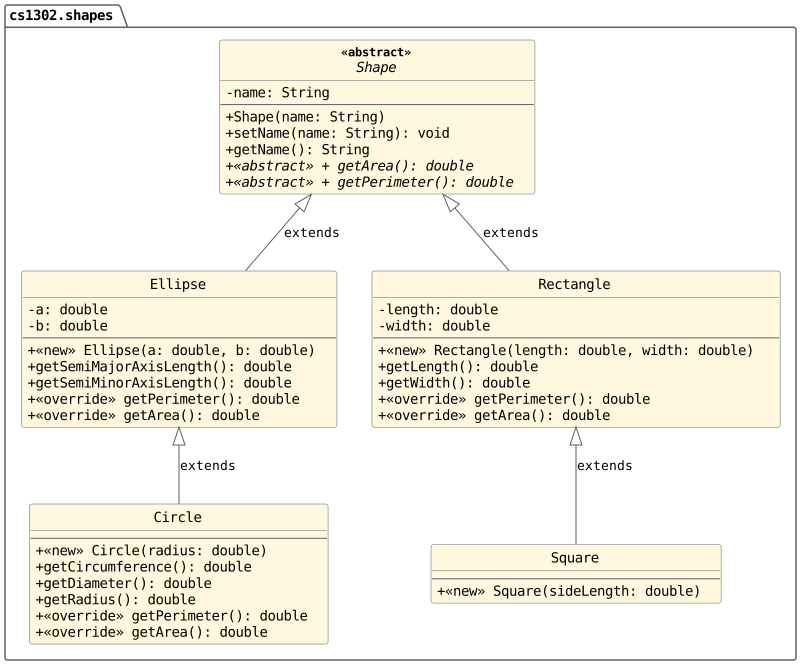
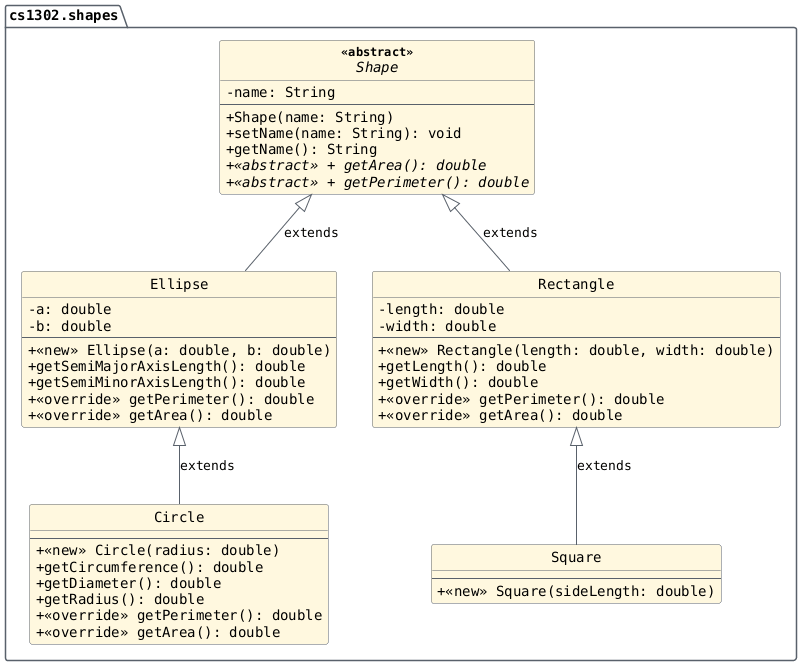
Create and document a
Squareclass in thecs1302.shapespackage based on the UML diagram above.Solution
/**
 * A {@code Square} is a rectangle where the sides
 * are the same length.
 */
public class Square extends Rectangle {

    /**
     * Constructs a {@link Square} object with the specified length
     * and width.
     *
     * @param sideLength the length of the sides of the square.
     */
    public Square (double sideLength) {
        super(sideLength, sideLength);
        this.setName("Square");
        // What's name?
    } // square
} // Square
Compile your
Squareclass and fix any errors.Note
Don't forget to ensure your new file passes the
check1302audit.Since we've added a new class to our project, it's a good idea to save our work using Git. Check the status of your local copy of the repository using the following command:
git statusTo add the new file to our repository so we can save the changes, use the
git addcommand:git add src/cs1302/shapes/Square.java
Now, use Git to commit the changes that you made to your source code:
git commit -m "Added a Square class to the Shapes hierarchy"
Javadoc Practice Opportunity
Make sure all classes have proper Javadoc comments and run
the check1302 utility to check your code style. Then,
run the javadoc command and make sure your website is
up-to-date with your new Square class.
Square Discussion
Using the diagram above: answer the following with your groups on your exit ticket:
How many instance variables are declared in
Square.java?How many instance variables are in an object of type
Square?How many methods are declared in
Square.java?How many methods can be called using a reference of type
Square?
Solution
0
3 (2 from
Rectangleand 1 fromShape.0
6 plus the methods inherited from
Object.
Overriding the toString method
Planning for a toString method
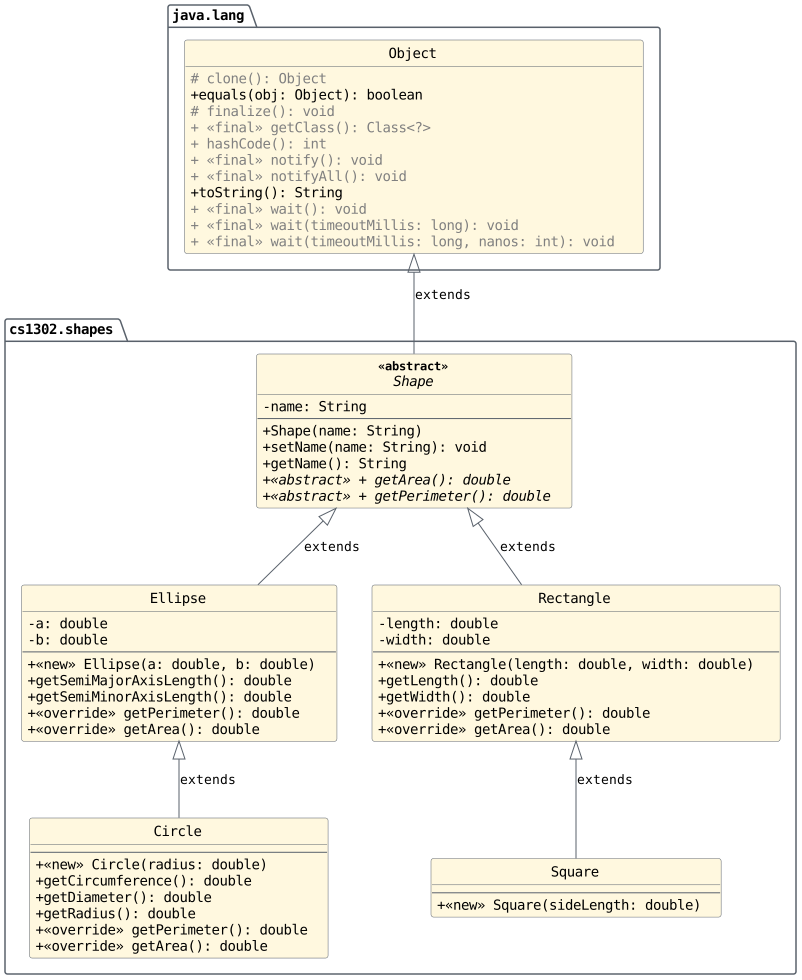
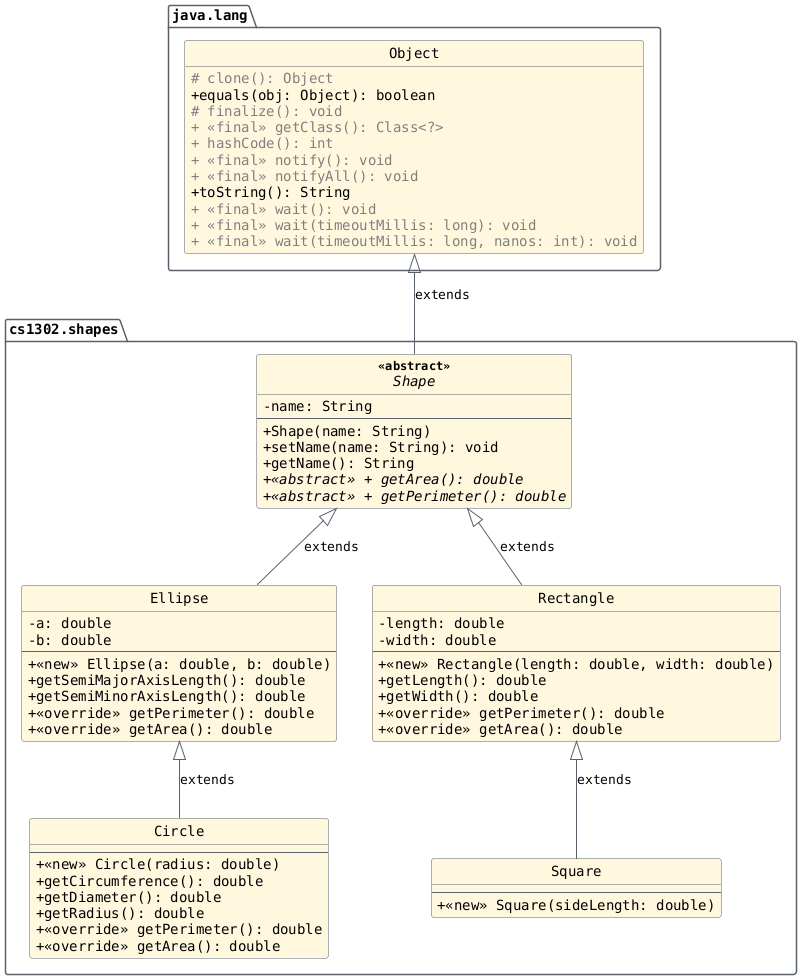
We want to override the toString method inherited
from Object so that it returns with a reference to a String
object containing the name, area, and perimeter of the shape.
To accomplish our goal, which class(es) will need to override
the toString method and why? Discuss with your groups and
write your answer on your exit ticket.
Solution
We can place the toString method in Shape because
we can call all of the necessary methods from that context.
Implementing a toString method
Implement the
toStringmethod as described in the previous section in the appropriate place(s).Compile your code and ensure that it still passes the
check1302audit.Tell Git to track changes made to your
Driver.javafile, then commit.
Solution
@Override
public String toString() {
    // Returns with a String reference for the shape's name, area, and perimeter.
    // The exact formatting isn't important.

    String returnVal = this.getName() + " ";
    returnVal += "has an area of: " + this.getArea();
    returnVal += " and a perimeter of: " + this.getPerimeter();

    return returnVal;
} // toString
Modifying the Driver Class
Open the
Driverclass in thecs1302.shapespackage. Inside of themainmethod do the following:Finish populating the provided
Shapearray with at least one object of each compatible type.Uncomment and complete the
printInfomethod near the bottom ofDriver.java. This will require filling in the blanks and writing the method body.Call the
printInfomethod in themainmethod below the comment.Compile and run the
Driverclass. You should see info printed about all of your shapes.Uncomment and complete the
getLargestByAreamethod near the bottom ofDriver.java. This will require filling in the blanks and writing the method body.Call the
getLargestByAreamethod in themainmethod below the comment and print the result.Compile and run the
Driverclass. You should see output related to the largest shape.Tell Git to track changes made to your
Driver.javafile, then commit.To view all of the commits you made in this activity assignment, run:
git adog
Sample Solution
Here is one possible solution for the Driver class:
/**
 * The driver program for our shapes example. This class
 * contains the main method and can be executed.
 */
public class Driver {

    public static void main(String[] args) {

        // Add two shapes of each type
        // Circle, Ellipse, Rectangle, and Square
        Shape[] shapes = new Shape[] {
            new Ellipse(1.1, 2.5),
            new Circle(1.5),
            new Square(4.2),
            new Rectangle(1.2, 3.4)
        };

        // Call the printInfo method below:
        Driver.printInfo(shapes);
        // Call the getLargestByArea method and print the result below:
        Shape largest = Driver.getLargestByArea(shapes);
        System.out.println(largest); // calls our new toString method!
    } // main

    /**
     * Prints information about every shape in the specified array.
     * Loops over the array, and, for each element, prints the name of
     * the shape, the area, and the perimeter.
     *
     * @param shapes the array of shapes
     */
    public static void printInfo(Shape[] shapes) {
        for (Shape s: shapes) {
            System.out.println(s); // calls our new toString method!
        } // for
    } // printInfo

    /**
     * Returns with a reference to the largest shape by area. Compares all of
     * the provided shapes and selects the one with the largest area.
     *
     * @param shapes the array of shapes
     * @return a reference to the largest shape
     * @throws NullPointerException if {@code shapes} has length 0
     */
    public static Shape getLargestByArea(Shape[] shapes) {
        // Assume the first shape is the largest
        Shape largest = shapes[0];

        for (Shape s: shapes) {
            if (s.getArea() > largest.getArea()) {
                largest = s;
            } // if
        } // for

        return largest;
    } // getLargestByArea
Compatibility: Test Yourself
Answer the following short answer questions in your notes:
How many methods does
Circleinherit fromEllipse? Why isn'tgetPerimeterlisted as being inherited fromEllipse?How many methods does
Circleinherit fromShape? Why aren't all methods inCirclelisted as being inherited fromShape?How many instance variables are contained in an object of type
Ellipse? How many are directly accessible?How many instance variables are contained in an object of type
Circle? How many are directly accessible?The
setNamemethod inShapeis declared to beprotected. Explain how theprotectedaccess modifier differs frompublicandprivate.
In your notes, recreate the following table:
Variable Type
Object Type
Valid? (Guess)
Valid? (Actual)
Explain
ShapeShapeShapeCircleShapeEllipseCircleShapeCircleEllipseCircleCircleEllipseShapeEllipseCircleEllipseEllipseCreate a
ShapeTest.javaprogram in thecs1302.shapespackage. In themainmethod ofShapeTest.java, do the following steps for each row in the table:Declare a reference variable called
objwith the type denoted in the Variable Type column.On the same line, create an object of the type denoted in the Object Type column using
newand an appropriate constructor call and assign it toobj. The first declaration and instantiation would look like this:Shape obj = new Shape();Make an educated guess as to whether or not the line will successfully compile. Note this in the Valid? (Guess) column of your table.
Save the file, then attempt to compile
ShapeTest.java. Note whether it compiled in the Valid? (Actual) column of your table.Now for the most important part. In the Explain column of your table, explain why the statement is valid or invalid. If the statement is invalid, do not simply copy the error message provided by the compiler–do your best to explain it in your own words.
Delete the line of code before proceeding to the next row.
In your notes, recreate the following table:
Variable Type
Object Type
Method Call
Valid? (Guess)
Valid? (Actual)
Explain
ShapeEllipsegetPerimeter()EllipseCirclegetName()EllipseCirclegetSemiMajorAxisLength()ShapeEllipsegetSemiMinorAxisLength()ShapeEllipsesetName()EllipseEllipsegetDiameter()ShapeCirclegetRadius()EllipseCirclegetCircumference()CircleCirclegetPerimeter()In the
mainmethod ofShapeTest.java, do the following steps for each row in the table:Declare a reference variable called
objwith the type denoted in the Variable Type column.On the same line, create an object of the type denoted in the Object Type column using
newand an appropriate constructor call and assign it toobj.On the next line, call the method listed in the Method Call column using
objas the calling object. If the method has a return type other thanvoid, then simply assign it to a new variable of the appropriate type.Make an educated guess as to whether or not the two lines of code will successfully compile. Note this in the Valid? (Guess) column of your table.
Save the file, then attempt to compile
ShapeTest.java. Note whether it compiled in the Valid? (Actual) column of your table.Now for the most important part. In the Explain column of your table, explain why the statement is valid or invalid. If the statement is valid, give the fully qualified name (FQN) of the class containing the implementation for the method.
Delete the two lines of code before proceeding to the next row.