8.5. List ADT - Examples with Both Implementations
Now that we have seen how the List ADT is intended to function from the user's
perspective, we can focus on how to make it work (i.e., how to implement it)
with both two different data structures: an array, and a linked list. In this
section we will refer to these array and linked list implementations as
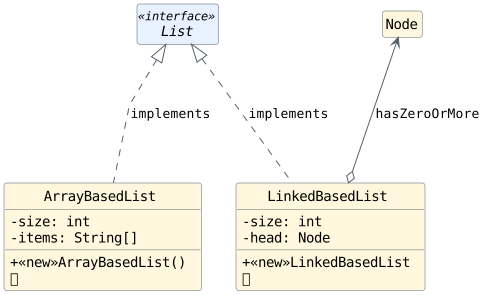
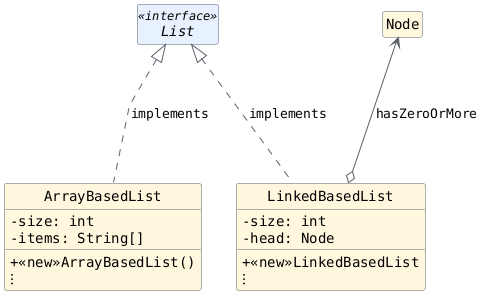
ArrayBasedList and LinkedBasedList, respectively, as depicted in
Fig. 8.5:
Fig. 8.5 Both list classes implement List. An ArrayBasedList object
will use an array object to store its list items, while a
LinkedBasedList object will use zero or more Node objects
to store its list items instead. [svg] [png]
The List interface is assumed to declare all of the List ADT operations
as abstract methods, and each list class is assumed to override all of those
methods with implementations that only use the class's associated data
structure. To keep things simple, we only allow list objects to store String
items; however, it is worth noting that the interface and classes involved can
easily be ajusted to assume some other data type with only minor adjustments to
the code.
8.6. Operating on a List
To understand how List ADT operations can be performed on each kind of object, we will illustrate what their internal state is expected to look like after each indicated operation is performed using a memory map. In the next section, we will show you what a new object of each class looks like, and each section after that will illustrate the result of performing an additional operation on each type of object (i.e., the examples will build on top of each other across the remaining sections on this page).
The illustration on this page only show what each type of list object looks like after all of the steps for an indicated operation have executed. The precise implementation details for each operation will be covered in later sections.
Important: Compact Memory Maps
These memory maps use a compact representation of strings. An arrow
connects each string reference box to a literal beside it. Each
String variable still stores a reference value; the corresponding
String object exists separately from the object or array containing
that variable. The compact display preserves reference identities even
when a shared string appears in more than one location.
8.6.1. Operation 1: Construct a New List
Assume we have access to a myList variable of type List within scope.
So long as myList is not currently storing null, we may safely assume
that it refers to an object of a class that implements List. In our case,
we only have two such classes, so myList will refer to either an
ArrayBasedList object or a LinkBasedObject object:
Regardless of the implementation, a newly constructed list obkect
stores zero items. Therefore, regardless of the underlying storage
mechanism (i.e., the underlying data structure), a newly constructed
list object should have a list size of 0.
The array-based implementation will need to create some initial storage space (in this case we chose an array with 3 elements), but do not confuse the object's storage space with the number of items it is storing. For example, storage baskets in real life need not store item at first; instead, they initially just provide space for us to eventually store item. The same is true for the elements of the array object in this context.
If we execute the code below, myList will refer to an ArrayBasedList
object:
List myList = new ArrayBasedList();
If we were to draw a memory map of how the variables/objects look in memory after executing this line of code, we would expect something like this:

In the array list implementation, a non-zero length array is created upon the initial construction of the list for potential future storage by the list.
If we declared and initialized the myList variable to refer to an
object of type LinkedBasedList instead, the code and memory map
would look like this:
List myList = new LinkedBasedList();

In the linked list implementation, no head node is
created upon the initial construction of the list. The value of head
is null, so it does not refer to a node.
Test Yourself
Regardless of whether myList refers to an object of type ArrayBasedList
or an object of type LinkedBasedList, the following code should have the
same output. Write the output you would expect in your notes:
List myList = // ... new LinkedBasedList() or new ArrayBasedList();
System.out.println("List Size: " + myList.size());
System.out.println("List Contents: " + myList.makeString(", "));
Test Yourself Solution (open after answering the question above)
The size is 0 regardless of the underlying object and the list contains no items.
We should see something like this output:
List Size: 0
List Contents:
8.6.2. Operation 2: Add an Element
Add element into index position 0. Adding an item to index
0conceptually adds the item to the beginning of the list. If thisaddoperation is successful, then we expect the list size to increase to1.myList.add(0, "Bread"); System.out.println("List Size: " + myList.size()); System.out.println("List Contents: " + myList.makeString(", "));
List Size: 1
List Contents: Bread
In the array list implementation, a reference to the item is stored at index
0within the array.In the linked list implementation, a node object is created whose
itemfield stores a reference to the string. The value assigned toheadis a reference to that node.Note
Notice how the link-based (linked list) implementation has only created a single
Nodeobject. The array-based implementation has two unused array components, each containingnull.Add another element into index position 0. The existing elements acquire indices one greater than before. This is a change in their logical positions, not a movement of the
Stringobjects in memory. Therefore, if thisaddoperation is successful, then we expect"Bread"to shift to index position1and the list size to increase to2.myList.add(0, "Cheese"); System.out.println("List Size: " + myList.size()); System.out.println("List Contents: " + myList.makeString(", "));
List Size: 2
List Contents: Cheese, Bread
In the array list implementation, the existing reference value is copied from index
0to index1. A reference to"Cheese"is then stored at index0.In the linked list implementation, a new node stores a reference to the item, then the newly created node's
nextvariable and the list head are updated accordingly.Add element into index position 1. Just like with the previous operation, some items in the list will conceptually shift to the right.
myList.add(1, "Milk");
System.out.println("List Size: " + myList.size());
System.out.println("List Contents: " + myList.makeString(", "));
List Size: 3
List Contents: Cheese, Milk, Bread
In the array list implementation, the reference to
"Bread"is copied from index1to index2before a reference to"Milk"is stored at index1.In the linked list implementation, a new node stores a reference to the item, then the
nextvariable of both the newly created node and the node referred to byheadare updated accordingly.Add element into index position 3. In this example, this conceptually places the item at the end of the list.
myList.add(3, "Ice Cream");
System.out.println("List Size: " + myList.size());
System.out.println("List Contents: " + myList.makeString(", "));
List Size: 4
List Contents: Cheese, Milk, Bread, Ice Cream
In the array list implementation, a new array of length
5replaces the full array of length3. The existing reference values are copied into the new array before a reference to"Ice Cream"is stored at index3. An existing array's length cannot change.In the linked list implementation, a new node stores a reference to the item, then the
nextvariable of the node in list position2is updated accordingly.


8.6.3. Operation 3: Remove an Element
Remove the first element. Remember, the
removeoperation will shift any subsequent elements in the list to the left (i.e. subtracts one from their indices).System.out.println("Removed: " + myList.remove(0)); System.out.println("List Size: " + myList.size()); System.out.println("List Contents: " + myList.makeString(", "));
Removed: Cheese
List Size: 3
List Contents: Milk, Bread, Ice Cream
In the array list implementation, the reference values in occupied array components after index
0are shifted left by one position. The previously occupied component at index3is set tonull.In the linked list implementation,
headis simply assigned a reference to the node that was previously referred to by thenextvariable in the first node.


8.6.4. Operation 4: Get an Element
Get the first element. After all the changes to the list, we expect
"Milk"to be the first item in the list.System.out.println("Item at index 0: " + myList.get(0)); System.out.println("List Size: " + myList.size()); System.out.println("List Contents: " + myList.makeString(", "));
Item at index 0: Milk
List Size: 3
List Contents: Milk, Bread, Ice Cream
In the array list implementation, no changes are needed internally to accommodate this operation. That location in the array can be accessed directly.
In the linked list implementation, no changes are needed internally to accommodate this operation. That location cannot be accessed directly; it must be reached starting with the node referred to by
head.
8.6.5. Operation 5: Clear the List
After a list is cleared, it conceptually has no items.
Test Yourself
Write down what you expect the following code to output:
myList.clear();
System.out.println("List Size: " + myList.size());
System.out.println("List Contents: " + myList.makeString(", "));
Test Yourself Solution (Don't open until you answer the question above)
List Size: 0
List Contents:

In this array-based implementation, size becomes 0 and every
array component is set to null, while the capacity remains 5.
Clearing these reference values avoids retaining references to removed
items. The List ADT specifies the logical result of clear; it does not
specify the backing array's capacity.
In the linked list implementation, the size is updated
to 0 and the head is set to null.