5. Exceptions Lesson
Example 1: PhoneNumberParser
Example 1: PhoneNumberParser
Sample solutions not included, because "Show Solutions" was not toggled before printing.
Note
This multipart activity walks students through the concepts of
exception identification, avoidance, handling, stack traces, scope
and throwing custom exceptions by using the classroom example of
PhoneNumberParser.
Prerequisite Information
This practice activity should be done on Odin, so make to complete all of the tutorials in the Unix chapter before attempting it and that you followed the steps in that chapter to activate the CSCI 1302 shell profile on your Odin account. This practice activity also assumes that readers have worked through the material in the Exceptions chapter prior to starting the activity.
Part 1: Identifying a Potential Exception
Download Starter Code
Execute the command below to download and extract the files:
bundle1302 phone
- downloading cs1302-phone bundle...
- verifying integrity of downloaded files using sha256sum...
- extracting downloaded archive...
- removing intermediate files...
subdirectory cs1302-phone successfully created
Use cd to change to the
cs1302-phonedirectory that was created and look at the files that were included in the starter code using tree. You should see output similar to the following:. └── src └── cs1302 └── phone ├── Driver.java └── PhoneNumberParser.java
Identify Dependencies (and Practice Emacs)
Open
PhoneNumberParser.javaandDriver.javafor editing at the same time in Emacs using the emacs command:emacs src/cs1302/phone/PhoneNumberParser.java \ src/cs1302/phone/Driver.java
Note: Switching Buffers
Each file will be opened in their own Emacs buffer. Use C-x o to switch between the buffers, as needed.
Note: Saving Files in Emacs Buffers
C-x C-s only saves the current buffer. If you want to save all buffers, use C-x s ! instead. To save a specific buffer, switch to that buffer, then use C-x C-s.
Note: Minimizing Emacs
If you minimize Emacs using C-z, then remember to bring it back using the fg command instead of rerunning the emacs command. Otherwise, you will open multiple instances of Emacs, which may lead to issues with multiple versions of the file.
Note: Exiting Emacs
When you are done, you can exit Emacs using C-x C-c.
On your exit ticket, write the order in which both
.javafiles should be compiled. Explain the order you chose.Sample Solution
PhoneNumberParser.javaneeds to be compiled first becauseDriver.javadepends on (calls) theparsemethod inPhoneNumberParser. Therefore, when we compileDriver.java, it will need access to the compiled code ofPhoneNumberParser.
Compile and Run
From
cs1302-phone, compile each.javafile undersrcintobinseparately using javac. Make sure that you include the appropriate command-line options to adjust the compiler's destination directory and, if needed, its classpath. Also make sure that you compile the files in the appropriate order. Write down both the commands, in order, on your exit ticket.Sample Solution
You would execute the following commands from within
cs1302-phone:javac -d bin src/cs1302/phone/PhoneNumberParser.java
javac -d bin -cp bin src/cs1302/phone/Driver.java
If you entered the commands correctly, then the output of running tree should now look like this:
.
├── bin
│   └── cs1302
│       └── phone
│           ├── Driver.class
│           └── PhoneNumberParser.class
└── src
    └── cs1302
        └── phone
            ├── Driver.java
            └── PhoneNumberParser.java
Now, run the
Driverclass from this location using the java command. Make sure that you include the appropriate command-line options to adjust the class path so that the compiler knows where to find theDriverclass. Write down the command on your exit ticket and underline the main class's FQN.Sample Solution
java -cp bin cs1302.phone.Driver
The FQN for the main class is
cs1302.phone.Driver.Enter a valid phone number at the prompt to make sure the code works as expected. Write down "Example:" followed by the number you tried on your exit ticket.
Predict the Output
Open PhoneNumberParser.java with Emacs and inspect the code.
If the user enters 706-12a-4567, the program will crash.
Without running the code, write the following on your exit ticket:
Where do you think the exception will originate (file and line number)?
What type of exception will be thrown? How can we know what that is without executing the program and letting it crash?
Sample Solution
The program will crash when we call parseInt on the
prefix string. This happens in the "prefix" portion of the
parse method on this line:
int prefix = Integer.parseInt(prefixString);
Explanation: The input has a non-numeric character a
in the prefix 12a. So, when the method tries to
convert 12a to an integer, it will throw a
NumberFormatException. This can be found in the Java
API Documentation of the Integer class.
Interpreting the Stack Trace
Run the program using the same input (
706-12a-4567). The output should look similar to the following:Pro Tip
If you ran the program recently (and haven't changed the code), just use C-p from the command line to go back to a previously used command (or use C-r to search for it).
Exception in thread "main" java.lang.NumberFormatException: For input string: "12a"
   at java.base/java.lang.NumberFormatException.forInputString(NumberFormatException.java:67)
 at java.base/java.lang.Integer.parseInt(Integer.java:668)
 at java.base/java.lang.Integer.parseInt(Integer.java:786)
 at cs1302.phone.PhoneNumberParser.parse(PhoneNumberParser.java:24)
 at cs1302.phone.Driver.promptAndParse(Driver.java:32)
 at cs1302.phone.Driver.main(Driver.java:16)
On your exit ticket, explain the output in as much detail as you can. For example:
Which method was called first?
What is the name of the second method that is called and where is it called (file and line number)?
What is the last method call in our code that appears in the stack trace?
Sample Solution
The program starts in
main.maincallspromptAndParsefrom line16inDriver.java.parsewhich is a static method in thePhoneNumberParserclass.
Part 2: Recovering from Exceptions
Exception Recovery
In your groups, modify the parse method in
PhoneNumberParser to gracefully recover from any potential
NumberFormatException exceptions. After your modification,
the program should print the message "Non-numeric
character detected in the phone number" followed by the message
printed at the end of the main method ("end of main") when
a NumberFormatException occurs.
Before writing any code: Carefully consider which lines
should be placed in the try block and why. How many lines
could throw a NumberFormatException? Discuss this
with your groups and summarize your thoughts on your exit
ticket.
java -cp bin cs1302.phone.Driver
start of main
Please enter your phone number in ###-###-#### format: 706-12a-4567
Non-numeric character detected in the phone number
end of main
Sample Solution
 1public static void parse(String phoneNumber) {
 2
 3    try {
 4        // attempt to parse the "area code" portion
 5        String areaCodeString = phoneNumber.substring(0, 3);
 6        int areaCode = Integer.parseInt(areaCodeString);
 7
 8        // attempt to parse the "prefix" portion
 9        String prefixString = phoneNumber.substring(4, 7);
10        int prefix = Integer.parseInt(prefixString);
11
12        // attempt to parse the "line number" portion
13        String lineNumberString = phoneNumber.substring(8, 12);
14        int lineNumber = Integer.parseInt(lineNumberString);
15
16        // display the constituent parts or portions
17        System.out.printf("Area code: %d\n", areaCode);
18        System.out.printf("Prefix: %d\n", prefix);
19        System.out.printf("Line Number: %d\n", lineNumber);
20    } catch (NumberFormatException nfe) {
21        System.out.println("Non-numeric character detected in the phone number");
22    } // try
23
24} // parse
Semantics and Using the Exception Object
nfe Refers to a NumberFormatException Object
} catch (NumberFormatException nfe) {
    String message = nfe.getMessage();
    System.out.printf("Non-numeric character detected (%s)\n", message);
} // try
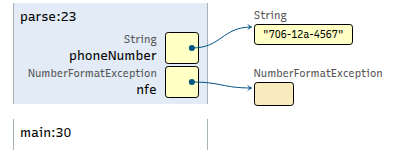
Example: 706-12a-4567
} catch (NumberFormatException nfe) {
    String message = nfe.getMessage();
    System.out.printf("Non-numeric character detected (%s)\n", message);
} // try
Modify the
catchblock in yourparsemethod to look like the code snippet shown above. If you don't currently have acatchblock, add this one (and make sure to add the correspondingtry).Save and compile all of your code.
Run the
Driverclass with input:706-12a-4567.
java -cp bin cs1302.phone.Driver
1start of main
2Please enter your phone number in ###-###-#### format: 706-12a-4567
3...
On your exit tickets, write down line 3 in the actual
output that you observed when you ran the program with
input 706-12a-4567.
Sample Solution (with memory map)
java -cp bin cs1302.phone.Driver
start of main
Please enter your phone number in ###-###-#### format: 706-12a-4567
Non-numeric character detected (For input "12a")
end of main
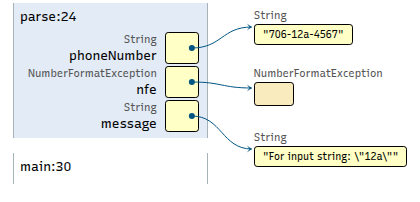
Example: 70x-12a-4567
java -cp bin cs1302.phone.Driver
1start of main
2Please enter your phone number in ###-###-#### format: 70x-12a-4567
3...
In your group, guess what you think line 3 in the output will look like (without running the program) when the input is
70x-12a-4567, then write down your guess on your exit ticket. Write "(guess)" next to it so your instructor knows what it is.Next, run the program with input
70x-12a-4567, then write down the actual output that you observe for line 3. Write "(actual)" next to it so your instructor knows what it is.If your guess wasn't correct, then discuss with your group and write down what you think your misunderstanding was. If you got it correct, then explain why the output is what it is.
Sample Solution (with memory map)
java -cp bin cs1302.phone.Driver
start of main
Please enter your phone number in ###-###-#### format: 70x-12a-4567
Non-numeric character detected (For input "70x")
end of main
Discussion
How many times does the catch block execute for
input 70x-12a-4567?
Other Invalid Inputs
As a group, come up with at least three other invalid inputs that do NOT cause a
NumberFormatException, then write them down on your exit ticket.For each example on your exit ticket, note whether an exception will be thrown. If an exception will be thrown , note the type of exception that would be thrown and the location (file and line number) where it will originate.
Sample Solution
701-123-456     // StringIndexOutOfBounds
7062221348      // StringIndexOutOfBounds
abcdefg         // StringIndexOutOfBounds or NumberFormatException - depends on code.

706-233-128397  // No exception. Is it a problem? More soon!
706X222X1348    // No exception. Is it a problem? More soon!
Multiple Catch (Instructor Demo)
Adjust parse to catch both NumberFormatException and
StringIndexOutOfBoundsException.
Sample Solution
public static void parse(String phoneNumber) {

    try {
        // attempt to parse the "area code" portion
        String areaCodeString = phoneNumber.substring(0, 3);
        int areaCode = Integer.parseInt(areaCodeString);

        // attempt to parse the "prefix" portion
        String prefixString = phoneNumber.substring(4, 7);
        int prefix = Integer.parseInt(prefixString);

        // attempt to parse the "line number" portion
        String lineNumberString = phoneNumber.substring(8, 12);
        int lineNumber = Integer.parseInt(lineNumberString);

        // display the constituent parts or portions
        System.out.printf("Area code: %d\n", areaCode);
        System.out.printf("Prefix: %d\n", prefix);
        System.out.printf("Line Number: %d\n", lineNumber);
    } catch (NumberFormatException nfe) {
        String message = nfe.getMessage();
        System.out.printf("Non-numeric character detected (%s)\n");
    } catch (StringIndexOutOfBoundsException sioobe) {
        String message = sioobe.getMessage();
        System.out.println("The provided phone number is too short (%s)\n", message);
    } // try

} // parse
Discussion
Why might handling the exceptions within parse be a bad
idea?
Hint: Think about what happens if we were to package up
our parse method and sell it to another developer
(without giving them access to the source code). They would
be able to call the parse method but unable to modify the
code.
Sample Solution
It keeps the method focused on its task (parsing), not error handling.
What if this code was used in a web API or mobile app? In those cases, you wouldn't want the error message printed to the terminal. In other words, the caller should be able to decide how to handle the exception.
What if the code was used in an application for non-English speakers? We wouldn't want the
parsemethod printing messages in English.In other words, the caller (like
mainorpromptAndParse) should be able to decide how to respond i.e. log, show a message, retry, etc.If we handle the exception within
parse, the calling method is forced to handle the error in that way (assuming the caller does not have access to the code inparse).
Part 3: Propagating Exceptions
Discussion
Answer on your exit tickets:
Look through the existing code. If we removed the try/catch from the
parse method, where is the next opportunity to catch them?
Sample Solution
The next opportunity is in promptAndParse in the driver.
Propagation
Adjust the code to allow the exceptions to propagate out of
parse by removing the try/catch we added in the
previous section. Then, update your code to catch both
exceptions in the promptAndParse method of the Driver
class.
Be sure to adjust the Javadoc comments above the parse method.
Sample Solution
/**
 * Parse the supplied phone number ({@code phoneNumber}) into its constituent parts. The phone
 * number is eepected to be of the form {@code ###-###-####} where each {@code #} is a
 * single digit (i.e., a nonnegative integer between {@code 0} and {@code 9}).
 *
 * @param phoneNumber The phone number to parse.
 * @throws NumberFormatException if {@code phoneNumber} contains non-numeric characters.
 * @throws StringIndexOutOfBoundsException if {@code PhoneNumber} is too short.
 */
public static void parse(String phoneNumber) {

    // attempt to parse the "area code" portion
    String areaCodeString = phoneNumber.substring(0, 3);
    int areaCode = Integer.parseInt(areaCodeString);

    // attempt to parse the "prefix" portion
    String prefixString = phoneNumber.substring(4, 7);
    int prefix = Integer.parseInt(prefixString);

    // attempt to parse the "line number" portion
    String lineNumberString = phoneNumber.substring(8, 12);
    int lineNumber = Integer.parseInt(lineNumberString);

    // display the constituent parts or portions
    System.out.printf("Area code: %d\n", areaCode);
    System.out.printf("Prefix: %d\n", prefix);
    System.out.printf("Line Number: %d\n", lineNumber);

} // parse
/**
 * Prompt the user to enter a phone number, then parse it using the {@link
 * cs1302.phone.PhoneNumberParser#parse(String)} method. If an exception is thrown when parsing
 * the phone number, then communicate the issue to the user with an appropriate error message.
 */
private static void promptAndParse() {
    Scanner input = new Scanner(System.in);

    System.out.print("Please enter your phone number in ###-###-#### format: ");
    String number = input.nextLine();

    try {
        // parse the phone number
        PhoneNumberParser.parse(number);

    } catch (NumberFormatException nfe) {
        System.out.println("Non-numeric character detected in the phone number");
    } catch (StringIndexOutOfBoundsException sioobe) {
        System.out.println("The provided phone number is too short");
    } // try

} // promptAndParse
Part 4: Allow Multiple Attempts
Practice Writing the Loop
In promptAndParse, add a loop to allow the user multiple attempts to enter
a valid phone number using the following plan:
Add a
intparameter topromptAndParsecalledmaxAttemptsand update the Javadoc comments to reflect the new parameter.Update the code within the method to:
1. assume valid input has not yet been entered
2. loop while valid input has not yet been entered and max attempts not exceeded:
   try:
       1. prompt the user to enter a phone number
       2. get a line from user input
       3. parse the line from user input
       4. assume valid input has now been entered
   catch: (add more catch blocks as needed)
       1. display appropriate error message
3. if valid input has not yet been entered:
       1. display an error -- maxAttempts has been exceeded
Update your call to
promptAndParseto provide an actual parameter.
Sample Solution
One sample solution is provided in the next dropdown in this lesson. Please remember that there are many valid solutions to this exercise.
Understanding a Solution
Take a few minutes to understand the code below.
 1/**
 2 * Prompt the user to enter a phone number, then parse it using the {@link
 3 * cs1302.phone.PhoneNumberParser#parse(String)} method. If an exception
 4 * is thrown when parsing the phone number, then communicate the issue to
 5 * the user with an appropriate error message.
 6 *
 7 * @param maxAttempts the maximum number of allowed attempts.
 8 */
 9private static void promptAndParse(int maxAttempts) {
10
11    int attempts = 0;
12    boolean valid = false;
13
14    Scanner input = new Scanner(System.in); // ---- (1)
15
16    while (!valid && (attempts < maxAttempts)) {
17        try {
18            attempts += 1; // --------------------- (2)
19            System.out.print("Please enter your phone number in ###-###-#### format: ");
20            String number = input.nextLine();
21            PhoneNumberParser.parse(number);
22            valid = true; // ---------------------- (3)
23        } catch (NumberFormatException nfe) {
24            System.err.print("Non-numeric character detected: ");
25            System.err.println(nfe.getMessage());
26        } catch (StringIndexOutOfBoundsException sioobe) {
27            System.err.print("Phone number too short: ");
28            System.err.println(sioobe.getMessage());
29        } // try
30    } // while
31
32    if (!valid) {
33        System.err.print("maxAttempts has been exceeded: ");
34        System.err.println(maxAttempts);
35    } // if
36
37} // promptAndParse
Answer the following questions on your exit ticket:
Why is the line marked
(1)placed outside of the loop?If you move the line marked
(2)to the end of thewhileloop (outside of the secondcatchblock), will the code still work as intended?What can you conclude about the phone number that was entered if the line marked
(3)executes?
Code Tracing
Assume maxAttempts is set to 2. Write the complete output for the following inputs
on your exit tickets:
70a-12x-aaaa
70a-123-aa
707-123-4567890
 1private static void promptAndParse(int maxAttempts) {
 2
 3    int attempts = 0;
 4    boolean valid = false;
 5
 6    Scanner input = new Scanner(System.in); // ---- (1)
 7
 8    while (!valid && (attempts < maxAttempts)) {
 9        try {
10            attempts += 1; // --------------------- (2)
11            System.out.print("Please enter your phone number in ###-###-#### format: ");
12            String number = input.nextLine();
13            PhoneNumberParser.parse(number);
14            valid = true; // ---------------------- (3)
15        } catch (NumberFormatException nfe) {
16            System.err.print("Non-numeric character detected: ");
17            System.err.println(nfe.getMessage());
18        } catch (StringIndexOutOfBoundsException sioobe) {
19            System.err.print("Phone number too short: ");
20            System.err.println(sioobe.getMessage());
21        } // try
22    } // while
23
24    if (!valid) {
25        System.err.print("maxAttempts has been exceeded: ");
26        System.err.println(maxAttempts);
27    } // if
28
29} // promptPhoneNumber
public static void parse(String phoneNumber) {

    String areaCodeString = phoneNumber.substring(0, 3);
    int areaCode = Integer.parseInt(areaCodeString);

    String prefixString = phoneNumber.substring(4, 7);
    int prefix = Integer.parseInt(prefixString);

    String lineNumberString = phoneNumber.substring(8, 12);
    int lineNumber = Integer.parseInt(lineNumberString);

    System.out.printf("Area code: %d\n", areaCode);
    System.out.printf("Prefix: %d\n", prefix);
    System.out.printf("Line Number: %d\n", lineNumber);

} // parse
Using Throw
707-123-4567890 is clearly too long, but our program will
not currently generate an exception as any additional numbers
are simply ignored.
Modify
parseinPhoneNumberParser.javaso that it throws anIllegalArgumentExceptionwhen the phone number is too long. Don't forget to update the Javadoc comment.Sample Solution
/**
 * Parse the supplied phone number ({@code phoneNumber}) into its constituent parts. The phone
 * number is eepected to be of the form {@code ###-###-####} where each {@code #} is a
 * single digit (i.e., a nonnegative integer between {@code 0} and {@code 9}).
 *
 * @param phoneNumber The phone number to parse.
 *
 * @throws IllegalArgumentException if the provided number is too long.
 */
public static void parse(String phoneNumber) {

    if (phoneNumber.length() > 12) {
        throw new IllegalArgumentException("Phone Number too long");
    } // if

    // attempt to parse the "area code" portion
    String areaCodeString = phoneNumber.substring(0, 3);
    int areaCode = Integer.parseInt(areaCodeString);

    // attempt to parse the "prefix" portion
    String prefixString = phoneNumber.substring(4, 7);
    int prefix = Integer.parseInt(prefixString);

    // attempt to parse the "line number" portion
    String lineNumberString = phoneNumber.substring(8, 12);
    int lineNumber = Integer.parseInt(lineNumberString);

    // display the constituent parts or portions
    System.out.printf("Area code: %d\n", areaCode);
    System.out.printf("Prefix: %d\n", prefix);
    System.out.printf("Line Number: %d\n", lineNumber);

} // parse
Catch the
IllegalArgumentExceptioninpromptAndParseand print the message from the exception object.Sample Solution
private static void promptAndParse(int maxAttempts) {

    int attempts = 0;
    boolean valid = false;

    Scanner input = new Scanner(System.in); // ---- (1)

    while (!valid && (attempts < maxAttempts)) {
        try {
            attempts += 1; // --------------------- (2)
            System.out.print("Please enter your phone number in ###-###-#### format: ");
            String number = input.nextLine();
            PhoneNumberParser.parse(number);
            valid = true; // ---------------------- (3)
        } catch (NumberFormatException nfe) {
            System.err.print("Non-numeric character detected: ");
            System.err.println(nfe.getMessage());
        } catch (StringIndexOutOfBoundsException sioobe) {
            System.err.print("Phone number too short: ");
            System.err.println(sioobe.getMessage());
        } catch (IllegalArgumentException iae) {
            System.err.println(iae.getMessage());
        } // try

    } // while

    if (!valid) {
        System.err.print("maxAttempts has been exceeded: ");
        System.err.println(maxAttempts);
    } // if

} // promptAndParse
Example 2: MyCat (Checked Exceptions)
Example 2: MyCat (Checked Exceptions)
Sample solutions not included, because "Show Solutions" was not toggled before printing.
Prerequisite Information
This practice activity should be done on Odin, so make to complete all of the tutorials in the Unix chapter before attempting it and that you followed the steps in that chapter to activate the CSCI 1302 shell profile on your Odin account. This practice activity also assumes that readers have worked through the material in the Exceptions chapter prior to starting the activity.
Note
This activity is intended to be presented to and/or in collaboration with students during class. It serves as the foundation for a collection of follow-up activities that each begin with code that is effectively a sample solution for this activity.
Step 0: Quick introduction to the cat command
The Unix cat command reads files sequentially, writing their contents to the terminal (standard output). The file operands are processed in command-line order.
After completing this activity, you will have your own version of cat called MyCat that supports reading a single file. Adding support for multiple files will be done in a follow-up activity.
Step 1: Download Starter Code for MyCat
Execute the command below to download and extract the files:
bundle1302 cat
- downloading cs1302-cat bundle...
- verifying integrity of downloaded files using sha256sum...
- extracting downloaded archive...
- removing intermediate files...
subdirectory cs1302-cat successfully created
Use cd to change to the
cs1302-catdirectory that was created and look at the files that were included in the starter code using tree. You should see output similar to the following:. ├── etc │ ├── ABC.txt │ └── hello.txt └── src └── cs1302 └── cat ├── MyCat.java └── Printer.java
Step 2: Identify Dependencies
Open
MyCat.javaandPrinter.javafor editing at the same time using the emacs command:emacs src/cs1302/cat/MyCat.java src/cs1302/cat/Printer.java
Each file will be opened in their own Emacs buffer.
Use C-x o to switch between the buffers, as needed.
Note: Saving one buffer does NOT automatically save other buffers. To save your edits, type C-x C-s in each buffer.
If you minimize Emacs using C-z, then remember to bring it back using the fg command instead of rerunning the emacs command. Otherwise, you will open multiple instances of Emacs, which may lead to issues with multiple versions of the file.
When you are done, you can exit Emacs by typing C-x C-c.
On your exit ticket, write the order in which they should be compiled. Explain the order you chose.
Sample Solution
Printer.javaneeds to be compiled first becauseMyCat.javadepends on (calls) theprintFileLinesmethod inPrinter.
Step 3: Attempt to compile the starter code
Here is a quick summary of the classes in the starter code:
Fully-Qualified Name |
Dependencies |
Description |
|---|---|---|
|
Utility class for printing files. |
|
|
|
Main class for the MyCat program. |
Attempt to compile the starter code. Based on this information, use javac to compile each
.javafile into a directory namedbin, adjusting the class path as needed to take into consideration each file's dependencies. Even if your commands are correct, one of the files will not compile due to an error – that is expected for now.Sample Solution
javac -d bin src/cs1302/cat/Printer.java
javac -d bin -cp bin src/cs1302/cat/MyCat.java
src/cs1302/cat/MyCat.java:27: error: unreported exception FileNotFoundException; must be caught or declared to be thrown
Printer.printFileLines(file);
                      ^
1 error
Understand the compile-time error.
src/cs1302/cat/MyCat.java:27: error: unreported exception FileNotFoundException;
    must be caught or declared to be thrown
Printer.printFileLines(file);
What it Means
The error message emitted by the compiler mentions FileNotFoundException; however, this compile-time error message looks different from the runtime error messages we are used to seeing about exceptions (i.e., the ones that include a stack trace). It states that the exception "must be caught or declared to be thrown," which means that FileNotFoundException is a checked exception and that the compiler found that we did not properly handle it in our code.
Decide how to fix the compile-time error. Since FileNotFoundException is a checked exception that is not currently being handling in our code, we must determine which of the two fixes mentioned by the compiler is most appropriate in this particular situation:
"must be caught"
To perform this fix, the code surrounding line
27inMyCat.javamust be adjusted so that the statement that is currently on line27is placed in atryblock that includes a correspondingcatchblock for FileNotFoundException."must be […] declared to be thrown"
To perform this fix, the code surrounding line
27is left as is, however the signature of the method containing line27is adjusted to declare that itthrowsFileNotFoundException.
Sample Solution
"must be caught" is the better choice in this situation. Line
27is in the program'smainmethod, and letting exceptions propagate outside ofmainis always discouraged since that will crash the program at runtime. If the method was not themainmethod, then usingthrowsto explicitly propagate the exception can be acceptable so long as the programmer is okay with calling methods handling the exception themselves.
Step 4: Resolve the compile-time error
Based on what we now know about the situation, use emacs to edit the code in
MyCat.javato fix/resolve the compile-time error.Sample Solution
19public static void main(String[] args) {
20
21    String filename = args[0];
22
23    try {
24        File file = new File(filename);
25        Printer.printFileLines(file);
26    } catch (FileNotFoundException fileNotFound) {
27        System.err.println("Unable to print: " + filename);
28        System.err.println(fileNotFound.getMessage());
29    } // try
30
31} // main
The sample solution does not address an issue that can occur when no command-line arguments are supplied. This is intentional.
Students might be tempted to handle that other issue by catching the
ArrayIndexOutOfBoundsExceptionthat can be thrown whenargs.length == 0andargs[0]is evaluated; however, the program is supposed to default to reading from standard input in such cases, so a better solution is to use anifstatement similar to the following near the top of themainmethod:if (args.length == 0) { args = new String[] { "-" }; } // if
Now that you have resolved the compile-time error, attempt to compile the starter code again (under the same assumptions mentioned earlier).
Sample Solution
javac -d bin src/cs1302/cat/Printer.java
javac -d bin -cp bin src/cs1302/cat/MyCat.java
Step 5: Run MyCat and compare it to cat
Use java to run cs1302.cat.MyCat twice, once for each of the two files in the
etc. After that, use the cat command that comes with Unix to display the same files (and standard input).Important
Your MyCat program should produce the same output as cat in both scenarios.
Sample Solution
java -cp bin cs1302.cat.MyCat etc/ABC.txt
    _    ____   ____
   / \  | __ ) / ___|
  / _ \ |  _ \| |
 / ___ \| |_) | |___
/_/   \_\____/ \____|
java -cp bin cs1302.cat.MyCat etc/hello.txt
hhhhhhh                                lllllll lllllll                   !!!
h:::::h                                l:::::l l:::::l                  !!:!!
h:::::h                                l:::::l l:::::l                  !:::!
h:::::h                                l:::::l l:::::l                  !:::!
 h::::h hhhhh           eeeeeeeeeeee    l::::l  l::::l    ooooooooooo   !:::!
 h::::hh:::::hhh      ee::::::::::::ee  l::::l  l::::l  oo:::::::::::oo !:::!
 h::::::::::::::hh   e::::::eeeee:::::eel::::l  l::::l o:::::::::::::::o!:::!
 h:::::::hhh::::::h e::::::e     e:::::el::::l  l::::l o:::::ooooo:::::o!:::!
 h::::::h   h::::::he:::::::eeeee::::::el::::l  l::::l o::::o     o::::o!:::!
 h:::::h     h:::::he:::::::::::::::::e l::::l  l::::l o::::o     o::::o!:::!
 h:::::h     h:::::he::::::eeeeeeeeeee  l::::l  l::::l o::::o     o::::o!!:!!
 h:::::h     h:::::he:::::::e           l::::l  l::::l o::::o     o::::o !!!
 h:::::h     h:::::he::::::::e         l::::::ll::::::lo:::::ooooo:::::o
 h:::::h     h:::::h e::::::::eeeeeeee l::::::ll::::::lo:::::::::::::::o !!!
 h:::::h     h:::::h  ee:::::::::::::e l::::::ll::::::l oo:::::::::::oo !!:!!
 hhhhhhh     hhhhhhh    eeeeeeeeeeeeee llllllllllllllll   ooooooooooo    !!!
cat etc/ABC.txt_ ____ ____ / \ | __ ) / ___| / _ \ | _ \| | / ___ \| |_) | |___ /_/ \_\____/ \____|
cat etc/hello.txthhhhhhh lllllll lllllll !!! h:::::h l:::::l l:::::l !!:!! h:::::h l:::::l l:::::l !:::! h:::::h l:::::l l:::::l !:::! h::::h hhhhh eeeeeeeeeeee l::::l l::::l ooooooooooo !:::! h::::hh:::::hhh ee::::::::::::ee l::::l l::::l oo:::::::::::oo !:::! h::::::::::::::hh e::::::eeeee:::::eel::::l l::::l o:::::::::::::::o!:::! h:::::::hhh::::::h e::::::e e:::::el::::l l::::l o:::::ooooo:::::o!:::! h::::::h h::::::he:::::::eeeee::::::el::::l l::::l o::::o o::::o!:::! h:::::h h:::::he:::::::::::::::::e l::::l l::::l o::::o o::::o!:::! h:::::h h:::::he::::::eeeeeeeeeee l::::l l::::l o::::o o::::o!!:!! h:::::h h:::::he:::::::e l::::l l::::l o::::o o::::o !!! h:::::h h:::::he::::::::e l::::::ll::::::lo:::::ooooo:::::o h:::::h h:::::h e::::::::eeeeeeee l::::::ll::::::lo:::::::::::::::o !!! h:::::h h:::::h ee:::::::::::::e l::::::ll::::::l oo:::::::::::oo !!:!! hhhhhhh hhhhhhh eeeeeeeeeeeeee llllllllllllllll ooooooooooo !!!
Choose Your Own Adventure
(After Steps 0-5 Above)
Adventure 1: Enhance MyCat (Code Writing)
During this adventure, you are tasked with implementing and documenting a new feature to enhance MyCat. The version of MyCat that is included in the starter code only accepts one command-line argument; however, the version of cat that comes with Unix supports zero or more command-line arguments.
Example Outputs
java -cp bin cs1302.cat.MyCat
#### hello hello #### world world #### C-d
java -cp bin cs1302.cat.MyCat etc/ABC.txt
    _    ____   ____
   / \  | __ ) / ___|
  / _ \ |  _ \| |
 / ___ \| |_) | |___
/_/   \_\____/ \____|
java -cp bin cs1302.cat.MyCat etc/ABC.txt etc/ABC.txt
_ ____ ____ / \ | __ ) / ___| / _ \ | _ \| | / ___ \| |_) | |___ /_/ \_\____/ \____| _ ____ ____ / \ | __ ) / ___| / _ \ | _ \| | / ___ \| |_) | |___ /_/ \_\____/ \____|
java -cp bin cs1302.cat.MyCat etc/hello.txt etc/ABC.txt
hhhhhhh lllllll lllllll !!! h:::::h l:::::l l:::::l !!:!! h:::::h l:::::l l:::::l !:::! h:::::h l:::::l l:::::l !:::! h::::h hhhhh eeeeeeeeeeee l::::l l::::l ooooooooooo !:::! h::::hh:::::hhh ee::::::::::::ee l::::l l::::l oo:::::::::::oo !:::! h::::::::::::::hh e::::::eeeee:::::eel::::l l::::l o:::::::::::::::o!:::! h:::::::hhh::::::h e::::::e e:::::el::::l l::::l o:::::ooooo:::::o!:::! h::::::h h::::::he:::::::eeeee::::::el::::l l::::l o::::o o::::o!:::! h:::::h h:::::he:::::::::::::::::e l::::l l::::l o::::o o::::o!:::! h:::::h h:::::he::::::eeeeeeeeeee l::::l l::::l o::::o o::::o!!:!! h:::::h h:::::he:::::::e l::::l l::::l o::::o o::::o !!! h:::::h h:::::he::::::::e l::::::ll::::::lo:::::ooooo:::::o h:::::h h:::::h e::::::::eeeeeeee l::::::ll::::::lo:::::::::::::::o !!! h:::::h h:::::h ee:::::::::::::e l::::::ll::::::l oo:::::::::::oo !!:!! hhhhhhh hhhhhhh eeeeeeeeeeeeee llllllllllllllll ooooooooooo !!! _ ____ ____ / \ | __ ) / ___| / _ \ | _ \| | / ___ \| |_) | |___ /_/ \_\____/ \____|
To progress with this adventure, modify the
mainmethod inMyCat.javaso that it works as expected when multiple command-line arguments provided by the user. To test your program, compare what it to what cat does when run with the same command-line arguments. Remember to also update the Javadoc comments in your program so that they correctly communicate any new behavior (e.g., the Javadoc comment for themainmethod).Sample Solution
/**
 * Entry point for the application. Multiple filenames
 * can be passed in as command-line arguments. The
 * program should print the contents of all given files
 * to standard output.
 *
 * @param args  the command-line arguments
 */
 public static void main(String[] args) {

     String filename = args[0];

     File file = new File(filename);
     Printer.printFileLines(file);

     for (int i = 0; i < args.length; i++) {

         String filename = args[i];

         try {
             File file = new File(filename);
             Printer.printFileLines(file);
         } catch (FileNotFoundException fileNotFound) {
             System.err.printf("Unable to print file %d: %s\n", i, filename);
             System.err.println(fileNotFound.getMessage());
         } // try
      } // for

  } // main
To complete this adventure, make sure that you can compile each
.javafile individually using javac and that you can run cs1302.cat.MyCat using java.
Adventure 2: Package Practice
Here is a quick summary of the classes in the starter code:
Fully-Qualified Name |
Dependencies |
Description |
|---|---|---|
|
Utility class for printing files. |
|
|
|
Main class for the MyCat program. |
During this adventure, you are tasked with adjusting the file and code to realize the FQN change(s) described below:
Before
After
cs1302.cat.Printercs1302.io.Printercs1302.cat.MyCatcs1302.cat.MyCatTo complete this adventure, make sure that you can compile each
.javafile individually under the new FQN assumptions and that you can run MyCat using java to view a couple providing multiple files (and test it with standard input). We recommend that you delete yourbindirectory so that you do not accidentally use old versions when compiling and running.
Adventure 3: Code Style Practice
During this adventure, you are tasked with making sure the code passes all of the course's code style guidelines.
To complete this adventure, make sure that you can compile each
.javafile individually, then use check1302 to discover code style issues and emacs to resolve those issues without changing the program's behavior. After you edit the code, be sure to double check that the code still compiles and runs as expected Even minor edits can introduce errors, so it's always best to do this double checking.
Adventure 4: API Documentation Practice
During this adventure, you are tasked with generating and hosting the API documentation website for MyCat so that users connected to the VPN can access it by accessing your Webwork URL with their web browser (at
/~myid/cs1302-cat-apiwheremyidis your Odin username).To complete this adventure, generate the files for the API documentation website using the javadoc command, then use the ln command to create a symbolic link to those files under your
~/public_htmldirectory so that you can access them using your web browser.If you do not remember how to generate and/or host a Javadoc-based API documentation website, then please refer to following sections in the Javadoc and API Documentation chapter before continuing:
Adventure 5: Interpreter Script Practice
Create an interpreter script to compile both files and run the program with multiple command line arguments.
Sample Solution
#!/bin/bash

javac -d bin src/cs1302/cat/Printer.java
javac -d bin -cp bin src/cs1302/cat/MyCat.java

java -cp bin cs1302.cat.MyCat etc/ABC.txt
java -cp bin cs1302.cat.MyCat etc/hello.txt