2. String List v2026.fa
Notice
This document contains the description for the String List project assigned to the students in the Fall 2026 CSCI 1302 classes at the University of Georgia.
2.1. Project Deadlines
This String List project is broken up into three parts, and each part has its own deadline. The deadlines for each part are summarized in Table 2.3, and instructions are provided in the Project Checklist section later in this document.
Part |
Due Date |
|---|---|
1 |
Wednesday, October 7th @ 11:55 PM |
2 |
Friday, October 16th @ 11:55 PM |
3 |
Friday, October 23rd @ 11:55 PM |
To earn full points, you are required to submit all three parts. If you want extra credit, then complete and submit the first and / or second parts before their deadlines, as explained in the drop-down below.
Submission-Based (SB) Extra Credit
Students who perform their final submission for Part 1 and / or Part 2 of the project via the specific submit1302 command mentioned for that part before its deadline stated in Table 2.3 will automatically receive +5 points of Submission-Based (SB) extra credit for that part. This assumes the submission also earns other credit since extra credit is extra and never intended to be the only credit earned.
If a student submits each part of the project correctly and on time, then the highest grade they can earn overall is 110 instead of 100.
Late Penalties
Late penalties do not start applying until after the final date/time listed in Table 2.3.
2.2. Project Preface
This second CSCI 1302 project for Fall 2026 is designed to help you apply and extend your prerequisite Java programming knowledge with new concepts from CSCI 1302 in a Unix development environment (i.e., Odin).
Motivation
This project will require you to apply some of the new concepts covered in CSCI 1302, including named packages, exceptions (creating and handling), and Java development in a Unix environment. It will also require you to utilize and apply object-oriented programming concepts like interfaces, inheritance, and polymorphism. If you have actively engaged with the CSCI 1302 course content offered so far this semester, then you should be able to comfortably, but not necessarily quickly, complete those aspects of the project by applying what you have practiced and learned from your content engagement.
Finally, this project may require you to do things that you have never been given explicit directions or instructions for — this is just a part of software development. In such cases, you may need to do some research to help you plan your solution. That being said, we have carefully prepared this project description document so that it answers the majority of your questions. If not, then please do not hesitate to ask a question on the course Piazza or during office hours.
Academic Honesty
All students at the University of Georgia explicitly agree to abide by the UGA student honor code when they sign the application for their admission to the University. Additionally, all students enrolled in a CSCI 1302 course section in Fall 2026 are subject to the Academic Honesty policy included in the Fall 2026 CSCI 1302 course syllabus. Furthermore, anyone with access to this project description document is expected to respect the copyright and licensing terms provided or linked to at the bottom of this document and the starter code.
With academic honesty in mind, we ask all Fall 2026 CSCI 1302 students not to fork the project repository on GitHub. Doing so may make your copy of the project publicly visible, and that can violate several of the policies described earlier. Instead of forking the repository, please follow the instructions provided later in this document to acquire a copy of the project description and starter code.
Course-Specific Learning Outcomes
If you work on and complete this project, then you will gain exposure and practice with the following learning outcomes:
# |
Exposure |
Description |
|---|---|---|
LO1.c |
⭐⭐ |
Create and modify text files and source code using a powerful terminal-based text editor such as Emacs or Vi. |
LO1.d |
⭐⭐ |
Use shell commands to compile new and existing software solutions that are organized into multi-level packages and have external dependencies. |
LO2.a |
⭐ |
Identify redundancy in a set of classes and interfaces, then refactor using inheritance and polymorphism to emphasize code reuse. |
LO2.b |
⭐⭐ |
Define, throw, and propagate exceptions appropriately in a software solution. |
LO3.a |
⭐⭐ |
Create and update source code that adheres to established style guidelines. |
LO3.b |
⭐ |
Create class, interface, method, and inline documentation that satisfies a set of requirements. |
LO4.c |
⭐ |
Design, create and use inheritance relationships in a software solution. |
LO7.c |
⭐ |
Use common abstract data types and structures, including lists, queues, arrays, and stacks in solving typical problems. |
Project Updates
If your instructor updates the project requirements or starter code before the project is due, then this section will be updated to include a summary of those updates and, if needed, instructions that describe how to update your working copy of the project with the latest versions of any changed files.
2.3. Project Description
In this project, you are tasked with writing and testing the code for
two classes that each implement, in their own unique way, the
Abstract Data Type (ADT) defined by the StringList interface.
Required Reading
Make sure that you have completed the readings listed below prior to starting this project:
You should also bookmark the following pages so that it is easier for you to refer to them while working on the project:
Introduction to String List Objects
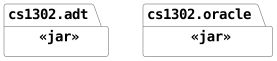
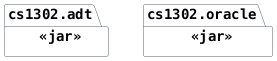
Note: Packages included in cs1302-str-list.jar
Several of the UML diagrams in this project description
include packages with a <<jar>> stereotype. For example,
when a package includes the <<jar>> stereotype (like the
one shown in Fig. 2.1), you
should assume that package, including its classes and
interfaces, is provided for you in the cs1302-str-list.jar file
that is included in the project's starter code.
You do not and must not recreate the classes and interfaces in these packages since they are already provided for you.
The cs1302.adt.StringList Interface
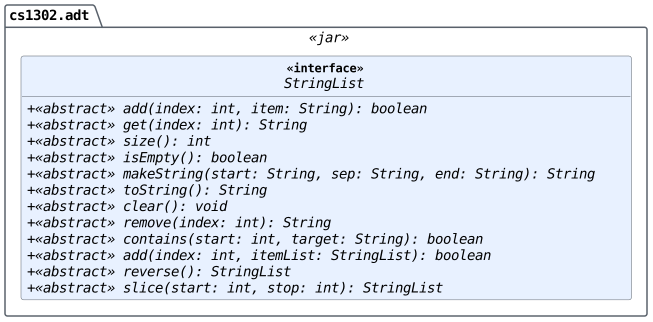
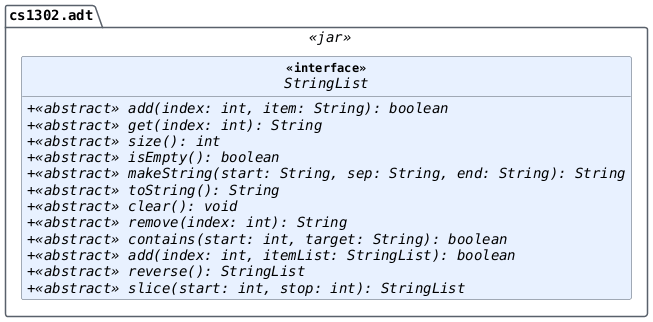
The StringList interface defines an ADT for
managing a string list (i.e., a list of string references). You
will NOT be writing the code for this interface yourself; instead,
a compiled version of the StringList interface is provided for you in the
cs1302-str-list.jar file (included in the project's starter code), its
full API documentation can be found here, and a short
UML diagram depicting what it looks like is shown below in
Fig. 2.2.
Fig. 2.2 UML diagram for the StringList interface in the cs1302.adt package. [svg] [png]
The Implementing Classes
In this project, you will implement the StringList interface two
different ways. While both implementations will behave the same
way from an outside perspective, each one will manage the
storage data structure for its list items in a completely
different way, as summarized in Table 2.4.
Implementing Class |
Storage Data Structure |
|---|---|
|
A simple, one-dimensional array object. |
|
A linked list of |
Instead of writing every method two times (i.e., once for each
class), you will create an abstract parent class named BaseStringList
that will include some instance variables and methods that are
common to both implementations.
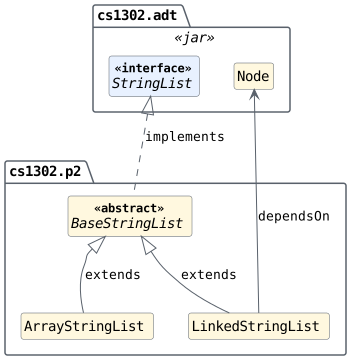
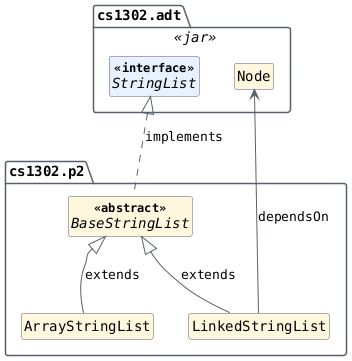
A small UML diagram depicting how these classes are related is provided below in Fig. 2.3, and a more detailed UML diagram that includes the methods you are expected to include in each class is provided later in the project's functional requirements section.
Fig. 2.3 UML diagram depicting the relationships between the
classes and interfaces in the cs1302.p2 and cs1302.adt
packages. A more detailed version of this diagram that
includes the instance variables and methods for each
class and interface is provided in the project's
functional requirements section. [svg] [png]
Tip
This project involves an interface, inheritance, and several classes, all of which can look daunting at first. Please take your time and read this entire project description before starting the project and be sure to follow the instructions for completing each part as they are described in the Project Checklist. You can do this.
Using and Testing String List Objects
Tip
When you refer to the interface's API documentation, you may be tempted to skip down the page to where the interface's methods are documented since those are the methods that you will write for your implementing classes. Be sure to also read the interface-level documentation provided near the top of the page. It includes important definitions, examples, and even sample code that you are expected to understand before attempting to implement the interface's individual methods.
Understanding ADT Expectations
As with most ADTs, we have expectations about how each method should behave when interacting with a string list object, even if we do not know or cannot see the internals of that object's class. This is because the classes for such objects all implement the same ADT interface. These expectations are carefully documented in the interface's API documentation.
For example, a new string list is expected to be size zero
(i.e., its size() method is expected to return with
0), regardless of whether the calling object is an ArrayStringList, a
LinkedStringList, or some other implementation of the StringList interface.
The examples in Listing 2.10 and
Listing 2.11 illustrate this idea nicely.
Even though each example involves a list object of a different
type, they test for the same expected behavior in the same
way by interacting with the object via the interface (via a StringList
variable).
 1StringList list = new ArrayStringList();
 2
 3int expectedSize = 0;
 4int actualSize = list.size();
 5
 6if (list.size() != 0) {
 7    String message = String.format(
 8        "size(): expected %d, but %d",
 9        expectedSize,
10        actualSize
11    );
12    throw new AssertionError(message);
13} // if
 1StringList list = new LinkedStringList();
 2
 3int expectedSize = 0;
 4int actualSize = list.size();
 5
 6if (list.size() != 0) {
 7    String message = String.format(
 8        "size(): expected %d, but %d",
 9        expectedSize,
10        actualSize
11    );
12    throw new AssertionError(message);
13} // if
Testing that ADT Expectations are Met
In this project, you also need to write test code that works with
objects of any kind of StringList implementation, including the ArrayStringList and
LinkedStringList classes that you are writing as well as the OracleStringList class
that is already provided for you in the project's starter
code.
The OracleStringList class fully and correctly implements the StringList
interface; however, its Java source code is not made available
to you. A compiled version of this class can be used by
including the path to cs1302-str-list.jar on the class path
when compiling and running code that uses it. You will use this
class when developing the test code that you will write to make
sure that your ArrayStringList and LinkedStringList classes behave correctly.
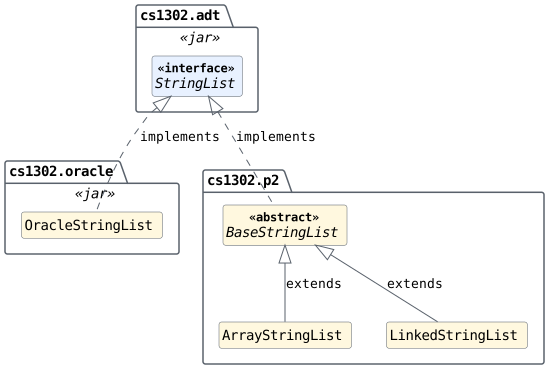
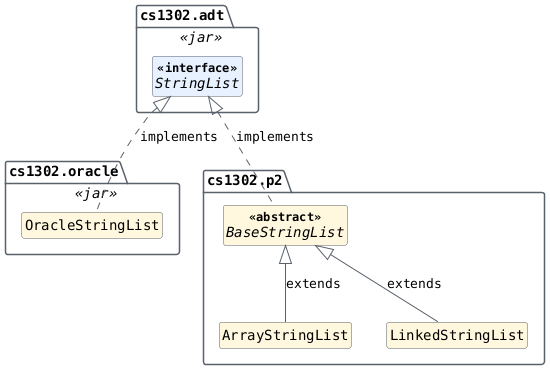
A simple UML diagram that depicts the relationship between the
OracleStringList class and the classes that you will be writing is provided
below in Fig. 2.4.
Fig. 2.4 UML diagram depicting the relationships between the
OracleStringList class in cs1302.oracle, the StringList interface in
cs1302.adt, and the classes that you will write in
cs1302.p2. [svg] [png]
Consider the code example in Listing 2.12, which is almost identical to the code provided earlier in Listing 2.10 and Listing 2.11. That is intentional.
All three examples test that the size() method for a
new string list object behaves correctly; however, each
example uses a different implementing class when constructing
the object that size() is called on. Since they are
all objects of classes that implement the same ADT interface,
they are also all expected to exhibit the same observable
behavior when interacting with them from the outside.
 1StringList list = new OracleStringList();
 2
 3int expectedSize = 0;
 4int actualSize = list.size();
 5
 6if (list.size() != 0) {
 7    String message = String.format(
 8        "size(): expected %d, but %d",
 9        expectedSize,
10        actualSize
11    );
12    throw new AssertionError(message);
13} // if
ADT Expectations for Different Implementing Classes
Expectations regarding ADT behavior must hold true even if the implementing classes behave differently on the inside.
For example, the two different overrides that you will write for
add(int, String) in ArrayStringList and LinkedStringList are going to look
quite different from each other since each class uses a
different storage data structure internally to manage its list
items. Despite that, we have the same expectations about what
we should observe from the outside when calling add(int,
String) and other methods.
Remember, you have access to the OracleStringList class provided in the
starter code. If you are ever unsure about how one of your
overrides for an interface method is expected to behave under a
certain scenario, then try that scenario using an OracleStringList object,
observe what it does, then refer to the method's API
documentation to make sure you understand how that behavior is
documented before attempting to make your version of the method
behave the same way.
Project Testing Setup
Tip
The test code that you will write for this project is expected
to properly test any valid implementation of the StringList
interface. Since this interface defines an ADT we can write our
tests based on the expectations and behavior described in its
API documentation, just like in the examples
illustrating how to test one expected behavior of the
size() method in Listing 2.10,
Listing 2.11, and
Listing 2.12.
One Set of Test Methods
Instead of writing the same test code multiple times, once for
each implementation, simply write it once using the interface
type and swap out the specific implementation that you want to
test. To help you get started, the starter code for
StringListTester.java is set up to let you do just that.
A simple UML diagram is provided below in
Fig. 2.5 that illustrates some of
the key pieces that enable this reusable testing setup to
work. In particular, pay close attention to the
newStringList() method and how that method is used in
the example code provided for testScenario1().
Fig. 2.5 UML diagram illustrating some of the key pieces that
enable the reusable testing setup in the
StringListTester class to work. [svg] [png]
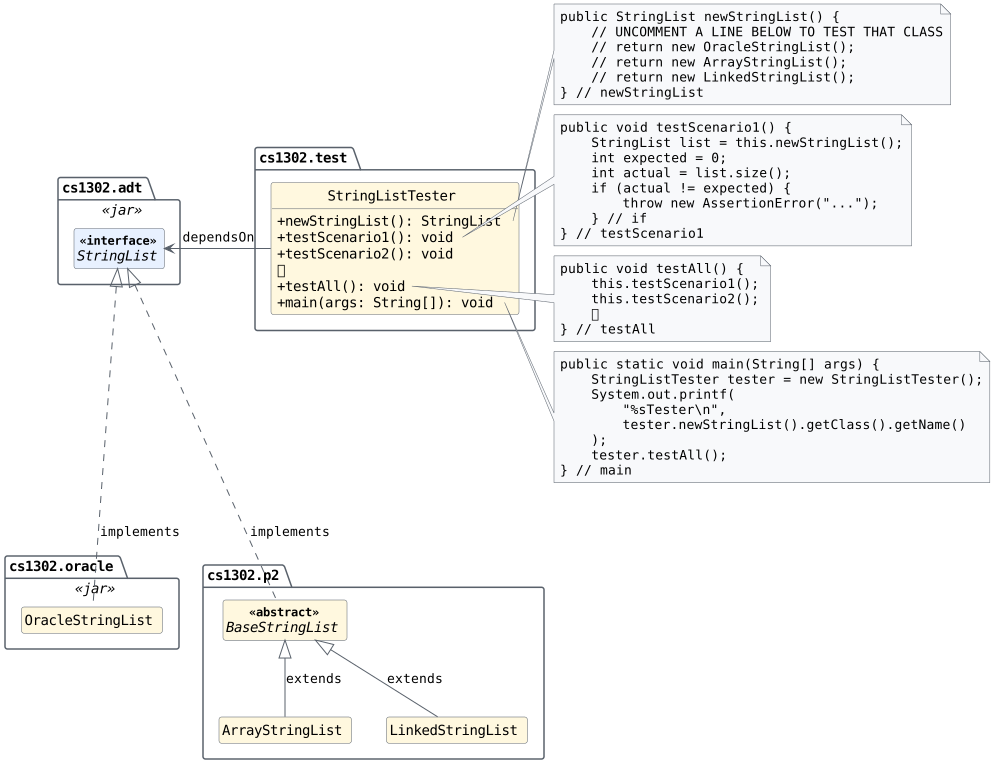
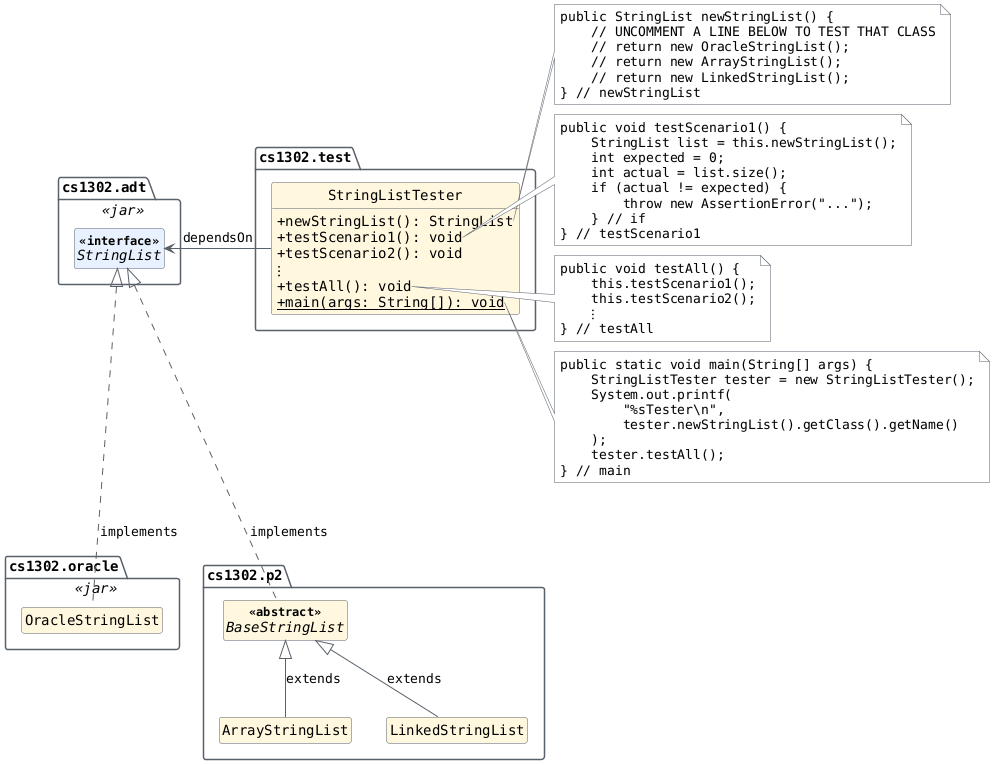
A few test scenarios are provided for you in the starter code; however, they are not to be considered complete or exhaustive. They are mostly provided to help you get started writing your own test code more quickly.
Additional Details
One goal for this project is to end up with completed versions of
the ArrayStringList and LinkedStringList classes that both extend the BaseStringList class and
each provide a different, concrete implementation of the StringList interface that
meets the project's functional and non-functional requirements.
Implementers are always free to implement additional methods in
addition to the ones defined by the interface. However, they should
not assume that users (e.g., graders) will use these additional
methods, even if declared with public visibility, since those
methods cannot be called when using a StringList variable. Such methods
can still be extremely useful in helping you avoid redundancy
across methods within an implementation.
Getting Started
You will not be starting from scratch. Instead, starter code is provided that you will need to download to get started, then modify and test to meet the project's requirements. To download the starter code, follow these instructions:
Log in to Odin.
If you have not done so, we recommend creating a separate directory inside of your home directory to store all of your CSCI 1302 projects instead of having them all directly inside your home directory.
Change to your CSCI 1302 projects directory.
Execute the following command to download the starter code into a sub-directory called
cs1302-str-list:git clone --depth 1 https://github.com/cs1302uga/cs1302-str-list.git
Change to the
cs1302-str-listdirectory that was just created, then use the tree command to verify that you now have a copy of the starter code:tree --filesfirst1. 2├── compile.sh 3├── jdeps.sh 4├── LICENSE.rst 5├── README.rst 6├── SUBMISSION.md 7├── test.sh 8├── lib 9│ └── cs1302-str-list.jar 10└── src 11 └── cs1302 12 ├── p2 13 │ ├── ArrayStringList.java 14 │ ├── BaseStringList.java 15 │ └── LinkedStringList.java 16 └── test 17 └── StringListTester.java
Descriptions of the files included in the starter code
A short description for each file contained in the starter code can be found below in Table 2.5.
Table 2.5 Descriptions of files included in the starter code for cs1302-str-list.¶File
Description
compile.shA script that compiles the starter code.
jdeps.shA script that shows the dependencies between types in your compiled code.
LICENSE.rstA copy of the license for starter code.
README.rstA small README file that points students to the project description.
SUBMISSION.mdA file that you will update to include your name and API documentation link.
test.shA script that runs the tester included in the starter code.
cs1302-str-list.jarA JAR file containing some already-compiled files included in the starter code.
BaseStringList.javaThe starter code for an abstract parent class for
StringListimplementations.ArrayStringList.javaThe starter code for an array-based
StringListimplementation.LinkedStringList.javaThe starter code for a linked-list-based
StringListimplementation.StringListTester.javaThe starter code for a reusable tester class for
StringListimplementations.Modify the
SUBMISSION.mdfile to meet the project requirement related to that file (stated here).emacs SUBMISSION.mdMake sure that you save the file before continuing to the next step.
Your
cs1302-str-listdirectory is managed by a local Git repository (hidden under a.gitdirectory), which means you should be able to stage the change that you just made toSUBMISSION.md, then commit that change to add it to the repository's history.Instructions: Stage and commit your
SUBMISSION.mdchangesCheck the current status of the local Git repository (refer to Listing 2.16 to see the exact command to use):
Listing 2.16 The git status command and example output after cloning the starter code and modifyingSUBMISSION.md, before staging the changes.¶git status1On branch main 2Your branch is up to date with 'origin/main'. 3 4Changes not staged for commit: 5 (use "git add <file>..." to update what will be committed) 6 (use "git restore <file>..." to discard changes in working directory) 7 modified: SUBMISSION.md 8 9no changes added to commit (use "git add" and/or "git commit -a")
Add
SUBMISSION.mdto the list of files that are "staged" for the next commit (refer to Listing 2.17 to see the exact command to use):Listing 2.17 The git add command stages the changes toSUBMISSION.mdfor the next commit. It normally produces no output on success.¶git add SUBMISSION.md
Check the current status of the local Git repository again to confirm that
SUBMISSION.mdis now included in the list of files that are "staged" for the next commit (refer to Listing 2.18 to see the exact command to use):Listing 2.18 The git status command and example output after staging the changes toSUBMISSION.mdfor the next commit.¶git status1On branch main 2Your branch is up to date with 'origin/main'. 3 4Changes to be committed: 5 (use "git restore --staged <file>..." to unstage) 6 modified: SUBMISSION.md
Commit the staged changes to the repository's history (refer to Listing 2.19 to see the exact command to use):
Listing 2.19 The git commit command and example output for recording the staged changes with the message specified by-m. Your commit hash will replace???????.¶git commit -m "added my info to SUBMISSION.md"
1[main ???????] added my info to SUBMISSION.md
2 1 file changed, 1 insertion(+), 1 deletion(-)
Confirm that the "commit" is now included in the repository's history with the message that was specified when it was committed (refer to Listing 2.20 to see the exact command to use):
Listing 2.20 The git command to view the log for the local Git repository (i.e., its history of commits). When you run this command, the output will show a different value for the top-most commit hash (i.e., not???????).¶git log --decorate --oneline --graph
1* ??????? (HEAD -> main) added my info to SUBMISSION.md
2* 141e8b4 (origin/main) starter code commit
Proceed to the Project Checklist to see the instructions for each part of the project.
2.4. Project Checklist
The steps in the following checklist assume you have already read the other parts of the project description. The first time that you read this section, simply take notes, then reread it again later to begin working on the project.
Part 1. Prepare and Plan (due Wednesday, October 7th @ 11:55 PM)
Preparing for Part 1
Follow the steps provided below to prepare the BaseStringList, ArrayStringList, and
LinkedStringList classes so that everything compiles and so that you can
test ArrayStringList and LinkedStringList with the same test code provided in
cs1302.test.StringListTester.
- Due Before:
Wednesday, October 7th @ 11:55 PM.
If you have not yet done so, download the starter code on Odin by following the instructions in the Getting Started dropdown provided earlier in this document.
Based on the API documentation for
StringListand the UML diagrams provided in the Overview: UML Diagrams dropdown and elsewhere under the project's Functional Requirements, add "stub" methods (or placeholders that let us compile the code without fully implementing a method) for the specific method overrides that are expected to be declared inBaseStringList,ArrayStringList, andLinkedStringList, in that order.How to identify the methods to declare
Refer to the UML diagrams shown in the Overview: UML Diagrams dropdown under the project's Functional Requirements. The "Default UML" diagram in the first tab shows the exact overrides that must be declared inside
BaseStringList.java,ArrayStringList.java, andLinkedStringList.java.You should notice that
BaseStringListdoes NOT declare an override for every abstract method listed in theStringListinterface. That is okay sinceBaseStringListis abstract. Any method overrides that are missing can still be called, assuming they are eventually "filled in" by an override declared in a concrete child class.How to write a "stub" method for an override
Refer to Listing 2.21 below for an example of a "stub" for the
size()method override that is expected to be declared inBaseStringList.java. Not only are you permitted to copy this example directly into yourBaseStringListclass, but you can base your other "stub" methods on it as well.1/** 2 * Returns with the number of items in this string list. 3 * {@inheritDoc}. 4 */ 5@Override 6public int size() { 7 // TODO: describe the plan for this method 8 throw new UnsupportedOperationException("not yet implemented"); 9} // size
As soon as you have valid "stub" methods added for the appropriate overrides in
BaseStringList,ArrayStringList, andLinkedStringList, you should be able to compile your project code using thecompile.shinterpreter script that is included in the project's starter code (see Listing 2.22)../compile.sh
The actions performed by
compile.shYou are encouraged to inspect the
compile.shscript to see what commands it executes. At a high level, it attempts to execute commands for the actions listed below in Table 2.6 until an action fails or all the actions complete successfully:Table 2.6 A list of the high-level actions performed by compile.sh.¶#
Action
Description
1
clean
Delete all files under
binanddocso that you do not risk accidentally using an old version of a compiled class or interface.2
compile
Compile the
BaseStringList,ArrayStringList,LinkedStringList, andcs1302.test.StringListTesterclasses to thebindirectory using the javac command3
document
Generate files for the API documentation website and place them in the
docdirectory using the javadoc command.4
lint
Check all the
.javafiles undersrcfor code style violations using the check1302 command.Important
If you encounter any errors or warnings when running the
compile.shscript, then you should always fix them before proceeding. This includes any errors or warnings emitted by the javadoc and check1302 commands in addition to those emitted by the javac command.Now that you have everything set up so that it compiles without any errors or warnings, you should stage and commit the changes that you have made to
BaseStringList.java,ArrayStringList.java, andLinkedStringList.javausing Git.Hint
You can follow the same process described earlier in Getting Started to accomplish this, but take care to specify a different commit message that more accurately describes the work that has been done since your last commit.
Now it is time to come up with a plan for each method override. Assuming each of your "stub" methods looks like the example shown in Listing 2.21, simply replace the "
// TODO" comment with one or more comments that list out the high-level steps that you think the method needs to perform.Tips for planning
Tip
The
BaseStringListdoes not set anything up to store list items; however, the method overrides declared in this class can call any of the methods available from the interface, even those that are not overridden inBaseStringListitself under the assumption that such a call will get "filled in" by an override in a child class.Tip
Be sure to read everything up to the "Method Details" section. That section is important but will make more sense later – you will want to reference it when you are ready to start writing code. Also be sure to carefully trace through any code examples that are given. These will help you understand how your class(es) will be used.
Tip
You need to make sure that you understand what a potential call to each method might look like and what a user would expect to happen when making that call on an object of an implementing class. Use the method documentation and code examples in the interface's API documentation to get started.
Tip
For each method in the interface, try to write down what you think the basic steps need to be in order to produce the desired outcome.
Try to keep it high level. If the steps that you write down sound like they can be accomplished with another method, then replace those steps with a note to refer to that method. If that other method does not yet exist, then you might introduce that as a private or protected helper method. Using existing methods can greatly cut down the amount of code you need to write and will minimize the number of bugs in your code.
Here is an example: If there are multiple methods that have a step that gets an element from a specific index in the list, then you might have that method call the
get(int)method instead of directly accessing the underlying data structure (array or linked list) which might require writing the same loop multiple times.Consider drawing out memory map diagrams similar to the ones shown in the List ADT - Examples with Both Implementations section of the textbook.
Based on the previous suggestion, draw out what the method dependencies are for each method (i.e., what method depends on what). If you notice any circular dependencies, then those should be eliminated.
The methods that do not depend on other methods are good candidates to start with when you begin the next phase of your development. We will call these the independent methods.
Specific planning steps for each file
Here are the specific steps that you should follow to add your planning comments to each file:
Add your planning comments to the stub methods in
BaseStringList.java, save it, and make sure it still compiles without any errors or warnings using thecompile.shscript. After that, stage and commit your changes to that file using Git.Add your planning comments to the stub methods in
ArrayStringList.java, save it, and make sure it still compiles without any errors or warnings using thecompile.shscript. After that, stage and commit your changes to that file using Git.Add your planning comments to the stub methods in
LinkedStringList.java, save it, and make sure it still compiles without any errors or warnings using thecompile.shscript. After that, stage and commit your changes to that file using Git.
Modify the
newStringList()method incs1302.test.StringListTesterto return with a reference to a newOracleStringListobject, then run thetest.shinterpreter script that is included in the project's starter code (see Listing 2.23)../test.sh
The actions performed by
test.shYou are encouraged to inspect the
test.shscript to see what commands it executes. At a high level, it attempts to execute commands for the actions listed below in Table 2.7 until an action fails or all the actions complete successfully:Table 2.7 A list of the high-level actions performed by test.sh.¶#
Action
Description
1
compile
Run the
compile.shscript.2
test
Run the
cs1302.test.StringListTesterclass using the java command.Important
If you encounter any errors when
cs1302.test.StringListTestertests a specific scenario, then that is helpful. If you encounter anAssertionError, then that means the implementation you are testing does not meet some behavior expectation.Use the output provided in the stack trace to determine which test scenario failed and what expectation was not met so that you can more quickly locate where to start addressing the issue in your code.
At this point, you should have a complete project environment set up with "stub" methods, planning comments, and one or more tester programs that you can adjust and run to check the functional correctness of your code as you begin to implement it during the next part of the project.
Before Wednesday, October 7th @ 11:55 PM, follow the submission instructions to prepare Part 1 of your project for submission and actually submit it.
Part 2. Implement ArrayStringList (due Friday, October 16th @ 11:55 PM)
Preparing for Part 2
To prepare for this part of the project, you must first complete and submit Part 1. Also, even though you are not finalizing the code for the overall project during this part, your submission for this part is still expected to meet all the non-functional requirements stated later in the project description.
- Due After:
Submitting Part 1.
- Due Before:
Friday, October 16th @ 11:55 PM.
Modify the
newStringList()method incs1302.test.StringListTesterto return with a reference to a newArrayStringListobject, then run thetest.shscript (see Listing 2.24)../test.sh
StringListTester is Expected to Fail
Since you have not fully implemented any of the methods that you added as "stub" methods yet, you should see the tester program crash when
test.shrunscs1302.test.StringListTesterusing the java command.Once you confirm that your tester is testing the
ArrayStringListclass but failing (as expected), stage and commit your changes using the appropriate Git commands.Implement and test the methods below in the order presented by following the specific steps stated in the next dropdown for each method:
Table 2.8 The methods to implement and test for Part 2.¶ #
Class
Method
1
BaseStringListint size()2
BaseStringListboolean isEmpty()3
ArrayStringListboolean add(int, String)4
ArrayStringListString get(int)5
BaseStringListString makeString(String, String, String)6
BaseStringListString toString()7
BaseStringListboolean contains(int, String)8
ArrayStringListvoid clear()9
ArrayStringListString remove(int)10
ArrayStringListStringList reverse()11
ArrayStringListStringList slice(int, int)12
BaseStringListboolean add(int, StringList)Specific steps for each method
Here are the specific steps that you should follow to implement and test each method listed earlier in Table 2.8:
Read the planning comments that you included in the method "stub" that you created for the current method.
Add test methods for one or more test scenarios that involve the current method to your
cs1302.test.StringListTesterclass, then make sure that those test methods work withOracleStringListby temporarily adjusting thenewStringList()method to return with a reference to a newOracleStringListobject and running thetest.shscript. Once your test methods compile and pass correctly forOracleStringListusingtest.sh, adjust thenewStringList()method to return with a reference to a newArrayStringListobject, then stage and commit your changes using the appropriate Git commands.Adjust the code for the current method by removing the throw-statement for the
UnsupportedOperationExceptionand writing some code to instruct the computer to follow your plan. Use thetest.shtest to compile and test your code. If you encounter an issue, use the information that you see to narrow down what and where the issue is, then attempt to modify the code to resolve that issue. Repeat, as needed, until the current method passes its tests. After that, stage and commit your changes using the appropriate Git commands.
Before Friday, October 16th @ 11:55 PM, follow the submission instructions to prepare Part 2 of your project for submission and actually submit it.
Part 3. Implement LinkedStringList (due Friday, October 23rd @ 11:55 PM)
Preparing for Part 3
To prepare for this part of the project, you must first complete and submit Part 2. Also, please remember that your submission for this part is expected to meet all the functional requirements and non-functional requirements stated in the project description.
- Due After:
Submitting Part 2.
- Due Before:
Friday, October 23rd @ 11:55 PM.
Modify the
newStringList()method incs1302.test.StringListTesterto return with a reference to a newLinkedStringListobject, then run thetest.shscript (see Listing 2.25)../test.sh
StringListTester is Expected to Fail
Since you have not fully implemented any of the methods that you added as "stub" methods to
LinkedStringList, you should see the tester program crash whentest.shrunscs1302.test.StringListTesterusing the java command.Once you confirm that your tester is testing the
LinkedStringListclass but failing (as expected), stage and commit your changes using the appropriate Git commands.Implement and test the methods below in the order presented by following the specific steps stated in the next dropdown for each method:
Table 2.9 The methods to implement and test for Part 3.¶ #
Class
Method
1
LinkedStringListboolean add(int, String)2
LinkedStringListString get(int)3
LinkedStringListvoid clear()4
LinkedStringListString remove(int)5
LinkedStringListStringList reverse()6
LinkedStringListStringList slice(int, int)Specific steps for each method
Here are the specific steps that you should follow to implement and test each method listed earlier in Table 2.9:
Read the planning comments that you included in the method "stub" that you created for the current method.
You should already have one or more test methods for the current method (from completing Part 2), but add more test methods as needed to check any scenarios that you did not consider previously. If you add any new test methods to your
cs1302.test.StringListTesterclass, then make sure that those test methods work withOracleStringListby temporarily adjusting thenewStringList()method to return with a reference to a newOracleStringListobject and running thetest.shscript. Once your test methods compile and pass correctly forOracleStringListusingtest.sh, adjust thenewStringList()method to return with a reference to a newLinkedStringListobject, then stage and commit your changes using the appropriate Git commands.Adjust the code for the current method by removing the throw-statement for the
UnsupportedOperationExceptionand writing some code to instruct the computer to follow your plan. Use thetest.shtest to compile and test your code. If you encounter an issue, use the information that you see to narrow down what and where the issue is, then attempt to modify the code to resolve that issue. Repeat, as needed, until the current method passes its tests. After that, stage and commit your changes using the appropriate Git commands.
Final Run-through.
Thoroughly test all of your methods on objects of both
ArrayStringListandLinkedStringListusing one or more tester programs.Remember to fix errors and warnings as you go, including code style violations, and to fully stage and commit your changes every time you confirm that something works.
Before Friday, October 23rd @ 11:55 PM, follow the submission instructions to prepare Part 3 of your project for submission and actually submit it.
2.5. Functional Requirements
A functional requirement defines a specific behavior between program inputs and outputs, and a collection of functional requirements describes how a program should function. If your submission satisfies a functional requirement listed in this section, then the requirement's point total is added to your submission grade.
Overview
For this project, you are required to create two different classes
that implement the same interface via a common abstract
parent. While the details are listed later in this
document, the following diagram illustrates the general
relationship between your classes and the interface. The package
cs1302.adt is provided for you in the cs1302-str-list.jar
file that is included in the starter code.
UML Diagrams
These tabs show the project relationships at increasing levels of detail, from the default UML overview to inherited members, constructor notes, and a memory map. Select each tab and read its content to connect the class structure with the initial state of string list objects.
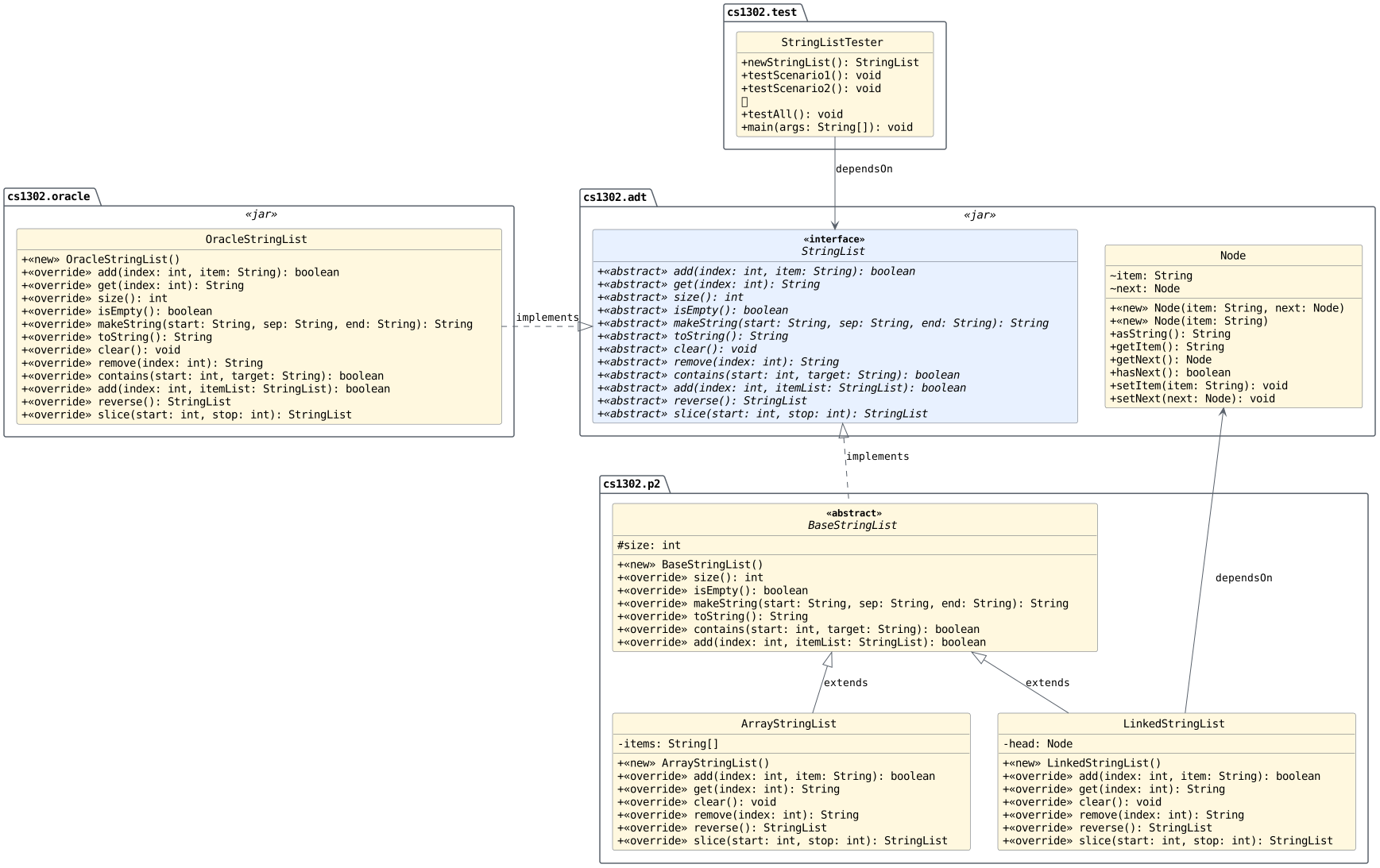
The UML diagram below in Fig. 2.6 shows the packages, classes, and interfaces involved in this project.
Fig. 2.6 UML diagram depicting the packages, classes, and interfaces involved in this project. [svg] [png]
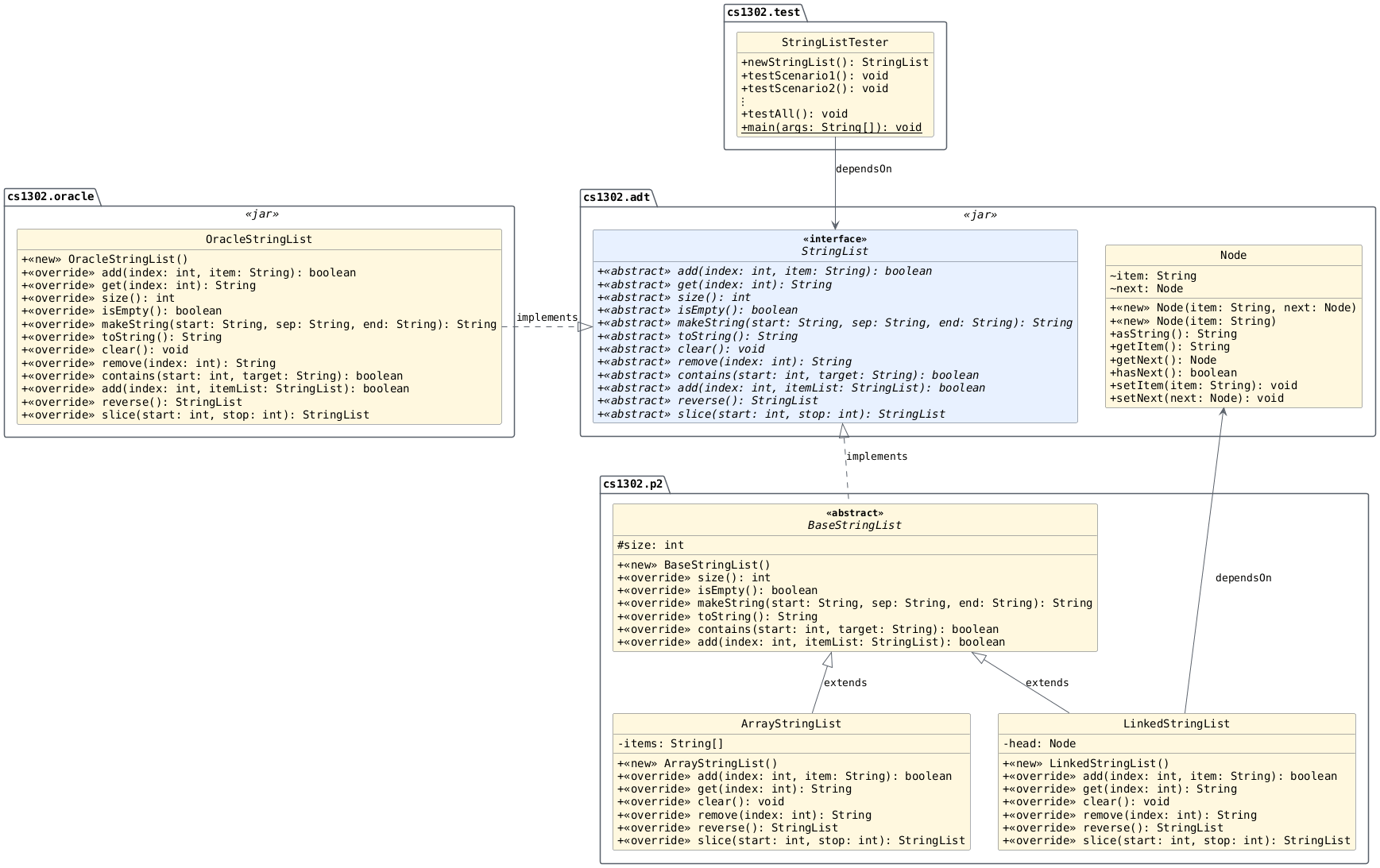
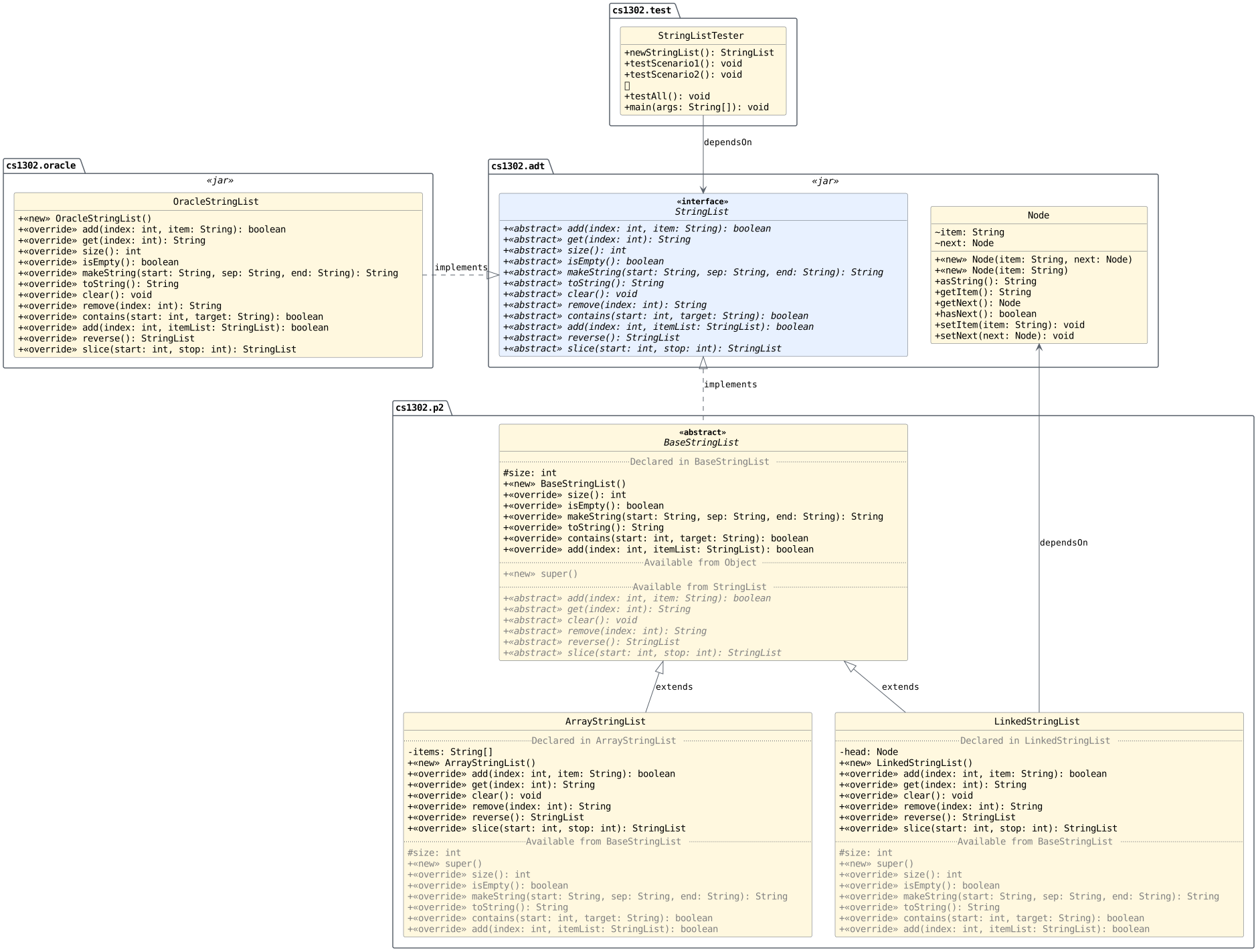
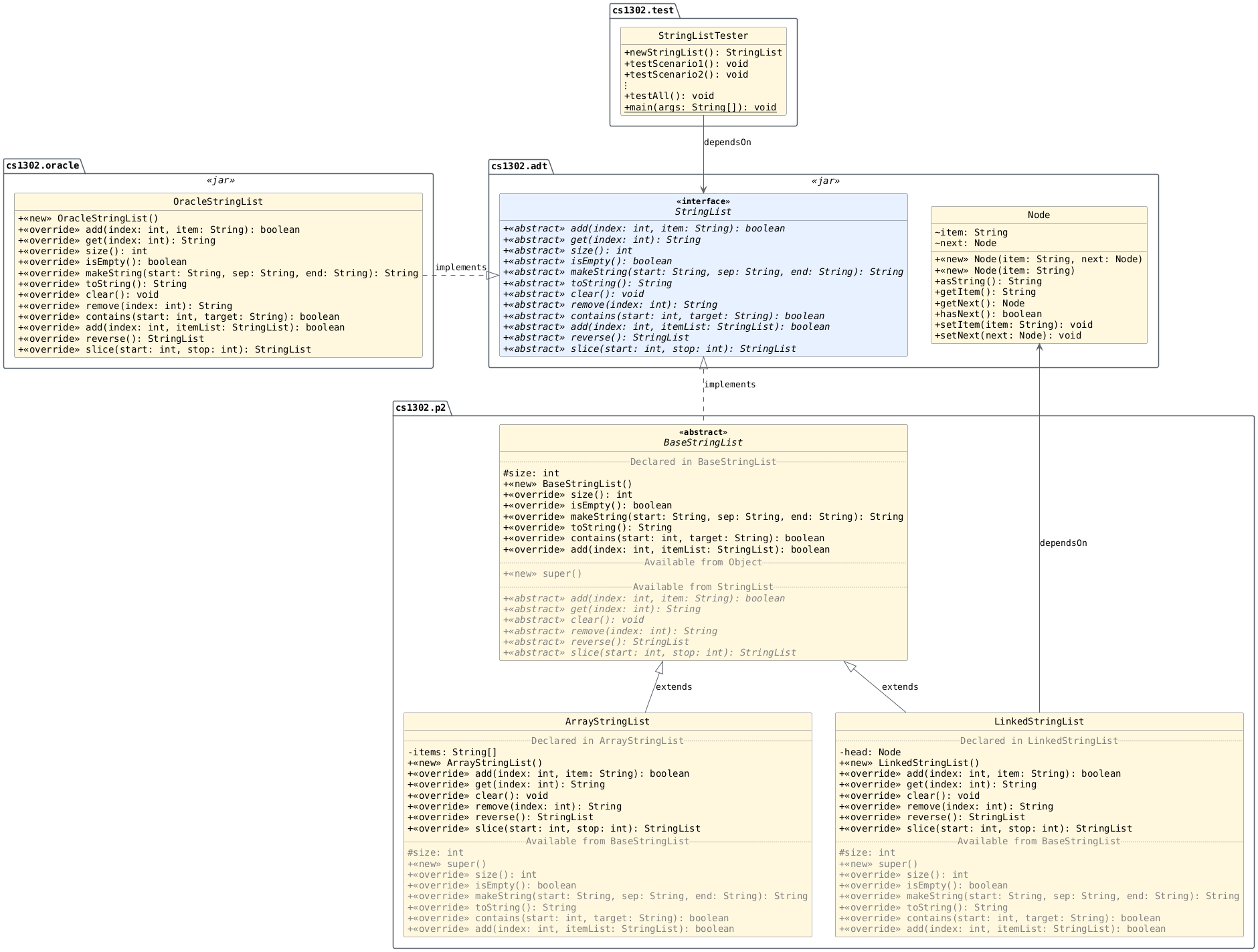
The UML diagram below in Fig. 2.7
shows the packages, classes, and interfaces involved in
this project. The level of detail it provides for the
classes in the cs1302.p2 package is expanded to show relevant
inherited fields and methods alongside their declarations.
Entries labeled super() denote superclass constructor
invocations; constructors are not inherited.
Fig. 2.7 Expanded UML overview showing relevant inherited
fields and methods alongside the declarations in
the cs1302.p2 classes. Entries labeled super()
denote superclass constructor invocations. [svg] [png]
The UML diagram below in Fig. 2.8
shows the packages, classes, and interfaces involved in
this project. The level of detail it provides for the
classes in the cs1302.p2 package is expanded to show relevant
inherited fields and methods alongside their declarations.
Entries labeled super() denote superclass constructor
invocations; constructors are not inherited. This version also
includes notes that show what the constructors for those
classes look like.
Fig. 2.8 Expanded UML overview showing relevant inherited
fields and methods alongside the declarations in
the cs1302.p2 classes. Entries labeled super()
denote superclass constructor invocations. Notes show
the no-argument constructor implementations for
these classes. [svg] [png]
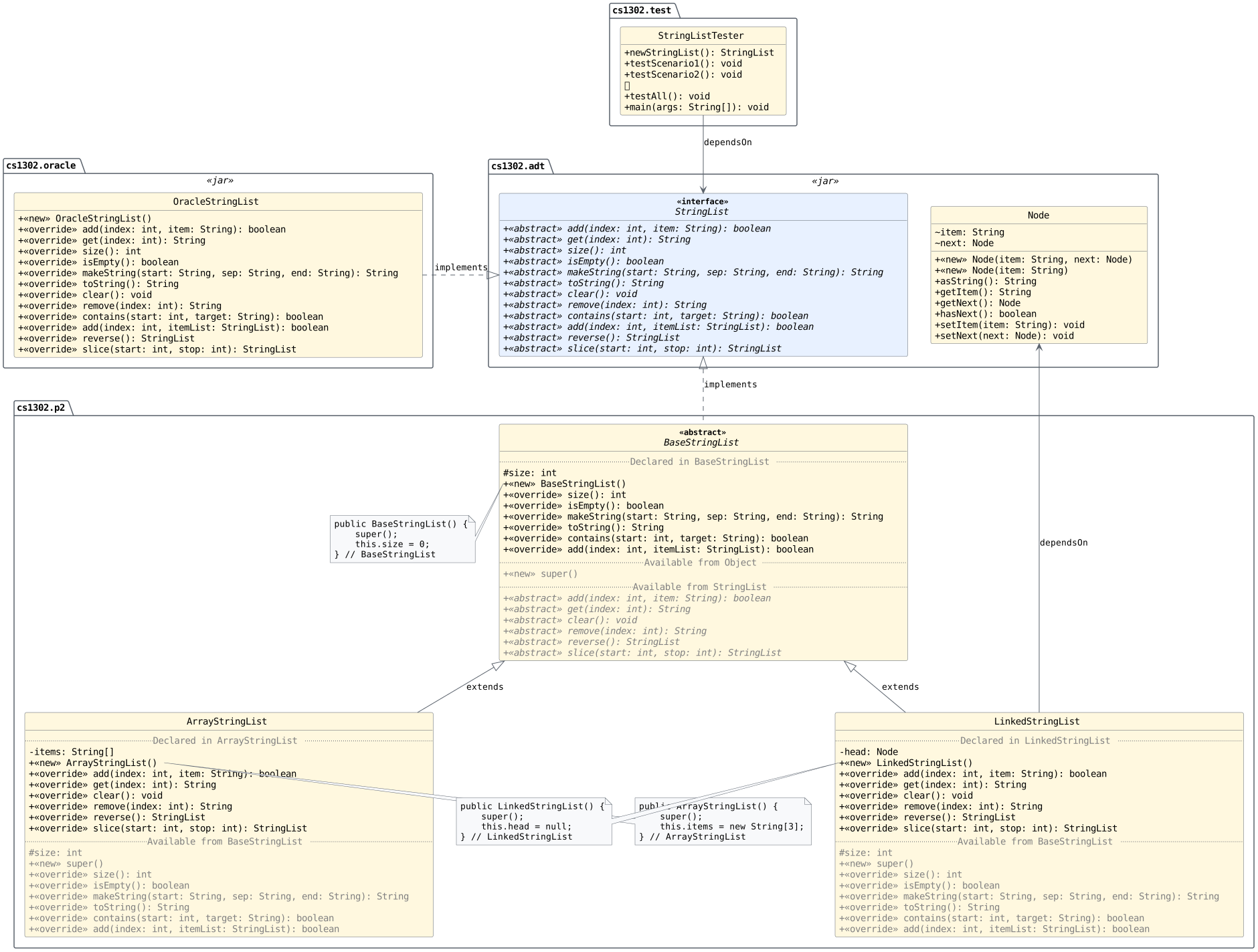
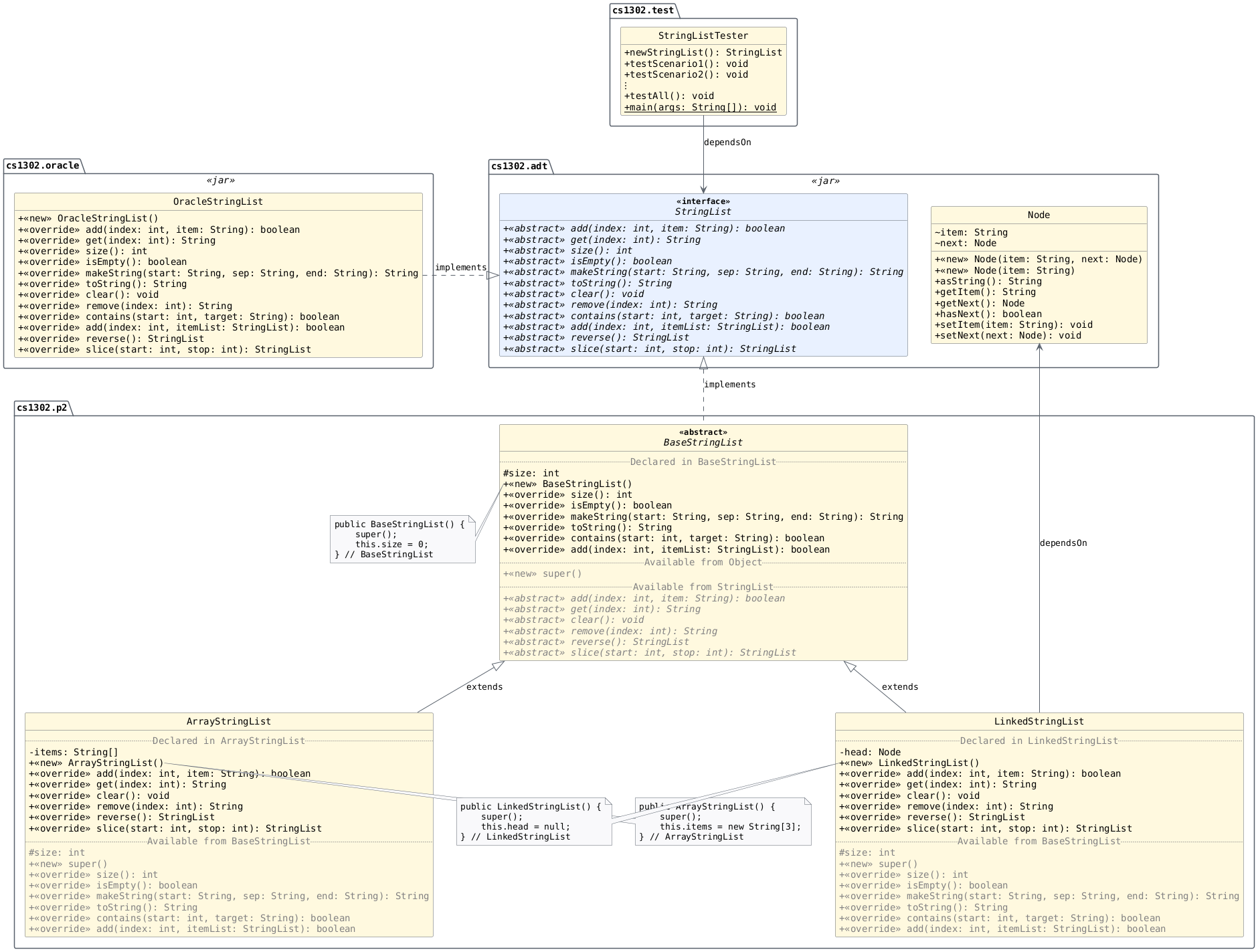
If you set up your constructors as depicted above in
Fig. 2.8, then any
new ArrayStringList and LinkedStringList objects that are created at runtime
should look like the ones depicted in the memory map shown
below for Listing 2.26.
ArrayStringList and a LinkedStringList with the initial
field values illustrated in
Fig. 2.8.¶4StringList list1 = new ArrayStringList();
5StringList list2 = new LinkedStringList();
Memory state after this string list construction. Note: The debugger breakpoint is on line 5. [code listing] [download] [open]

Memory state after this string list construction. Note: The debugger breakpoint is on line 6. [code listing] [download] [open]

Note
When a caption places a breakpoint on a line, execution is paused before that line executes: it is the next line to execute and has not yet executed. This is the usual meaning of a breakpoint when stepping through code in a debugger.
Using what is in the JAR file
You do not have access to the source code for classes in
cs1302.adt. However, you do have access to the byte code
and the API documentation website. You will need to use both
StringList and Node in your code because BaseStringList directly
implements StringList and LinkedStringList depends on Node.
cs1302.p2.BaseStringList
Starter Code
The cs1302.p2.BaseStringList class is one of the classes
that you are responsible for implementing and testing. A
partially implemented version of this file is included in
the starter code. It is your responsibility to ensure that it is
placed under src and named correctly based on the
information provided below.
Item |
Description |
|---|---|
Source |
|
FQN |
|
Package Name |
|
Simple Name |
|
UML Diagrams
These tabs distinguish the members declared in BaseStringList from the abstract
methods it inherits from StringList. Select each tab and read its content to
understand the responsibilities of this abstract class.
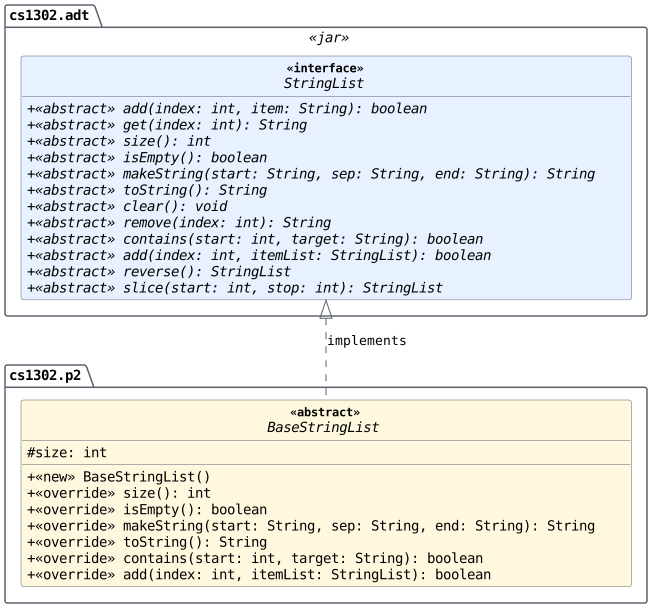
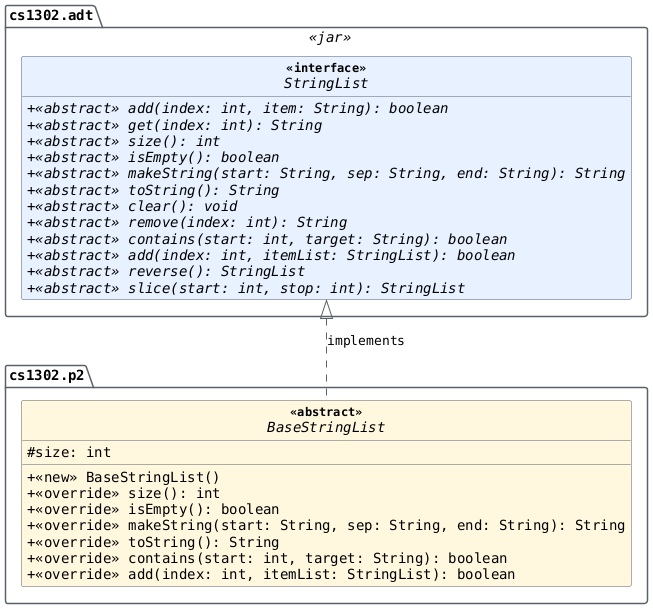
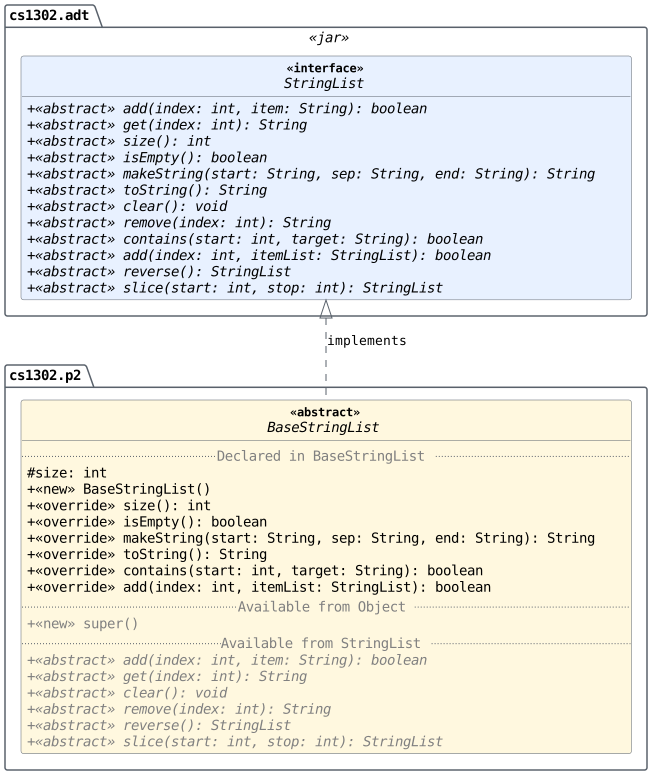
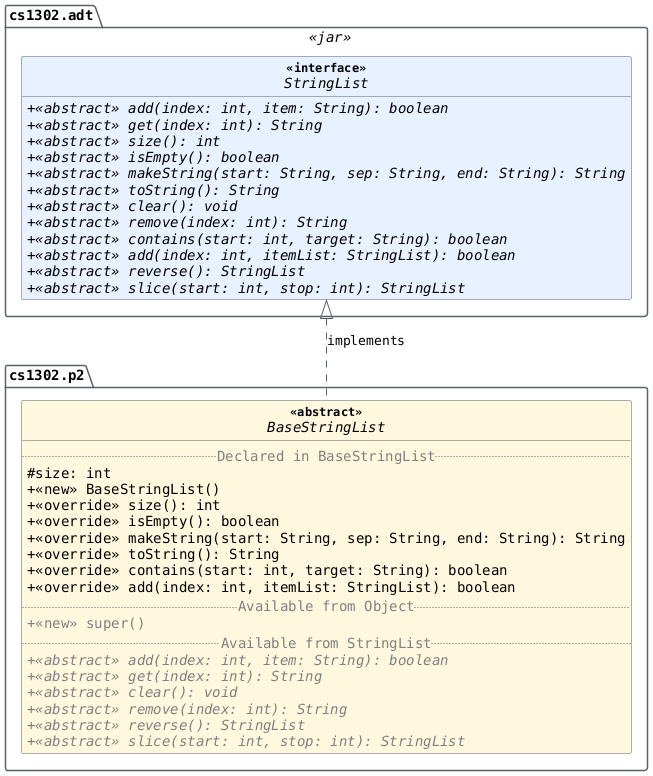
Class Design
Create the abstract BaseStringList class such that it properly implements a
subset of the abstract methods of StringList. Since BaseStringList
is abstract, it is not mandatory to implement all methods of StringList
within this class. The exact methods this class must implement are
listed in the method section for BaseStringList in the
UML diagram.
Remember, since BaseStringList is an abstract parent to both
ArrayStringList and LinkedStringList, its methods must
be implemented without reference to the underlying data
structure. In other words, within BaseStringList, you cannot
use arrays or nodes. The code contained in this class must be
general enough to work with both.
Note
The size instance variable in BaseStringList is shown
as #size in the UML diagram to designate that it has
_protected_ visibility and, therefore, must be declared in
your Java code using the protected visibility
modifier. The child classes of BaseStringList inherit
their own copies of this protected size instance variable
and have direct access to them. This variable should be
initialized in the BaseStringList constructor. You must
NOT re-declare the size variable in either of the child
classes. For more information about _protected_ visibility,
refer to the Protected Visibility reading.
Note
The methods that are listed in the UML diagram in
BaseStringList must be implemented in that class. You are
not allowed to move any of them into ArrayStringList or
LinkedStringList. You may, however, find that you can
move one or more methods from ArrayStringList and
LinkedStringList up into BaseStringList. Moving
methods up is allowed. In fact, it is encouraged. Any method
that you can move up only has to be written once. However,
accomplishing this will require some thought. We hope that
all of you spend some time trying to ensure that
ArrayStringList and LinkedStringList only contain the
methods that absolutely need to be implemented in the child
classes.
Dependencies
It should also be noted that the BaseStringList class depends
on some classes that we have included in
cs1302-str-list.jar.
Class / Interface |
Description |
|---|---|
An ADT / interface for a sequence of references to non-empty |
You do not have access to the source code for the classes and interfaces in that Java ARchive (JAR) file; however, API documentation for those classes is provided here.
The compilation instructions that we provide below will ensure that these dependencies are available on the classpath so that the compiler can find them.
How to Compile
To compile BaseStringList.java, execute the following command
while directly inside the cs1302-str-list directory:
javac -Werror -g \
    -cp lib/cs1302-str-list.jar -d bin \
    src/cs1302/p2/BaseStringList.java
cs1302.p2.ArrayStringList
Starter Code
The cs1302.p2.ArrayStringList class is one of the classes
that you are responsible for implementing and testing. A
partially implemented version of this file is included in
the starter code. It is your responsibility to ensure that it is
placed under src and named correctly based on the
information provided below.
Item |
Description |
|---|---|
Source |
|
FQN |
|
Package Name |
|
Simple Name |
|
UML Diagrams
These tabs compare the declarations in the ArrayStringList class hierarchy with
an expanded view of relevant inherited fields and methods. Select each
tab and read its content to understand how ArrayStringList builds on BaseStringList.
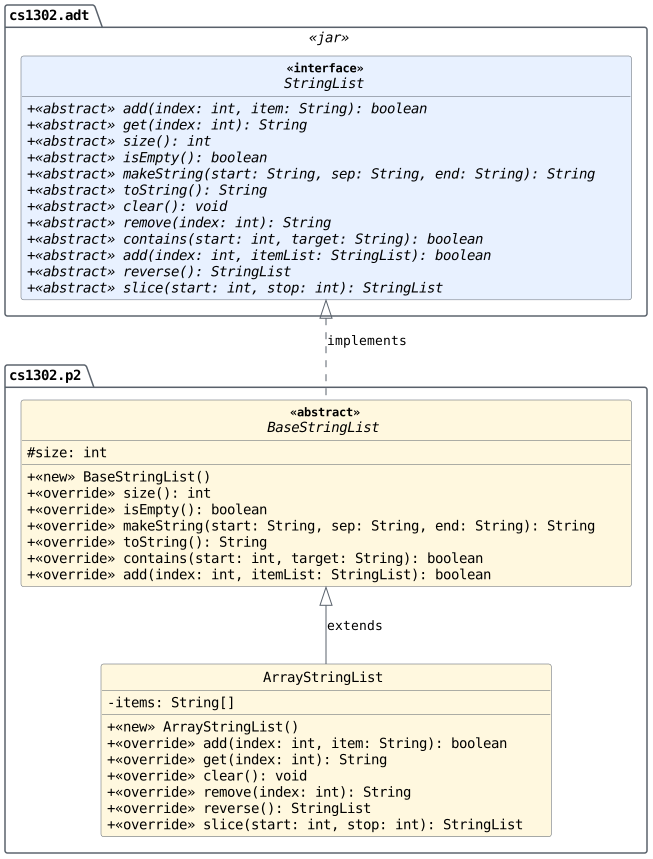
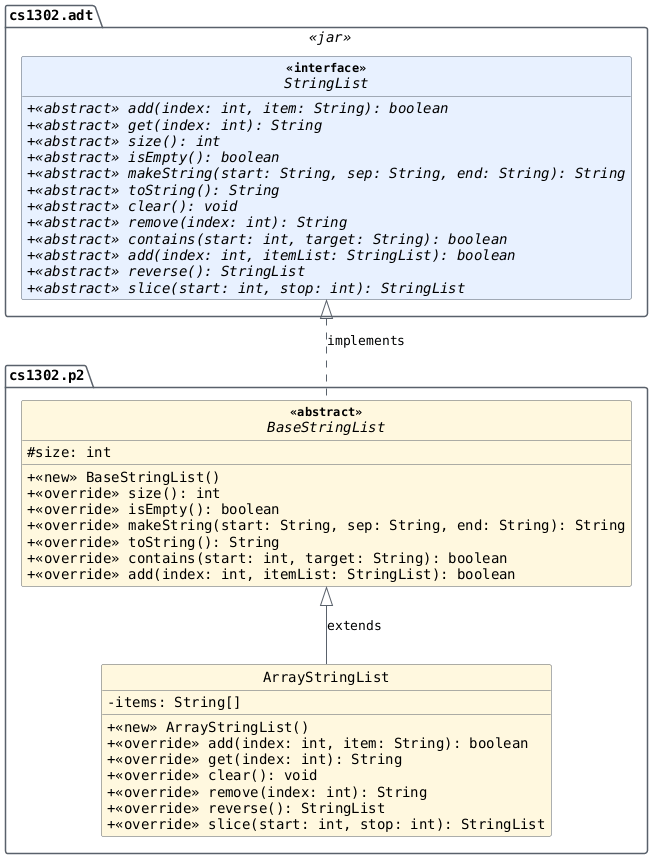
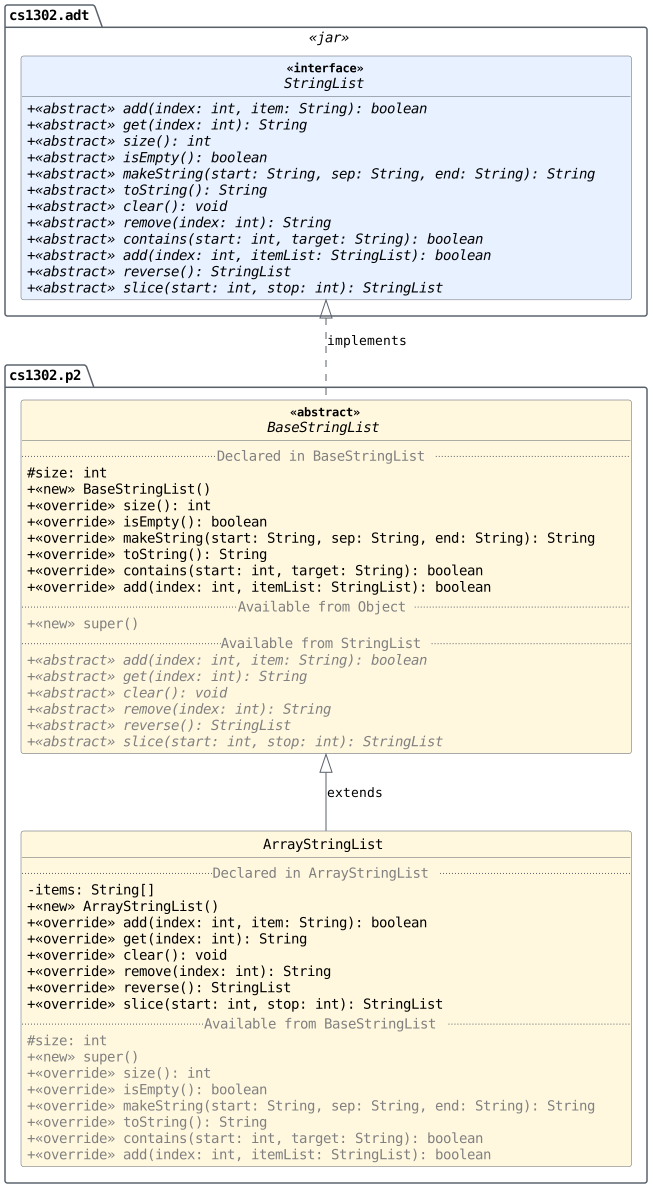
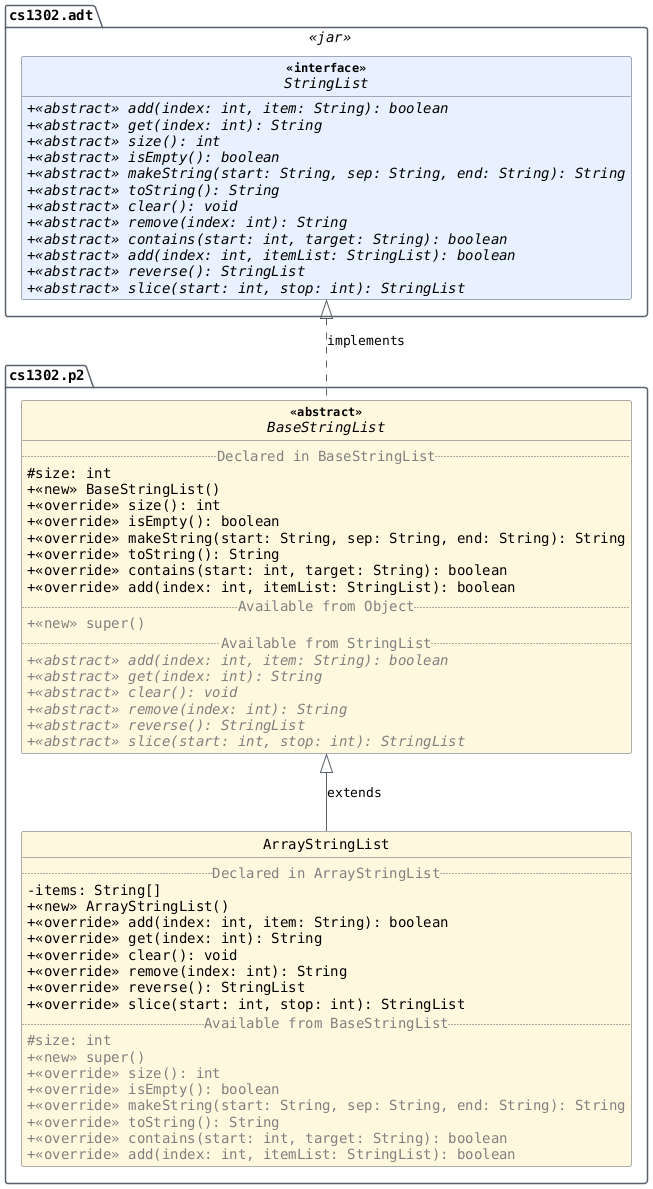
Class Design
Create the ArrayStringList class such that it properly extends BaseStringList and
fully implements the StringList interface with additional
requirements listed below.
You must explicitly define and document a default constructor for this class. The initial size of an
ArrayStringListis0regardless of the list's underlying storage — remember, the list's internal storage and the list itself are two different things. Here is the signature:1public ArrayStringList() {
Over the lifetime of an
ArrayStringListobject, its internal storage may change to accommodate more list elements. When your code increases the size of anArrayStringListobject's internal array storage, you should actively avoid: i) increasing the array size by one; and ii) doubling the size of the array.Increasing by one is wasteful as it requires making a new array and copying over all elements every time an item is added. Doubling the size of the array may be wasteful at large sizes as there may be many indices that contain null. Somewhere in between is more reasonable (increasing by 50%? increasing by 25%?).
We will leave the details up to you. Furthermore, you should not set the initial array size to zero or to the largest number that is allowed.
There is a requirement related to this class's storage included in the Non-Functional Requirements.
Dependencies
The ArrayStringList class depends on your BaseStringList
class as well as some classes that we have included in
cs1302-str-list.jar.
Class / Interface |
Description |
|---|---|
An ADT / interface for a sequence of references to non-empty |
You do not have access to the source code for the classes and interfaces in that Java ARchive (JAR) file; however, API documentation for those classes is provided here.
The compilation instructions that we provide below will ensure that these dependencies are available on the classpath so that the compiler can find them.
How to Compile
To compile ArrayStringList.java, execute the following command
while directly inside the cs1302-str-list directory:
javac -Werror -g \
    -cp bin:lib/cs1302-str-list.jar -d bin \
    src/cs1302/p2/ArrayStringList.java
cs1302.p2.LinkedStringList
Starter Code
The cs1302.p2.LinkedStringList class is one of the classes
that you are responsible for implementing and testing. A
partially implemented version of this file is included in
the starter code. It is your responsibility to ensure that it is
placed under src and named correctly based on the
information provided below.
Item |
Description |
|---|---|
Source |
|
FQN |
|
Package Name |
|
Simple Name |
|
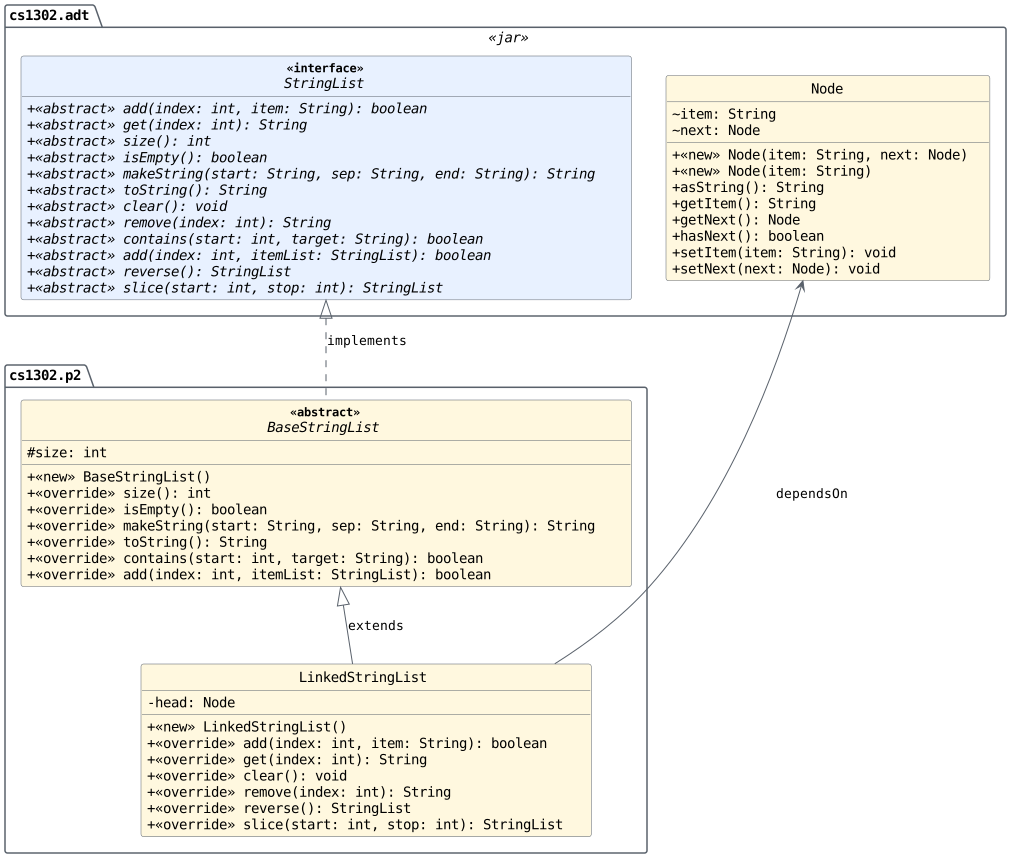
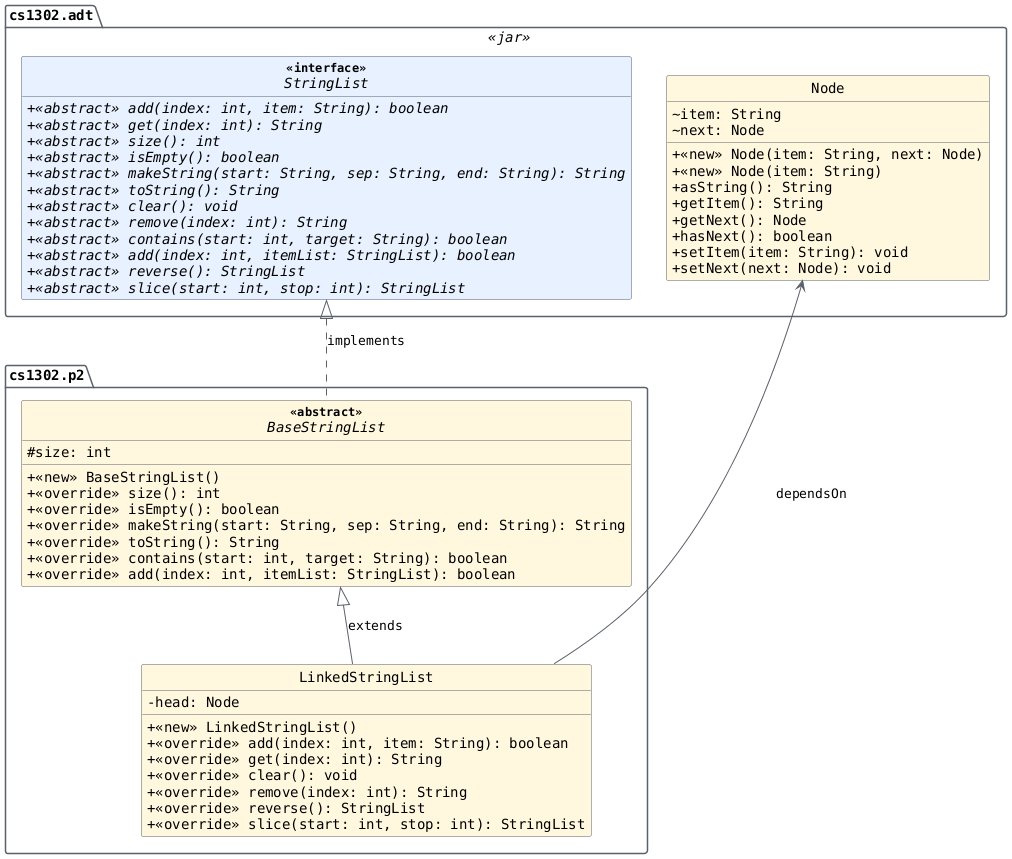
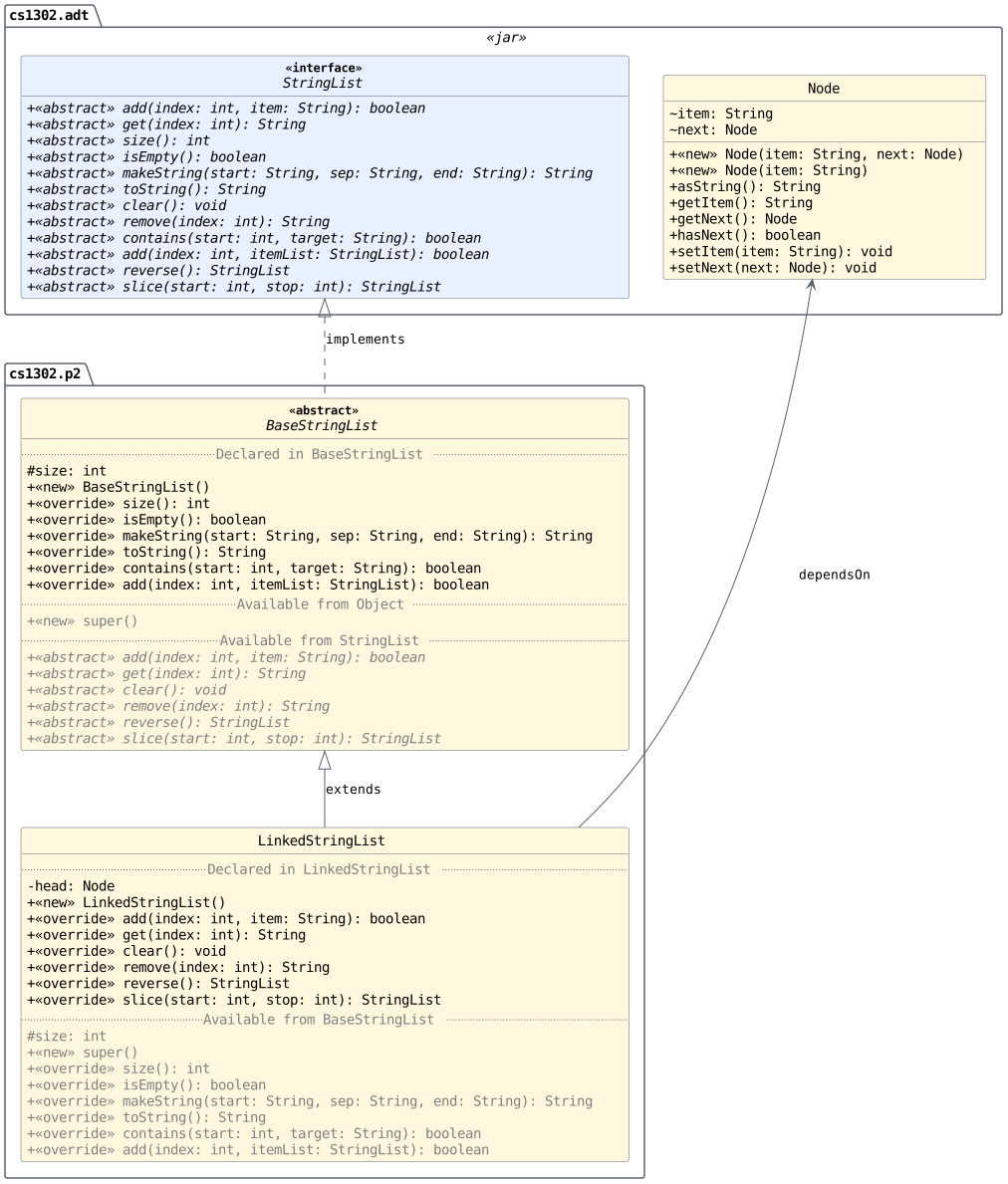
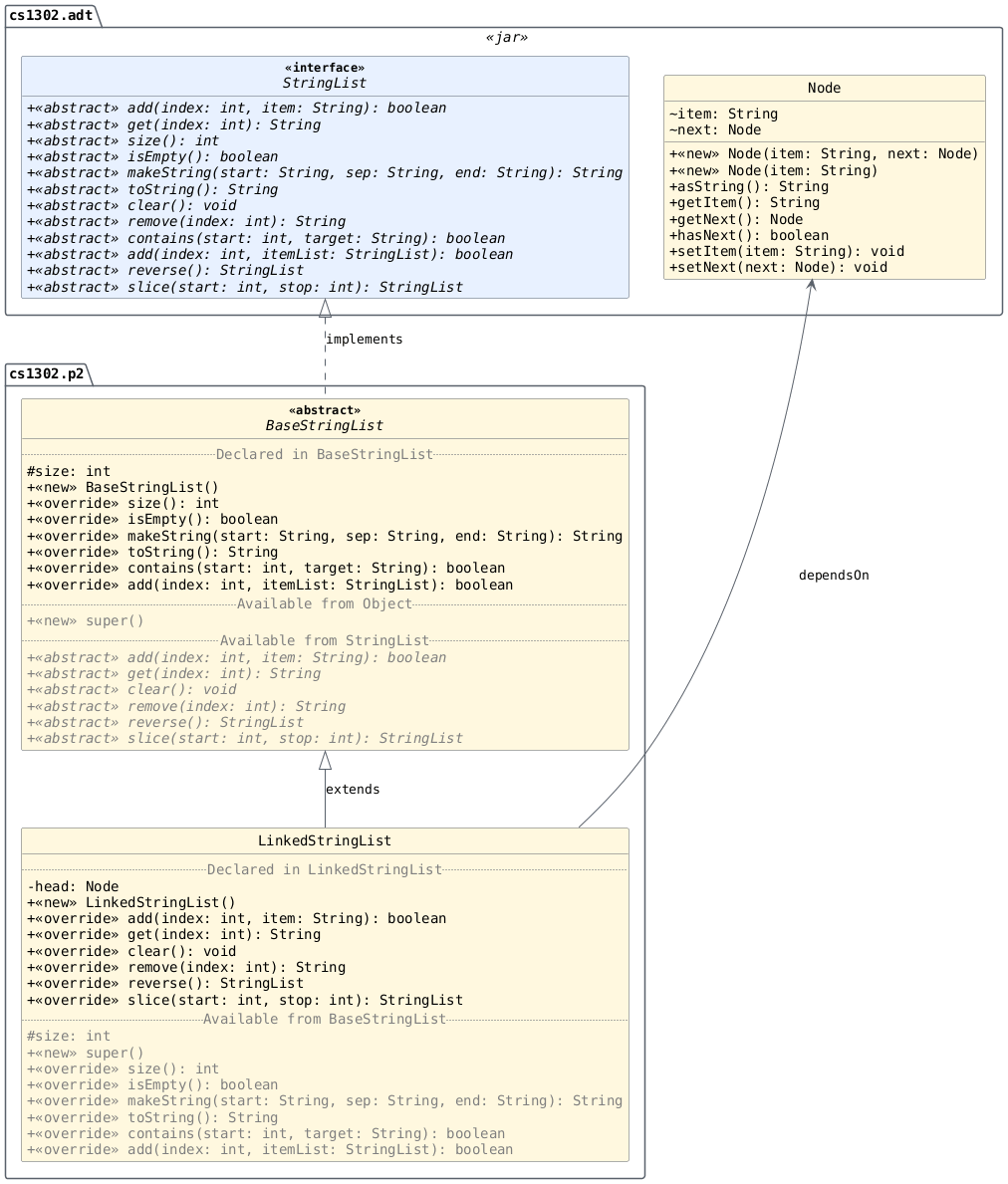
UML Diagrams
These tabs show how LinkedStringList builds on BaseStringList and uses the provided Node
class, with default and expanded views of class members. Select each
tab and read its content to distinguish declared members from relevant
inherited fields and methods.
Class Design
Create the LinkedStringList class such that it properly extends BaseStringList and
fully implements the StringList interface with additional
requirements listed below.
You must explicitly define and document a default constructor for this class. The initial size of a
LinkedStringListis0regardless of the list's underlying storage — remember, the list's internal storage and the list itself are two different things. Here is the signature:1public LinkedStringList() {
There is a requirement related to this class's storage included in the Non-Functional Requirements.
Dependencies
The LinkedStringList class depends on your BaseStringList
class as well as some classes that we have included in
cs1302-str-list.jar.
Class / Interface |
Description |
|---|---|
An ADT / interface for a sequence of references to non-empty |
|
A node for an item in a linked list data structure. |
You do not have access to the source code for the classes and interfaces in that Java ARchive (JAR) file; however, API documentation for those classes is provided here.
The compilation instructions that we provide below will ensure that these dependencies are available on the classpath so that the compiler can find them.
How to Compile
To compile LinkedStringList.java, execute the following command
while directly inside the cs1302-str-list directory:
javac -Werror -g \
    -cp bin:lib/cs1302-str-list.jar -d bin \
    src/cs1302/p2/LinkedStringList.java
cs1302.test.StringListTester
Starter Code
The cs1302.test.StringListTester class is one of the classes that you are
responsible for updating while working on this project.
Item |
Description |
|---|---|
Source |
|
FQN |
|
Package Name |
|
Simple Name |
|
UML Diagrams
The tab below directs you to the testing setup and diagrams relating
cs1302.test.StringListTester to the other project types. Read its content and review
the referenced Testing Setup section before writing your tests.
Please refer to the Testing Setup section provided earlier for
more information about how the cs1302.test.StringListTester class is
structured, including one or more UML diagrams that show
how it relates to the other files in the project.
Class Design
You are responsible for implementing test cases to test your
ArrayStringList and LinkedStringList. There are a few examples of test methods
already provided for you in cs1302.test.StringListTester, but you will add more
as you work through the Project Checklist.
Dependencies
The cs1302.test.StringListTester class uses the StringList interface and the OracleStringList class
provided in cs1302-str-list.jar. When you adjust its
newStringList() method to construct an ArrayStringList or LinkedStringList object,
it also depends on that implementation class.
Class / Interface |
Description |
|---|---|
An ADT / interface for a sequence of references to non-empty |
|
An oracle implementation of the |
You do not have access to the source code for the classes and interfaces in that Java ARchive (JAR) file; however, API documentation for those classes is provided here.
The compilation instructions that we provide below will ensure that these dependencies are available on the classpath so that the compiler can find them.
How to Compile
To compile StringListTester.java, execute the following command
while directly inside the cs1302-str-list directory:
javac -Werror -g \
    -cp bin:lib/cs1302-str-list.jar -d bin \
    src/cs1302/test/StringListTester.java
Hidden Test Cases (100 points)
The functional aspects of this project will be graded using unit
tests, none of which will be made available before the project
deadline. You are expected to test your implementations yourself
via interface polymorphism in your StringListTester.java file.
2.6. Non-Functional Requirements
A non-functional requirement specifies criteria that can be used to judge your submission independently from its function or behavior. If functional requirements describe what your submission should do, then the non-functional requirements describe how your submission is supposed to be. If your submission does not satisfy a non-functional requirement listed in this section, then the requirement's point total is deducted from your submission grade.
Missing Parts (45 points)
You are expected to submit all three parts of this project as described elsewhere in this document. 15 points will be subtracted from your earned point total for each missing part, up to a maximum deduction of 45 points.
Environment and Structure (100 points)
This project must compile and run correctly on Odin using the specific version of Java that is enabled by the CSCI 1302 shell profile, and your directory structure and package structure should match the structure of the starter code.
The location of the default package for source code should be a direct sub-directory of
cs1302-str-listcalledsrc.The only
.javafiles that you should include areBaseStringList.java,ArrayStringList.java,LinkedStringList.java, andStringListTester.java(as well as the.javafiles for any child classes ofStringListTesterthat you create, if applicable).The
BaseStringList.java,ArrayStringList.java,LinkedStringList.java, andStringListTester.javafiles (as well as the.javafiles for any child classes ofStringListTesterthat you create, if applicable) are expected to compile without any errors or warnings on Odin using the commands provided in the compilation instructions that are included elsewhere in this document for theBaseStringList,ArrayStringList,LinkedStringList, andcs1302.test.StringListTesterclasses, respectively.
The location of the default package for compiled code should be a sub-directory of
cs1302-str-listcalledbin.If you include compiled code with your submission, then it will be ignored. Graders are instructed to recompile your submission on Odin before testing your submission.
The location of your generated API documentation website files should be a sub-directory of
cs1302-str-listcalleddoc.See the API Documentation Website non-functional requirement for more information about what should be in the
docdirectory.
If a problem is encountered for your submission that is explicitly described above, then 100 points will be subtracted from your earned point total; however, if the problem is compilation-related or structure-related and NOT explicitly described above, then it will be handled on an individual basis.
Code Style (20 points)
Every .java file that you include as part of your submission
for this project must be in valid style as defined in the CS1302
Code Style Guide. All of the
individual code style guidelines listed in the style guide document
are considered for this requirement.
If check1302 on Odin reports any style violations for your submission, then 5 points will be subtracted from your earned point total for each violation, up to a maximum deduction of 20 points.
The check1302 command is one of the last actions
performed by the compile.sh script included in the
project's starter code.
API Documentation Website (5 points)
Generate the API documentation website for all of the code in the
cs1302.test and cs1302.p2 packages into a directory named
doc directly inside your cs1302-str-list directory, then host the
documentation on Odin using cs1302-str-list-doc as the name
for your symbolic link. The command to do this is already provided
to you in the compile.sh script that is included in the
project's starter code.
To host the API documentation website so that it is accessible via
your Webwork URL, create a symbolic link to your project's doc
directory at ~/public_html/cs1302-str-list-doc using the ln
command by adapting the instructions provided here. You only need to create the
symbolic link once, assuming you create it correctly.
If your doc directory is missing OR does not contain the
appropriate files, then 5 points will be subtracted
from your earned point total. This will be checked for each
part, so make sure to double check your doc directory and the
generated website to make sure they are up to date prior to
submitting each part of the project.
SUBMISSION.md (5 points)
Modify the file named SUBMISSION.md inside the cs1302-str-list
directory to include the following information:
Your name and UGA ID number; and
The full link to the API documentation website that you generated and hosted to satisfy the related non-functional requirement stated earlier.
Here is an example of what the SUBMISSION.md file looks like in
the starter code:
Sally Smith (811-000-999)
https://webwork.cs.uga.edu/~user/cs1302-str-list-doc
Be sure to modify the contents of SUBMISSION.md with your
information. Although the file extension is .md, the
SUBMISSION.md file is just a plain text file that you can edit
with a text editor like Emacs.
If your SUBMISSION.md file is missing OR does not contain the
appropriate information, then 5 points will be
subtracted from your earned point total. This will be checked for
each part, so make sure to double check your SUBMISSION.md
file prior to submitting each part of the project.
Git Commit Log (15 points)
The files in your project submission must be under version control and fully committed using Git, and your Git commit log should indicate progress since the project was assigned or since the last part was due, whichever is more recent.
Each part of the project requires you to make several commits, so this shouldn't be a problem so long as you are following the instructions in the Project Checklist.
If no such progress is indicated via your commit log, then 5 points will be subtracted from your earned point total for each applicable part, up to a maximum deduction of 15 points.
ArrayStringList Storage (100 points)
You must use a basic Java array for this class's storage. The
initial size of the array does not have to be the same size as the
initial size of the list. Whenever the size of the list is about to
exceed the size of its array, the list should dynamically allocate
a new array of a larger size and copy the contents over — please
consider writing and documenting a private support method to do
this. If you use Java's java.util.ArrayList class or something
similar (e.g., a class that implements java.util.Collection),
then that will result in an immediate violation of this
non-functional requirement, regardless of any use of a regular
array elsewhere in the class. This requirement also prohibits any
use of third-party implementations of list or list-like interfaces.
LinkedStringList Storage (100 points)
You must use a sequence of Node objects for this class's
storage. Unlike the array-based implementation in ArrayStringList, this type
of storage is not limited to the number of elements that can fit
into an array (because there is no underlying array). Instead,
it's limited only by the available memory for the Java program
using the LinkedStringList object. If you use Java's java.util.LinkedList
class or something similar (e.g., a class that implements
java.util.Collection), then that will result in an immediate
violation of this non-functional requirement, regardless of any use
of any Node objects elsewhere in the class. This requirement
also prohibits any use of third-party implementations of list or
list-like interfaces.
No Implementation Dependencies (100 points)
You are not permitted to use one implementation of the StringList
interface in another implementation. For example, you cannot use
the ArrayStringList class inside of your LinkedStringList class or vice
versa. Additionally, BaseStringList cannot depend on either of the StringList
implementations; however, it can (and should) depend on the StringList
interface itself. If you have any questions about this, then please
ask your instructor.
You can check this using the jdeps tool. Inspect the output of
the command below after everything is compiled. You do not want to
see ArrayStringList pointing to LinkedStringList or vice-versa.
jdeps -v -cp lib/cs1302-str-list.jar bin
In the illustrative output excerpts below, A -> B means that class
A depends on type B. The final column identifies where B
was found.
1cs1302.p2.ArrayStringList  -> cs1302.p2.LinkedStringList  bin
2cs1302.p2.BaseStringList   -> cs1302.p2.ArrayStringList   bin
Violates the requirement: The first line shows ArrayStringList depending on
LinkedStringList. The second shows BaseStringList depending on ArrayStringList. Either dependency
violates this requirement on its own.
1cs1302.p2.ArrayStringList  -> cs1302.p2.BaseStringList  bin
2cs1302.p2.LinkedStringList -> cs1302.p2.BaseStringList  bin
3cs1302.p2.BaseStringList   -> cs1302.adt.StringList     cs1302-str-list.jar
Does not violate the requirement: Both concrete classes depend on
their required superclass, BaseStringList, which depends on the StringList interface.
These dependencies are permitted. These are only excerpts; inspect the
full output for prohibited dependencies elsewhere.
No java.util.Arrays Dependencies (or similar; 100 points)
You are also NOT allowed to use the java.util.Arrays class.
You can also check for the presence of this dependency using
jdeps as described in an earlier requirement — you don't want
to see java.util.Arrays anywhere in the output. The
System.arraycopy and the array's clone method are also not
allowed for similar reasons. You can use C-s and C-r
in Emacs to see if your files contain these methods.
The following illustrative excerpts show how to interpret the output from the jdeps command in the previous requirement.
1cs1302.p2.ArrayStringList -> java.util.Arrays java.base
Violates the requirement: This line shows ArrayStringList depending on
java.util.Arrays. Using any method from that class creates a
prohibited dependency.
1cs1302.p2.ArrayStringList -> java.lang.Object  java.base
2cs1302.p2.ArrayStringList -> java.lang.String  java.base
Does not violate the requirement: Dependencies on Object and
String are permitted. Inspect the full output to check for a
java.util.Arrays dependency elsewhere.
Note
jdeps reports dependencies on classes, not which methods are
called. A dependency on java.lang.System alone does not tell you
whether System.arraycopy is used, and this output cannot identify
array clone calls. Even if java.util.Arrays is absent, inspect
your source code for those prohibited calls before concluding that
your implementation satisfies the entire requirement.
2.7. Submission Instructions
You will submit each part of your project on Odin. Before you
submit each part, make sure that your project files are located in a
directory called cs1302-str-list. If you followed the instructions provided
earlier in the Getting Started dropdown to
download the project's starter code, then cs1302-str-list is already your
directory name.
How to Submit
To submit a specific part of the project, first change into the parent of your project directory (i.e., one directory above it), then complete the steps below.
Ensure that all of the
.javafiles in your project compile without any errors or warnings on Odin using the compile commands included in thecompile.shscript that is included in the project's starter code. This script also checks your.javafiles for code style violations using the check1302 command, although you can still run check1302 src manually.Warning
If there are style violations, then fix them, recompile, and retest your code. Retesting is important to ensure that you do not accidentally break your code when fixing a style issue.
Ensure that you have generated and hosted the API documentation website for your code, as described in the related non-functional requirement.
Warning
You only need to create the symbolic link to your project's
docdirectory at~/public_html/cs1302-str-list-doconce using the ln command to host the website. Assuming that the symbolic link was created correctly, you do not need to create it again; however, you must regenerate the website files underdocusing the appropriate javadoc command to update the contents of that website.Ensure that your
SUBMISSION.mdfile is up to date, as described in the related non-functional requirement.Ensure that your project's code is fully committed using Git. You can use the git status command to determine if the local copy of your repository has any changes that need to be committed (or confirm that everything is good), then use the git add and git commit commands to stage and commit changes, as needed.
What to look for when using git status
If your copy of the project is fully committed, then git status should inform you that there is nothing to commit:
git status1On branch main 2... 3nothing to commit, working tree clean
You do not have permission to publish your local commits to the book author's copy of the repository at
origin/main, so please disregard any suggestion from Git to use git push when working on this project.git status1On branch main 2Your branch is ahead of 'origin/main' by ?? commits. 3 (use "git push" to publish your local commits) 4...
If you add any new
.javafiles (e.g., if you set up separate tester classes as described in the comments insideStringListTester.java), then they will not be tracked by Git at first. The git status command will let you know this and give you the command to use in order to start tracking them and include them on the stage for your next commit.git status1On branch main 2... 3Untracked files: 4 (use "git add <file>..." to include in what will be committed) 5 src/cs1302/test/ArrayStringListTester.java 6 src/cs1302/test/OracleStringListTester.java 7 src/cs1302/test/LinkedStringListTester.java
Once you are certain that the code included in your project compiles, has no code style violations, includes both an up-to-date
docdirectory andSUBMISSION.mdfile, and is fully committed using Git, then you can submit your work using the following command, replacingNwith the specific part of the project you are submitting:submit1302 cs1302-str-list partN
Warning
Do NOT literally type
partN; instead, be sure to replaceNwith the specific part of the project you are submitting! For example, usepart1when submitting Part 1.Inspect the output of the last command to verify that your project was submitted. Your
cs1302-str-listdirectory should now contain a receipt file that starts withrec. The exact name of the receipt file may vary, depending on the part of the project that you are submitting.
If you have any problems submitting your project then please contact your instructor as soon as possible; however, doing this the day or night the project is due is probably not the best idea.
2.8. Frequently Asked Questions
What is a Java ARchive (JAR) file?
In Java, .jar files are Java™ Archive (JAR) files that bundle
multiple files into a single compressed file. Typically a JAR file
contains the package directories and .class files for a
library. This is just like the bin directory that you are used
to, except it is all bundled into a single file.
How can I test that an exception was thrown?
In this project, you are tasked with making sure that exceptions are thrown from your method overrides in certain situations based on each method's API documentation. When testing your methods, you will want to make sure that one of the things you check is that your methods actually do, in fact, throw those exceptions when they are expected to per the API documentation.
An example of a test method you might write to test whether your
add(int, String) method throws an
IndexOutOfBoundsException when a negative value is supplied for
the index parameter is provided below in
Listing 2.31.
add(int, String)
throws an IndexOutOfBoundsException when a
negative value is supplied for the index
parameter.¶ 1public void testScenario4() {
2 try {
3 StringList list = this.newStringList();
4 list.add(-1, "a");
5 throw new AssertionError(
6 "add(int, String): no exception thrown, but IOOBE expected"
7 );
8 } catch (IndexOutOfBoundsException ioobe) {
9 System.out.println("add(int, String): IOOBE thrown as expected");
10 } catch (Throwable cause) {
11 throw new AssertionError(
12 String.format(
13 "add(int, String): %s thrown, but IOOBE expected",
14 cause.getClass().getName()
15 ),
16 cause
17 );
18 } // cause
19} // testScenario4
We recommend that you further break up your test code into methods in order to reduce the redundancy you see in the example above. Your test code does not need to look exactly like the test code that we provide, but an illustrative example is provided below in Listing 2.32 to help you get started with this idea.
add(int, String) throws an
IndexOutOfBoundsException for index -1, with reusable
static helpers for reporting success and failure. You will
need to include proper Javadoc comments if you add these
static methods to your tester class.¶ 1private static void pass(String message, Object... args) {
2 System.out.printf(message, args);
3} // pass
4
5private static void fail(String message, Object... args) {
6 String formatted = String.format(message, args);
7 throw new AssertionError(formatted);
8} // fail
9
10private static void failFromException(Throwable cause, String message, Object... args) {
11 String formatted = String.format(message, args);
12 throw new AssertionError(formatted, cause);
13} // failFromException
14
15public void testScenario4() {
16 try {
17 StringList list = this.newStringList();
18 list.add(-1, "a");
19 StringListTester.fail("add(int, String): no exception thrown, but IOOBE expected");
20 } catch (IndexOutOfBoundsException ioobe) {
21 StringListTester.pass("add(int, String): IOOBE thrown as expected");
22 } catch (Throwable cause) {
23 StringListTester.failFromException(
24 cause,
25 "add(int, String): %s thrown, but IOOBE expected",
26 cause.getClass().getName()
27 );
28 } // catch
29} // testScenario4
Why doesn't inheritDoc seem to work?
The {@inheritDoc} tag does not work because the javadoc
tool requires the source code in order to automatically pull the
text of comments from supertypes when applicable. We did not
provide you with the source code for the interface, so this is
working as intended.
Tip
Do NOT manually copy the entire comment and parameter details
from the API website. Instead, include a summary sentence and
{@inheritDoc} to make it clear to readers of the source code
that your intent is to inherit the documentation. An example of
this can be found in the style guide, here.