1. C4 Alpha v2026.fa
Notice
This document contains the description for the C4 Alpha project assigned to the students in the Fall 2026 CSCI 1302 classes at the University of Georgia.
1.1. Project Deadlines
This C4 Alpha project is broken up into three parts, and each part has its own deadline. The deadlines for each part are summarized in Table 1.5, and instructions are provided in the Project Checklist section later in this document.
Part |
Due Date |
|---|---|
1 |
Thursday, September 10th @ 11:55 PM |
2 |
Wednesday, September 16th @ 11:55 PM |
3 |
Friday, September 25th @ 11:55 PM |
To earn full points, you are required to submit all three parts. If you want extra credit, then complete and submit the first and / or second parts before their deadlines, as explained in the drop-down below.
Submission-Based (SB) Extra Credit
Students who perform their final submission for a Part 1 and / or
Part 2 of the project via the specific submit1302 command
mentioned for that part before its deadline stated in
Table 1.5 will automatically receive +5
points of Submission-Based (SB) extra credit for that part. This
assumes the submission also earns other credit since extra credit
is extra and never intended to be the only credit earned.
If a student submits each part of the project correctly and on time, then the highest grade they can earn overall is 110 instead of 100.
Late Penalties
Late penalties do not start applying until after the final date/time listed in Table 1.5.
1.2. Project Preface
This first CSCI 1302 project for Fall 2026 is designed to help you apply and extend your prerequisite Java programming knowledge with new concepts from CSCI 1302 in a Unix development environment (i.e., Odin).
Motivation
If you are competent with the learning outcomes for CSCI 1301 (i.e., the prerequisite course), then you already have most of the Java programming knowledge required to complete this project; otherwise, this assignment will help you identify the gaps in your prerequisite programming knowledge so that you can tackle those gaps early in the semester.
This project will also require you to apply some of the new concepts covered in CSCI 1302, including named packages, exception (creating and handling), and Java development in a Unix environment. If you have actively engaged with the CSCI 1302 course content offered so far this semester, then you should be able to comfortably, but not necessarily quickly, complete those aspects of the project by applying what you have practiced and learned from your content engagement.
Finally, this project may require you to do things that you have never been given explicit directions or instructions for — this is just a part of software development. In such cases, you may need to do some research to help you plan your solution. That being said, we have carefully prepared this project description document so that it answers the majority of your questions. If not, then please do not hesitate to ask a question on the course Piazza or during office hours.
Academic Honesty
All students at the University of Georgia explicitly agree to abide by the UGA student honor code when they sign the application for their admission to the University. Additionally, all students enrolled in a CSCI 1302 course section in Fall 2026 are subject to the Academic Honesty policy included in the Fall 2026 CSCI 1302 course syllabus. Furthermore, anyone with access to this project description document is expected to respect the copyright and licensing terms provided or linked to at the bottom of this document and the starter code.
With academic honesty in mind, we ask all Fall 2026 CSCI 1302 students not to fork the project repository on GitHub. Doing so may make your copy of the project publicly visible, and that can violate several of the policies described earlier. Instead of forking the repository, please follow the instructions provided later in this document to acquire a copy of the project description and starter code.
Course-Specific Learning Outcomes
If you work on and complete this project, then you will gain exposure and practice with the following learning outcomes:
# |
Exposure |
Description |
|---|---|---|
LO1.a |
⭐⭐ |
Navigate and modify files, directories, and permissions in a multi-user Unix-like environment. |
LO1.b |
⭐ |
Execute, redirect, pipe, and manage programs/processes in a multi-user Unix-like environment. |
LO1.c |
⭐⭐ |
Create and modify text files and source code using a powerful terminal-based text editor such as Emacs or Vi. |
LO1.d |
⭐⭐ |
Use shell commands to compile new and existing software solutions that are organized into multi-level packages and have external dependencies. |
LO2.b |
⭐⭐ |
Define, throw, and propagate exceptions appropriately in a software solution. |
LO3.a |
⭐⭐ |
Create and update source code that adheres to established style guidelines. |
LO3.b |
⭐ |
Create class, interface, method, and inline documentation that satisfies a set of requirements. |
LO7.c |
⭐ |
Use common abstract data types and structures, including lists, queues, arrays, and stacks in solving typical problems. |
Project Updates
If your instructor updates the project's requirements or starter code before the project is due, then this section will be updated to include a summary of those updates and, if needed, instructions that describe how to update your working copy of the project with the latest versions of any changed files.
1.3. Project Description
In this C4 Alpha project, you will implement and test a class that represents the popular board game Connect Four.
Introduction
Connect Four is a two-player connection game involving a two-dimensional grid of tokens. Here are the basic rules for Connect Four:
To prepare a new game of Connect Four, the grid is setup to accommodate an acceptable number of rows and columns; however, it should not yet contain any tokens.
To get ready to play, both players are assigned a unique token.
To play the game, both players take turns "dropping" copies of their token into non-full columns in the grid. When a token is dropped, it falls to the lowest position in the column that does not yet contain a token.
To win the game, a player must strategically drop their tokens so that four of them connect inside the grid. They are allowed to connect horizontally, vertically, and diagonally.
The game is over once all positions in the grid a filled or when a player wins the game.
The class that you will implement and test will be expected to provide the high-level functionality described above via its constructor and instance methods — the details about what is required are included later in this document.
What you are about to read may seem counter-intuitive, but you will not be writing any code for this project to let users interactively play a game of Connect Four; instead, you will implement and test a class that, once fully implemented, can be used to make writing such an interactive program easier.
Getting Started
You will not be starting from scratch. Instead, starter code is provided that you will need to download to get started, then modify and test to meet the project's requirements. To download the starter code, follow these instructions:
Login to Odin.
If you have not done so, we recommend creating a separate directory inside of your home directory to store all of your CSCI 1302 projects instead of having them all directly inside your home directory.
Change to your CSCI 1302 projects directory.
Execute the following command to download the starter code into a sub-directory called
cs1302-c4-alpha:git clone --depth 1 https://github.com/cs1302uga/cs1302-c4-alpha.git
Change to the
cs1302-c4-alphadirectory that was just created, then use thetreecommand to verify that you now have a copy of the starter code undersrc:tree srcsrc └── cs1302 └── game ├── ConnectFour.java ├── ConnectFourCLI.java └── ConnectFourTester.java
1.4. Project Checklist
The steps in the following checklist assume you have already read the other parts of the project description. The first time that you read this section, simply take notes, then reread it again later to begin working on the project.
Part 1. Prepare and Plan (due Thursday, September 10th @ 11:55 PM)
Preparing for Part 1
To prepare for this part of the project, you must first read the
entire project description. After you have done that, follow the
steps provided below to prepare and plan out the implementation
for the cs1302.game.ConnectFour class that will finish writing the code
for later in Part 2. If you skip reading the entirety of the
project description, then you risk missing important details
that should be considered when planning out your implementation.
Also, even though you are not writing code for this part, your
submission for this part is still expected to meet all the
non-functional requirements stated later in the
project description.
- Due Before:
Thursday, September 10th @ 11:55 PM.
Read through the entire project description and write down questions as you go.
We recommend reading the project description again. A second read-through will help you fill in gaps in your understanding and you may be able to answer some of the questions you wrote down during your first read-through.
If you have not yet done so, download the starter code on Odin by following the instructions in the Getting Started dropdown provided earlier in this document.
Read all of the comments included in
src/cs1302/game/ConnectFour.java, but do not write any code yet. Instead, try to list out the high-level steps for the constructor and methods using a sequence of distinct steps that you can turn into code later.Read through the notes you just wrote. If you see that the steps you wrote for one method include a sequence of steps in another method, then consider whether you can have one method simply call the other. If you see the same steps in several methods, you should consider factoring out the common parts into a single, separate method that you can call from both places. Those are both examples of code reuse and refactoring.
Remember, you have not been tasked with writing any code just yet. For each unimplemented method in
ConnectFour.java, write down your plan for that method as a comment inside the method, taking into account what you think will be tested. We suggest your comments take the form of bullet points so that you can easily reuse some or all of them later when you start to implement the code in Part 2.Before Thursday, September 10th @ 11:55 PM, follow the submission instructions to prepare Part 1 of your project for submission and actually submit it. If your submission contains any implemented methods, then it will only count for the second part's due date and not the first part's due date. The specific submission command to use in the last step of those instructions for this part of the project is stated below:
submit1302 cs1302-c4-alpha part1
Part 2. Partially Implement (due Wednesday, September 16th @ 11:55 PM)
Preparing for Part 2
To prepare for this part of the project, you must first complete
and submit Part 1. You will also need to familiarize yourself
with the tests provided in cs1302.game.ConnectFourTester so that you
can use them to help you implement and test cs1302.game.ConnectFour.
Finally, even though you are not expected to have the entire
implementation for your project finished for this part, your
submission for this part is still expected to meet all the
non-functional requirements stated later in the
project description.
- Due After:
Submitting Part 1.
- Due Before:
Wednesday, September 16th @ 11:55 PM.
Read all of the comments included in
src/cs1302/game/ConnectFourTester.java, then carefully look over itstestConstructor01()method. You will use that method to help you test theConnectFour(int, int)constructor in the next step.It is important that you make every effort to understand how the constructor is being tested by the
testConstructor01()method so that you can confidently implement and test the constructor as you go.Go ahead and uncomment the call to
testConstructor01()in themainmethod incs1302.game.ConnectFourTester, recompile all of your.javafiles, then run thecs1302.game.ConnectFourTesterclass and confirm that the test method fails. After all, it tests the constructor and you have not implemented the constructor yet.
Utilizing your own understanding of how the
ConnectFour(int,
int)
constructor should behave, the plan you wrote for part 1, and the output of runningtestConstructor01()viacs1302.game.ConnectFourTester, implement that constructor (with good code style) by repeatedly writing a little bit of it and testing it usingcs1302.game.ConnectFourTesteras you go.If done properly, your code will always be in a state that compiles (so that you can run the tester), and you should be able to confidently assume that what you have already written either works correctly or it doesn't because a specific part of a test failed.
With practice, the former assumption will help you write code that is more clear, and the latter assumption will help you quickly narrow down where to look when you debug an error.
As you make edits to
ConnectFour.java, make sure that you recompile all of your.javafiles before rerunning thecs1302.game.ConnectFourTesterclass. Repeat, as needed, until you are confident that your code passes the test(s) presented intestConstructor01().Example: Compile and Run to Check testConstructor01()
Compile
ConnectFour.javaandConnectFourTester.java, then run thecs1302.game.ConnectFourTesterclass:javac -Werror -g \ -cp lib/cs1302-gameutil.jar -d bin \ src/cs1302/game/ConnectFour.java
javac -Werror -g \ -cp bin:lib/cs1302-gameutil.jar -d bin \ src/cs1302/game/ConnectFourTester.java
java -cp bin:lib/cs1302-gameutil.jar \ cs1302.game.ConnectFourTester
Below is an example of what the tester output might look if the constructor has not been modified from what it looks like in the starter code, assuming the only method being called by
mainistestConstructor01(). If yourmainmethod calls other test methods, then you should only check the relevant parts of the output when comparing it to this sample output.[testConstructor01] [DISPLAY ONLY: MANUALLY CHECK TEST OUTPUT] expect: this.rows = 6 expect: this.cols = 7 expect: this.grid = 6-by-7 (2D) with null elements expect: this.player = 1-by-2 (1D) with null elements expect: this.numDropped = 0 expect: this.lastDropRow = -1 expect: this.lastDropCol = -1 Exception in thread "main" java.lang.UnsupportedOperationException: constructor: not yet implemented. at cs1302.game.ConnectFour.<init>(ConnectFour.java:55) at cs1302.game.ConnectFourTester.testConstructor01(ConnectFourTester.java:100) at cs1302.game.ConnectFourTester.main(ConnectFourTester.java:28)
Below is an example of what the tester output might look like when the test code in the
testConstructor01method passes, assuming the only method being called bymainistestConstructor01(). If yourmainmethod calls other test methods, then you should only check the relevant parts of the output when comparing it to this sample output.Regarding Other Methods in ConnectFourTester.java
There are several example test methods provided in the starter code for
cs1302.game.ConnectFourTester; however, those provided methods are NOT to be considered exhaustive.When you first download the starter code, none of those methods are called from the class's
mainmethod. Just like you usedtestConstructor01to help you work through this step, you will use some of the other provided test methods when completing subsequent steps, and you will end up writing additional test methods of your own to perform additional testing for scenarios that the provided test methods do not currently test.
Once you are confident that your
ConnectFour(int, int)constructor passes the test intestConstructor01(), carefully look over thetestConstructor02()method incs1302.game.ConnectFourTester. You will use that method to help you further test yourConnectFour(int, int)constructor and some of the getter methods incs1302.game.ConnectFour.It is important that you make every effort to understand how the constructor and getter methods are being tested by the
testConstructor02()method so that you can confidently implement and test things as you go.Go ahead and uncomment the call to
testConstructor02()in themainmethod incs1302.game.ConnectFourTester, recompile all of your.javafiles, then run thecs1302.game.ConnectFourTesterclass to see whether your constructor passes those additional tests. We recommend that you do NOT comment out the call totestConstructor01()so that if you break something, it is easier to notice.As you make edits to
ConnectFour.java, make sure that you recompile all of your.javafiles before rerunning thecs1302.game.ConnectFourTesterclass. Repeat, as needed, until you are confident that your code passes the test(s) presented intestConstructor01().Example: Compile and Run to Check testConstructor02()
Compile
ConnectFour.javaandConnectFourTester.java, then run thecs1302.game.ConnectFourTesterclass:javac -Werror -g \ -cp lib/cs1302-gameutil.jar -d bin \ src/cs1302/game/ConnectFour.java
javac -Werror -g \ -cp bin:lib/cs1302-gameutil.jar -d bin \ src/cs1302/game/ConnectFourTester.java
java -cp bin:lib/cs1302-gameutil.jar \ cs1302.game.ConnectFourTester
Below is an example of what the tester output might look like when the test code in the
testConstructor02method passes, assuming the only method being called bymainistestConstructor02(). If yourmainmethod calls other test methods, then you should only check the relevant parts of the output when comparing it to this sample output.[testConstructor02] Pass: getRows() correctly returned 6 Pass: getCols() correctly returned 7 Pass: isInBounds(0, 0) correctly returned true Pass: getTokenAt(0, 0) correctly returned null Pass: isInBounds(0, 1) correctly returned true Pass: getTokenAt(0, 1) correctly returned null Pass: isInBounds(0, 2) correctly returned true Pass: getTokenAt(0, 2) correctly returned null Pass: isInBounds(0, 3) correctly returned true Pass: getTokenAt(0, 3) correctly returned null Pass: isInBounds(0, 4) correctly returned true Pass: getTokenAt(0, 4) correctly returned null Pass: isInBounds(0, 5) correctly returned true Pass: getTokenAt(0, 5) correctly returned null Pass: isInBounds(0, 6) correctly returned true Pass: getTokenAt(0, 6) correctly returned null Pass: isInBounds(1, 0) correctly returned true Pass: getTokenAt(1, 0) correctly returned null Pass: isInBounds(1, 1) correctly returned true Pass: getTokenAt(1, 1) correctly returned null Pass: isInBounds(1, 2) correctly returned true Pass: getTokenAt(1, 2) correctly returned null Pass: isInBounds(1, 3) correctly returned true Pass: getTokenAt(1, 3) correctly returned null Pass: isInBounds(1, 4) correctly returned true Pass: getTokenAt(1, 4) correctly returned null Pass: isInBounds(1, 5) correctly returned true Pass: getTokenAt(1, 5) correctly returned null Pass: isInBounds(1, 6) correctly returned true Pass: getTokenAt(1, 6) correctly returned null Pass: isInBounds(2, 0) correctly returned true Pass: getTokenAt(2, 0) correctly returned null Pass: isInBounds(2, 1) correctly returned true Pass: getTokenAt(2, 1) correctly returned null Pass: isInBounds(2, 2) correctly returned true Pass: getTokenAt(2, 2) correctly returned null Pass: isInBounds(2, 3) correctly returned true Pass: getTokenAt(2, 3) correctly returned null Pass: isInBounds(2, 4) correctly returned true Pass: getTokenAt(2, 4) correctly returned null Pass: isInBounds(2, 5) correctly returned true Pass: getTokenAt(2, 5) correctly returned null Pass: isInBounds(2, 6) correctly returned true Pass: getTokenAt(2, 6) correctly returned null Pass: isInBounds(3, 0) correctly returned true Pass: getTokenAt(3, 0) correctly returned null Pass: isInBounds(3, 1) correctly returned true Pass: getTokenAt(3, 1) correctly returned null Pass: isInBounds(3, 2) correctly returned true Pass: getTokenAt(3, 2) correctly returned null Pass: isInBounds(3, 3) correctly returned true Pass: getTokenAt(3, 3) correctly returned null Pass: isInBounds(3, 4) correctly returned true Pass: getTokenAt(3, 4) correctly returned null Pass: isInBounds(3, 5) correctly returned true Pass: getTokenAt(3, 5) correctly returned null Pass: isInBounds(3, 6) correctly returned true Pass: getTokenAt(3, 6) correctly returned null Pass: isInBounds(4, 0) correctly returned true Pass: getTokenAt(4, 0) correctly returned null Pass: isInBounds(4, 1) correctly returned true Pass: getTokenAt(4, 1) correctly returned null Pass: isInBounds(4, 2) correctly returned true Pass: getTokenAt(4, 2) correctly returned null Pass: isInBounds(4, 3) correctly returned true Pass: getTokenAt(4, 3) correctly returned null Pass: isInBounds(4, 4) correctly returned true Pass: getTokenAt(4, 4) correctly returned null Pass: isInBounds(4, 5) correctly returned true Pass: getTokenAt(4, 5) correctly returned null Pass: isInBounds(4, 6) correctly returned true Pass: getTokenAt(4, 6) correctly returned null Pass: isInBounds(5, 0) correctly returned true Pass: getTokenAt(5, 0) correctly returned null Pass: isInBounds(5, 1) correctly returned true Pass: getTokenAt(5, 1) correctly returned null Pass: isInBounds(5, 2) correctly returned true Pass: getTokenAt(5, 2) correctly returned null Pass: isInBounds(5, 3) correctly returned true Pass: getTokenAt(5, 3) correctly returned null Pass: isInBounds(5, 4) correctly returned true Pass: getTokenAt(5, 4) correctly returned null Pass: isInBounds(5, 5) correctly returned true Pass: getTokenAt(5, 5) correctly returned null Pass: isInBounds(5, 6) correctly returned true Pass: getTokenAt(5, 6) correctly returned null Pass: getNumDropped(): correctly threw IllegalStateException Pass: getLastDropRow(): correctly threw IllegalStateException Pass: getLastDropCol(): correctly threw IllegalStateException Pass: getPhase() correctly returned NEW Pass: The constructor and getter methods look good!
Utilizing your own understanding of how the
ConnectFour(int, int)constructor should behave, the plan you wrote for Part 1, and the output of runningtestConstructor02()viacs1302.game.ConnectFourTester, continue to implement that constructor (with good code style) and related getter method by repeatedly writing a little bit of each and testing them usingcs1302.game.ConnectFourTesteras you go.If you encounter a
UnsupportedOperationException, then that likely means you have not implemented a particular method yet or, if you did, you forgot to remove thethrowsstatement in the body of that method. Do not fear this exception; instead, simply use it to help you figure out what to try to implement and test next.
Once you are confident that your
ConnectFour(int, int)constructor and getter methods pass the test intestConstructor02(), carefully write one or more test methods incs1302.game.ConnectFourTesterto make sure that your constructor incs1302.game.ConnectFouronly throws anIllegalArgumentExceptionexception when supplied parameter values for a grid that is too large or too small.Write and comment the test methods first, then call them in the
mainmethod incs1302.game.ConnectFourTester. After that, use that to finish your constructor implementation.If the plan you wrote for your constructor in Part 1 includes anything that should happen but has not been tested yet, then follow a similar process to write test methods for those things and use them to help you implement and test your code.
Once you are confident that your
ConnectFour(int, int)constructor has passed the provided tests and some of your own tests, write additional tests to help you implement and test aspects of the getter methods that you have not yet tested, if any.For example, write a test method that checks to make sure that
isInBounds(int, int)correctly returnsfalsewhen invalid parameter arguments are supplied. Likewise, write a test method to make sure thatgetNumDropped()correctly throws anIllegalStateExceptionif called when the current game phase isGamePhase.READY.Those are just examples and do not constitute an exhaustive list of things to check. Refer to the API documentation for each method that you are implementing to see what they are expected to return with (if not
void) or throw.
Follow a similar process to what has been described for the constructor write test methods to help you implement and test the following methods in
cs1302.game.ConnectFour, some of which you may have already implemented – these are the methods that we expect you to have implemented and tested for Part 2:ConnectFour(int, int)getRows()getCols()isInBounds(int, int)getTokenAt(int, int)setPlayerTokens(Token, Token)getPlayerToken(int)getNumDropped()getLastDropRow()getLastDropCol()getPhase()dropToken(int, int)
Warning
Do NOT implement
isLastDropConnectFour()for Part 2. That particular method is one that you will implement and test during Part 3 of this project.Before Wednesday, September 16th @ 11:55 PM, follow the submission instructions to prepare Part 2 of your project for submission and actually submit it. The specific submission command to use in the last step of those instructions for this part of the project is stated below:
submit1302 cs1302-c4-alpha part2
Part 3. Review and Finalize (due Friday, September 25th @ 11:55 PM)
Preparing for Part 3
To prepare for this part of the project, you must first complete and submit Part 2. Also, please remember that your submission for this part is expected to meet all the functional requirements and non-functional requirements stated in the project description.
- Due After:
Submitting Part 2.
- Due Before:
Friday, September 25th @ 11:55 PM.
Use the
testGamePlay01(),testGamePlay02(), and additional test methods that you write incs1302.game.ConnectFourTesterto implement and test theisLastDropConnectFour()method.Be sure to try different scenarios. As you test, you may find bugs in other methods that need to be fixed. Since you have test code, those bugs should be easier to identify, reason about, and locate as you debug your project code.
Warning
Do NOT check all combinations for a connect four! The
isLastDropConnectFour()method is named what it is for a reason: to detect if the last drop created a connect four, one must only inspect the locations near and including the last drop location. It is a good thing that yourdropToken(int, int)method saves where that location is in via one or more of the instance variables. If implemented correctly, theisLastDropConnectFour()method will always return with a value quickly since it only checks for a connect four that includes the position of the last drop.Do one final pass through this project description and your code to make sure that you did not miss anything.
Run your code through ALL your test cases one last time to make sure that everything works as intended.
Double check your code style. Remember, this applies to all
.javafiles in your submission.After you implemented and tested everything in
cs1302.game.ConnectFour, compile and run thecs1302.game.ConnectFourCLIclass provided in the starter code to play your game.Before Friday, September 25th @ 11:55 PM, follow the submission instructions to prepare Part 3 of your project for submission and actually submit it. The specific submission command to use in the last step of those instructions for this part of the project is stated below:
submit1302 cs1302-c4-alpha part3
1.5. Functional Requirements
A functional requirement defines a specific behavior between program inputs and outputs, and a collection of functional requirements describes how a program should function. If your submission satisfies a functional requirement listed in this section, then the requirement's point total is added to your submission grade.
cs1302.game.ConnectFour (100 points)
Starter Code
The cs1302.game.ConnectFour class is one of the classes that
you are responsible for implementing and testing. When you
downloaded the starter code, a partially implemented version of
this class was included under the project's src directory:
Item |
Description |
|---|---|
Source |
|
FQN |
|
Package Name |
|
Simple Name |
|
Class Design
When you implement this class, you will not have much leeway in terms of the class's overall design; however, you are free to add additional instance methods, as needed, to improve readability and code reuse. The details regarding what you are explicitly not permitted to do are explained later in the Non-Functional Requirements section.
Dependencies
It should also be noted that the ConnectFour class depends
on some classes that we have included in
lib/cs1302-gameutil.jar.
Class |
Description |
|---|---|
A |
|
A |
|
The |
You do not have access to the source code for the classes in that Java ARchive (JAR) file; however, API documentation for those classes is provided here.
The compilation instructions that we provide below will ensure that these dependencies are available on the classpath so that the compiler can find them.
How to Compile
To compile ConnectFour.java, execute the following command
while directly inside the cs1302-c4-alpha directory:
javac -Werror -g \
    -cp lib/cs1302-gameutil.jar -d bin \
    src/cs1302/game/ConnectFour.java
Once compiled, you can begin to test the ConnectFour class
by modifying and running cs1302.game.ConnectFourTester.
Game Phases
Your implementation of cs1302.game.ConnectFour is expected
to support the multiple phases defined by the cs1302.gameutil.GamePhase
enumeration.
When a ConnectFour game object is constructed, it is said to
be in the GamePhase.NEW phase, which just means that
GamePhase.NEW is assigned to the object's phase instance
variable. The game object may move into other phases as methods
are called on it. The behavior of some methods depends on the
phase the object is in when called.
Here is a high-level overview of all the required phases and the methods that trigger a game object to change what phase it is in:
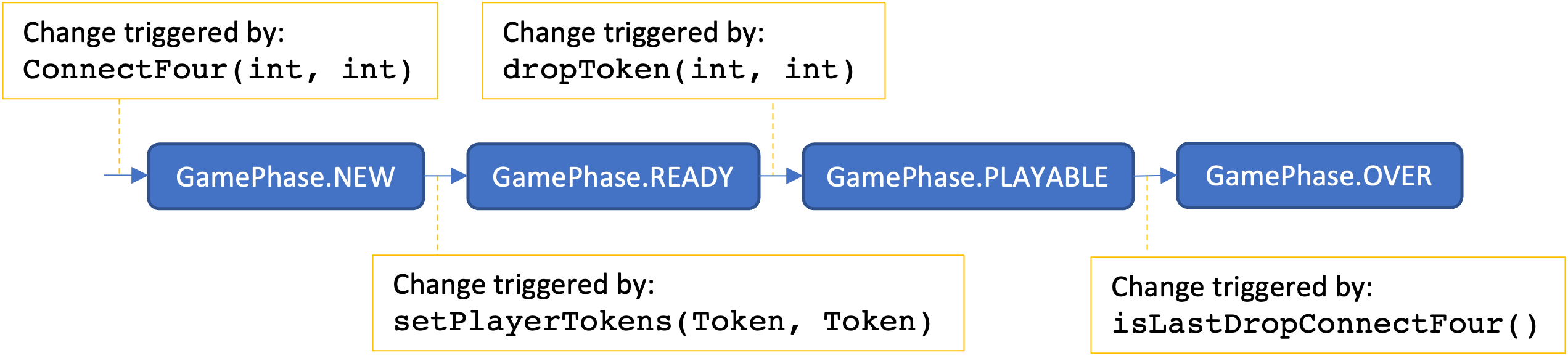
Fig. 1.7 High-level overview of all the required phases and the methods that trigger phase changes.
The details for each game phase are provided in the dropdowns below:
GamePhase.NEW
- GamePhase.NEW:
A newly constructed game is in this phase.
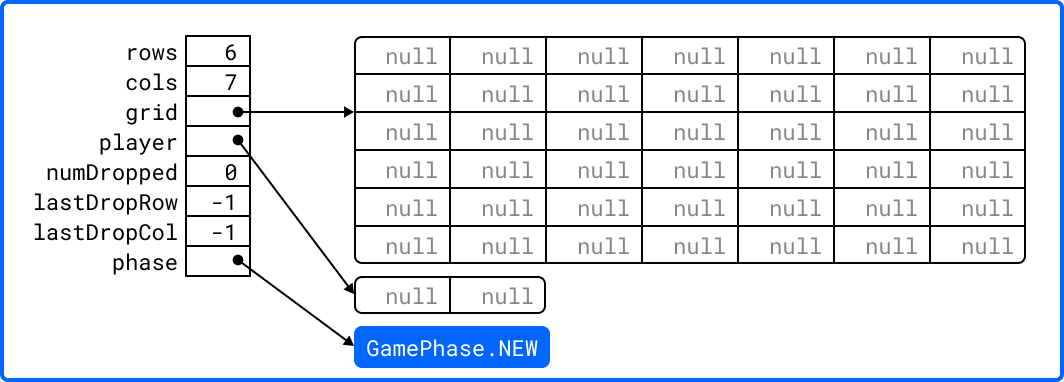
When a ConnectFour object is created, the constructor
should check for any exceptional cases, then initialize the
object's instance variables to the values described below:
Instance Variable |
Description and Initial Value |
|---|---|
|
the supplied value of the |
|
the supplied value of the |
|
a two-dimensional |
|
a one-dimensional |
|
the |
|
the |
|
the |
|
|
Below is an example of some code that constructs a game object with six rows and seven columns followed by an illustration of what the inside of that object should look like when it's done being constructed:
ConnectFour game = new ConnectFour(6, 7);
GamePhase.READY
- GamePhase.READY:
A game that is ready to be played is in this phase.
A game object that is in the GamePhase.NEW phase should
move into the GamePhase.READY phase when its
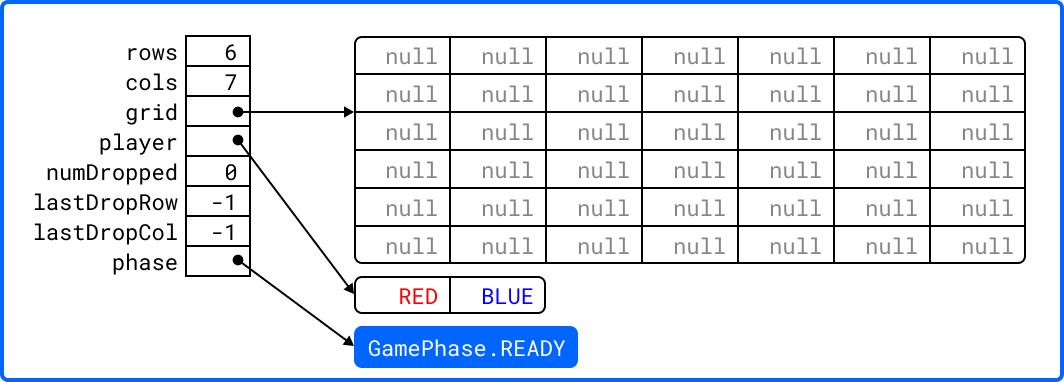
setPlayerTokens method is called for the first time.
Below is an example of some code that sets the player tokens
of a game object in the GamePhase.NEW phase followed by
an illustration of what the inside of that object should look
like immediately after the code has executed and the object
is in the GamePhase.READY phase:
game.setPlayerTokens(Token.RED, Token.BLUE);
GamePhase.PLAYABLE
- GamePhase.PLAYABLE:
A game that is being played is in this phase.
A game object that is in the GamePhase.READY phase should
move into the GamePhase.PLAYABLE phase when its
dropToken method is called for the first time.
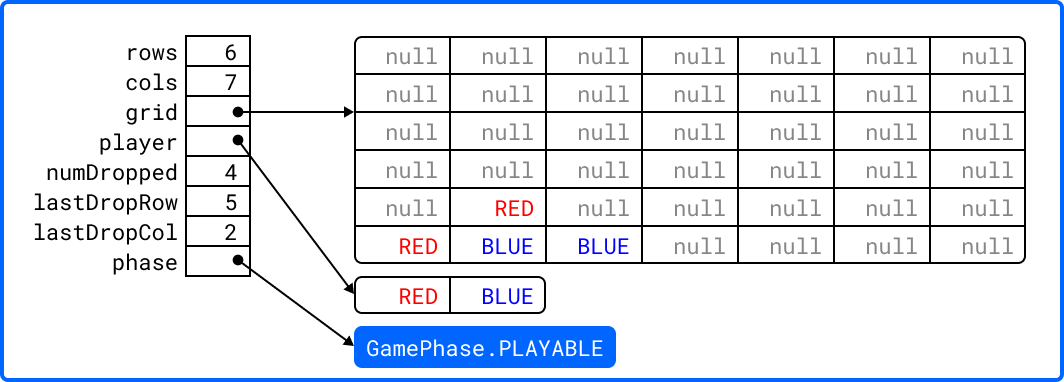
Below is an example of some code that drops several tokens
into the grid of a game object in the GamePhase.READY
phase. Each line of code is followed by an illustration of
what the inside of that object should look like immediately
after the line has been executed. Please note that the
object is in the GamePhase.PLAYABLE phase immediately
after the first line has executed:
game.dropToken(0, 0); // first player, column 0
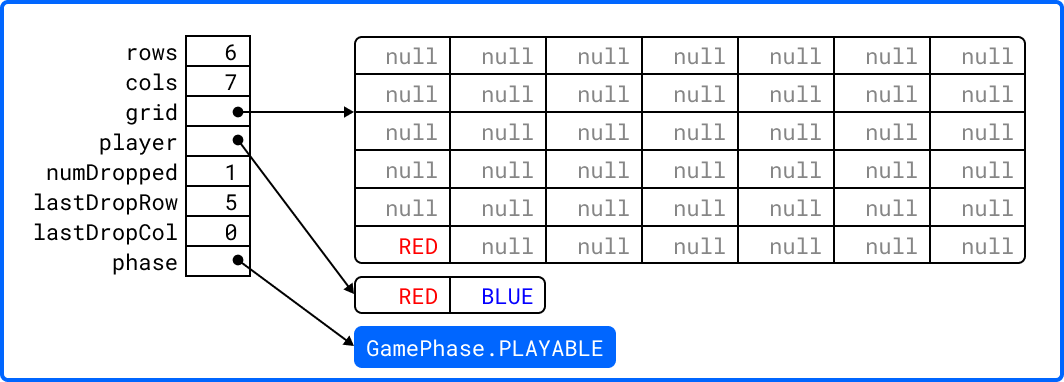
game.dropToken(1, 1); // second player, column 1
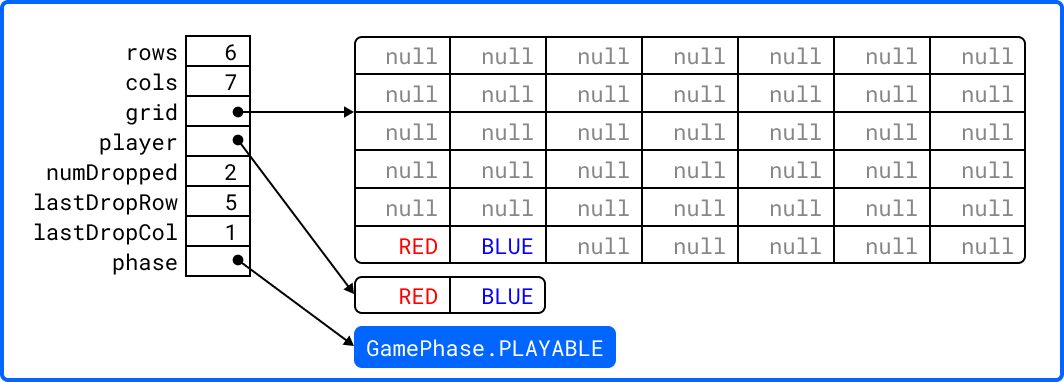
game.dropToken(0, 1); // first player, column 1
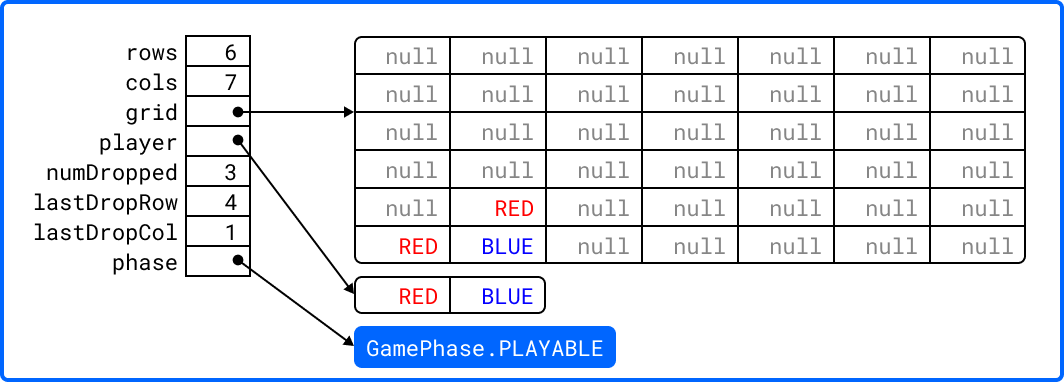
game.dropToken(1, 2); // second player, column 2
GamePhase.OVER
- GamePhase.OVER:
A game that has ended is in this phase.
A game object that is in the GamePhase.PLAYABLE phase
should move into the GamePhase.OVER phase when its
isLastDropConnectFour method is called and one of the
following conditions are met:
the grid is full; or
the method is about to return
truebecause the last drop created a connect four.
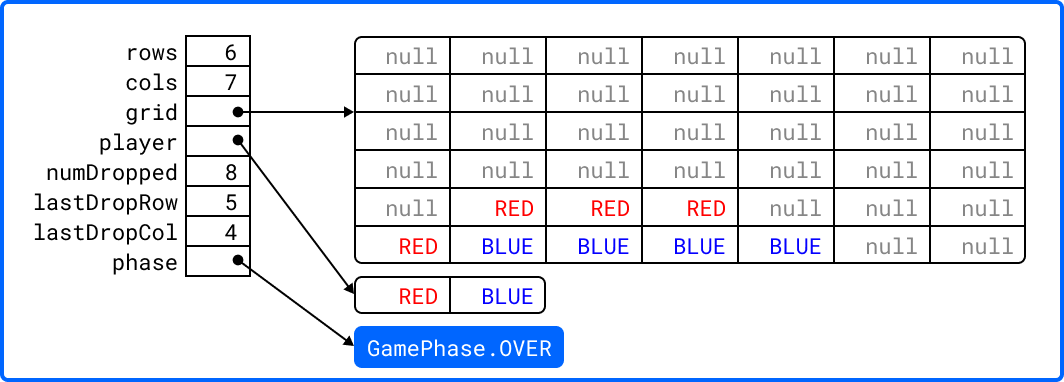
Consider the following illustration of a game object that is
currently in the GamePhase.PLAYABLE phase:
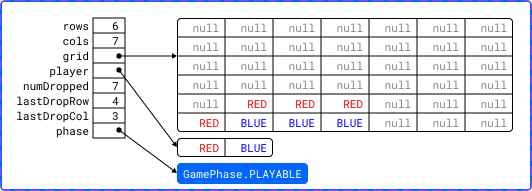
Below is an example of some code that drops a winning token
into the grid of the game object depicted above, then checks
for that win using the object's isLastDropConnectFour
method. The code is followed by an illustration of what the
inside of that object should look like immediately after the
code has been executed. Please note that the object moves
into the GamePhase.OVER phase immediately after the last
call to isLastDropConnectFour() has executed:
game.dropToken(1, 4); // second player, column 4
if (game.isLastDropConnectFour()) {
System.out.println("second player has won!");
} // if
Specific Requirements (100 points)
Your cs1302.game.ConnectFour implementation is expected to
function as described in the API documentation included in the
starter code and as described in the Game Phases dropdown presented earlier in this
document.
To be clear, your program should not only meet these expectations under normal conditions; it should also meet them under exceptional conditions — some of the sample test cases we provided in the starter code demonstrate how to test a behavior when an exception is involved.
After the final due date, it will be tested using several test
cases that you will not have access to ahead of time. The test
methods that you write in your cs1302.game.ConnectFourTester class will
help you prepare your implementation, but they will not be used
to determine your grade.
cs1302.game.ConnectFourTester
Starter Code
The cs1302.game.ConnectFourTester class is where you will
write code to test your cs1302.game.ConnectFour class. When
you downloaded the starter code, a partially implemented version
of this class was included under the project's src
directory:
Item |
Description |
|---|---|
Source |
|
FQN |
|
Package Name |
|
Simple Name |
|
Class Design
You should use this tester class to help you test the
constructor and methods of your ConnectFour class under
different scenarios. In many respects, you have a lot of
leeway. The details regarding what you are explicitly
not permitted to do are explained later in the Non-Functional
Requirements section.
Dependencies
It should also be noted that the ConnectFourTester class
depends on some classes that we have included in
lib/cs1302-gameutil.jar. You do not have access to the
source code for the classes in that Java ARchive (JAR) file;
however, API documentation for those classes is provided
here.
The compilation instructions that we include below will ensure that these dependencies are available on the classpath so that the compiler can find them.
How to Compile and Run
Important
Take note at how the value for the -cp option to both
javac and java is supplied in the instructions below.
The value that is used causes both bin and
lib/cs1302-gameutil.jar to be included on the classpath.
To compile ConnectFourTester.java, you need to first
(re)compile ConnectFour.java, then run the following command
directly inside the cs1302-c4-alpha directory:
javac -Werror -g \
    -cp bin:lib/cs1302-gameutil.jar -d bin \
    src/cs1302/game/ConnectFourTester.java
Once compiled, you can run cs1302.game.ConnectFourTester using java:
java -cp bin:lib/cs1302-gameutil.jar \
    cs1302.game.ConnectFourTester
Specific Requirements
There are no functional requirements for
cs1302.game.ConnectFourTester. Just keep in mind that you
are expected to use it to help you test your code.
cs1302.game.ConnectFourCLI
Starter Code
The cs1302.game.ConnectFourCLI class provides a command-line
program to let users play your game. When you downloaded the
starter code, an implemented version of this program was
included under the project's src directory:
Item |
Description |
|---|---|
Source |
|
FQN |
|
Package Name |
|
Simple Name |
|
This command-line program does not replace the testing that you
are asked to do in ConnectFourTester. Instead, it is
provided to give you a way to play your game, assuming it is
implemented properly. It may also help you when you debug your
code.
Dependencies
It should also be noted that the ConnectFourTester class
depends on some classes that we have included in
lib/cs1302-gameutil.jar. You do not have access to the
source code for the classes in that Java ARchive (JAR) file;
however, API documentation for those classes is provided
here.
The compilation instructions that we include below will ensure that these dependencies are available on the classpath so that the compiler can find them.
How to Compile and Run
To compile ConnectFourCLI.java, you need to first
(re)compile ConnectFour.java, then run the following command
directly inside the cs1302-c4-alpha directory:
javac -Werror -g \
    -cp bin:lib/cs1302-gameutil.jar -d bin \
    src/cs1302/game/ConnectFourCLI.java
Once compiled, you can run cs1302.game.ConnectFourCLI
using java:
java -cp bin:lib/cs1302-gameutil.jar cs1302.game.ConnectFourCLI
Specific Requirements
There are no functional requirements for
cs1302.game.ConnectFourCLI. Just keep in mind that you are
expected to use it to help you test your code.
1.6. Non-Functional Requirements
A non-functional requirement specifies criteria that can be used to judge your submission independently from its function or behavior. If functional requirements describe what your submission should do, then the non-functional requirements describe how your submission is supposed to be. If your submission does not satisfy a non-functional requirement listed in this section, then the requirement's point total is deducted from your submission grade.
Missing Parts (45 points)
You are expected to submit all three parts of this project as described elsewhere in this document. 15 points will be subtracted from your earned point total for each missing part, up to a maximum deduction of 45 points.
Environment and Structure (100 points)
This project must compile and run correctly on Odin using the specific version of Java that is enabled by the CSCI 1302 shell profile, and your directory structure and package structure should match the structure of the starter code.
You should NOT modify the location of any of the provided
.javafiles.You should NOT modify the package statement in any of the provided
.javafiles.The location of the default package for source code should be a direct sub-directory of
cs1302-c4-alphacalledsrc.The only
.javafiles that you should include are your modified versions of the ones in the starter code — you should NOT add any additional source code files.The
ConnectFour.java,ConnectFourTester.java, andConnectFourCLI.javafiles are expected to compile without any errors or warnings on Odin using the commands provided in the compilation instructions that are included elsewhere in this document for thecs1302.game.ConnectFour,cs1302.game.ConnectFourTester, andcs1302.game.ConnectFourCLIclasses, respectively.
The location of the default package for compiled code should be a sub-directory of
cs1302-c4-alphacalledbin.If you include compiled code with your submission, then it will be ignored. Graders are instructed to recompile your submission on Odin before testing your submission.
The location of your generated API documentation website files should be a sub-directory of
cs1302-c4-alphacalleddoc.See the API Documentation Website non-functional requirement for more information about what should be in the
docdirectory.
If a problem is encountered for your submission that is explicitly described above, then 100 points will be subtracted from your earned point total; however, if the problem is compilation-related or structure-related and NOT explicitly described above, then it will be handled on an individual basis.
Code Style (20 points)
Every .java file that you include as part of your submission
for this project must be in valid style as defined in the CS1302
Code Style Guide. All of the
individual code style guidelines listed in the style guide document
are considered for this requirement.
If check1302 on Odin reports any style violations for your
submission, then 5 points will be subtracted from
your earned point total for each violation, up to a maximum
deduction of 20 points.
API Documentation Website (5 points)
Generate the API documentation website for all of the code in the
cs1302.game package into a directory named doc directly
inside your cs1302-c4-alpha directory, then host the documentation on
Odin using cs1302-c4-doc as the name for your symbolic
link. Instructions describing how to do both of those things are
provided in the Javadoc and API Documentation chapter.
Assuming you are directly inside your cs1302-c4-alpha directory, the
command below can be used to generate the website files and
place them in the doc directory:
cs1302.game package in doc. The -link
option lets the Javadoc tool create documentation
links to the classes provided in the Java ARchive (JAR) file, even
though you do not have access to their source code.¶javadoc -d doc \
-cp lib/cs1302-gameutil.jar \
-sourcepath src \
-subpackages cs1302.game \
-link https://cs1302uga.github.io/cs1302-c4-alpha/doc/
To host the API documentation website so that it accessible via
your Webwork URL, create a symbolic link to your project's doc
directory at ~/public_html/cs1302-c4-doc using the ln
command by adapting the instructions provided here. You only need to create the
symbolic link once, assuming you create it correctly.
If your doc directory is missing OR does not contain the
appropriate files, then 5 points will be subtracted
from your earned point total. This will be checked for each
part, so make sure to double check your doc directory and the
generated website to make sure they are up to date prior to
submitting each part of the project.
SUBMISSION.md (5 points)
Modify the file named SUBMISSION.md inside the cs1302-c4-alpha
directory to include the following information:
Your name and UGA ID number; and
The full link to the API documentation website that you generated and hosted to satisfy the related non-functional requirement stated earlier.
Here is an example of what the SUBMISSION.md file looks like in
the starter code:
Sally Smith (811-000-999)
https://webwork.cs.uga.edu/~user/cs1302-c4-doc
Be sure to modify the contents of SUBMISSION.md with your
information. Although the file extension is .md, the
SUBMISSION.md file is just a plain text file that you can edit
with a text editor like Emacs.
If your SUBMISSION.md file is missing OR does not contain the
appropriate information, then 5 points will be
subtracted from your earned point total. This will be checked for
each part, so make sure to double check your SUBMISSION.md
file prior to submitting each part of the project.
1.7. Submission Instructions
You will submit each part of your project on Odin. Before you
submit each part, make sure that your project files are located in a
directory called cs1302-c4-alpha. If you followed the instructions provided
earlier in the Getting Started dropdown to
download the project's starter code, then cs1302-c4-alpha is already your
directory name.
How to Submit
To submit a specific part of the project, first change into the parent of your project directory (i.e., one directory above it), then complete the steps below.
Ensure that all of the
.javafiles in your project compile without any errors or warnings on Odin using the specific commands provided in the compilation instructions for thecs1302.game.ConnectFour,cs1302.game.ConnectFourTester, andcs1302.game.ConnectFourCLIclasses, respectively.Check every
.javafile in your submission for code style violations using thecheck1302command. If you have been following the instructions provided earlier in this document, then you have done this frequently, but it does not hurt to double-check it before you submit. If you are in the parent directory ofcs1302-c4-alpha, then you can check your entire submission using the command below:check1302 cs1302-c4-alphaWarning
If there are style violations, then fix them, recompile, and retest your code. Retesting is important to ensure that you do not accidentally break your code when fixing a style issue.
Ensure that you have generated and hosted the API documentation website for your code, as described in the related non-functional requirement.
Warning
You only need to create the symbolic link to your project's
docdirectory at~/public_html/cs1302-c4-doconce using thelncommand to host the website. Assuming that the symbolic link was created correctly, you do not need to create it again; however, you must regenerate the website files underdocusing the appropriatejavadoccommand to update the contents of that website.Ensure that your
SUBMISSION.mdfile is up to date, as described in the related non-functional requirement.Once you are certain that the code included in your project compiles, has no code style violations, and includes both an up-to-date
docdirectory andSUBMISSION.mdfile, then you can submit your work using the following command, replacingNwith the specific part of the project you are submitting:submit1302 cs1302-c4-alpha partN
Warning
Do NOT literally type
partN; instead, be sure to replaceNwith the specific part of the project you are submitting! For example, usepart1when submitting Part 1.Inspect the output of the last command to verify that your project was submitted. Your
cs1302-c4-alphadirectory should now contain a receipt file that starts withrec. The exact name of the receipt file may vary, depending on the part of the project that you are submitting.
If you have any problems submitting your project then please contact your instructor as soon as possible; however, doing this the day or night the project is due is probably not the best idea.
1.8. Frequently Asked Questions
What is a Java ARchive (JAR) file?
In Java, .jar files are Java™ Archive (JAR) files that bundle
multiple files into a single compressed file. Typically a JAR file
contains the package directories and .class files for a
library. This is just like the bin directory that you are used
to, except it is all bundled into a single file.
For example, the lib/cs1302-gameutil.jar file contains the
package directories and .class files for the classes and
enumerations defined in cs1302.gameutil package. If you are in
the cs1302-c4-alpha directory, then you can use the following command to
take a peek into the archive:
jar -tf lib/cs1302-gameutil.jar
You should notice that the top-level directory in the JAR file is
cs1302, which means that the JAR file itself can serve as the
default package for compiled code — this is why we use -cp in
examples given elsewhere in this project description.
Do I need to extract the files from the JAR file?
No, you do not and must not extract (or unzip/unjar) the files from the JAR file.
Java tools like javac, java, and
javadoc can directly read the compiled bytecode and
package structure from inside the archive when its path (i.e.,
lib/cs1302-gameutil.jar) is supplied on the classpath using the
-cp option.
Extracting the contents of the JAR file into your project's
src or bin directories is unnecessary and can cause
compilation errors, class name collisions, or violations of the
non-functional requirements.
How do I use the GamePhase and Token enums?
An enumeration (or enum) is a special Java type used to define a
fixed set of named constants. The starter JAR file provides two
such enums in the cs1302.gameutil package: GamePhase and
Token.
Here is how you can use them in your code:
Import the Enum Types: Explicitly import the enum types at the top of your
.javafile:import cs1302.gameutil.GamePhase; import cs1302.gameutil.Token;
Reference Enum Constants: Access the predefined constants using the enum type name followed by the constant name (for example,
GamePhase.NEWorToken.RED). Do not use thenewkeyword, as enum constants are already instantiated for you.Assign and Compare Values: You can declare variables of an enum type, assign enum constants to them, and compare them directly using the
==equality operator (or the.equals()method). This works because the==operator checks if two references refer to the same object, and since there is only one instance of each enum constant, this comparison is perfectly valid. Do not use the equality operator for object comparison in general; however, it is safe for enums.
The example below is just a high-level example; you should not copy the example code directly. Instead, you should use the concepts demonstrated in the example to help you write your own code.
// Variable declaration and assignment
GamePhase currentPhase = GamePhase.NEW;
Token playerToken = Token.RED;

// Checking equality using ==
if (currentPhase == GamePhase.READY) {
    System.out.println("The game is ready to play.");
} // if

if (playerToken == Token.RED) {
    System.out.println("Current token is RED.");
} // if