6. Interfaces Lesson
Introduction to Interfaces
Introduction to Interfaces
Sample solutions not included, because "Show Solutions" was not toggled before printing.
Note
Activity objective: Show the benefits of interfaces at a high level. We want students to consider when it is appropriate to use an interface.
Interfaces in the Real World
If we swap out one specific device / object with another that shares the same interface, we can still use the new device even though it likely works differently. We are able to do this because we are familiar with the interface:
Motor Vehicles and Humans
Phone Dial Pads / Screens and Humans
Remote Controls and Humans
The same is true when two hardware devices need to interact:
ATMs and Debit Cards
Computers and USB Devices
etc.
This same idea can be applied to a software system (or systems) to let different parts interact.
Interfaces in Software
Scenario: Disparate Classes, Common Action
We have Java code that uses an object of a particular class to perform some action or actions using the object, and we need to update the code to also be able to use an object of some other class to perform the same kind of action or actions using that object. The classes for these objects each perform the action in their own way.
Goal:
Setup our code so that whenever it switches between using these objects to perform the action, the code outside those object's classes does not need to be updated.
Java Interfaces:
An interface makes classes plug an play (polymorphism). Just like if you swap out your car, you don't want to have to relearn how to drive.
Interfaces allow us to remove dependencies between classes and make our code easier to update in the future.
When to Use:
Multiple disparate classes that share a common action but are otherwise unrelated (disparate) are good candidates for this technique.
Tip
Think of the common action as a high level action that will work differently on different devices.
For example: A car "moves forward" (high level action) when you press the gas pedal. However, older cars work differently from new cars, electric cars work differently from gas cars, etc.
Group Activity
Come up with an example involving two classes and a common action that meet the following criteria:
The classes are disparate (for this activity, let's have NO overlap).
The classes contain a common action (method) that can be performed on either kind of object, even though the classes are disparate.
The common action should be a high level action. The action should not be done the same way for each class.
Create an interface to describe the common action.
Deliverables:
A UML diagram that shows the two classes, the interface, and the relationships between all three (arrows).
A short justification describing how the implementation of the common action (method) is different but still accomplishes the common goal.
The Drawable Interface
The Drawable Interface
Sample solutions not included, because "Show Solutions" was not toggled before printing.
Note
Activity objective: Show the benefits of interfaces using an example we can refactor.
Step 1: Write out disparate classes along with the main method that calls a method to draw each (name the draw method differently). The draw methods will need to be in the driver class for the first step.
Step 2: Show how we can refactor the code and put the draw method in each class and then adjust the main method.
Step 3: Add an interface and show the resulting UML diagram. The classes/relationships have changed. However, the main method is so much cleaner and won't need to be modified later.
Note
Reference: Interface and Class Listings
1package cs1302.draw;
2
3public interface Drawable {
4
5    void draw();
6
7} // Drawable
 1package cs1302.draw;
 2
 3import java.awt.Color;
 4
 5public class Tree implements Drawable {
 6
 7    private int height;
 8    private Color trunkColor;
 9
10    public Tree(int height, Color trunkColor) {
11        this.height = height;
12        this.trunkColor = trunkColor;
13    } // Tree
14
15    public void grow(int amount) {
16        this.height += amount;
17        System.out.println("The tree is now " + height + " feet tall.");
18    } // grow
19
20    public int getHeight() {
21        return this.height;
22    } // getHeight
23
24    public Color getTrunkColor() {
25        return this.trunkColor;
26    } // getTrunkColor
27
28    @Override
29    public void draw() {
30        System.out.println("**** Gathering info to draw Tree ****");
31        System.out.printf("Getting trunk color... %s\n", this.getTrunkColor());
32        System.out.printf("Getting the height... %d\n", this.getHeight());
33        System.out.println("Doing some math...");
34        System.out.println("**** Rendering Tree ****");
35        System.out.printf(
36            "This %s tree is %d meters tall.\n",
37            this.getTrunkColor().toString(),
38            this.getHeight()
39        );
40    } // draw
41
42} // Tree
 1package cs1302.draw;
 2
 3import java.awt.Color;
 4
 5public class Person implements Drawable {
 6
 7    private Color eyeColor;
 8    private Color hairColor;
 9
10    public Person(Color eyeColor, Color hairColor) {
11        this.eyeColor = eyeColor;
12        this.hairColor = hairColor;
13    } // Person
14
15    public void describeAppearance() {
16        System.out.println("This person has " +
17                           eyeColor.toString() + " eyes and " +
18                           hairColor.toString() + " hair.");
19    } // describeAppearance
20
21    public Color getEyeColor() {
22        return this.eyeColor;
23    } // getEyeColor
24
25    public Color getHairColor() {
26        return this.hairColor;
27    } // getHairColor
28
29    @Override
30    public void draw() {
31        System.out.println("**** Gathering info to draw the Person ****");
32        System.out.printf("Getting eye color... %s\n", this.getEyeColor());
33        System.out.printf("Getting hair color... %s\n", this.getHairColor());
34        System.out.println("**** Rendering Person... ****");
35        System.out.printf(
36            "This is a person with eye color %s and hair color %s.\n",
37            this.getEyeColor(),
38            this.getHairColor()
39        );
40    } // draw
41
42} // Person
 1package cs1302.draw;
 2
 3import java.awt.Color;
 4
 5public class Airplane implements Drawable {
 6
 7    private Color paintColor;
 8    private int numberOfWheels;
 9    private double length;
10
11    public Airplane(Color paintColor, int numberOfWheels, double length) {
12        this.paintColor = paintColor;
13        this.numberOfWheels = numberOfWheels;
14        this.length = length;
15    } // Airplane
16
17    public void fly() {
18        System.out.printf(
19            "The %s airplane, with %d wheels and a length of ~ %.2f meters, is flying high!\n",
20            this.paintColor,
21            this.numberOfWheels,
22            this.length
23        );
24    } // fly
25
26    public Color getPaintColor() {
27        return this.paintColor;
28    } // getPaintColor
29
30    public int getNumberOfWheels() {
31        return this.numberOfWheels;
32    } // getNumberOfWheels
33
34    public double getLength() {
35        return this.length;
36    } // getLength
37
38    @Override
39    public void draw() {
40        System.out.println();
41        System.out.println("**** Gathering info to draw Airplane ****");
42        System.out.printf("Getting paint color... %s\n", this.getPaintColor());
43        System.out.printf("Getting the number of wheels... %d\n", this.getNumberOfWheels());
44        System.out.printf("Getting the length... ~ %.2f\n", this.getLength());
45        System.out.println("**** Rendering Airplane... ****");
46        this.fly();
47    } // draw
48
49} // Airplane
 1package cs1302.draw;
 2
 3import java.awt.Color;
 4
 5public class Flower implements Drawable {
 6
 7    private Color petalColor;
 8    private int numberOfPetals;
 9
10    public Flower(Color petalColor, int numberOfPetals) {
11        this.petalColor = petalColor;
12        this.numberOfPetals = numberOfPetals;
13    } // Flower
14
15    public void bloom() {
16        System.out.println("The flower with " +
17                           numberOfPetals + " petals is blooming!");
18    } // bloom
19
20    public void changeColor(Color newColor) {
21        this.petalColor = newColor;
22        System.out.println("The flower's color has been changed to " + newColor);
23    } // changeColor
24
25    public Color getPetalColor() {
26        return this.petalColor;
27    } // getPetalColor
28
29    public int getNumberOfPetals() {
30        return this.numberOfPetals;
31    } // getNumberOfPetals
32
33    @Override
34    public void draw() {
35        System.out.println("**** Gathering info to draw Flower ****");
36        System.out.printf("Getting petal color... %s\n", this.getPetalColor());
37        System.out.printf("Getting the number of petals... %s\n", this.getNumberOfPetals());
38        System.out.println("**** Rendering Flower... ****");
39        System.out.printf(
40            "This %s flower has %d petals!\n",
41            this.getPetalColor(),
42            this.getNumberOfPetals()
43        );
44    } // draw
45
46} // Flower
 1package cs1302.draw;
 2
 3public class Utility {
 4
 5    public static void drawIt(Drawable obj) {
 6        obj.draw();
 7    } // drawIt
 8
 9    public static void drawAll(Drawable[] objs) {
10        for (Drawable obj : objs) {
11            obj.draw();
12        } // for
13    } // drawAll
14
15} // Utility
Part 1: Exploring the Problem
UML - Version 1
Consider the UML Diagram below and answer the following on your exit tickets:
Would you consider
Tree,Airplane, andPersonto be disparate classes?Do they share a common action?
Is the common action implemented the same way?
UML - Version 2
The common action "Draw" can be added to each class using an identical method signature:
UML - Version 3
Now, imagine we want to be able to draw many different objects of each type. We might create methods like this:
Discussion
Answer the following on your exit ticket:
Keeping the same structure as the existing code, what steps
would we need to take to add another class, Flower, that
can be drawn? Assume that the Flower class has two
methods: drawStem and drawPetals and that you would
need to call both to draw the entire flower. We also want a
method that allows us to draw many flowers at once.
You can answer by describing what you would need to do or by drawing a UML diagram.
Post-Discussion UML
What is tedious/error-prone about this process? What if we needed to add hundreds of classes that can be drawn?
Redundant Code
Let's take a minute to consider the methods inside of the
Utility class. The drawFlowers method probably
looks something like this:
public static void drawFlowers(Flower[] flowers) {
    for (Flower currentFlower: flowers) {
        currentFlower.draw();
    } // for
} // drawFlowers
On your exit tickets, answer the following questions:
How is
drawTreesdifferent fromdrawFlowers?How is
drawAirplanesdifferent fromdrawFlowers?Is there redundancy between these methods?
Thinking Bigger
Having to add a method to Utility every time we add a new
class (like Flower) is the equivalent of having to learn
to drive all over again if you buy a new car. We have to do this
because our classes do not have a common interface (even though
they all contain the same method).
Two changes doesn't seem like a big deal at first, but imagine a larger code base with more dependencies. You don't want to be worried that every change you make may introduce bugs in other classes and you certainly don't want to be checking all dependent code for potential issues.
Part 2: Incorporating the Interface
How do Interfaces help?
Remember the goals of using interfaces:
Implementing classes should be plug and play
Reduce dependencies
Question
Answer the following on your exit ticket:
How could we incorporate an interface into this code?
What would you call the new interface?
What method(s) would need to be in the interface?
Which classes would implement the interface?
UML Comparison
What is better about the version of this code that contains the interface? Write your answer on your exit ticket.
Solution
There is only one dependency and fewer methods in Utility. The
Utility class will now work with all types that implement Drawable.
Discussion
Question
Answer the question below on your exit ticket:
With the new structure that incorporates the Drawable
interface, what would we need to do to add another class,
Flower, that can be drawn?
Updated UML
Part 2.5: Memory Map: Calling the drawAll Method
On your exit tickets, draw a memory map that depicts what memory
looks like after all the lines in the main method execute:
1public static void drawAll(Drawable[] objs) {
2    for (Drawable obj: objs) {
3        obj.draw();
4    } // for
5} // for
1public static void main(String[] args) {
2
3    Drawable[] objects = new Drawable[2];
4
5} // main
1public static void drawAll(Drawable[] objs) {
2    for (Drawable obj: objs) {
3        obj.draw();
4    } // for
5} // for
1public static void main(String[] args) {
2
3    Drawable[] objects = new Drawable[2];
4    objects[0] = new Tree(12, Color.GRAY);
5    objects[1] = new Person(Color.GREEN, Color.GRAY);
6
7} // main
1public static void drawAll(Drawable[] objs) {
2    for (Drawable obj: objs) {
3        obj.draw();
4    } // for
5} // for
 1public static void main(String[] args) {
 2
 3    Drawable[] objects = new Drawable[2];
 4    objects[0] = new Tree(12, Color.GRAY);
 5    objects[1] = new Person(Color.GREEN, Color.GRAY);
 6
 7    // What does memory look like when inside drawAll but
 8    // just before it executes its first line of code?
 9    Utility.drawAll(objects);
10
11} // main
1public static void drawAll(Drawable[] objs) {
2    for (Drawable obj: objs) {
3        obj.draw();
4    } // for
5} // for
 1public static void main(String[] args) {
 2
 3    Drawable[] objects = new Drawable[2];
 4    objects[0] = new Tree(12, Color.GRAY);
 5    objects[1] = new Person(Color.GREEN, Color.GRAY);
 6
 7    // What does memory look like when inside drawAll and
 8    // just before the call to draw() executes (first iteration)?
 9    Utility.drawAll(objects);
10
11} // main
What is the data type of the
objvariable?Is the value of
objequal tonull?If not
null, what is the data type of the object thatobjrefers to?What class defines the body of the
draw()method being called viaobj?
Solution: Interactive Memory Stepper
Step through the creation of the Drawable[] array, polymorphic
object instantiation, and the call to Utility.drawAll to
verify the memory map and reference variables:
 1package cs1302.draw;
 2
 3import java.awt.Color;
 4
 5public class Driver {
 6
 7    public static void main(String[] args) {
 8        Drawable[] objects = new Drawable[2];
 9        objects[0] = new Tree(12, Color.GRAY);
10        objects[1] = new Person(Color.GREEN, Color.GRAY);
11
12        Utility.drawAll(objects);
13    } // main
14
15} // Driver
1package cs1302.draw;
2
3public interface Drawable {
4
5    void draw();
6
7} // Drawable
 1package cs1302.draw;
 2
 3import java.awt.Color;
 4
 5public class Person implements Drawable {
 6
 7    private Color eyeColor;
 8    private Color hairColor;
 9
10    public Person(Color eyeColor, Color hairColor) {
11        this.eyeColor = eyeColor;
12        this.hairColor = hairColor;
13    } // Person
14
15    public void describeAppearance() {
16        System.out.println("This person has " +
17                           eyeColor.toString() + " eyes and " +
18                           hairColor.toString() + " hair.");
19    } // describeAppearance
20
21    public Color getEyeColor() {
22        return this.eyeColor;
23    } // getEyeColor
24
25    public Color getHairColor() {
26        return this.hairColor;
27    } // getHairColor
28
29    @Override
30    public void draw() {
31        System.out.println("**** Gathering info to draw the Person ****");
32        System.out.printf("Getting eye color... %s\n", this.getEyeColor());
33        System.out.printf("Getting hair color... %s\n", this.getHairColor());
34        System.out.println("**** Rendering Person... ****");
35        System.out.printf(
36            "This is a person with eye color %s and hair color %s.\n",
37            this.getEyeColor(),
38            this.getHairColor()
39        );
40    } // draw
41
42} // Person
 1package cs1302.draw;
 2
 3import java.awt.Color;
 4
 5public class Tree implements Drawable {
 6
 7    private int height;
 8    private Color trunkColor;
 9
10    public Tree(int height, Color trunkColor) {
11        this.height = height;
12        this.trunkColor = trunkColor;
13    } // Tree
14
15    public void grow(int amount) {
16        this.height += amount;
17        System.out.println("The tree is now " + height + " feet tall.");
18    } // grow
19
20    public int getHeight() {
21        return this.height;
22    } // getHeight
23
24    public Color getTrunkColor() {
25        return this.trunkColor;
26    } // getTrunkColor
27
28    @Override
29    public void draw() {
30        System.out.println("**** Gathering info to draw Tree ****");
31        System.out.printf("Getting trunk color... %s\n", this.getTrunkColor());
32        System.out.printf("Getting the height... %d\n", this.getHeight());
33        System.out.println("Doing some math...");
34        System.out.println("**** Rendering Tree ****");
35        System.out.printf(
36            "This %s tree is %d meters tall.\n",
37            this.getTrunkColor().toString(),
38            this.getHeight()
39        );
40    } // draw
41
42} // Tree
 1package cs1302.draw;
 2
 3public class Utility {
 4
 5    public static void drawIt(Drawable obj) {
 6        obj.draw();
 7    } // drawIt
 8
 9    public static void drawAll(Drawable[] objs) {
10        for (Drawable obj : objs) {
11            obj.draw();
12        } // for
13    } // drawAll
14
15} // Utility
cs1302/draw/Driver.java
 1package cs1302.draw;
 2
 3import java.awt.Color;
 4
 5public class Driver {
 6
 7    public static void main(String[] args) {
 8        Drawable[] objects = new Drawable[2];
 9        objects[0] = new Tree(12, Color.GRAY);
10        objects[1] = new Person(Color.GREEN, Color.GRAY);
11
12        Utility.drawAll(objects);
13    } // main
14
15} // Driver
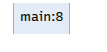
Stepping through memory allocation and drawAll execution Note: The debugger breakpoint is on line 8 in Driver.java. [code listing]
> (no output yet)>_ Console Output 
cs1302/draw/Driver.java
 1package cs1302.draw;
 2
 3import java.awt.Color;
 4
 5public class Driver {
 6
 7    public static void main(String[] args) {
 8        Drawable[] objects = new Drawable[2];
 9        objects[0] = new Tree(12, Color.GRAY);
10        objects[1] = new Person(Color.GREEN, Color.GRAY);
11
12        Utility.drawAll(objects);
13    } // main
14
15} // Driver
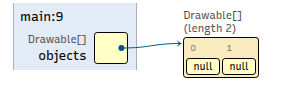
Stepping through memory allocation and drawAll execution Note: The debugger breakpoint is on line 9 in Driver.java. [code listing]
> (no output yet)>_ Console Output 
cs1302/draw/Driver.java
 1package cs1302.draw;
 2
 3import java.awt.Color;
 4
 5public class Driver {
 6
 7    public static void main(String[] args) {
 8        Drawable[] objects = new Drawable[2];
 9        objects[0] = new Tree(12, Color.GRAY);
10        objects[1] = new Person(Color.GREEN, Color.GRAY);
11
12        Utility.drawAll(objects);
13    } // main
14
15} // Driver
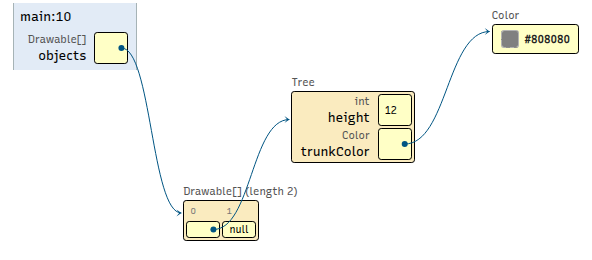
Stepping through memory allocation and drawAll execution Note: The debugger breakpoint is on line 10 in Driver.java. [code listing]
> (no output yet)>_ Console Output 
cs1302/draw/Driver.java
 1package cs1302.draw;
 2
 3import java.awt.Color;
 4
 5public class Driver {
 6
 7    public static void main(String[] args) {
 8        Drawable[] objects = new Drawable[2];
 9        objects[0] = new Tree(12, Color.GRAY);
10        objects[1] = new Person(Color.GREEN, Color.GRAY);
11
12        Utility.drawAll(objects);
13    } // main
14
15} // Driver
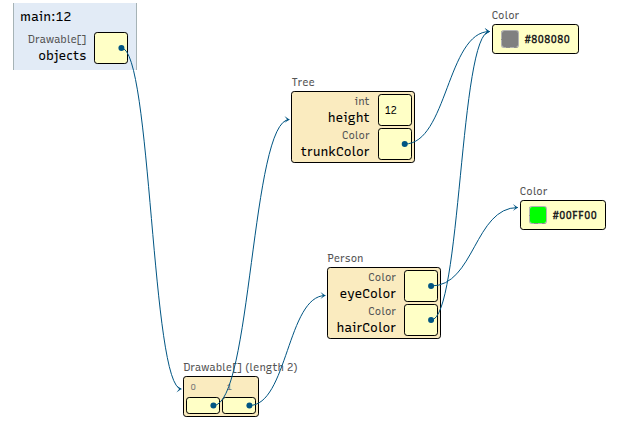
Stepping through memory allocation and drawAll execution Note: The debugger breakpoint is on line 12 in Driver.java. [code listing]
> (no output yet)>_ Console Output 
cs1302/draw/Utility.java
 1package cs1302.draw;
 2
 3public class Utility {
 4
 5    public static void drawIt(Drawable obj) {
 6        obj.draw();
 7    } // drawIt
 8
 9    public static void drawAll(Drawable[] objs) {
10        for (Drawable obj : objs) {
11            obj.draw();
12        } // for
13    } // drawAll
14
15} // Utility
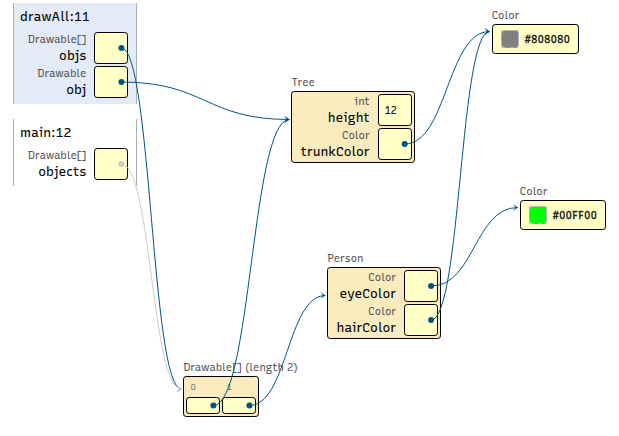
Stepping through memory allocation and drawAll execution Note: The debugger breakpoint is on line 11 in Utility.java. [code listing]
> (no output yet)>_ Console Output 
cs1302/draw/Utility.java
 1package cs1302.draw;
 2
 3public class Utility {
 4
 5    public static void drawIt(Drawable obj) {
 6        obj.draw();
 7    } // drawIt
 8
 9    public static void drawAll(Drawable[] objs) {
10        for (Drawable obj : objs) {
11            obj.draw();
12        } // for
13    } // drawAll
14
15} // Utility
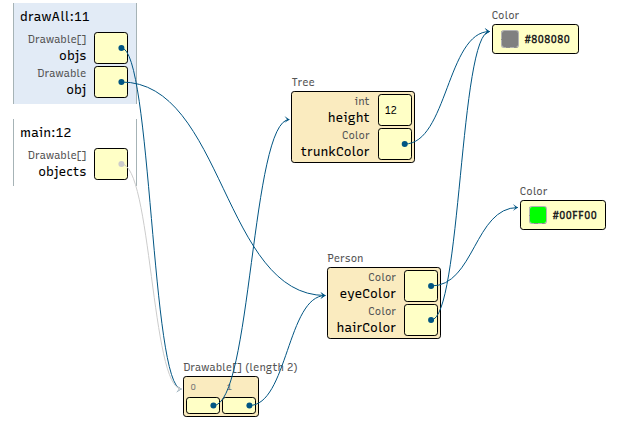
Stepping through memory allocation and drawAll execution Note: The debugger breakpoint is on line 11 in Utility.java. [code listing]
**** Gathering info to draw Tree ****
Getting trunk color... java.awt.Color[r=128,g=128,b=128]
Getting the height... 12
Doing some math...
**** Rendering Tree ****
This java.awt.Color[r=128,g=128,b=128] tree is 12 meters tall.
>_ Console Output 
cs1302/draw/Utility.java
 1package cs1302.draw;
 2
 3public class Utility {
 4
 5    public static void drawIt(Drawable obj) {
 6        obj.draw();
 7    } // drawIt
 8
 9    public static void drawAll(Drawable[] objs) {
10        for (Drawable obj : objs) {
11            obj.draw();
12        } // for
13    } // drawAll
14
15} // Utility
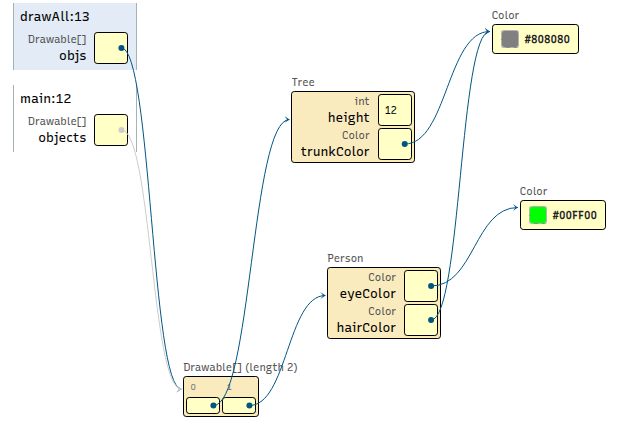
Stepping through memory allocation and drawAll execution Note: The debugger breakpoint is on line 13 in Utility.java. [code listing]
**** Gathering info to draw Tree ****
Getting trunk color... java.awt.Color[r=128,g=128,b=128]
Getting the height... 12
Doing some math...
**** Rendering Tree ****
This java.awt.Color[r=128,g=128,b=128] tree is 12 meters tall.
**** Gathering info to draw the Person ****
Getting eye color... java.awt.Color[r=0,g=255,b=0]
Getting hair color... java.awt.Color[r=128,g=128,b=128]
**** Rendering Person... ****
This is a person with eye color java.awt.Color[r=0,g=255,b=0] and hair color java.awt.Color[r=128,g=128,b=128].
>_ Console Output 
Part 3: Compatibility
Imagine the code in each group is found in the main method
of a Driver class.
For each numbered block of code, write on your exit tickets whether or not the code will compile. Explain your answer for each.
Group 1
Drawable d = new Person(Color.BLUE, Color.BLUE);
d.draw();
Drawable d = new Person(Color.BLUE, Color.BLUE);
d.getEyeColor();
Drawable d = new Person(Color.BLUE, Color.BLUE);
Utility.drawIt(d);
Group 1: Sample Solutions
Yes:
draw()is defined in theDrawableinterface andPersonis compatible withDrawablesince it implements it.1package cs1302.draw; 2 3import java.awt.Color; 4 5public class Driver { 6 7 public static void main(String[] args) { 8 Drawable d = new Person(Color.BLUE, Color.BLUE); 9 d.draw(); 10 } // main 11 12} // Driver
1package cs1302.draw; 2 3public interface Drawable { 4 5 void draw(); 6 7} // Drawable
1package cs1302.draw; 2 3import java.awt.Color; 4 5public class Person implements Drawable { 6 7 private Color eyeColor; 8 private Color hairColor; 9 10 public Person(Color eyeColor, Color hairColor) { 11 this.eyeColor = eyeColor; 12 this.hairColor = hairColor; 13 } // Person 14 15 public void describeAppearance() { 16 System.out.println("This person has " + 17 eyeColor.toString() + " eyes and " + 18 hairColor.toString() + " hair."); 19 } // describeAppearance 20 21 public Color getEyeColor() { 22 return this.eyeColor; 23 } // getEyeColor 24 25 public Color getHairColor() { 26 return this.hairColor; 27 } // getHairColor 28 29 @Override 30 public void draw() { 31 System.out.println("**** Gathering info to draw the Person ****"); 32 System.out.printf("Getting eye color... %s\n", this.getEyeColor()); 33 System.out.printf("Getting hair color... %s\n", this.getHairColor()); 34 System.out.println("**** Rendering Person... ****"); 35 System.out.printf( 36 "This is a person with eye color %s and hair color %s.\n", 37 this.getEyeColor(), 38 this.getHairColor() 39 ); 40 } // draw 41 42} // Person
cs1302/draw/Driver.java
 1package cs1302.draw;
 2
 3import java.awt.Color;
 4
 5public class Driver {
 6
 7    public static void main(String[] args) {
 8        Drawable d = new Person(Color.BLUE, Color.BLUE);
 9        d.draw();
10    } // main
11
12} // Driver
Calling an interface method through an interface reference Note: The debugger breakpoint is on line 8 in Driver.java. [code listing]
> (no output yet)>_ Console Output 
cs1302/draw/Driver.java
1package cs1302.draw; 2 3import java.awt.Color; 4 5public class Driver { 6 7 public static void main(String[] args) { 8 Drawable d = new Person(Color.BLUE, Color.BLUE); 9 d.draw(); 10 } // main 11 12} // Driver
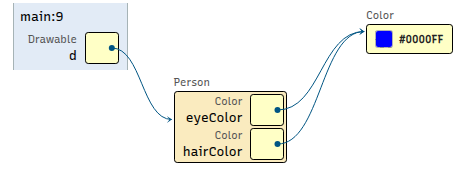
Calling an interface method through an interface reference Note: The debugger breakpoint is on line 9 in Driver.java. [code listing]
> (no output yet)>_ Console Output 
cs1302/draw/Person.java
1package cs1302.draw; 2 3import java.awt.Color; 4 5public class Person implements Drawable { 6 7 private Color eyeColor; 8 private Color hairColor; 9 10 public Person(Color eyeColor, Color hairColor) { 11 this.eyeColor = eyeColor; 12 this.hairColor = hairColor; 13 } // Person 14 15 public void describeAppearance() { 16 System.out.println("This person has " + 17 eyeColor.toString() + " eyes and " + 18 hairColor.toString() + " hair."); 19 } // describeAppearance 20 21 public Color getEyeColor() { 22 return this.eyeColor; 23 } // getEyeColor 24 25 public Color getHairColor() { 26 return this.hairColor; 27 } // getHairColor 28 29 @Override 30 public void draw() { 31 System.out.println("**** Gathering info to draw the Person ****"); 32 System.out.printf("Getting eye color... %s\n", this.getEyeColor()); 33 System.out.printf("Getting hair color... %s\n", this.getHairColor()); 34 System.out.println("**** Rendering Person... ****"); 35 System.out.printf( 36 "This is a person with eye color %s and hair color %s.\n", 37 this.getEyeColor(), 38 this.getHairColor() 39 ); 40 } // draw 41 42} // Person
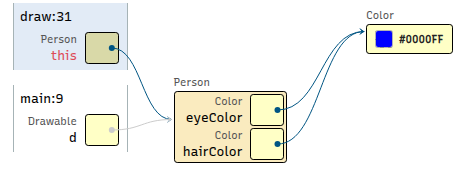
Calling an interface method through an interface reference Note: The debugger breakpoint is on line 31 in Person.java. [code listing]
> (no output yet)>_ Console Output 
cs1302/draw/Person.java
1package cs1302.draw; 2 3import java.awt.Color; 4 5public class Person implements Drawable { 6 7 private Color eyeColor; 8 private Color hairColor; 9 10 public Person(Color eyeColor, Color hairColor) { 11 this.eyeColor = eyeColor; 12 this.hairColor = hairColor; 13 } // Person 14 15 public void describeAppearance() { 16 System.out.println("This person has " + 17 eyeColor.toString() + " eyes and " + 18 hairColor.toString() + " hair."); 19 } // describeAppearance 20 21 public Color getEyeColor() { 22 return this.eyeColor; 23 } // getEyeColor 24 25 public Color getHairColor() { 26 return this.hairColor; 27 } // getHairColor 28 29 @Override 30 public void draw() { 31 System.out.println("**** Gathering info to draw the Person ****"); 32 System.out.printf("Getting eye color... %s\n", this.getEyeColor()); 33 System.out.printf("Getting hair color... %s\n", this.getHairColor()); 34 System.out.println("**** Rendering Person... ****"); 35 System.out.printf( 36 "This is a person with eye color %s and hair color %s.\n", 37 this.getEyeColor(), 38 this.getHairColor() 39 ); 40 } // draw 41 42} // Person
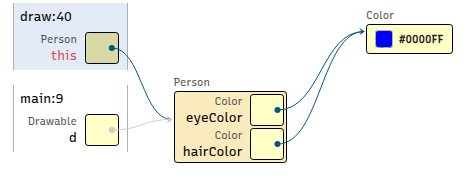
Calling an interface method through an interface reference Note: The debugger breakpoint is on line 40 in Person.java. [code listing]
**** Gathering info to draw the Person **** Getting eye color... java.awt.Color[r=0,g=0,b=255] Getting hair color... java.awt.Color[r=0,g=0,b=255] **** Rendering Person... **** This is a person with eye color java.awt.Color[r=0,g=0,b=255] and hair color java.awt.Color[r=0,g=0,b=255].
>_ Console Output 
cs1302/draw/Driver.java
1package cs1302.draw; 2 3import java.awt.Color; 4 5public class Driver { 6 7 public static void main(String[] args) { 8 Drawable d = new Person(Color.BLUE, Color.BLUE); 9 d.draw(); 10 } // main 11 12} // Driver
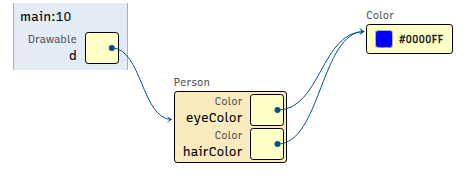
Calling an interface method through an interface reference Note: The debugger breakpoint is on line 10 in Driver.java. [code listing]
**** Gathering info to draw the Person **** Getting eye color... java.awt.Color[r=0,g=0,b=255] Getting hair color... java.awt.Color[r=0,g=0,b=255] **** Rendering Person... **** This is a person with eye color java.awt.Color[r=0,g=0,b=255] and hair color java.awt.Color[r=0,g=0,b=255].
>_ Console Output 
No: The compiler only looks at the type of the variable (
Drawable), which determines which methods can be called. The interface does not containgetEyeColor(), so it is not allowed.1package cs1302.draw; 2 3import java.awt.Color; 4 5public class Driver { 6 7 public static void main(String[] args) { 8 Drawable d = new Person(Color.BLUE, Color.BLUE); 9 d.getEyeColor(); 10 } // main 11 12} // Driver
Compiler error (expected)
cs1302/draw/Driver.java:9: error: cannot find symbol d.getEyeColor(); ^ symbol: method getEyeColor() location: variable d of type Drawable 1 errorYes: The
drawItmethod takes in a reference of typeDrawable. Any compatible type can be passed in.1package cs1302.draw; 2 3import java.awt.Color; 4 5public class Driver { 6 7 public static void main(String[] args) { 8 Drawable d = new Person(Color.BLUE, Color.BLUE); 9 Utility.drawIt(d); 10 } // main 11 12} // Driver
1package cs1302.draw;
2
3public interface Drawable {
4
5    void draw();
6
7} // Drawable
 1package cs1302.draw;
 2
 3import java.awt.Color;
 4
 5public class Person implements Drawable {
 6
 7    private Color eyeColor;
 8    private Color hairColor;
 9
10    public Person(Color eyeColor, Color hairColor) {
11        this.eyeColor = eyeColor;
12        this.hairColor = hairColor;
13    } // Person
14
15    public void describeAppearance() {
16        System.out.println("This person has " +
17                           eyeColor.toString() + " eyes and " +
18                           hairColor.toString() + " hair.");
19    } // describeAppearance
20
21    public Color getEyeColor() {
22        return this.eyeColor;
23    } // getEyeColor
24
25    public Color getHairColor() {
26        return this.hairColor;
27    } // getHairColor
28
29    @Override
30    public void draw() {
31        System.out.println("**** Gathering info to draw the Person ****");
32        System.out.printf("Getting eye color... %s\n", this.getEyeColor());
33        System.out.printf("Getting hair color... %s\n", this.getHairColor());
34        System.out.println("**** Rendering Person... ****");
35        System.out.printf(
36            "This is a person with eye color %s and hair color %s.\n",
37            this.getEyeColor(),
38            this.getHairColor()
39        );
40    } // draw
41
42} // Person
1package cs1302.draw; 2 3public class Utility { 4 5 public static void drawIt(Drawable obj) { 6 obj.draw(); 7 } // drawIt 8 9 public static void drawAll(Drawable[] objs) { 10 for (Drawable obj : objs) { 11 obj.draw(); 12 } // for 13 } // drawAll 14 15} // Utility
cs1302/draw/Driver.java
1package cs1302.draw; 2 3import java.awt.Color; 4 5public class Driver { 6 7 public static void main(String[] args) { 8 Drawable d = new Person(Color.BLUE, Color.BLUE); 9 Utility.drawIt(d); 10 } // main 11 12} // Driver
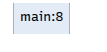
Passing an interface reference into
Utility.drawItNote: The debugger breakpoint is on line 8 in Driver.java. [code listing]¶> (no output yet)>_ Console Output 
cs1302/draw/Driver.java
1package cs1302.draw; 2 3import java.awt.Color; 4 5public class Driver { 6 7 public static void main(String[] args) { 8 Drawable d = new Person(Color.BLUE, Color.BLUE); 9 Utility.drawIt(d); 10 } // main 11 12} // Driver
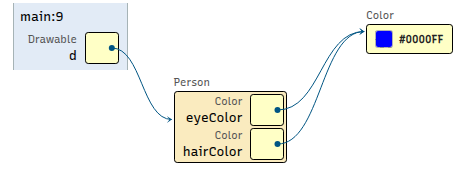
Passing an interface reference into
Utility.drawItNote: The debugger breakpoint is on line 9 in Driver.java. [code listing]¶> (no output yet)>_ Console Output 
cs1302/draw/Utility.java
1package cs1302.draw; 2 3public class Utility { 4 5 public static void drawIt(Drawable obj) { 6 obj.draw(); 7 } // drawIt 8 9 public static void drawAll(Drawable[] objs) { 10 for (Drawable obj : objs) { 11 obj.draw(); 12 } // for 13 } // drawAll 14 15} // Utility
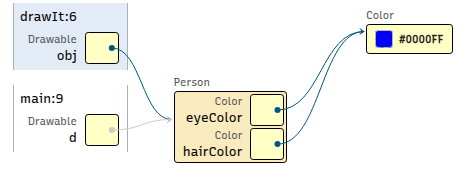
Passing an interface reference into
Utility.drawItNote: The debugger breakpoint is on line 6 in Utility.java. [code listing]¶> (no output yet)>_ Console Output 
cs1302/draw/Person.java
 1package cs1302.draw;
 2
 3import java.awt.Color;
 4
 5public class Person implements Drawable {
 6
 7    private Color eyeColor;
 8    private Color hairColor;
 9
10    public Person(Color eyeColor, Color hairColor) {
11        this.eyeColor = eyeColor;
12        this.hairColor = hairColor;
13    } // Person
14
15    public void describeAppearance() {
16        System.out.println("This person has " +
17                           eyeColor.toString() + " eyes and " +
18                           hairColor.toString() + " hair.");
19    } // describeAppearance
20
21    public Color getEyeColor() {
22        return this.eyeColor;
23    } // getEyeColor
24
25    public Color getHairColor() {
26        return this.hairColor;
27    } // getHairColor
28
29    @Override
30    public void draw() {
31        System.out.println("**** Gathering info to draw the Person ****");
32        System.out.printf("Getting eye color... %s\n", this.getEyeColor());
33        System.out.printf("Getting hair color... %s\n", this.getHairColor());
34        System.out.println("**** Rendering Person... ****");
35        System.out.printf(
36            "This is a person with eye color %s and hair color %s.\n",
37            this.getEyeColor(),
38            this.getHairColor()
39        );
40    } // draw
41
42} // Person
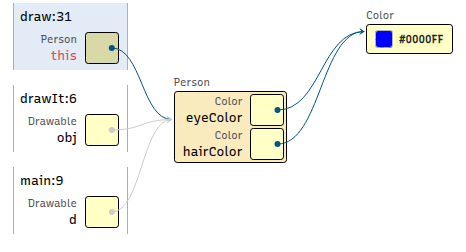
Passing an interface reference into
Utility.drawItNote: The debugger breakpoint is on line 31 in Person.java. [code listing]¶> (no output yet)>_ Console Output 
cs1302/draw/Person.java
 1package cs1302.draw;
 2
 3import java.awt.Color;
 4
 5public class Person implements Drawable {
 6
 7    private Color eyeColor;
 8    private Color hairColor;
 9
10    public Person(Color eyeColor, Color hairColor) {
11        this.eyeColor = eyeColor;
12        this.hairColor = hairColor;
13    } // Person
14
15    public void describeAppearance() {
16        System.out.println("This person has " +
17                           eyeColor.toString() + " eyes and " +
18                           hairColor.toString() + " hair.");
19    } // describeAppearance
20
21    public Color getEyeColor() {
22        return this.eyeColor;
23    } // getEyeColor
24
25    public Color getHairColor() {
26        return this.hairColor;
27    } // getHairColor
28
29    @Override
30    public void draw() {
31        System.out.println("**** Gathering info to draw the Person ****");
32        System.out.printf("Getting eye color... %s\n", this.getEyeColor());
33        System.out.printf("Getting hair color... %s\n", this.getHairColor());
34        System.out.println("**** Rendering Person... ****");
35        System.out.printf(
36            "This is a person with eye color %s and hair color %s.\n",
37            this.getEyeColor(),
38            this.getHairColor()
39        );
40    } // draw
41
42} // Person
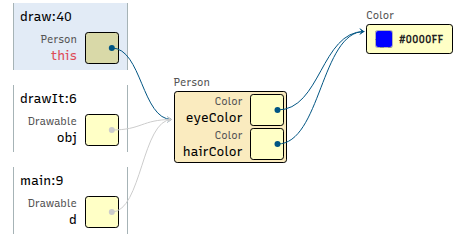
Passing an interface reference into
Utility.drawItNote: The debugger breakpoint is on line 40 in Person.java. [code listing]¶**** Gathering info to draw the Person **** Getting eye color... java.awt.Color[r=0,g=0,b=255] Getting hair color... java.awt.Color[r=0,g=0,b=255] **** Rendering Person... **** This is a person with eye color java.awt.Color[r=0,g=0,b=255] and hair color java.awt.Color[r=0,g=0,b=255].
>_ Console Output 
cs1302/draw/Utility.java
1package cs1302.draw; 2 3public class Utility { 4 5 public static void drawIt(Drawable obj) { 6 obj.draw(); 7 } // drawIt 8 9 public static void drawAll(Drawable[] objs) { 10 for (Drawable obj : objs) { 11 obj.draw(); 12 } // for 13 } // drawAll 14 15} // Utility
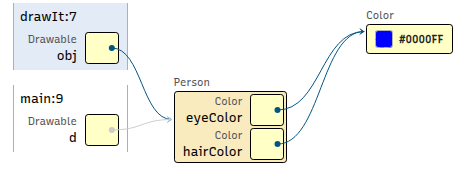
Passing an interface reference into
Utility.drawItNote: The debugger breakpoint is on line 7 in Utility.java. [code listing]¶**** Gathering info to draw the Person **** Getting eye color... java.awt.Color[r=0,g=0,b=255] Getting hair color... java.awt.Color[r=0,g=0,b=255] **** Rendering Person... **** This is a person with eye color java.awt.Color[r=0,g=0,b=255] and hair color java.awt.Color[r=0,g=0,b=255].
>_ Console Output 
cs1302/draw/Driver.java
 1package cs1302.draw;
 2
 3import java.awt.Color;
 4
 5public class Driver {
 6
 7    public static void main(String[] args) {
 8        Drawable d = new Person(Color.BLUE, Color.BLUE);
 9        Utility.drawIt(d);
10    } // main
11
12} // Driver
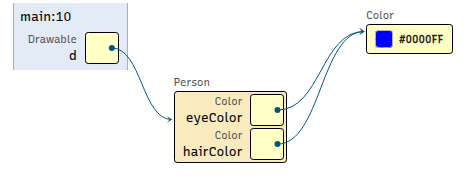
Passing an interface reference into
Utility.drawItNote: The debugger breakpoint is on line 10 in Driver.java. [code listing]¶**** Gathering info to draw the Person **** Getting eye color... java.awt.Color[r=0,g=0,b=255] Getting hair color... java.awt.Color[r=0,g=0,b=255] **** Rendering Person... **** This is a person with eye color java.awt.Color[r=0,g=0,b=255] and hair color java.awt.Color[r=0,g=0,b=255].
>_ Console Output 
Group 2
Utility.drawIt(new Person(Color.BLUE, Color.BLUE));
Person bob = new Person(Color.BLUE, Color.BLUE); System.out.println(bob.getHaircolor());
Airplane plane = new Drawable();
Group 2: Sample Solutions
Yes: The
drawItmethod takes in a reference of typeDrawable. Any compatible type can be passed in.1package cs1302.draw; 2 3import java.awt.Color; 4 5public class Driver { 6 7 public static void main(String[] args) { 8 Utility.drawIt(new Person(Color.BLUE, Color.BLUE)); 9 } // main 10 11} // Driver
1package cs1302.draw;
2
3public interface Drawable {
4
5    void draw();
6
7} // Drawable
 1package cs1302.draw;
 2
 3import java.awt.Color;
 4
 5public class Person implements Drawable {
 6
 7    private Color eyeColor;
 8    private Color hairColor;
 9
10    public Person(Color eyeColor, Color hairColor) {
11        this.eyeColor = eyeColor;
12        this.hairColor = hairColor;
13    } // Person
14
15    public void describeAppearance() {
16        System.out.println("This person has " +
17                           eyeColor.toString() + " eyes and " +
18                           hairColor.toString() + " hair.");
19    } // describeAppearance
20
21    public Color getEyeColor() {
22        return this.eyeColor;
23    } // getEyeColor
24
25    public Color getHairColor() {
26        return this.hairColor;
27    } // getHairColor
28
29    @Override
30    public void draw() {
31        System.out.println("**** Gathering info to draw the Person ****");
32        System.out.printf("Getting eye color... %s\n", this.getEyeColor());
33        System.out.printf("Getting hair color... %s\n", this.getHairColor());
34        System.out.println("**** Rendering Person... ****");
35        System.out.printf(
36            "This is a person with eye color %s and hair color %s.\n",
37            this.getEyeColor(),
38            this.getHairColor()
39        );
40    } // draw
41
42} // Person
 1package cs1302.draw;
 2
 3public class Utility {
 4
 5    public static void drawIt(Drawable obj) {
 6        obj.draw();
 7    } // drawIt
 8
 9    public static void drawAll(Drawable[] objs) {
10        for (Drawable obj : objs) {
11            obj.draw();
12        } // for
13    } // drawAll
14
15} // Utility
cs1302/draw/Driver.java
1package cs1302.draw; 2 3import java.awt.Color; 4 5public class Driver { 6 7 public static void main(String[] args) { 8 Utility.drawIt(new Person(Color.BLUE, Color.BLUE)); 9 } // main 10 11} // Driver
Passing an implementing class reference into
Utility.drawItNote: The debugger breakpoint is on line 8 in Driver.java. [code listing]¶> (no output yet)>_ Console Output 
cs1302/draw/Utility.java
 1package cs1302.draw;
 2
 3public class Utility {
 4
 5    public static void drawIt(Drawable obj) {
 6        obj.draw();
 7    } // drawIt
 8
 9    public static void drawAll(Drawable[] objs) {
10        for (Drawable obj : objs) {
11            obj.draw();
12        } // for
13    } // drawAll
14
15} // Utility
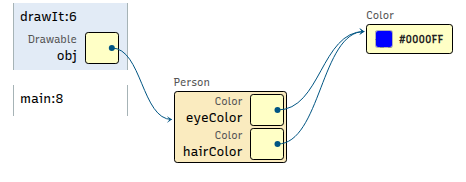
Passing an implementing class reference into
Utility.drawItNote: The debugger breakpoint is on line 6 in Utility.java. [code listing]¶> (no output yet)>_ Console Output 
cs1302/draw/Person.java
 1package cs1302.draw;
 2
 3import java.awt.Color;
 4
 5public class Person implements Drawable {
 6
 7    private Color eyeColor;
 8    private Color hairColor;
 9
10    public Person(Color eyeColor, Color hairColor) {
11        this.eyeColor = eyeColor;
12        this.hairColor = hairColor;
13    } // Person
14
15    public void describeAppearance() {
16        System.out.println("This person has " +
17                           eyeColor.toString() + " eyes and " +
18                           hairColor.toString() + " hair.");
19    } // describeAppearance
20
21    public Color getEyeColor() {
22        return this.eyeColor;
23    } // getEyeColor
24
25    public Color getHairColor() {
26        return this.hairColor;
27    } // getHairColor
28
29    @Override
30    public void draw() {
31        System.out.println("**** Gathering info to draw the Person ****");
32        System.out.printf("Getting eye color... %s\n", this.getEyeColor());
33        System.out.printf("Getting hair color... %s\n", this.getHairColor());
34        System.out.println("**** Rendering Person... ****");
35        System.out.printf(
36            "This is a person with eye color %s and hair color %s.\n",
37            this.getEyeColor(),
38            this.getHairColor()
39        );
40    } // draw
41
42} // Person
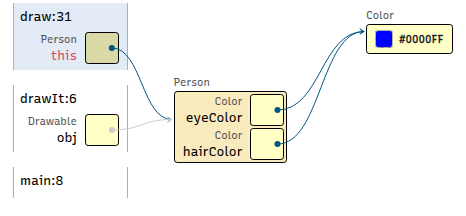
Passing an implementing class reference into
Utility.drawItNote: The debugger breakpoint is on line 31 in Person.java. [code listing]¶> (no output yet)>_ Console Output 
cs1302/draw/Person.java
 1package cs1302.draw;
 2
 3import java.awt.Color;
 4
 5public class Person implements Drawable {
 6
 7    private Color eyeColor;
 8    private Color hairColor;
 9
10    public Person(Color eyeColor, Color hairColor) {
11        this.eyeColor = eyeColor;
12        this.hairColor = hairColor;
13    } // Person
14
15    public void describeAppearance() {
16        System.out.println("This person has " +
17                           eyeColor.toString() + " eyes and " +
18                           hairColor.toString() + " hair.");
19    } // describeAppearance
20
21    public Color getEyeColor() {
22        return this.eyeColor;
23    } // getEyeColor
24
25    public Color getHairColor() {
26        return this.hairColor;
27    } // getHairColor
28
29    @Override
30    public void draw() {
31        System.out.println("**** Gathering info to draw the Person ****");
32        System.out.printf("Getting eye color... %s\n", this.getEyeColor());
33        System.out.printf("Getting hair color... %s\n", this.getHairColor());
34        System.out.println("**** Rendering Person... ****");
35        System.out.printf(
36            "This is a person with eye color %s and hair color %s.\n",
37            this.getEyeColor(),
38            this.getHairColor()
39        );
40    } // draw
41
42} // Person
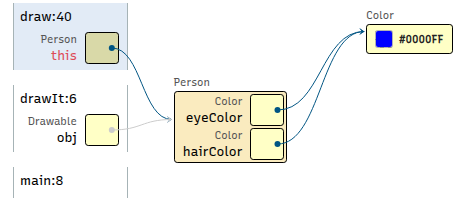
Passing an implementing class reference into
Utility.drawItNote: The debugger breakpoint is on line 40 in Person.java. [code listing]¶**** Gathering info to draw the Person **** Getting eye color... java.awt.Color[r=0,g=0,b=255] Getting hair color... java.awt.Color[r=0,g=0,b=255] **** Rendering Person... **** This is a person with eye color java.awt.Color[r=0,g=0,b=255] and hair color java.awt.Color[r=0,g=0,b=255].
>_ Console Output 
cs1302/draw/Utility.java
 1package cs1302.draw;
 2
 3public class Utility {
 4
 5    public static void drawIt(Drawable obj) {
 6        obj.draw();
 7    } // drawIt
 8
 9    public static void drawAll(Drawable[] objs) {
10        for (Drawable obj : objs) {
11            obj.draw();
12        } // for
13    } // drawAll
14
15} // Utility
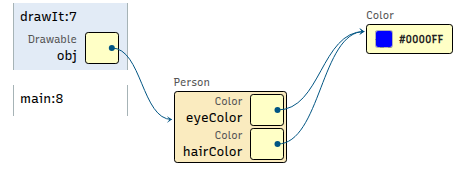
Passing an implementing class reference into
Utility.drawItNote: The debugger breakpoint is on line 7 in Utility.java. [code listing]¶**** Gathering info to draw the Person **** Getting eye color... java.awt.Color[r=0,g=0,b=255] Getting hair color... java.awt.Color[r=0,g=0,b=255] **** Rendering Person... **** This is a person with eye color java.awt.Color[r=0,g=0,b=255] and hair color java.awt.Color[r=0,g=0,b=255].
>_ Console Output 
cs1302/draw/Driver.java
 1package cs1302.draw;
 2
 3import java.awt.Color;
 4
 5public class Driver {
 6
 7    public static void main(String[] args) {
 8        Utility.drawIt(new Person(Color.BLUE, Color.BLUE));
 9    } // main
10
11} // Driver

Passing an implementing class reference into
Utility.drawItNote: The debugger breakpoint is on line 9 in Driver.java. [code listing]¶**** Gathering info to draw the Person **** Getting eye color... java.awt.Color[r=0,g=0,b=255] Getting hair color... java.awt.Color[r=0,g=0,b=255] **** Rendering Person... **** This is a person with eye color java.awt.Color[r=0,g=0,b=255] and hair color java.awt.Color[r=0,g=0,b=255].
>_ Console Output 
Yes: The variable type is
Person, so unique person methods are accessible.1package cs1302.draw; 2 3import java.awt.Color; 4 5public class Driver { 6 7 public static void main(String[] args) { 8 Person bob = new Person(Color.BLUE, Color.BLUE); 9 bob.getEyeColor(); 10 } // main 11 12} // Driver
1package cs1302.draw;
2
3public interface Drawable {
4
5    void draw();
6
7} // Drawable
 1package cs1302.draw;
 2
 3import java.awt.Color;
 4
 5public class Person implements Drawable {
 6
 7    private Color eyeColor;
 8    private Color hairColor;
 9
10    public Person(Color eyeColor, Color hairColor) {
11        this.eyeColor = eyeColor;
12        this.hairColor = hairColor;
13    } // Person
14
15    public void describeAppearance() {
16        System.out.println("This person has " +
17                           eyeColor.toString() + " eyes and " +
18                           hairColor.toString() + " hair.");
19    } // describeAppearance
20
21    public Color getEyeColor() {
22        return this.eyeColor;
23    } // getEyeColor
24
25    public Color getHairColor() {
26        return this.hairColor;
27    } // getHairColor
28
29    @Override
30    public void draw() {
31        System.out.println("**** Gathering info to draw the Person ****");
32        System.out.printf("Getting eye color... %s\n", this.getEyeColor());
33        System.out.printf("Getting hair color... %s\n", this.getHairColor());
34        System.out.println("**** Rendering Person... ****");
35        System.out.printf(
36            "This is a person with eye color %s and hair color %s.\n",
37            this.getEyeColor(),
38            this.getHairColor()
39        );
40    } // draw
41
42} // Person
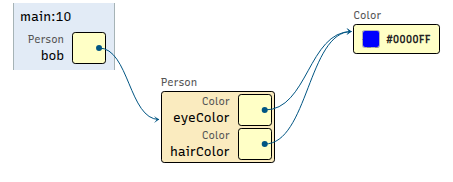
Calling a class-specific method through a class-type reference [code listing]
No: Interfaces cannot be instantiated using the
newkeyword.1package cs1302.draw; 2 3public class Driver { 4 5 public static void main(String[] args) { 6 Airplane plane = new Drawable(); 7 } // main 8 9} // Driver
1package cs1302.draw; 2 3import java.awt.Color; 4 5public class Airplane implements Drawable { 6 7 private Color paintColor; 8 private int numberOfWheels; 9 private double length; 10 11 public Airplane(Color paintColor, int numberOfWheels, double length) { 12 this.paintColor = paintColor; 13 this.numberOfWheels = numberOfWheels; 14 this.length = length; 15 } // Airplane 16 17 public void fly() { 18 System.out.printf( 19 "The %s airplane, with %d wheels and a length of ~ %.2f meters, is flying high!\n", 20 this.paintColor, 21 this.numberOfWheels, 22 this.length 23 ); 24 } // fly 25 26 public Color getPaintColor() { 27 return this.paintColor; 28 } // getPaintColor 29 30 public int getNumberOfWheels() { 31 return this.numberOfWheels; 32 } // getNumberOfWheels 33 34 public double getLength() { 35 return this.length; 36 } // getLength 37 38 @Override 39 public void draw() { 40 System.out.println(); 41 System.out.println("**** Gathering info to draw Airplane ****"); 42 System.out.printf("Getting paint color... %s\n", this.getPaintColor()); 43 System.out.printf("Getting the number of wheels... %d\n", this.getNumberOfWheels()); 44 System.out.printf("Getting the length... ~ %.2f\n", this.getLength()); 45 System.out.println("**** Rendering Airplane... ****"); 46 this.fly(); 47 } // draw 48 49} // Airplane
1package cs1302.draw;
2
3public interface Drawable {
4
5    void draw();
6
7} // Drawable
Compiler error (expected)
cs1302/draw/Driver.java:6: error: Drawable is abstract; cannot be instantiated Airplane plane = new Drawable(); ^ 1 error
Group 3
Drawable tree = new Tree(5, Color.GREEN); tree.grow(7);
Tree tree = new Tree(5, Color.GREEN); tree.draw();
Drawable device = new Scanner(System.in); device.draw();
Group 3: Sample Solutions
No:
growis unique to theTreeclass and is not visible when using aDrawablereference sinceDrawabledoes not have agrowmethod.1package cs1302.draw; 2 3import java.awt.Color; 4 5public class Driver { 6 7 public static void main(String[] args) { 8 Drawable tree = new Tree(5, Color.GREEN); 9 tree.grow(7); 10 } // main 11 12} // Driver
Compiler error (expected)
cs1302/draw/Driver.java:9: error: cannot find symbol tree.grow(7); ^ symbol: method grow(int) location: variable tree of type Drawable 1 errorYes:
Treeimplements the interface, so it possesses thedraw()method.1package cs1302.draw; 2 3import java.awt.Color; 4 5public class Driver { 6 7 public static void main(String[] args) { 8 Tree tree = new Tree(5, Color.GREEN); 9 tree.draw(); 10 } // main 11 12} // Driver
1package cs1302.draw;
2
3public interface Drawable {
4
5    void draw();
6
7} // Drawable
1package cs1302.draw; 2 3import java.awt.Color; 4 5public class Tree implements Drawable { 6 7 private int height; 8 private Color trunkColor; 9 10 public Tree(int height, Color trunkColor) { 11 this.height = height; 12 this.trunkColor = trunkColor; 13 } // Tree 14 15 public void grow(int amount) { 16 this.height += amount; 17 System.out.println("The tree is now " + height + " feet tall."); 18 } // grow 19 20 public int getHeight() { 21 return this.height; 22 } // getHeight 23 24 public Color getTrunkColor() { 25 return this.trunkColor; 26 } // getTrunkColor 27 28 @Override 29 public void draw() { 30 System.out.println("**** Gathering info to draw Tree ****"); 31 System.out.printf("Getting trunk color... %s\n", this.getTrunkColor()); 32 System.out.printf("Getting the height... %d\n", this.getHeight()); 33 System.out.println("Doing some math..."); 34 System.out.println("**** Rendering Tree ****"); 35 System.out.printf( 36 "This %s tree is %d meters tall.\n", 37 this.getTrunkColor().toString(), 38 this.getHeight() 39 ); 40 } // draw 41 42} // Tree
cs1302/draw/Driver.java
 1package cs1302.draw;
 2
 3import java.awt.Color;
 4
 5public class Driver {
 6
 7    public static void main(String[] args) {
 8        Tree tree = new Tree(5, Color.GREEN);
 9        tree.draw();
10    } // main
11
12} // Driver
Calling a class-specific method through a class-type reference Note: The debugger breakpoint is on line 8 in Driver.java. [code listing]
> (no output yet)>_ Console Output 
cs1302/draw/Driver.java
1package cs1302.draw; 2 3import java.awt.Color; 4 5public class Driver { 6 7 public static void main(String[] args) { 8 Tree tree = new Tree(5, Color.GREEN); 9 tree.draw(); 10 } // main 11 12} // Driver
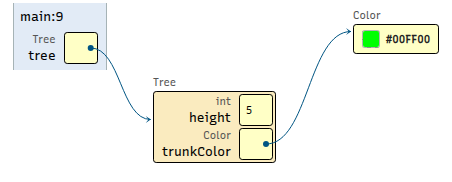
Calling a class-specific method through a class-type reference Note: The debugger breakpoint is on line 9 in Driver.java. [code listing]
> (no output yet)>_ Console Output 
cs1302/draw/Driver.java
1package cs1302.draw; 2 3import java.awt.Color; 4 5public class Driver { 6 7 public static void main(String[] args) { 8 Tree tree = new Tree(5, Color.GREEN); 9 tree.draw(); 10 } // main 11 12} // Driver
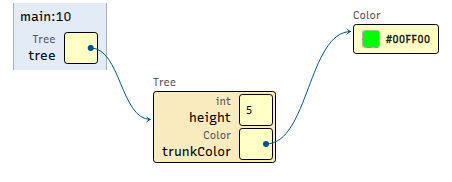
Calling a class-specific method through a class-type reference Note: The debugger breakpoint is on line 10 in Driver.java. [code listing]
**** Gathering info to draw Tree **** Getting trunk color... java.awt.Color[r=0,g=255,b=0] Getting the height... 5 Doing some math... **** Rendering Tree **** This java.awt.Color[r=0,g=255,b=0] tree is 5 meters tall.
>_ Console Output 
No: The
Drawableis not compatible withScannersinceScannerdoes not implement the interface.1package cs1302.draw; 2 3import java.util.Scanner; 4 5public class Driver { 6 7 public static void main(String[] args) { 8 Drawable device = new Scanner(System.in); 9 device.draw(); 10 } // main 11 12} // Driver
Compiler error (expected)
cs1302/draw/Driver.java:8: error: incompatible types: Scanner cannot be converted to Drawable Drawable device = new Scanner(System.in); ^ 1 error
Group 4
Utility.drawIt(new Scanner(System.in));
Tree tree = new Tree(5, Color.GREEN); Drawable d = tree;
Group 4: Sample Solutions
No: The
Drawableis not compatible withScannersinceScannerdoes not implement the interface.1package cs1302.draw; 2 3import java.util.Scanner; 4 5public class Driver { 6 7 public static void main(String[] args) { 8 Utility.drawIt(new Scanner(System.in)); 9 } // main 10 11} // Driver
Compiler error (expected)
cs1302/draw/Driver.java:8: error: incompatible types: Scanner cannot be converted to Drawable Utility.drawIt(new Scanner(System.in)); ^ Note: Some messages have been simplified; recompile with -Xdiags:verbose to get full output 1 errorYes: Assigning a specific object to a compatible type (class or interface) is always allowed.
1package cs1302.draw; 2 3import java.awt.Color; 4 5public class Driver { 6 7 public static void main(String[] args) { 8 Tree tree = new Tree(5, Color.GREEN); 9 Drawable d = tree; 10 } // main 11 12} // Driver
1package cs1302.draw;
2
3public interface Drawable {
4
5    void draw();
6
7} // Drawable
 1package cs1302.draw;
 2
 3import java.awt.Color;
 4
 5public class Tree implements Drawable {
 6
 7    private int height;
 8    private Color trunkColor;
 9
10    public Tree(int height, Color trunkColor) {
11        this.height = height;
12        this.trunkColor = trunkColor;
13    } // Tree
14
15    public void grow(int amount) {
16        this.height += amount;
17        System.out.println("The tree is now " + height + " feet tall.");
18    } // grow
19
20    public int getHeight() {
21        return this.height;
22    } // getHeight
23
24    public Color getTrunkColor() {
25        return this.trunkColor;
26    } // getTrunkColor
27
28    @Override
29    public void draw() {
30        System.out.println("**** Gathering info to draw Tree ****");
31        System.out.printf("Getting trunk color... %s\n", this.getTrunkColor());
32        System.out.printf("Getting the height... %d\n", this.getHeight());
33        System.out.println("Doing some math...");
34        System.out.println("**** Rendering Tree ****");
35        System.out.printf(
36            "This %s tree is %d meters tall.\n",
37            this.getTrunkColor().toString(),
38            this.getHeight()
39        );
40    } // draw
41
42} // Tree
cs1302/draw/Driver.java
 1package cs1302.draw;
 2
 3import java.awt.Color;
 4
 5public class Driver {
 6
 7    public static void main(String[] args) {
 8        Tree tree = new Tree(5, Color.GREEN);
 9        Drawable d = tree;
10    } // main
11
12} // Driver
Assigning a class reference to an interface reference Note: The debugger breakpoint is on line 8 in Driver.java. [code listing]
cs1302/draw/Driver.java
 1package cs1302.draw;
 2
 3import java.awt.Color;
 4
 5public class Driver {
 6
 7    public static void main(String[] args) {
 8        Tree tree = new Tree(5, Color.GREEN);
 9        Drawable d = tree;
10    } // main
11
12} // Driver
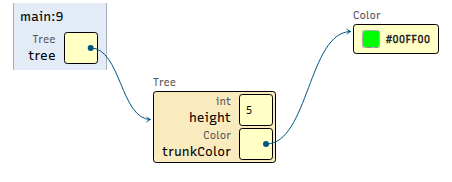
Assigning a class reference to an interface reference Note: The debugger breakpoint is on line 9 in Driver.java. [code listing]
cs1302/draw/Driver.java
 1package cs1302.draw;
 2
 3import java.awt.Color;
 4
 5public class Driver {
 6
 7    public static void main(String[] args) {
 8        Tree tree = new Tree(5, Color.GREEN);
 9        Drawable d = tree;
10    } // main
11
12} // Driver
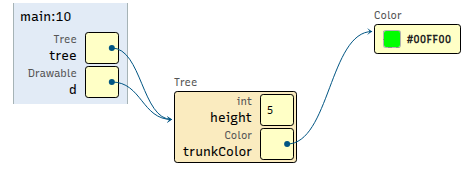
Assigning a class reference to an interface reference Note: The debugger breakpoint is on line 10 in Driver.java. [code listing]
Part 4: Bulk Draw
Download Source Code
Note
The starter code contains the same interface and implementing
classes. It also comes with a Driver program (containing a main method).
While the implementing classes do implement the interface and have
a draw method, they may not have all of the methods found
in the UML above. Any differences are not substantial and will
not affect your ability to complete the last two parts of the
lesson.
Execute the command below to download and extract the files:
bundle1302 interface-lesson
- downloading cs1302-interface-lesson bundle...
- verifying integrity of downloaded files using sha256sum...
- extracting downloaded archive...
- removing intermediate files...
subdirectory cs1302-interface-lesson successfully created
Change to the cs1302-interface-lesson directory that was created using
cd, then look at the files that were bundled as part of the
starter code using tree.
Interpreter Script
Notice the file called compile_and_run.sh located directly inside of
cs1302-interface-lesson. This file contains the appropriate compilation
commands for each of the files in our starter code. Instead of typing each
command manually, we can run this file to clean out bin, compile the
code, and run our driver. You can find more information on compiler
scripts in the assigned textbook reading on the topic.
Go ahead and run the file now. You won't see any output because our
Driver doesn't contain any print statements (yet).
./compile_and_run.sh
Bulk Draw (Activity)
In the main of the Driver class, we have created an array
of Drawable references and assigned each index a valid/compatible
object.
Implement the drawAll method in Utility.java and then
call the method from main using the existing Drawable array.
When you are finished, use the script
(compile_and_run.sh) to compile and run your code instead
of manually typing out the commands.
Now, you should see some output.
Part 5: Adding an Implementing Class
Planning for a new class (No Laptops)
Discuss and then draw a UML diagram for a new class to add to the code that meets the following criteria:
has minimal overlap with the existing classes (disparate);
has at least two instance variables;
has at least two instance methods (excluding getters/setters);
properly implements the
Drawableinterface.
Implement the new class (Laptops)
Create the
.javafor your new class and implement it in that file. In addition to everything else, be sure to not forget to includeimplementsand the method override.Update the compile script to compile the new class.
Make sure that your new class compiles using the script before continuing to the next part.
Use the new class (Laptops)
Add an instance of the new class to the
Drawablearray in themainmethod.Call
drawAllon the updated array containing the new type of object.
Write on your exit ticket: How did the code in the Utility
class have to change to accommodate this new class?