13. Components Lesson
Components
Components
Lesson Objectives
Motivate and introduce custom components in JavaFX.
JavaFX Components
Download starter code
Download the starter code for this chapter and places it into
a subdirectory called cs1302-components:
sh -c "$(curl -fsSL https://cs1302book.com/_bundle/cs1302-components.sh)"
- downloading cs1302-components bundle...
- verifying integrity of downloaded files using sha256sum...
- extracting downloaded archive...
- removing intermediate files...
subdirectory cs1302-components successfully created
Activity: Draw Scene Graph
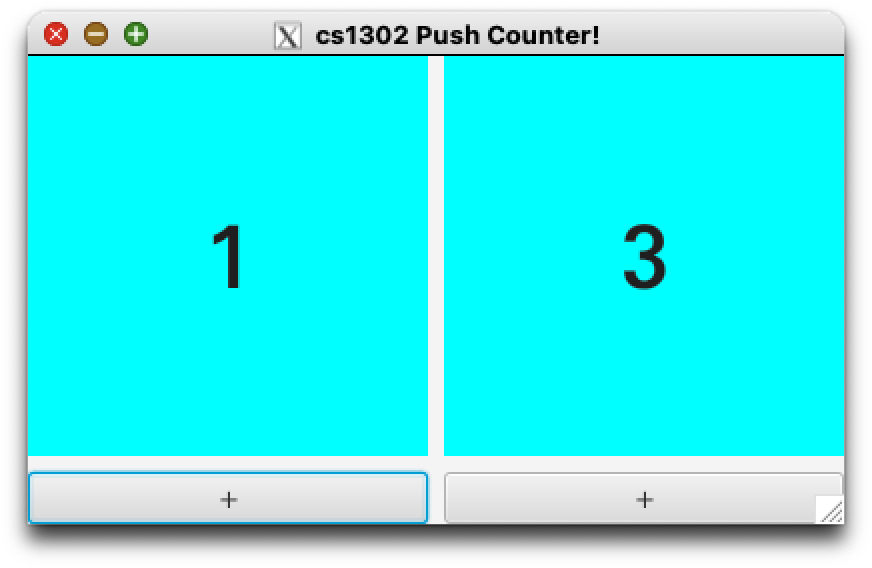
Our goal is to create the application (app) depicted below.
On your group's exit ticket (and in your notes):
list the different JavaFX
Nodeclasses that you think the app uses; anddraw the containment hierarchy and scene graph for the app based on your list of
Nodeclasses and what you see in the screenshot.
Do not worry about styling (color, font, etc) for now.
Note
The blue boxes are Label components.
Sample Solution: Draw Scene Graph (1)
Fig. 67 Sample Soluton: Containment Hierarchy & Scene Graph: Redundant Counter App
Discussion - Part 1
Discussion - Part 2
What is the best way to reduce redundancy in this situation?
Aside: Student - Part 1
What is wrong with this code?
 1public class FakeAthena {
 2
 3   // Student names
 4   private String name0;
 5   private String name1;
 6   private String name2;
 7   private String name3;
 8
 9   // Student 81 numbers
10   private long idNum0;
11   private long idNum1;
12   private long idNum2;
13   private long idNum3;
14
15   // Student account balances
16   private double balance0;
17   private double balance1;
18   private double balance2;
19   private double balance3;
20
21} // FakeAthena
Aside: Student - Part 2
What is wrong with this code?
 1public class FakeAthenaV2 {
 2   // Student names
 3   private Student student0;
 4   private Student student1;
 5   private Student student2;
 6   private Student student3;
 7} // FakeAthena
 8
 9public class Student {
10   private String name;
11   private long idNum;
12   private double balance;
13} // Student
Aside: Student - Part 3
 1public class FakeAthenaV3 {
 2   // Student names
 3   private Student[] students;
 4} // FakeAthena
 5
 6public class Student {
 7   private String name;
 8   private long idNum;
 9   private double balance;
10} // Student
Discussion: CounterApp - Part 1
Can we do better?
 1public class CounterApp extends Application {
 2
 3   Stage stage;
 4   Scene scene;
 5   HBox root;
 6
 7   VBox pushCounter0;
 8   VBox pushCounter1;
 9   VBox pushCounter2;
10
11   Label counterLabel0;
12   Label counterLabel1;
13   Label counterLabel2;
14
15   Button incrementButton0;
16   Button incrementButton1;
17   Button incrementButton2;
18
19} // CounterApp
Fig. 70 Sample Soluton: Containment Hierarchy & Scene Graph: Redundant Counter App
Discussion: CounterApp - Part 2
Is this better?
 1public class CounterApp extends Application {
 2
 3   Stage stage;
 4   Scene scene;
 5   HBox root;
 6
 7   PushCounter pushCounter0;
 8   PushCounter pushCounter1;
 9   PushCounter pushCounter2;
10
11   ...
12
13} // CounterApp
14
15public class PushCounter {
16
17   Label counterLabel;
18   Button incrementButton;
19
20} // PushCounter
Fig. 71 Sample Soluton: Containment Hierarchy & Scene Graph: Redundant Counter App
Discussion: CounterApp - Part 3
Is this better?
 1public class CounterApp extends Application {
 2
 3   Stage stage;
 4   Scene scene;
 5   HBox root;
 6
 7   PushCounter[] pushCounters;
 8
 9} // CounterApp
10
11public class PushCounter {
12
13   Label counterLabel;
14   Button incrementButton;
15
16} // PushCounter
Fig. 72 Sample Soluton: Containment Hierarchy & Scene Graph: Redundant Counter App with Array
Activity: PushCounter
On your exit ticket (and in your notes), fill in the blanks in the code below.
Scene Graphs: Before and After
 1package cs1302.app;
 2
 3import javafx.event.ActionEvent;
 4import javafx.event.EventHandler;
 5import javafx.scene.control.Button;
 6import javafx.scene.control.Label;
 7import javafx.scene.layout.VBox;
 8
 9/**
10 * A "push counter" component.
11 */
12public class PushCounter extends ______ {  // BLANK 1
13
14    /** Default initial counter value. */
15    public static final int DEF_INITIAL_COUNTER = 0;
16
17    int counter;
18    Label counterLabel;
19    Button incrementButton;
20
21    /**
22     * Construct a push counter with an initial {@code counter} value.
23     * @param counter The initial counter value.
24     */
25    public PushCounter(int counter) {
26        ________________;                 // BLANK 2
27        this.counter = 0;
28        this.counterLabel = new Label(Integer.toString(this.counter));
29        this.incrementButton = new Button("+");
30        this.initScene();
31        this.initEventHandlers();
32    } // PushCounter
33
34    /**
35     * Construct a push counter with the default initial counter value.
36     */
37    public PushCounter() {
38        this(PushCounter.DEF_INITIAL_COUNTER);
39    } // PushCounter
40
41    /** Initialize the scene. */
42    private void initScene() {
43        // Add the label and the button to the PushCounter
44        ________________;                 // BLANK 3
45    } // initScene
46
47    /** Initialize the event handlers. */
48    private void initEventHandlers() {
49        EventHandler<ActionEvent> incrementHandler = __________; // BLANK 4
50        incrementButton.setOnAction(incrementHandler);
51    } // initEventHandlers
52
53    /** Increment the counter counter. */
54    private void increment() {
55        this.counter += 1;
56        this.counterLabel.setText(Integer.toString(this.counter));
57    } // increment
58
59} // PushCounter
public class PushCounter extends ______ {  // BLANK 1

} // PushCounter
/** Default initial counter value. */
public static final int DEF_INITIAL_COUNTER = 0;
public PushCounter(int counter) {
    ________________;                 // BLANK 2
    this.counter = 0;
    this.counterLabel = new Label(Integer.toString(this.counter));
    this.incrementButton = new Button("+");
    this.initScene();
    this.initEventHandlers();
} // PushCounter
public PushCounter() {
    this(PushCounter.DEF_INITIAL_COUNTER);
} // PushCounter
1int counter;
2Label counterLabel;
3Button incrementButton;
1private void initScene() {
2    // Add the label and the button to the PushCounter
3    ________________;                 // BLANK 3
4} // initScene
1Button incrementButton;
1private void initEventHandlers() {
2    EventHandler<ActionEvent> incrementHandler = __________; // BLANK 4
3    incrementButton.setOnAction(incrementHandler);
4} // initEventHandlers
1private void increment() {
2    this.counter += 1;
3    this.counterLabel.setText(Integer.toString(this.counter));
4} // increment
Live Coding
Finish the PushCounter and the CounterApp and run the code.
Quick Review
Fun with Styling
The starter code includes a styled version of the
push counter class called StyledPushCounter.
You can replace PushCounter with StyledPushCounter
in your scene graph to get the fully styled
version of the app! The way it works is described
below:
 1/** Constructs a new Styled Push Counter! */
 2public StyledPushCounter() {
 3    super();
 4    // style the label
 5    this.counterLabel.setPrefWidth(StyledPushCounter.DEF_LABEL_SIZE);
 6    this.counterLabel.setPrefHeight(StyledPushCounter.DEF_LABEL_SIZE);
 7    this.counterLabel.setAlignment(Pos.BASELINE_CENTER);
 8    this.counterLabel.setFont(StyledPushCounter.DEF_FONT);
 9    this.counterLabel.setBackground(StyledPushCounter.DEF_BACKGROUND);
10    // style the button
11    this.incrementButton.setMaxWidth(Double.MAX_VALUE);
12    this.incrementButton.setPrefWidth(this.counterLabel.getWidth());
13} // StyledPushCounter
 1package cs1302.app;
 2
 3import javafx.geometry.Pos;
 4import javafx.scene.control.Button;
 5import javafx.scene.control.Label;
 6import javafx.scene.layout.Background;
 7import javafx.scene.layout.BackgroundFill;
 8import javafx.scene.layout.VBox;
 9import javafx.scene.paint.Color;
10import javafx.scene.paint.Paint;
11import javafx.scene.text.Font;
12import javafx.scene.text.FontWeight;
13
14/** A styled "push counter" component. */
15public class StyledPushCounter extends PushCounter {
16
17    /** Default Font for Counter. */
18    private static final Font DEF_FONT =
19        Font.font("Padauk", FontWeight.BOLD, 50.0);
20
21    /** Default Label Size for Counter. */
22    private static final double DEF_LABEL_SIZE = 200.0;
23
24    /** Default Background for Counter. */
25    private static final Background DEF_BACKGROUND =
26        new Background(new BackgroundFill(Color.AQUA, null, null));
27
28    /** Constructs a new Styled Push Counter! */
29    public StyledPushCounter() {
30        super();
31        // style the label
32        this.counterLabel.setPrefWidth(StyledPushCounter.DEF_LABEL_SIZE);
33        this.counterLabel.setPrefHeight(StyledPushCounter.DEF_LABEL_SIZE);
34        this.counterLabel.setAlignment(Pos.BASELINE_CENTER);
35        this.counterLabel.setFont(StyledPushCounter.DEF_FONT);
36        this.counterLabel.setBackground(StyledPushCounter.DEF_BACKGROUND);
37        // style the button
38        this.incrementButton.setMaxWidth(Double.MAX_VALUE);
39        this.incrementButton.setPrefWidth(this.counterLabel.getWidth());
40    } // StyledPushCounter
41
42} // StyledPushCounter
Extra Practice: TabbedPane
Take the ImageLoader and add a TabbedPane (Image
Browswer app). Start with the scene graph with multiple
ImageLoaders. We want to put one in each tab. How do we
adjust the scene graph?