15. JSON and HTTP Lesson
JSON and HTTP
JSON and HTTP
To see sample solutions, click on the "Configure activity" button and select "Show solutions" from the menu that appears.
Sample solutions not included, because "Show solutions" was not selected before printing.
Part 1
Download starter code
Download the starter code for this chapter and places it into
a subdirectory called cs1302-json-http:
bundle1302 json-http
- downloading cs1302-json-http bundle...
- verifying integrity of downloaded files using sha256sum...
- extracting downloaded archive...
- removing intermediate files...
subdirectory cs1302-json-http successfully created
cd cs1302-json-http
./compile.sh
+ mvn -q -e clean
+ mvn -q -e compile dependency:build-classpath -DincludeScope=runtime -Dmdep.outputFile=target/runtime-path.txt
+ set +x
...
Aside: Reading from a File
To read lines from a text file, a static method named
readFromFile is provided in cs1302.json.Helper:
 1    .create();                                    // builds a Gson object and returns with a reference to it
 2
 3/**
 4 * Read a string from a file.
 5 * @param path The path to the file.
 6 * @return a reference to a {@link String} object containing the file contents
 7 */
 8public static String readFromFile(String path) {
 9
10    File file = new File(path);
11    String result = "";
12
13    try (Scanner input = new Scanner(file)) {
14        while (input.hasNextLine()) {
15            String line = input.nextLine();
16            result += line + "\n";
17        } // while
18    } catch (IOException cause) {
19        System.err.println(cause);
20        System.exit(1);
21    } // try
22
23    return result.stripTrailing();
Try With Resources
A try-with-resources statement let's you declare and assign
an AutoClosable (e.g, a Scanner) so that it can be
automatically closed once the try-with-resources block is
finished.
try (autoclosable declaration) {
Quick Intro: JavaScript Object Notation (JSON)
In JSON, plain text is arranged in a specific way to describe the contents of an object. Here are the basic rules:
:is used to pair a key / variable name with a value;""is used to denote a key / variable name or a string literal value;{}is used to denote an object; and[]is used to denote an array.
Aside: Gson
Instead of parsing JSON strings directly using methods like
substring, we will use a the
Gson
object provided by Google's Gson project to parse them
directly into Java objects.
1/** Google {@code Gson} instance for parsing JSON-formatted strings. */
2public static final Gson GSON = new GsonBuilder()
3    .setPrettyPrinting()                          // enable nice output when printing
4    .create();                                    // builds a Gson object and returns with a reference to it
The code above is inside Helper.java. Since it's static,
we can use a "static import" in Driver.java so that we
can use GSON.fromJson instead of Helper.GSON.fromJson
when we code later:
1import static cs1302.json.Helper.GSON;
Builder Pattern
Refer to the JSON and HTTP chapters in the textbook for a
description of the builder pattern and how it relates to
GsonBuilder.
Activity Template: Model and Use JSON in Java using Gson
On your exit tickets (and in your notes), answer the questions below based on the JSON data that your instructor is showing you.
What kind of data is denoted by the outermost JSON in the file?
How many objects are denoted?
How many types of objects are denoted?
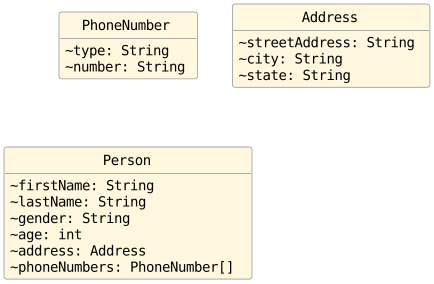
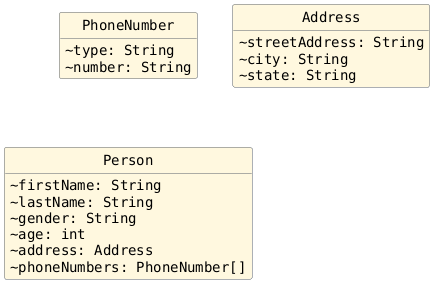
For each type of object (excluding strings and arrays), write down the Java skeleton code for a class depicting that type. Use a class name that makes sense based on the object's data and only include package private variable declarations for each variable.
Syntax |
Description |
|---|---|
|
used to pair a key / variable name with a value |
|
used to denote a key / variable name or a string literal value |
|
used to denote an object |
|
used to denote an array |
Pro Tip
Once you have identified how many kinds of objects are depicted, work from the inner-most object to the outer-most object when answering (4) so that you always have a datatype name for the variables that you list.
On your exit tickets (and in your notes):
Write down the line of code to convert the JSON data that you just modeled to Java object(s) using Gson.
Write down the code to perform the data-specific task(s) that your instructor has noted in the code.
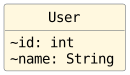
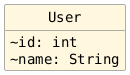
1String bobJson = Helper.readFromFile(Driver.FILE_BOB_JSON);
2System.out.println(bobJson);
3
4// ____ user = GSON.<____>fromJson(bobJson, ____.class);
5//
6// Tasks:
7// - print the user's id
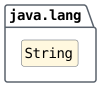
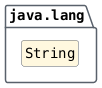
1String abcdJson = Helper.readFromFile(Driver.FILE_ABCD_JSON);
2System.out.println(abcdJson);
3
4// ____ abcd = GSON.<____>fromJson(abcdJson, ____.class);
5//
6// Tasks:
7// - print the array length
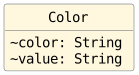
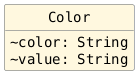
1String colorsJson = Helper.readFromFile(Driver.FILE_COLORS_JSON);
2System.out.println(colorsJson);
3
4// ____ colors = GSON.<____>fromJson(colorsJson, ____.class);
5//
6// Tasks:
7// - print the number of colors depicted
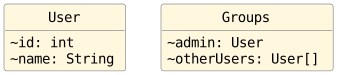
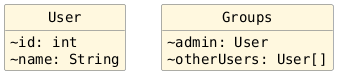
1String groupsJson = Helper.readFromFile(Driver.FILE_GROUPS_JSON);
2System.out.println(groupsJson);
3
4// ____ groups = GSON.<____>fromJson(groupsJson, ____.class);
5//
6// Tasks:
max method in Helper is already written. You do NOT need to rewrite it; just use it by calling Helper.max.¶1/**
2 * Return with the reference value of the max item based on the supplied comparator.
3 * @param <T> The item type.
4 * @param items The items to consider.
5 * @param cmp The comparator to use for comparisons.
6 * @return the selected reference value
7 */
8public static <T> T max(T[] items, Comparator<T> cmp) {
1private static void runFileJoeJsonExample() {
2
3    String joeJson = Helper.readFromFile(Driver.FILE_JOE_JSON);
4    System.out.println(joeJson);
5
6    // ____ joe = GSON.<____>fromJson(joeJson, ____.class);
7
8    // Tasks:
9    // - print the person's first name and last name
Part 2
Aside: Reading from a URI
To read lines from a URI, an HTTP client is provided in cs1302.json.Helper
along with a static method named readFromUri:

Creating the HTTP Client (Replaces the Browser)
1/** HTTP client. */
2public static final HttpClient HTTP_CLIENT = HttpClient.newBuilder()
3    .version(HttpClient.Version.HTTP_2)           // uses HTTP protocol version 2 where possible
4    .followRedirects(HttpClient.Redirect.NORMAL)  // always redirects, except from HTTPS to HTTP
5    .build();                                     // builds an HttpClient object and returns with a reference to it
Construct HTTP Request
1// build the HTTP request
2URI locationUri = URI.create(location);
3HttpRequest request = HttpRequest.newBuilder()
4    .uri(locationUri) // sets the HttpRequest's URI
5    .GET()            // sets the HttpRequest's request method to GET
Send HTTP Request
1try {
2
3    // send HTTP request; receive HTTP response
4    HttpResponse<String> response = HTTP_CLIENT.send(request, BodyHandlers.ofString());
Receive HTTP Response and check status
 1try {
 2
 3    // send HTTP request; receive HTTP response
 4    HttpResponse<String> response = HTTP_CLIENT.send(request, BodyHandlers.ofString());
 5
 6    // check HTTP response
 7    if (response.statusCode() != 200) {
 8        String message = String.format(
 9            "error: HTTP status code for %s: %d (expected 200)",
10            response.uri(),
11            response.statusCode()
12        );
13        throw new IOException(message);
Get the body of the HTTP response so that we can update our program's state.
 1String result = "";
 2
 3try {
 4
 5    // send HTTP request; receive HTTP response
 6    HttpResponse<String> response = HTTP_CLIENT.send(request, BodyHandlers.ofString());
 7
 8    // check HTTP response
 9    if (response.statusCode() != 200) {
10        String message = String.format(
11            "error: HTTP status code for %s: %d (expected 200)",
12            response.uri(),
13            response.statusCode()
14        );
15        throw new IOException(message);
16    } // if
17
18    // store the reference to the response body
19    result = response.body();
20
21} catch (InterruptedException|IOException cause) {
22    System.err.println(cause);
23    System.exit(1);
24} // try
 1/**
 2 * Read a string from a URI using an HTTP client.
 3 * @param location The URI to request.
 4 * @return a reference to a {@link String} object containing the response body
 5 */
 6public static String readFromUri(String location) {
 7
 8    // build the HTTP request
 9    URI locationUri = URI.create(location);
10    HttpRequest request = HttpRequest.newBuilder()
11        .uri(locationUri) // sets the HttpRequest's URI
12        .GET()            // sets the HttpRequest's request method to GET
13        .build();         // builds an HttpRequest object and returns with a reference to it
14
15    String result = "";
16
17    try {
18
19        // send HTTP request; receive HTTP response
20        HttpResponse<String> response = HTTP_CLIENT.send(request, BodyHandlers.ofString());
21
22        // check HTTP response
23        if (response.statusCode() != 200) {
24            String message = String.format(
25                "error: HTTP status code for %s: %d (expected 200)",
26                response.uri(),
27                response.statusCode()
28            );
29            throw new IOException(message);
30        } // if
31
32        // store the reference to the response body
33        result = response.body();
34
35    } catch (InterruptedException|IOException cause) {
36        System.err.println(cause);
37        System.exit(1);
38    } // try
39
40    return result.stripTrailing();
41
42} // readFromUri
HTTP Client, HTTP Requests, and HTTP Responses
Refer to the HTTP chapter in the textbook for an overview of the HTTP protocol and descriptions for terms like HTTP client, HTTP request, and HTTP response.
Getting JSON response from iTunes
Create a String variable containing the base URI.
1/**
2 * Return with a reference to the result array for an iTunes Search API search.
3 * @param term The text string you want to search for.
4 * @return A reference to an array of {@link ItunesResult} objects.
5 */
6public static ItunesResult[] searchItunesAPI(String term) {
7
8    // form the URI
9    String uri = "https://itunes.apple.com/search";
Add the search term to the URI. Use URLEncoder.encode(String, Charset)
to ensure that query string parameter values are valid
URL syntax. Always use this method instead of using
replace or replaceAll so that you don't have
to manually handle all the edge cases yourself.
User Input for |
URL-encoded |
|---|---|
|
|
|
|
 1/**
 2 * Return with a reference to the result array for an iTunes Search API search.
 3 * @param term The text string you want to search for.
 4 * @return A reference to an array of {@link ItunesResult} objects.
 5 */
 6public static ItunesResult[] searchItunesAPI(String term) {
 7
 8    // form the URI
 9    String uri = "https://itunes.apple.com/search";
10    uri += "?term=" + URLEncoder.encode(term, StandardCharsets.UTF_8);
Example: Invalid and Valid Request URIs
|
URI |
Valid? |
|
|
NO |
|
YES |
|
|
|
NO |
|
YES |
In the
"daft punk"example, leaving it unencoded causes an erroneous split in the URI.In the
"simon & garfunkel"example, leaving unencoded causesgarfunkelto be interpreted as the name of the second query string parameter.
Add additional query string parameters, as needed. A full list of query string parameters can be found in the iTunes Search API documentation (link in project description).
 1/**
 2 * Return with a reference to the result array for an iTunes Search API search.
 3 * @param term The text string you want to search for.
 4 * @return A reference to an array of {@link ItunesResult} objects.
 5 */
 6public static ItunesResult[] searchItunesAPI(String term) {
 7
 8    // form the URI
 9    String uri = "https://itunes.apple.com/search";
10    uri += "?term=" + URLEncoder.encode(term, StandardCharsets.UTF_8);
11    uri += "&limit=25";
12    uri += "&media=music";
13    uri += "&entity=song";
Example: Valid Request URIs
|
Request URI as a |
|---|---|
|
|
|
|
Read the JSON data from the URI.
 1/**
 2 * Return with a reference to the result array for an iTunes Search API search.
 3 * @param term The text string you want to search for.
 4 * @return A reference to an array of {@link ItunesResult} objects.
 5 */
 6public static ItunesResult[] searchItunesAPI(String term) {
 7
 8    // form the URI
 9    String uri = "https://itunes.apple.com/search";
10    uri += "?term=" + URLEncoder.encode(term, StandardCharsets.UTF_8);
11    uri += "&limit=25";
12    uri += "&media=music";
13    uri += "&entity=song";
14
15    // read the JSON from the URI
16    String json = Helper.readFromUri(uri);
Activity Template: Model and Use JSON
On your exit tickets (and in your notes), answer the questions below based on the JSON data that your instructor is showing you.
What kind of data is denoted by the outermost JSON in the file?
How many objects are denoted?
How many types of objects are denoted?
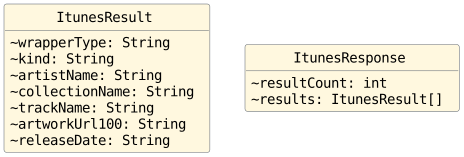
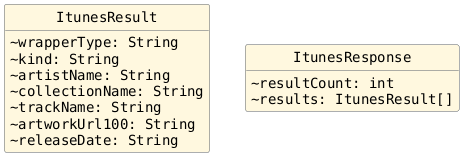
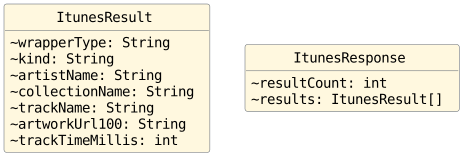
For each type of object (excluding strings and arrays), write down the Java skeleton code for a class depicting that type. Use a class name that makes sense based on the object's data and only include package private variable declarations for each variable.
Syntax |
Description |
|---|---|
|
used to pair a key / variable name with a value |
|
used to denote a key / variable name or a string literal value |
|
used to denote an object |
|
used to denote an array |
Pro Tip
Once you have identified how many kinds of objects are depicted, work from the inner-most object to the outer-most object when answering (4) so that you always have a datatype name for the variables that you list.
Attention
You do NOT have to include all the variables depicted in the JSON in your class(es).
If you only include some of them, Gson will
ignore the ones you don't include when your eventual
call to fromJson(String, Class) parses the
string you give it.
For this activity, only include these variables for each "result":
|
|
On your exit tickets (and in your notes), write down
the lines of code to finish the searchItunesAPI
method.
 1/**
 2 * Return with a reference to the result array for an iTunes Search API search.
 3 * @param term The term to search for.
 4 * @return The results.
 5 */
 6public static ItunesResult[] searchItunesAPI(String term) {
 7
 8    // form the URI
 9    String uri = "https://itunes.apple.com/search";
10    uri += "?term=" + URLEncoder.encode(term, StandardCharsets.UTF_8);
11    uri += "&limit=25";
12    uri += "&media=music";
13    uri += "&entity=song";
14
15    // read the JSON from the URI
16    String json = Helper.readFromUri(uri);
17
18    // convert the JSON to Java object(s)
19    _____ response = GSON.<_____>fromJson(json, _____.class);
20
21    // return with the reference to the result array
22    return _____;
23
24} // searchItunesAPI
On your exit tickets (and in your notes), write down the code to perform the data-specific task(s) that your instructor has noted in the code.
largestMatch method in Helper is already written. You do NOT need to rewrite it; just use it by calling Helper.largestMatch.¶ 1/**
2 * Return with the reference value selected using the provided test.
3 * Largest is determined using the supplied comparator.
4 * @param <T> The item type.
5 * @param items The items to consider.
6 * @param cmp The comparator to use for comparisons.
7 * @param test The predicate to use for testing.
8 * @return the selected reference value
9 */
10public static <T> T largestMatch(T[] items, Comparator<T> cmp, Predicate<T> test) {
1ItunesResult[] results = ItunesSearchApi.searchItunesAPI("daft punk");
2
3// Task:
4// Print the name of the longest track in the
5// collection named "Random Access Memories"
searchItunesAPI method in ItunesSearchApi that we just wrote. You do NOT need to rewrite it; just use it by calling ItunesSearchApi.searchItunesAPI.¶1/**
2 * Return with a reference to the result array for an iTunes Search API search.
3 * @param term The text string you want to search for.
4 * @return A reference to an array of {@link ItunesResult} objects.
5 */
6public static ItunesResult[] searchItunesAPI(String term) {